NoisyS0cks: Undocumented SOCKS5 Pivot Framework Giving Ransomware Affiliates a Foothold Inside Networks
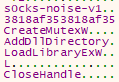
The WatchGuard Attestation Team has uncovered an undocumented pivot framework written in Golang that opens a Smux-multiplexed SOCKS5-style pivot channel on each compromised host using one of two interchangeable transports: KCP-over-UDP with DTLS obfuscation or Noise-over-TCP with TLS obfuscation. The dual-faced implant is config-driven, either as a service or through an embedded configuration deployed at runtime. It masquerades as the legitimate Windows service TieringEngineService.exe in what was believed to be a RedSun exploit because of the name. When executed, the service is then hidden under a non-default scheduled-task folder (\TaskGlobal\) and registered with a fake Microsoft Edge prefix name (MicrosoftEdgeUpdateTaskMachineCore_) using the verbatim Microsoft-given description for that Edge service. The implant connects to an IP address (67.217.228.51) associated with various phishing and information stealing campaigns, and several ransomware operations. The developers used the name s0cks-noise-v1, and thus, we named it NoisyS0cks.
The act of pivoting is a lateral movement technique that implies that an attacker has compromised a host and is using tools and techniques as a steppingstone to gather information on other internal systems. A pivoting framework, in conjunction with the act of pivoting, is a tool with architectural design and reusability. There are artifacts throughout this analysis that indicate an intent to design further and evolve this tool. Pivoting, however, has no offensive capability, and therefore, there are no offensive and malicious capabilities embedded within this framework. It’s explicitly for persistence and information gathering. Thus, further malware, such as defensive countermeasure disablers, information stealers or ransomware would follow this.
Static File Analysis
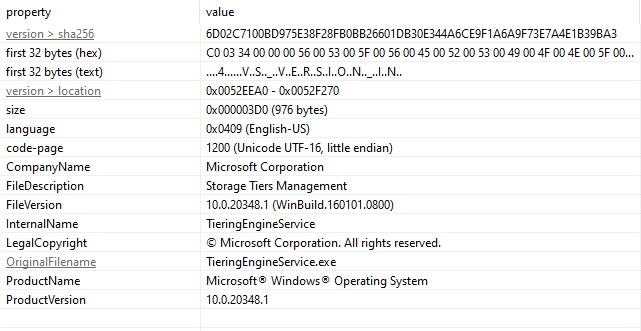
The analysis begins with a look at the file characteristics. It claims to be the legitimate Storage Tiers Management executable by Microsoft.
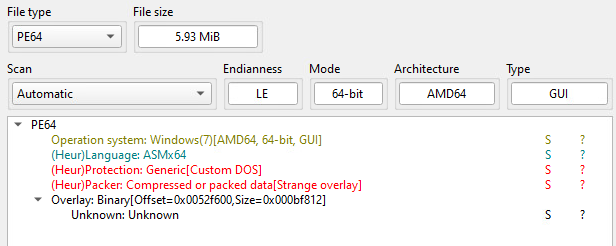
Although it’s a “Microsoft-authored” file, static file header analyzers are unable to determine the coding language and detects a suspicious overlay; one the legitimate TieringEngineService.exe doesn’t have. It also has high entropy indicating it’s packed.
A quick peek at the strings showed Golang artifacts throughout. Running the file through GoReSym shows that all the metadata was stripped except for the Golang version – v1.22.0.
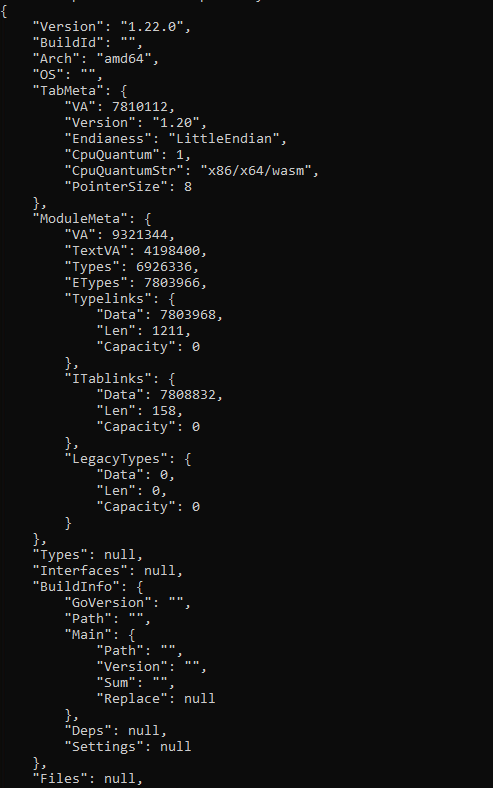
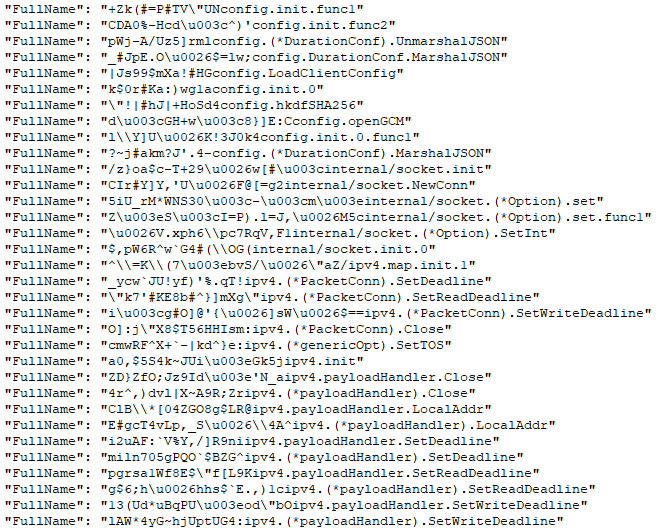
Filtering for ‘FullName’ in the GoReSym output provides a list of function names. It shows that this file was obfuscated with garble, an open source Golang code obfuscator that also strips metadata.
Disassembling the file in IDA reveals all of the garbled functions as well as the main functions:
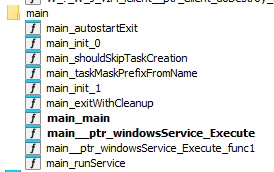
Main
Main (main_main) begins by establishing garbage collection (GC) at 50% as opposed to the default of 100%. This means once the heap grows by 50% the GC runs. It also sets a memory cap at 64MB. These two functions ensure the process remains small and non-memory consuming.

It then calls svc.isWindowsService to determine if it is running as a service by checking if the parent process name is ‘services.exe’. Otherwise, it is executed as a standalone process. The execution continues by setting a flag that was able to be revealed by scrapping together various garble-bled strings uncovered during analysis: ‘use –config <file> or embed via builder’.
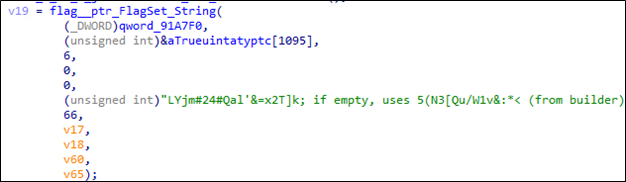
The flag string reveals several things:
- The malware is config driven.
- There are two ways for the implant to get its configuration.
- A builder exists for this malware.
- This specific sample uses the embedded config from the builder.
- The config is embedded in the file somewhere.
After the flag is set, main invokes LoadClientConfig function that loads the configuration mentioned in the flag.

LoadClientConfig
The execution flow and logic of the malware depend on hard-coded config values and if the config fails to load, it exits. This means that if the config file is removed, renamed, corrupted, and so on, before or after execution, the implant is effectively removed.
The LoadClientConfig function populates a ClientConfig struct that contains 23 fields and foreshadows its functionality:
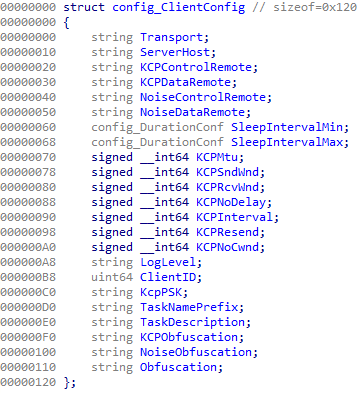
The struct contains fields for a transport type, server host, KCP and Noise transport configurations, a log toggle, and other network settings. Most of these are accepted as-is by the operator-defined config, except min and max sleep interval boundary checks, PSK key sizing, and one other: Transport. The check for the Transport field checks if the string equals ‘kcp’ or ‘noise’, which defines the dual-transport aspect.
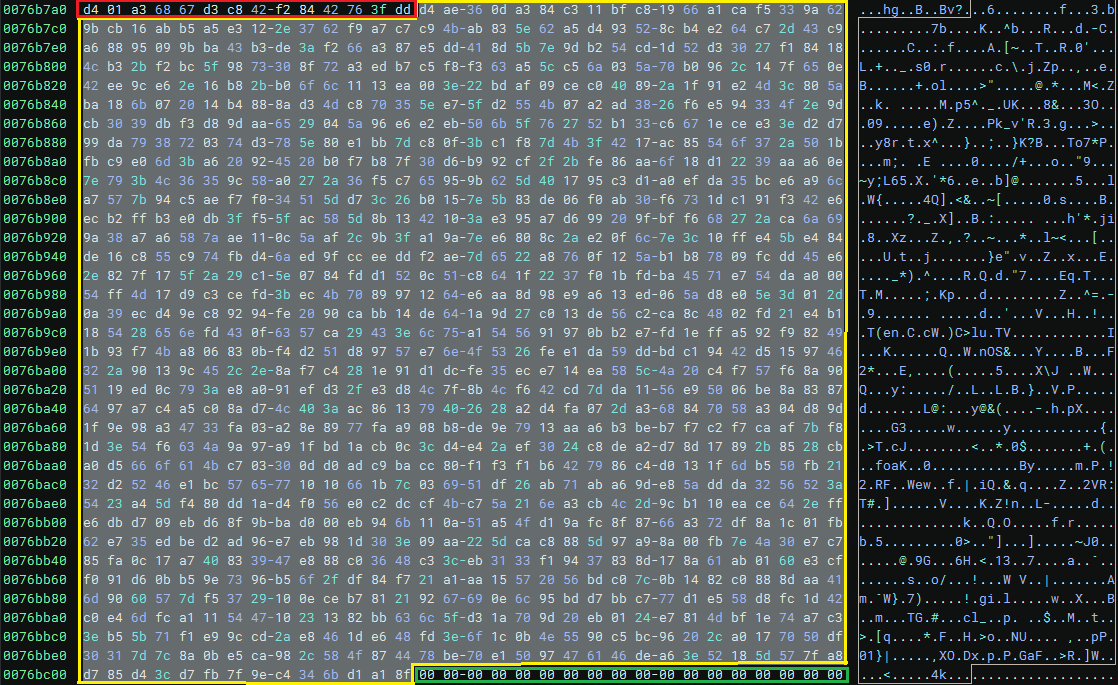
The config is initialized at runtime. This means we can set a breakpoint in a debugger, such as X64dbg, and extract the entire embedded config after the LoadClientConfig function returns. However, for those more adventurous, most of the encryption artifacts are present to decrypt this offline. We’ve included some of them via a staging function with information about the header, nonce, one of three HKDF inputs, AAD, and ciphertext.
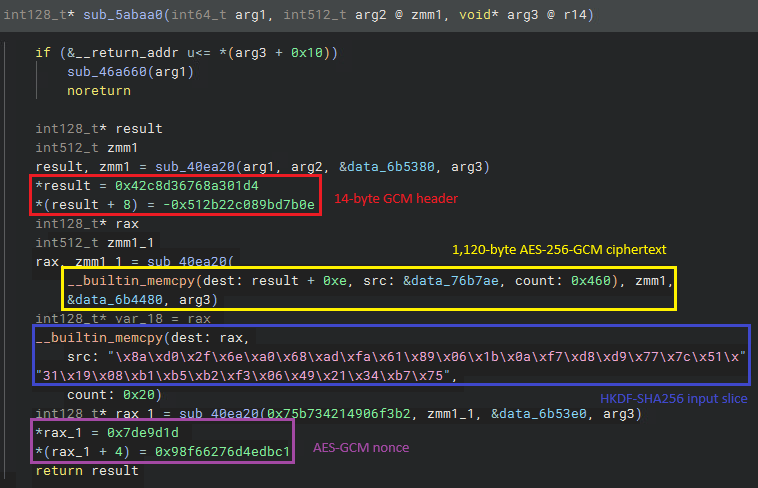
The AAD is the 14-byte header in red and the ciphertext is at the location in yellow (data_76b7ae). The green at the end is padding.
Whether it’s decrypted or grabbed at runtime, the official extracted config from the attacker looks like this.
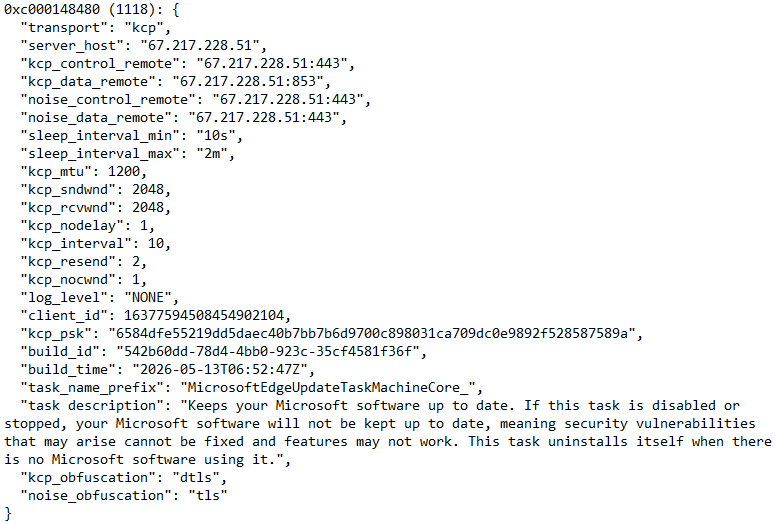
A couple of important things to extract from this:
- Operator set KCP as transport.
- The remote IP address uses ports 443 and 853.
- At the bottom, KCP obfuscation is DTLS; Noise uses TLS.
- The polling interval is a minimum of 10 seconds to a max of 2 minutes.
- Each build has an ID and is timestamped.
- It sets a task name prefix and description impersonating a legitimate Microsoft service.
The transport, obfuscation, and port numbers imply that, upon execution, this will send UDP datagrams on port 853 using DTLS obfuscation, making the packets appear as authentic DNS-over-QUIC packets. KCP traffic on port 443 will appear as DNS-over-HTTPS packets. So, the malware intends to send DTLS and UDP datagrams on the wire every 10 seconds to 2 minutes to that C2 IP address, which is hosted by BL Networks, an anonymous virtual private server (VPS) provider highly correlated with ransomware affiliate operations.
Now that the config is thoroughly understood, the next step in main is to see what the config is applied to and what actions are performed based on the values given.
Client Struct
First, a Client object is created with the config, a value is applied to stopCh (stop channel), and then it runs.
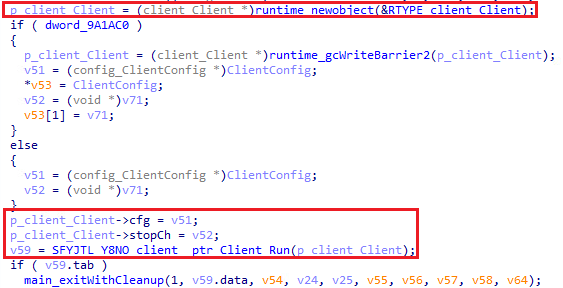
The client struct is visible just as the client config is:
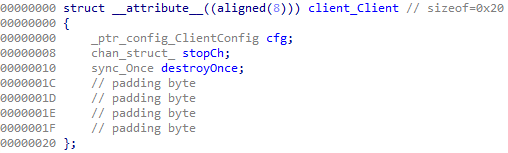
A client has three components:
- cfg – The config
- stopCh – a stopCh (stop channel) struct
- destroyOnce – a destroy function that is guaranteed to only run once
These three fields are effectively run, pause, and destroy.

Client_Run
Client_Run is where most of the action happens. It begins with an indefinite loop (while(1)) after attempting some logging setup, which was deactived by the operator via the config setting. It then grabs the config-defined minimum sleep duration and max duration and calls client_jitter. The jitter function selects a random time between the min and the max duration and is applied to the client poller. In lay terms: the implant will poll at a random time between 10 seconds and two minutes.
PollOnce
After staging, it calls PollOnce, which is a branching function to either the Noise transport PollOnce function or the KCP PollOnce function.
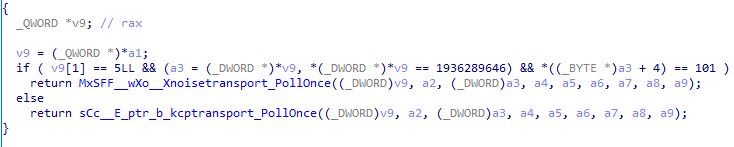
In this case, the KCP PollOnce transport function is invoked because the operator set the config Transport field to ‘kcp’. However, as a preface, these two poll functions are identical except for nuances in transport structure, not execution. They apply the respective transport settings from the operator-defined config, apply a 10 second poller timeout, then listen for dispatch commands from the operator.
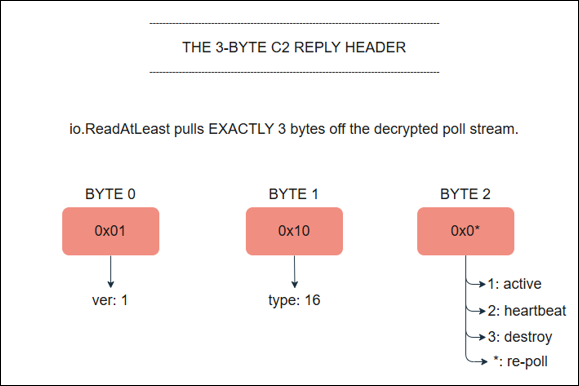
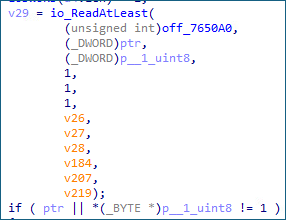
At the end of the pollOnce function, the malware begins to set up the operator controller logic. It reads in the first three bytes from the payload header and branches based on which byte the implant receives. An error message observed in the code reveals the first byte is the ‘version’ and the second byte is ’type’.
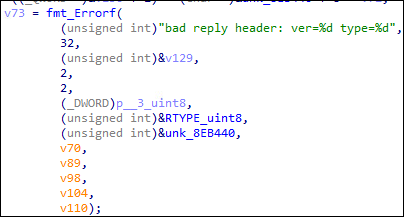
What type means here could only be assumed. The first byte we theorize is the observed version at the beginning of this post – s0cks-noise-v1. Thus, the hard-coded value is ‘1’. The second byte, the type, is a hard-coded value of ‘16’. The third byte is the dispatch command. It switches on values 1,2, or 3. It also has a default case which returns the execution flow back to the poller, repeating the cycle. Therefore, the dispatch commands are as follows:
- active
- heartbeat / no-op
- destroy
The picture below shows the check for the first and second bytes, and flows through a switch statement based on if the third byte is 1, 2, 3, or default (anything other than 1, 2, or 3).
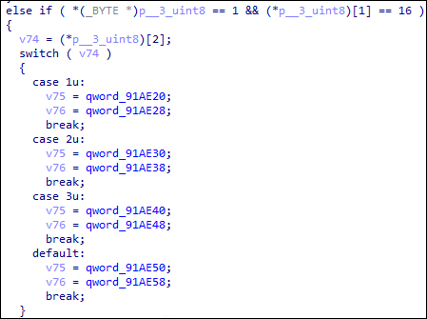
Visually, the C2 reply header looks like:
Active (1)
activeLoop
If the command dispatch byte equals 1, then the implant runs the ‘activeLoop’ function, which hosts the primary functionality of this pivot framework. Once this command is received by the operator, the implant knows to wake up and start taking actions. It’s no longer polling at this point. The execution begins with an inner loop–hence the name, activeLoop—and begins actions until the operator pauses or destroys the implant completely.

Once the client is active, it establishes three primary listeners: a polling watchdog listening for the stopCh command (dispatch command 2), a keepDataAlive heartbeat, and an error handler that leads to doDestroy (dispatch command 3).
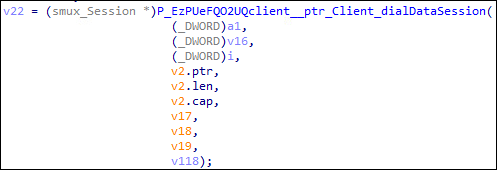
After these listeners are established, activeLoop’s primary functionality is in the dialDataSession function that returns a smux session, which is particularly revealing.
dialDataSession
The dialDataSession function does the same KCP versus Noise transport check as earlier and is responsible for establishing the control and data channel pairings to act as an additional encrypted channel to the C2. The control channel is for signaling and listens for incoming C2 commands on port 443. The data channel is for transport and is only in use when the implant is active (command dispatch 1) on port 853. The data channel is more commonly referred to as a tunnel.
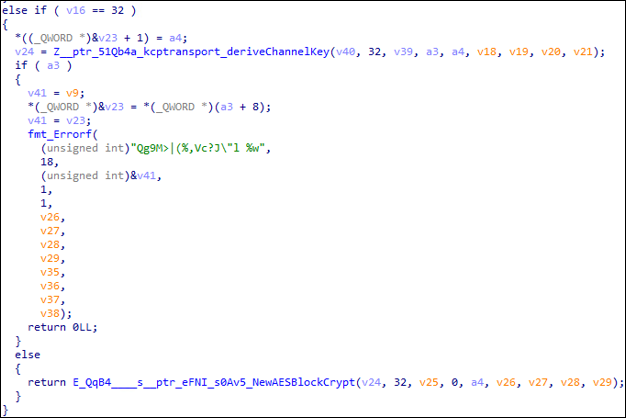
Each KCP channel derives its own AES-256 key during session setup using the same master PSK from the config combined with a channel-specific HKDF info tag. Control and data channels therefore encrypt under different keys despite sharing a root secret. Thus, recovering one channel’s traffic does not enable decryption of the other.
DialDataSession continues by doing another trivial check for ‘dtls’ and calls NewDTLSDisguiseConn that wraps the KCP bytes into a properly formatted DTLS record and passes it to NewConn. In other words, this function acts as a middle man between KCP and UDP that wraps the KCP data with DTLS and sends it to the wire via UDP. This happens in reverse on the receving machine. UDP datagrams get parsed as DTLS records, decrypted, and sent to KCP handlers.

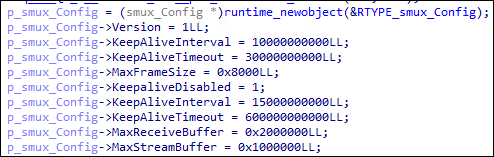
The function finishes by tweaking settings and returning a smux client session. If the implant can’t open the data channel session, it waits for three seconds and tries again. After three failed attempts it gives up (nine total seconds) and goes back to the main poller, waiting for an active, heartbeat, or destroy dispatch command.
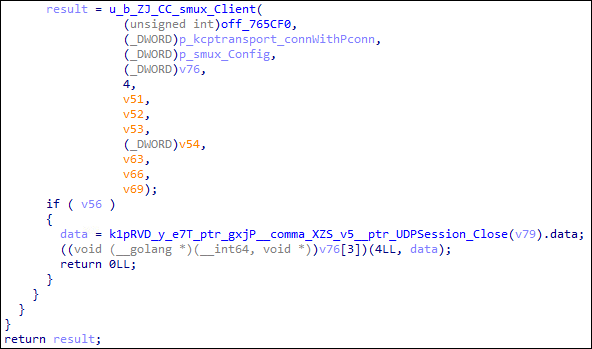
After the smux client session is successfully instantiated, it sends it’s first message back to the C2 using a specific format:
HELLO %016x
This string was uncovered in the obfs_init blob decrypted at runtime, among many other important string artifacts.
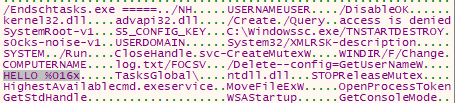
The 22-byte ASCII string fits perfectly with the client ID provided in the config, which is 16 bytes (“client_id”: 16377594508454902104). Converting the decimal client ID to ASCII shows the exact first bytes of a smux session for this particular config:
HELLO e3603fa31c3cc358
In code, this appears as a call to convT64 and then a call to Fprintf. The location of the client is qword_91AE60 and the length of the data is at qword_91A368.
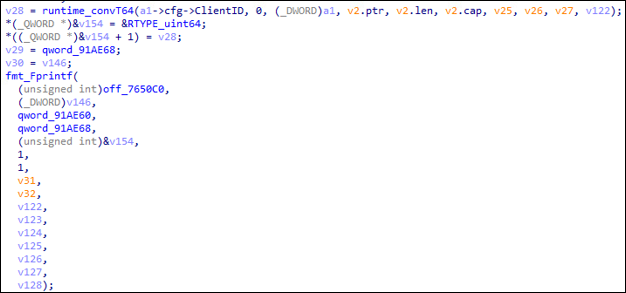
An implant using a hardcoded client ID for communication instead of other fingerprinting mechanisms ensures that the implant persists and is identifiable if the machine moves networks with IP changes and NAT changes, and can even allow the operator to change C2 infrastructure while still being able to identify the implant.
The activeLoop function continues by calling an AcceptStream function that blocks open data channels until the operate initiates a new one. If the operator invokes a new session, it hands back a fresh stream object. All in all, this means that one encrypted tunnel can carry many concurrent pivot streams. The data channel is the tunnel and smux is the multiplexer that lets multiple independent logical streams ride concurrently inside it. Each stream object created by dialDataSession is passed to handleStream which handles the entire lifecycle of one pivot stream.
handleStream
Once a stream is created and accepted, it is then handled. DialDataSession stages the stream, and handleStream, well, handles it. It does this starting with parsing a small SOCKS5-like request that the operator sends as the first bytes of the stream. That header data is used to dial the TCP target within the header, signal back, and then hand it off to a final function called bridge to relay bytes back and forth. After bridge returns, the stream is cleaned up and frees up space for another stream. The final questions for an active session remain: What does the SOCKS5-like request look like and what does bridge do.
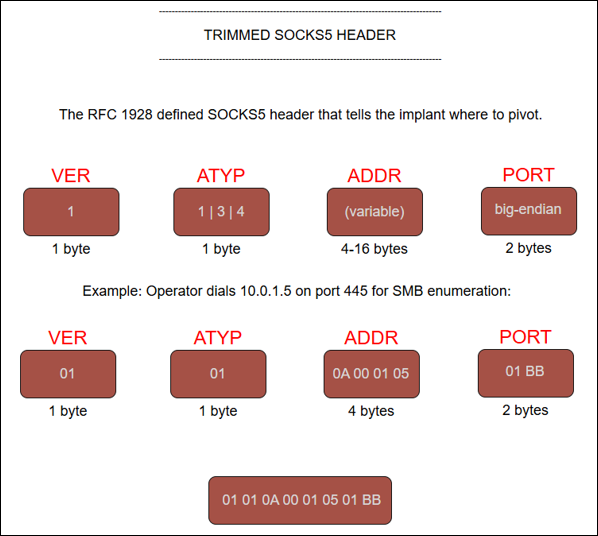
The NoisyS0cks implant leverages a trimmed version of SOCKS5 as defined in RFC 1928. It includes:
- VER
- ATYP
- ADDRESS
- PORT
And excludes:
- Method-negotiation handshake
- Authentication sub-negotiation
- CMD byte
- RSV byte
It excludes the handshake and authentication because the underlying KCP and DTLS PSK already proves identity; it’s redundant, and the CMD and RSV have no functionality within this framework.
Therefore, the SOCKS5-style header used by this implant looks like:
[VER][ATYP][ADDRESS][PORT]
Where:
- VER: (1 byte) hardcoded 0x01 value.
- ATYP: (1 byte)
- 0x01: IPv4 address
- 0x03: Domain
- 0x04: IPv6 address
- The implant explicitly prohibits IPv6 addresses and exits to the main poller if one is provided.
- ADDRESS: (1-256 bytes) IPv4 address value
- PORT: (2 bytes) port number
Therefore, we can use an example from this operator to see what the SOCKS5-like header would look like, for example, if an operator wanted to reach the domain controller at 10.0.1.5 on port 445 (SMB), the attacker would send that command down the wire via a new smux session and the header appears as:
- VER: 1 (0x01)
- ATYP: 1 (0x01)
- ADDRESS: 10.0.1.5 (0x10 0x00 0x01 0x05)
- PORT: 445 (0x01BD)
After the header is parsed, the TCP socket is tuned with NoDelay, a KeepAlive setting set to 60 seconds, and 256 KB buffers. This is all offloaded to the final primary function in an active session: bridge. The bridge function is where the implant stops being a parser and becomes an active relay.
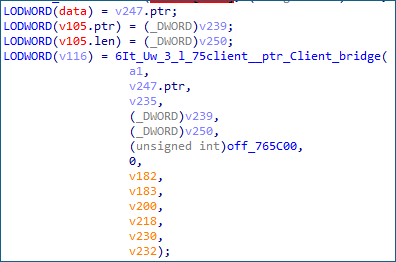
Bridge establishes two countingReader and countingWriter pairs. One for the smux stream and the other for the TCP socket.




This function bridges the TCP socket with the smux stream that allows for birectional traffic to flow within the tunnel.
Each reader and writer pairing has a five second tick with a five-minute idle threashold. If both directions sit silent for five minutes, the pivot is torn down. Although, all other pivot streams continue as normal.


Finally, after all the setup is done, it launches two helper goroutines. One copies bytes from the smux stream to the TCP socket and the other to launch the idle watchdog. The parent goroutine handles the reverse direction of the relay. From that point on, three workflows run concurrently: operator bytes shuttling to the target, target bytes shuttling back to the operator, and the watchdog ticking in the background. Both copy loops use pooled buffers and run until one side closes the connection.
To summarize the active dispatch command section, it ultimately grabs the values from the client config which drives how data will be transported from the machine back to the C2, and vice versa. The Transport field steers how the communication will develop further. If the operator chooses KCP, then UDP is utilized for communication, else if the operator choose Noise, then TCP is used. Furthermore, the config has fields for obfuscation for each transport type: DTLS for KCP and TLS for Noise. Then, the malware sets up a smux multiplxer to manage multiple streams regardless of the transport type. The multiplier handles various streams defined in the SOCKS5-style header given by the operator.
Heartbeat/no-op (2)
The heartbeat dispatch command is uneventful, and that’s by design. It’s purpose is to continue polling. That’s it. It sets a poll counter to 0 and loops through.
Destroy (3)
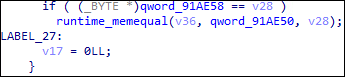
Referencing the client struct, it contained a config, stop channel inner struct, and a destroyOnce sync.Once object. The stop channel struct effectively lets the implant know the operator is done for now. Whereas the destroyOnce object tells the implant the operator is done for good. Once the operator provides a destroy command (3), the switch statement triggers a doDestroy command to begin the destruction process.

The doDestroy function locks the destroyOnce object in the struct and points to an inner function at offset 721398 (off_721398).

This function launches LaunchSelfDestruct and then sleeps for 3 seconds.

LaunchSelfDestruct is always called at the end of execution, either by the operator invoking it directly or if an error occurs in activeLoop. This means that the primary exit function in main never gets called. Either the operator will destroy the implant directly or it breaks, otherwise it will poll indefinitely.

It begins by marking the service for deletion from the Service Control Manager (SCM) database registry.
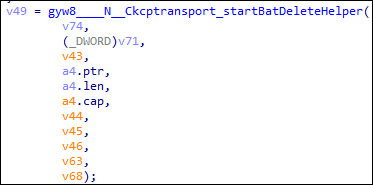
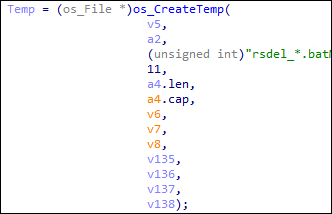
A BAT file helper is invoked that creates a BAT file called rsdel_*.bat, where the wildcard symbol is a random string. The BAT file can also be extracted from memory at runtime, just like the config and other important values.
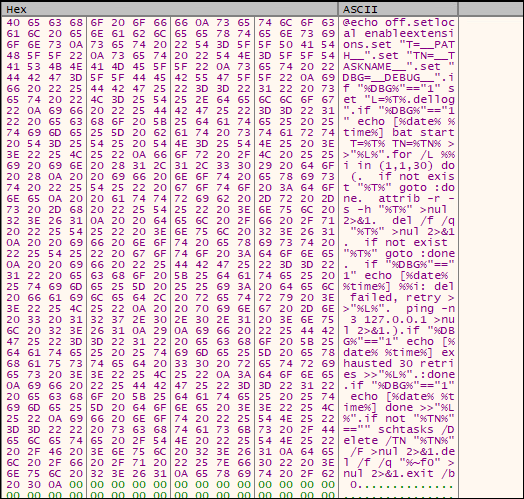
Rewritten for readability:
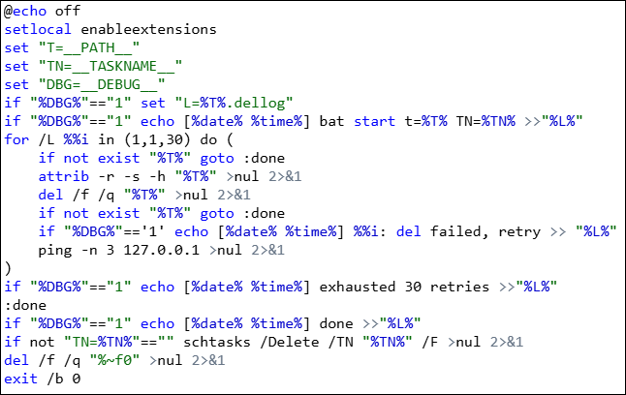
Aside from the logging instructions, which were disabled for this sample, this BAT file performs three primary tasks:
- Attempts 30 times to delete the binary with a sleep between each attempt. The “sleep” is three ping attempts to local host
- Delete
- If failed, ping localhost three times
- Tries up to 30 times
- Remove the scheduled task
- Deletes itself (the BAT file)

If the BAT file fails to run, the last step for the entire execution is to schedule the binary to delete itself after reboot. The last fallback mechanism for cleanup in the execution. It then returns to the doDestroy function and sleeps for the defined 3 seconds, and execution ends.
PCAP
The majority of information was extracted during static file analysis, but seeing a packet capture of execution provides visual verification of the obfuscated packets on the wire. Since the operator chose KCP with DTLS obfuscation, the packets appear as UDP datagrams with the occassional DTLS datagram.
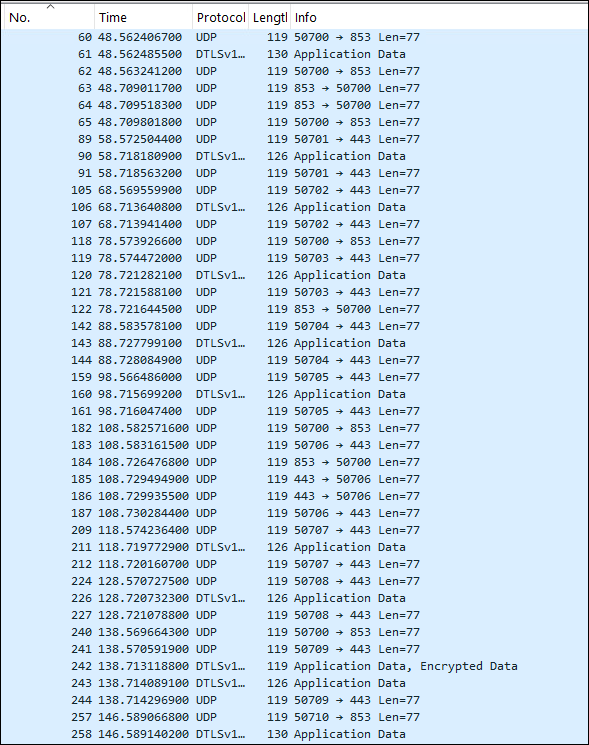
The UDP datagrams are the outbound packets from the victim machine on port 443. These are the control frames. No additional data is flowing through them, only the dispatch commands change the value (1, 2, or 3). This also explains why each datagram has a length of 77 bytes; it sends the same data length every time.
The DLTS datagrams, on the other hand, are the inbound traffic from the operator. When an operator opens a pivot, they dial the destination on the victim machine that’s provided in the SOCKS5-style header. The header provides the given IPv4 address or domain and a port number, gets handled, and a bridge is opened up in the tunnel. Since relay data is flowing through, the size will alter slightly, as is shown in the PCAP.
Therefore, not only does the PCAP show the file in execution, but it also is an actual capture of the operator sending commands to the testing sandbox enviroment.
Conclusion
In summary, NoisyS0cks, or s0cks-noise-v1, isn’t just an implant, a tunnel, or a fully ingrained RAT. It’s a pivot framework with indicators for further development such as versioning, verbose logging, graceful error catching, and being config-driven. It instills persistence on a machine and installs two multiplexed birectional relays, one for control flow and the other a data tunnel. Within this tunnel, an operator can invoke a bunch of pivot sessions concurrently. This means that an operator can pefrorm various tasks on their own machine, with their own tools, and it all be passed through the tunnel. In other words, all of these tasks can be performed at the same time:
- SMB (445) and LDAP (389) enumeration using Bloodhound
- MySQL recon (3306)
- Kerberoasting using port 88
- SSH (22) pivoting
And so on. The SOCKS5-like header contains the port numbers along with the IPv4 address or domain where these actions are performed. The relay has no idea what bytes are being passed through, it simply moves them along.
Given the C2 infrastructure is associated with information stealing campaigns and ransomware groups, indicators of NoisyS0cks on a machine are sure to preempt a subsequent information stealer or RAT, or even ransomware, further down the attack chain. This pivot framework is a foothold onto a system; one of the first steps.
IoCs
| MD5 | 0ee434b22145bE65a7c93646ab08c636 |
| SHA1 | c77271ab9c621ae8dd6783fd6b45c306a9472230 |
| SHA256 | e683d6f736d56dd7d8696887bb7e3d407a45cce40afbf9d7c4a9cf1547957143 |
| C2 IP | 67.217.228.51 |
| File Path | C:\Windows\SysWOW64\TieringEngineService.exe |
| Task name Prefix | MicrosoftEdgeUpdateTaskMachineCore_ |
| Task Folder | \TasksGlobal\* |
| Batch Deletion Script | %TEMP%\rsdel_*.bat |
| Scheduled Task | %TEMP%\task_*.xml |
YARA
rule NoisyS0cks_v1 {
meta:
description = "Detects NoisyS0cks V1"
author = "Ryan Estes"
date = "2026/05/28"
strings:
$go_init = "runtime.g"
$kcp = { 6b 63 }
$noise = { 6e 6f 69 73 }
$kcp_dtls = { 64 74 6c 73 }
$noise_tls = { 74 6c }
$config_transport = "Transport" ascii
$config_kcppsk = "KcpPSK" ascii
$config_sleep_min = "SleepIntervalMin" ascii
$config_sleep_max = "SleepIntervalMax" ascii
$config_server_host = "ServerHost" ascii
$rsdel_prefix = "rsdel_" ascii
condition:
($go_init) and
(all of ($kcp*) or all of ($noise*)) and
all of ($config) and
($rsdel_prefix)
}
External References
- http://www.noiseprotocol.org/noise.html
- https://datatracker.ietf.org/doc/html/rfc1928
- https://github.com/Nightmare-Eclipse/RedSun
- https://github.com/skywind3000/kcp
- https://github.com/xtaci/smux
Tools Used
- Binary Ninja
- Censys
- CyberChef
- Detect it Easy (DiE)
- GoReSym
- IDA
- Notepad++
- PEStudio
- PowerShell
- PPEE (puppy)
- Regshot
- System Informer
- VirusTotal
- Wireshark
- X64DBG