FormBook Malware Analysis: Phishing Campaigns Use DLL Side-Loading and Obfuscated JavaScript to Target Businesses
WatchGuard telemetry identified two different phishing campaigns targeting Greek, Spanish, Slovenian, Bosnian and Latin and Central American companies, that use different techniques to delivery FormBook malware.
FormBook is a data-stealing malware that targets Windows systems, primarily distributed through phishing emails with malicious attachments. It collects sensitive information like login credentials, browser data, and screenshots, using advanced evasion techniques to avoid detection.
It was first discovered in 2016 and is believed to be a product of underground cybercriminal forums, where it is sold as a "malware-as-a-service" to various threat actors. It has been used in numerous phishing campaigns globally, targeting various industries.
Initial Vector
As mentioned earlier, the two campaigns deliver the malware with Phishing emails that have an attached file with a name in the same idiom that is related to order or payment.

Figure 1. Events showing that the phishing was opened in the victim
The attachment delivered is a compacted file where the files that are inside of it depend on the campaign.
Artifact Analysis – Campaign 1
In the first campaign observed, the file delivered is a RAR file with 4 files, three of them are DLLs, and one of them is a Windows Executable file (EXE). The EXE was identified as ImBox.exe, a file that belongs to Sandboxie-plus project, and it’s being abused with DLL side-loading.
DLL side-loading is a technique used by attackers to execute malicious code by tricking a program into loading a harmful dynamic-link library (DLL) instead of a legitimate one. This method often exploits the way Windows searches for DLLs, allowing the attacker to use a trusted executable to run their malicious payload without detection.
In this case, the malicious DLL is msvcp140.dll, which is called when the executable is opened. If we compare the files that are bundled in the delivered Rar file, with the original ones of Sandboxie-plus, we can note the difference in the msvcp140.dll file size.
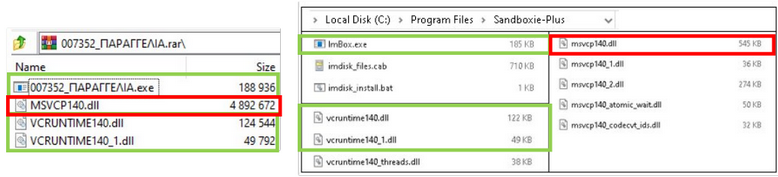
Figure 2. Comparison of the files in the malicious attachment and the original ones from Sandboxie
The malicious DLL has many Export functions, but many of them have the same code, which is a characteristic of DLLs used in this type of attack.
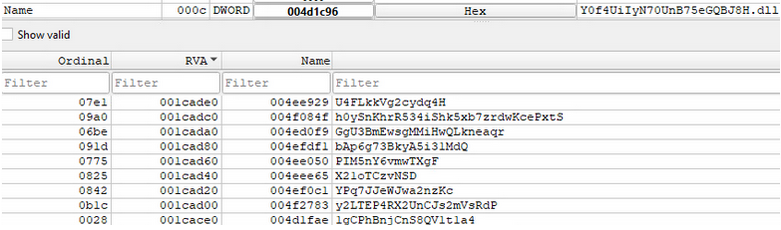
Figure 3. Exported functions of the malicious DLL
Among the many Export functions, it has just two similar functions that the only difference is that one of them has one more call to a function, that is inside a comparison.
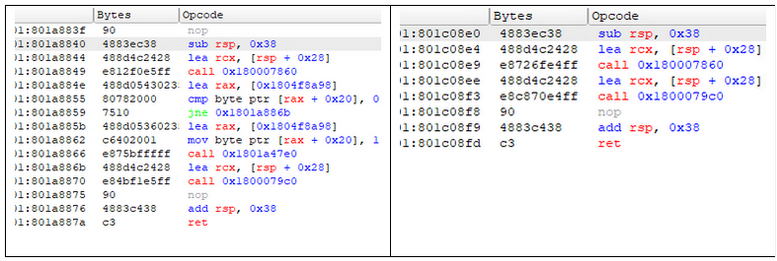
Figure 4. The two functions present in the malicious DLL
It was identified that the function called is “?_Init@locale@std@@CAPEAV_Locimp@12@Z”.

Figure 5. Identification of the function called in the DLL
Just for comparison, this same function on the original DLL has the following instructions.
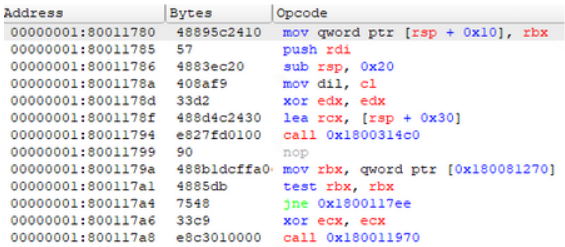
Figure 6. Instructions of the function in the original DLL
During the execution, the DLL creates a file in the TEMP directory, writing the content just after the creation.
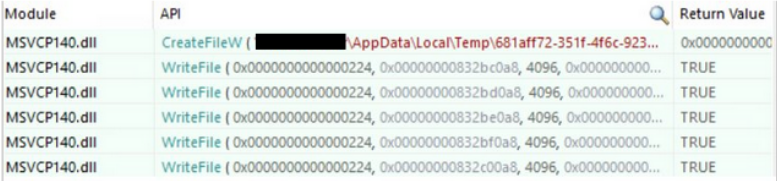
Figure 7. Events of the file creation and the content being written on it
The content written is a Windows executable file, which was identified as the FormBook malware.
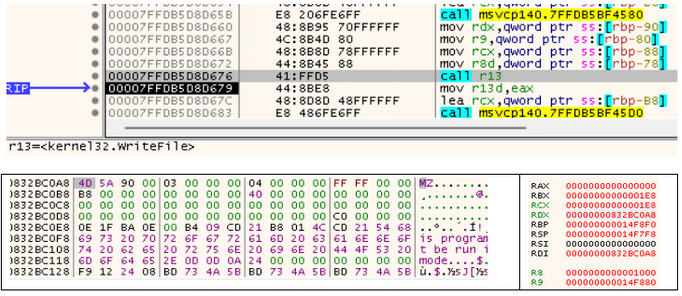
Figure 8. Bytes written in the created file
Other cases were observed related to this campaign involving the following softwares:
- An earlier version of TikTok desktop executable, using the DLL “base.dll”.
- ADelRCP Dynamic Link Library, a component of Adobe Acrobat Reader that functions as PDF Preview Handler, using the DLL “msi.dll”.
- The Windows version of the data compression tool XZ Utils, using the DLL “liblzma-5.dll”
Artifact Analysis – Campaign
In the other campaign observed, inside of the attachment has a JavaScript file, which is highly obfuscated.
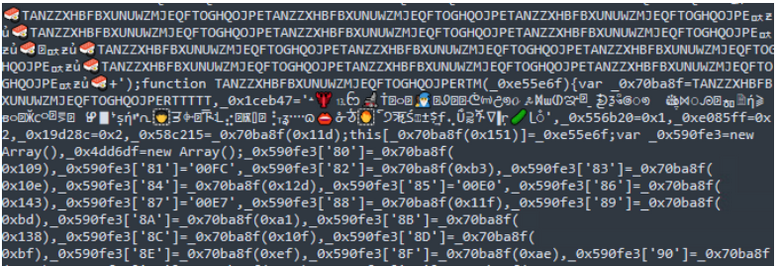
Figure 9. Highly obfuscated JavaScript
When executed, the JavaScript drops two files, Ollo.png and Til.png, and calls Powershell passing as argument a very long string encoded in Base64, with one substring embedded on it to difficult a possible decode made by automation.
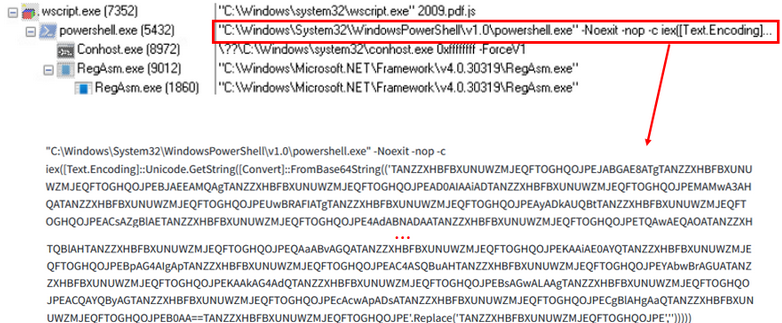
Figure 10. Process tree with the Powershell command line
When decoded, we can see a sequence of commands that first reads Ollo.png and decrypt the content using AES, using a key and an initiation vector (IV) that is also encoded in Base64. After the decryption, the content is also in Base64, and after the decode is possible to identify that it’s a Windows executable.
After that, the generated file is called passing a string as argument, which is a reversed Base64 that points to Til.png. Another argument passed is “RegAsm”, that was observed in the process tree in Figure 10.
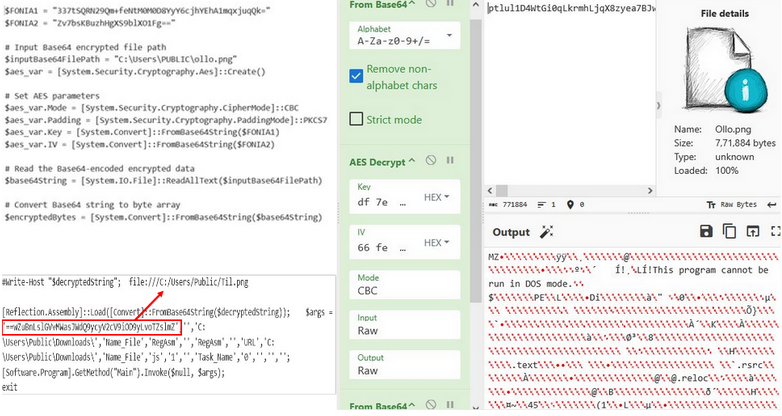
Figure 11. Output of Ollo.png after the process made on it
The generated file is a DLL with .NET Framework, that has a product defined as “Microsoft.Win32.TaskScheduler”. This product name, combined with one of its namespaces, “HackForums.gigajew”, and the function “Mandark”, that belongs to this namespace, was also observed in a report produced by Instrisec.
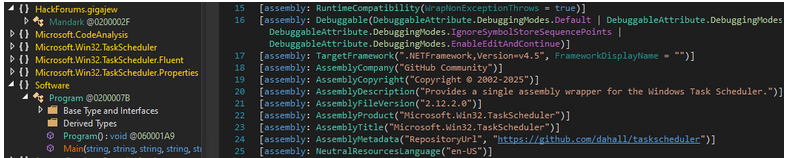
Figure 12. Mandark Loader
The Intrisec report named this file PanthomVAI and classified it as a custom Loader, mentioning that the malware families that were already observed being delivered with this Loader include Remcos, XWorm, AsyncRAT, DarkCloud, SmokeLoader. So, the difference in this case is that it’s being used to distribute FormBook.
It was also identified that, in this case, the code has obfuscation, changing the names of the functions and of the variables to difficult analysis.
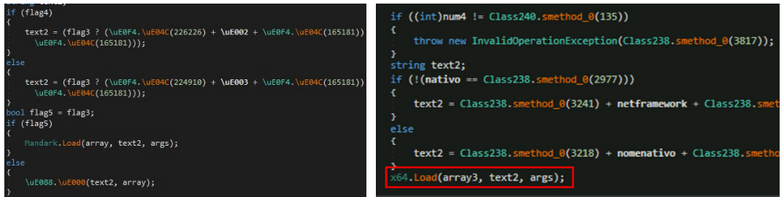
Figure 13. Comparison of code used in this campaign (left) and code analyzed by Intrisec (right)
As was identified in Figure X, the name is reversed, as so its content, which later is Base64 decoded and the result is injected in the process also passed as argument, that we could see in Figure X that is RegAsm.
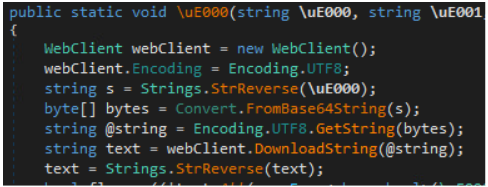
Figure 14. Start of the code of Mandark Loader
Performing the actions seen in the code, we can see that the result is a Windows executable which corresponds to the FormBook malware.
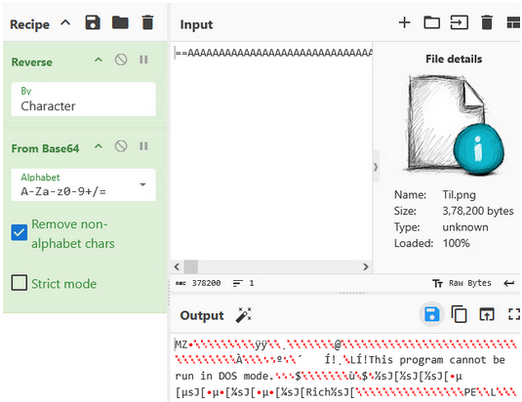
Figure 15. Output of Til.png after the process made on it
Artifact Analysis – FormBook malware
The two campaigns mentioned earlier deliver the same payload, which is an executable associated with FormBook malware.
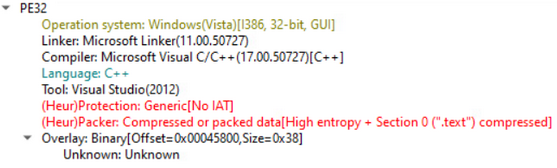
Figure 16. Information of the analyzed artifact
The Import Directory Table (IDT) of FormBook is empty, suggesting that it imports the functions dynamically. For monitoring evasion purposes, this malware maps a copy of this DLL and performs many of its interactions with the operating system through this DLL.

Figure 17. Information of the analyzed artifact, showing no content in the Image Directory Entries
The actions initially performed by the malware are the same described by Stormshield, which shows how it maps ntdll.dll in memory to act as a form-grabber that uses an inline hook mechanism to capture information from some browsers.
The procedure of the ntdll.dll mapping is performed in 3 steps:
- Reading RAW ntdll.dll from disk into memory
- Manually mapping ntdll.dll headers and sections
- Dynamically loading function addresses from the mapped DLL
Step 1: Reading RAW ntdll.dll from disk into memory
Import and use NtCreateFile to get the handle of ntdll.dll

Figure 18. Use of NtCreateFile
Get the size of ntdll.dll to allocate heap memory using NtQueryInformationFile

Figure 19. Use of NtQueryInformationFile
Read RAW bytes into the allocated memory using NtReadFile

Figure 20. Use of NtReadFile
Monitoring the actions allows us to validate the use of these 3 functions.

Figure 21. Events generated during the process
Step 2: Manually mapping ntdll.dll headers and sections
Mapping ntdll headers and section into memory from the raw copy using NtAllocateVirtualMemory.
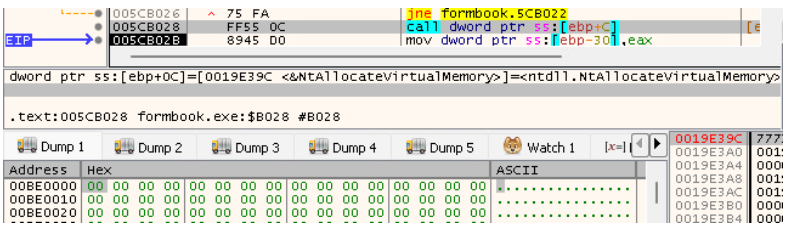
Figure 22. Use of NtAllocateVirtualMemory
The region allocated has a DLL with the same sections of ntdll.dll, which can be identified by the combination of two unique functions of this DLL, which are “.mrdata” and “.00cfg”.
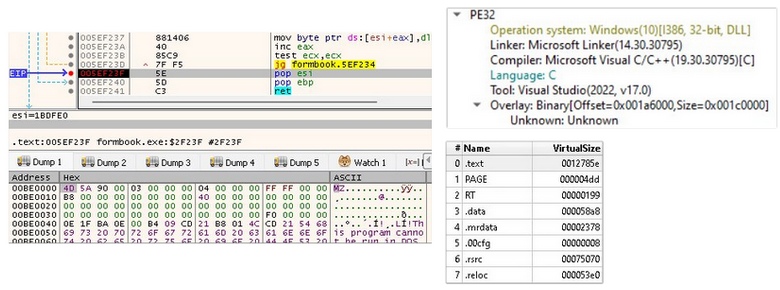
Figure 23. Ntdll.dll structure wrote in memory
One key point to flag suspicious is that this manually mapped DLL is in one committed region, with the PAGE_EXECUTE_READWRITE (ERW) protection, while the original ntdll.dll loaded by Windows is mapped in several committed regions with different protections in its sections.
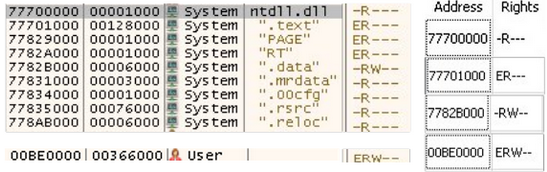
Figure 24. Comparison of permissions in the original and in the mapped ntdll.dll
Step 3: Dynamically loading function addresses from the mapped DLL
After the mapping of the headers and sections, the function APIs are loaded so it will be executed as a syscall, allowing the malware to bypass user-mode monitoring due to the direct call to the kernel in the mapped copy of ntdll.dll in memory.
Indicators of compromise
Campaign 1:
E-mail messages that have attachments with the filename ending in .rar, .r00 or .arj, which carries a file with one of the filenames in the table below.
| Filename | Country |
|
ΠΑΡΑΓΓΕΛΙΑ_<numbers> ΠΛΗΡΩΜΗ_<numbers> SWIFT_ΑΝΤΙΓΡΑΦΟ_<numbers> SW_<numbers> |
Greece |
|
PAGO_<numbers> COTIZACIÓN_<numbers> PO_<numbers> |
Spain and Latin and Central America countries |
|
PLACILO_<numbers> NAROČILO_<numbers> |
Slovenia |
| PLAĆANJE_<numbers> | Bosnia and Herzegovina |
Campaign 2:
E-mail messages attachments with the filename ending in .pdf.<extension associated to compression>, which carries a file with the filename ending in .pdf.js.
Ollo.png: 872116260461fe63dd8664dbfbc7efa0
Til.png: 8d79722188d998327dd7edf9924bffe2
Microsoft.Win32.TaskScheduler.dll: 9601283e3153779f5a7e845365fdd87d
FormBook malware: ab0d213d4df3de06bbd2db524fb73282
Conclusion
This research shows that FormBook continues to be a highly adaptable threat, with attackers using multiple delivery and execution chains to reach the same end goal: credential theft and data collection on Windows systems. In the campaigns analyzed here, threat actors relied on phishing emails themed around orders and payments, then used techniques such as DLL side-loading, heavily obfuscated JavaScript, PowerShell, AES decryption, and custom loaders to deploy the final FormBook payload.
What makes these campaigns especially noteworthy is not just the malware itself, but the diversity of methods used to evade detection and abuse legitimate software and trusted system processes. This reinforces an important reality for defenders: effective detection cannot rely on a single artifact or static indicator alone. Security teams should monitor for suspicious archive-based email attachments, anomalous DLL loading behavior, PowerShell execution tied to user-opened attachments, and signs of manual DLL mapping or direct syscall activity in memory. By correlating these behaviors across the attack chain, organizations can improve their ability to detect and stop FormBook infections before sensitive data is compromised.