Open mobile navigation menu
  • Log In
  • Contact Us
  • Global Sites

    Français
    Deutsch
    Italiano
    Português
    Español
    日本語
Home
  • Back

    Platform

    • Platform
    • Red AI - Rai
    • Unified Security Platform
    • Unified Security Agent
    • Centralized Management
    • AI-Powered XDR
    • RMM & PSA Integrations
    • Compliance Reports
    • Managed Services for MSPs
    • Managed Detection & Response
    • Network Security
    • Firewalls
    • Firewall Security Services
    • Network Detection & Response (NDR)
    • Secure Wi-Fi
    • Endpoint Security
    • Endpoint Detection and Response
    • Endpoint Security Modules
    • Managed EDR
    • Identity Security
    • Multi-Factor Authentication (MFA)
    • Total Identity Security
    • Hardware Token
    • Secure Access Service Edge (SASE)
    • Cloud Detection & Response
    • Zero Trust Network Access (ZTNA)
    • View All Products
  • Back

    Why WatchGuard

    • Why WatchGuard
    • WatchGuard vs The Competition
    • Compare SonicWall
    • Compare Microsoft
    • Compare Fortinet
    • Compare Sophos
    • View All Competitors
    • Case Studies
    • Case Studies
    • Partner Success Stories
    • Solutions
    • Industries
    • Organizations
    • spacer
    • Industry Recognition
    • Awards & Recognition
    • Customer Reviews
    • Compliance & Regulations
  • Back

    Learn

    • Cybersecurity 101
    • AI & Automation
    • Cyber Attacks & Threats
    • Endpoint Security
    • VPN
    • Managed Detection & Response

    • Blogs
    • Corporate News Blog
    • Product & Support Blog
    • Secplicity
    • Threat Lab
    • Internet Security Report
    • Ransomware Tracker
    • The 443 Podcast
    • Cybersecurity Trends
    • SD-WAN
    • XDR Security
    • Zero Trust Security
    • MSP vs MSSP
    • Webinars & Events
    • Register for a Webinar
    • Upcoming Live Demos
    • On Demand Webinars
    • Help Me Buy
    • Demos & Free Trials
    • Find a Reseller
    • Online Store (Renewals Only)
    • View All Resources
  • Back

    Company

    • News Room
    • Press Releases
    • Press Coverage
    • Corporate News Blog
    • Webinars & Events
    • Media Contacts
    • About WatchGuard
    • Leadership
    • IMPACT Partner Conference
    • 30 Years of Innovation
    • Girona FC Partnership
    • Careers
    • Recognition
    • Customer Reviews
    • Awards & Recognition
    • Trust Center
    • PSIRT
    • Product Certifications
  • Back

    Partners

    • Partners
    • Join WatchGuardONE
    • WatchGuardONE Program
    • WatchGuardONE MSP Program
    • Partner Success
    • WatchGuardONE Benefits
    • Partner Success Stories
    • Partner Connect
    • Find a Partner
    • Find a Distributor
  • Back

    Support

    • Support
    • Technical Resources
    • Technical Search
    • User Forums
    • Technical Documentation
    • Product & Support Blog
    • Software Downloads
    • Security Portal
    • Training
    • Certification
    • WatchGuard Learning Center
    • Locate a Training Partner
    • Training Schedule
    • Video Tutorials
    • Support Services
    • Hire an Expert
    • Support Levels
    • Additional Support Services
    • spacer
    • Security Advisory List
    • Status Dashboard
  • Close search
  • Try Now
Close search
  • Solutions
  • Products & Services
  • Research
  • Partner Program
  • Support
  • News
  • Careers
  • Portal Login
  • Contact Us
  • Try Now

Wi-Fi 6 Access Points

Secure Cloud-Managed Wireless for Every Environment

Modern businesses depend on secure, reliable wireless connectivity to support employees, guests, and connected devices. WatchGuard Wi‑Fi 6 access points deliver high-performance wireless networking with centralized cloud management, making it easy to extend coverage, simplify administration, and scale across any environment.

Get Pricing
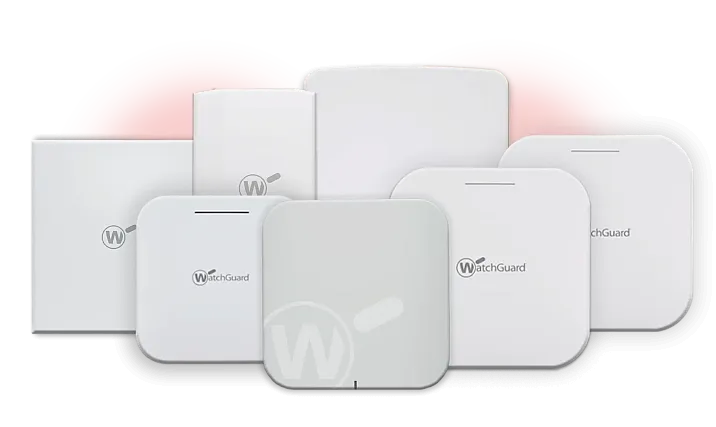
WatchGuard Access Points

Why WatchGuard Access Points

Large black W inside of a cloud made of connected red, black and gray lines

Manage wireless networks from a single cloud platform with visibility, monitoring, and configuration in one place

Black shield with a stylized Wi-Fi sign on the front

Protect users and devices with enterprise-grade Wi‑Fi security and WPA3 encryption across every deployment

red dot with a gray semicircle around it and a black semicircle around that one

Deliver reliable connectivity anywhere with indoor, outdoor, rugged, and high-density access point options

Say Hello to Secure and Scalable Wi-Fi

WatchGuard Wi‑Fi 6 access points are built to deliver reliable wireless performance across a wide range of environments. From small offices and retail locations to schools, warehouses, and outdoor deployments, our portfolio makes it easy to find the right balance of coverage, capacity, and durability. Compare models, features, and deployment options to identify the access point that best fits your business requirements.

Indoor Access Points

WatchGuard AP130 AP230W AP330 AP432
Recommended
Use Cases
Low-density for indoor environments such as small offices, remote workers, and meeting rooms Low- to medium-density indoor environments like hospitality, classrooms, multi-unit dwellings, and conference rooms Medium-density for retail, point of sale systems in retail, K-12 schools, and offices High-density indoor environments, including expansive offices, large corporate or education campuses
Radios & Streams Wi-Fi 6 2x2 Wi-Fi 6 2x2
w/ 2x2 Dedicated Scanning Security Radio
Wi-Fi 6 2x2
w/ 2x2 Dedicated Scanning Security Radio
Wi-Fi 6 4x4
Throughput 1201 Mbps / 574 Mbps 1201 Mbps / 574 Mbps 1201 Mbps / 574 Mbps 2402 Mbps / 1148 Mbps
Ports 1 x 1Gbps (PoE+) Uplink: 1 x 1 Gbps (PoE+)
Extension: 4 x 1 Gbps
1 x 2.5 Gbps (PoE+) 1 x 2.5 Gbps (PoE+)
Mounting Options T-Bar Ceiling
Flat Surface Mount
Flat Surface Mount T-Bar Ceiling
Flat Surface Mount
T-Bar Ceiling
Flat Surface Mount
Datasheet AP130 AP230W AP330 AP432

Outdoor/Rugged Access Points

WatchGuard AP332CR AP430CR
Recommended
Use Cases
Medium-density for rugged or outdoor environments such as commercial retail, K-12 schools, manufacturing, and offices High-density for rugged or outdoor environments such as expansive campuses, manufacturing, stadiums, and hospital facilities
Radios & Streams Wi-Fi 6 2x2 Wi-Fi 6 4x4
w/ 2x2 Dedicated Scanning Security Radio
Throughput 1201 Mbps / 574 Mbps 2402 Mbps (4x4) / 574 Mbps (2x2)
Ports 1 x 2.5 Gbps (PoE+) 1 x 5 Gbps (PoE+)
1 x 1 Gbps
Mounting Options Flat Surface Mount
Pole Mount
Flat Surface Mount
Pole Mount
Datasheet AP332CR AP430CR

Wi-Fi Package Options

Product Feature Standard Wi-Fi USP Wi-Fi
Native WatchGuard Cloud Management Features ✓ ✓
24/7 Support and Hardware Warranty ✓ ✓
Inventory Management ✓ ✓
SSH/CLI Access ✓ ✓
Configuration of Radio Settings ✓ ✓
Firmware Updates ✓ ✓
24-Hour Reporting/Visibility ✓ ✓
Live Status Visibility ✓ ✓
WatchGuard Cloud API Integration for PSA ✓ ✓
AP Site Templating ✓ ✓
Captive Portal ✓ ✓
Syslog Server Output   ✓
IKEv2 VPN Features (RAP)   ✓
30-Day Reporting/Visibility   ✓
Future WatchGuard Portfolio Integrations   ✓
Future Security and Wi-Fi Features*   ✓

*Features included in the Unified Security Platform license will be determined by WatchGuard. Some features may require additional products from WatchGuard to work.

Which AP Is Right For Your Environment?

Different environments place different demands on your wireless network. Whether you need cost-effective coverage for a small business, high-capacity connectivity for busy public spaces, or weather-resistant access points for outdoor locations, WatchGuard offers Wi‑Fi 6 solutions designed to meet your performance, coverage, and security requirements.

Hospitality

Recommended:

AP230W, AP432

AP230W for guest rooms

AP432 for lobbies, conference spaces, and common areas

Education

Recommended:

AP330, AP432

AP330 for classrooms and standard school deployments

AP432 for lecture halls, common areas, and high-density student environments

Manufacturing

Recommended:

AP332CR, AP430CR

AP332CR for warehouses, loading docks, and outdoor industrial environments

AP430CR for large manufacturing campuses, distribution centers, and high-density operations

“The performance of the Wi-Fi 6 APs is lightning-fast and reliably secure. Wi-Fi 6 and WPA3 are essential for a modern network and WatchGuard has delivered an exceptional wireless experience. ”

Luis Gimenez, Director of Technology at SPW

Understanding Wireless Coverage, Capacity, and Access Point Selection

Selecting the right wireless access point requires balancing coverage, capacity, deployment environment, and user requirements. Explore common questions about Wi‑Fi 6 access points, indoor and outdoor wireless deployments, access point sizing, and model comparisons to better understand which solution fits your organization's needs.
The best access point depends on your environment, user density, and deployment requirements. AP130 is ideal for small offices and branch locations, AP230W is designed for hospitality and in-room deployments, AP330 is well suited for retail, education, and professional offices, and AP432 is designed for high-density indoor environments. For outdoor deployments, AP332CR provides rugged wireless coverage, while AP430CR is built for high-density outdoor environments.

Both AP130 and AP330 deliver secure Wi‑Fi 6 connectivity, but they are designed for different environments. AP130 is intended for low-density deployments such as small offices, remote sites, and meeting rooms. AP330 is built for medium-density environments and includes additional capabilities such as a dedicated security scanning radio and higher-speed connectivity, making it a better choice for retail, education, and larger office deployments.

AP330 is designed for medium-density wireless environments, while AP432 is optimized for high-density deployments with larger numbers of connected users and devices. Organizations typically choose AP330 for retail stores, classrooms, and office floors, while AP432 is better suited for large campuses, conference facilities, lecture halls, and other environments where capacity and performance are critical.

The number of access points required depends on the size of your facility, building layout, construction materials, coverage requirements, and the number of connected devices. Small offices may require only one or two access points, while schools, hotels, warehouses, and campuses often require multiple access points to provide reliable coverage and capacity. A wireless site assessment can help determine the optimal number and placement of access points.

A dedicated security scanning radio enables continuous wireless security monitoring without impacting client performance. Organizations that require enhanced visibility into wireless activity often choose models such as the AP230W, AP330, or AP430CR. For smaller deployments where advanced monitoring is not a primary requirement, AP130 may be sufficient.

AP332CR is designed for medium-density outdoor deployments and is an excellent choice for schools, retail locations, office exteriors, and general outdoor coverage. AP430CR is designed for higher-capacity deployments and is better suited for larger campuses, manufacturing operations, healthcare facilities, stadiums, and other environments requiring greater performance and scalability.

Downloads & Resources

Blog: Wi-Fi Intrusion from neighboring networks, how to stop the Nearest Neighbor…
Blog: This New Wi-Fi Attack Can Intercept Data Traffic
Datasheet: AP230W
Solution Brochure: Simplified Wi‑Fi in WatchGuard Cloud
eBook: WatchGuard Network Access Enforcement
Feature Brief: Network Access Enforcement and Control
More Resources
  • About Us
  • Contact Us
  • News Room
  • Careers
  • Product List & SKUs
  • Firebox Sizing Tool
  • Compare Firewall Appliances
  • Support
  • Trust Center
  • PSIRT
  • Cookie Policy
  • Privacy Policy
  • Media & Brand Kit
  • Manage Email Preferences
LinkedIn X Facebook Instagram YouTube

Email Us

Global Sites

Français
Deutsch
Italiano
Português
Español
日本語

Copyright © 1996-2026 WatchGuard Technologies, Inc. All Rights Reserved.
Terms of Use | California Collection Notice | Do Not Sell or Share My Personal Information