Microsoft AMDR: Safe Deployment Practices
This document describes in detail the Safe Deployment Practices (SDP) adopted by WatchGuard Technologies for its antivirus protection solutions across both the consumer market (home) and the enterprise market. The goal is to demonstrate compliance with Microsoft Virus Initiative (MVI) program requirements and with the security controls applicable to the Windows ecosystem.
In addition, this SDP document provides evidence that WatchGuard performs development, signing, distribution, and maintenance activities for the antimalware solutions within a framework of security, resilience, and compatibility, aligned with Microsoft best practices.
The scope of this document covers all software life-cycle phases related to the secure delivery of the product:
- Binary build and signing: Compilation in controlled environments, reproducible builds, and signing with EV certificates and Microsoft Trusted Signing for kernel-mode drivers.
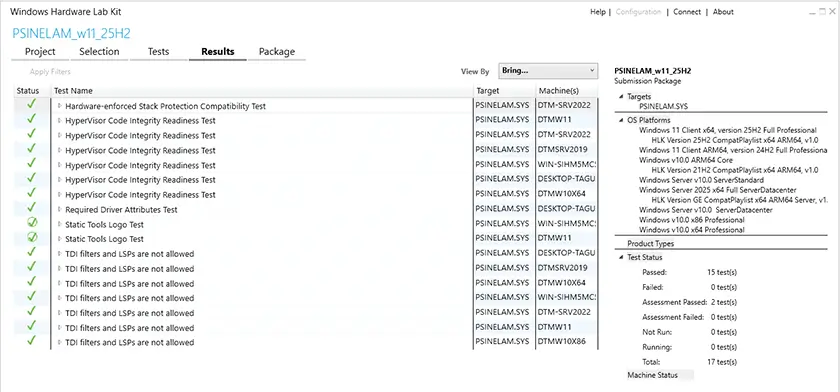
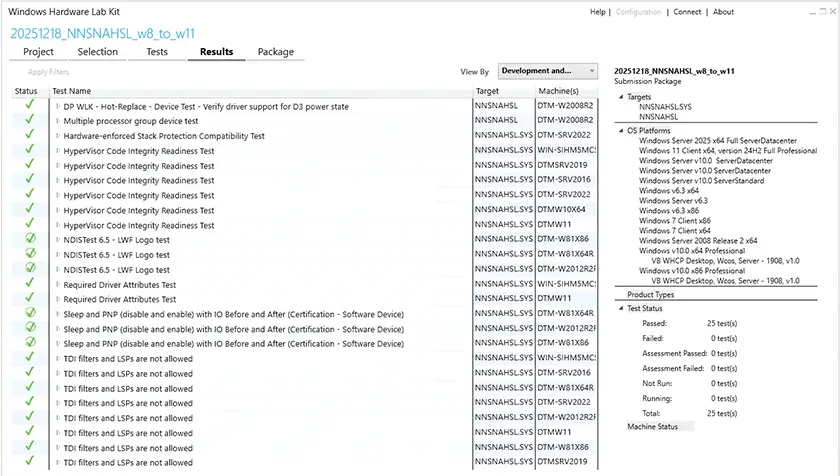
- Pre-deployment validation: Functional, compatibility, and performance testing across the supported Windows versions, including HLK/WHCK validations (See Figure A.1.1 and Figure A.1.2) and Secure Boot test coverage.
- Gradual deployment strategy: Staged rollout mechanisms, pre-release channels (QA/Integration, Staging, Friends & Family, Production), and rollback policies to minimize risk.
- Update and rollback: Delivery of updates through secure channels, recovery mechanisms, and token-protected generic uninstallers.
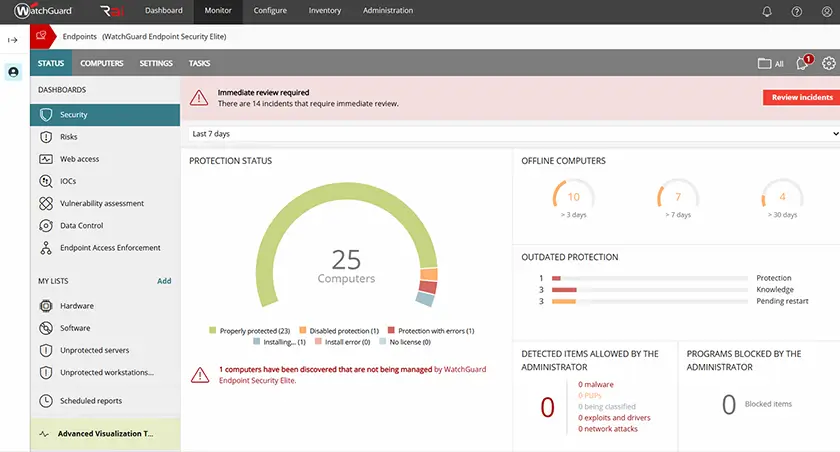
- Telemetry and monitoring: Collection of installation, resource-consumption, and error metrics, integrated into dashboards for early regression detection.
- Compatibility and security: Assured operation on x86, x64, and ARM64 architectures; on Windows 7/Server 2008 R2 and higher; with support for Secure Boot and BitLocker.
Within this scope, the document attests that both consumer-market (home) products (web-based installation via digitally signed stub installers) and enterprise-market products (fleet management via a cloud console) meet safe-deployment requirements, ensuring continuous customer protection and the integrity of the Windows ecosystem.
Deployment Strategy
WatchGuard applies different deployment strategies depending on the product and the target environment (consumer or enterprise), ensuring security, resilience, and traceability in both cases.
Enterprise Market
- WatchGuard Agent deployment is performed through a secure cloud management console that acts as the centralized distribution and orchestration point.
- The console enables administrators to define installation, update, and uninstall policies at the organization, endpoint group, or individual endpoint level.
- TLS-encrypted communication and certificate-based authentication are used to guarantee the confidentiality and integrity of deployment commands.
Consumer Market (Home)
- Installation is carried out via stub installers, designed to be lightweight and verifiable, which dynamically download the required components from trusted distribution servers.
- Stub installers are digitally signed and perform cryptographic verification of downloaded binaries before proceeding with installation.
- Protection and integrity-validation mechanisms are present throughout the entire installation flow.
Update Distribution
- All updates are delivered as digitally signed packages.
- Before installation, each package undergoes an integrity check through signature validation.
- Update channels are divided into:
- Production: General distribution to all end customers.
- Friends & Family: Collaborative channel involving WatchGuard’s own environment and a small cohort of customers prior to global release.
- Staging: Intermediate channel for controlled validations before release to the broader Friends & Family channel.
- QA/Integration: Internal testing channel.
- The deployment system supports staged rollout, enabling progressive release across segments of the installed base to reduce risk and allow early regression detection.
Recovery Mechanisms
- Rollback during upgrade: The installer implements a phased flow (pre-upgrade, upgrade, post-upgrade). During pre-upgrade, a configuration backup is taken together with several checks. If an error is detected during the upgrade phase, the system automatically restores the backup and aborts the process, ensuring the endpoint remains on the previous stable, functional version.
- Self-cleanup and safe reinstallation mechanism triggered by the agent in exceptional corruption scenarios (based on errors returned during installation or upgrade).
- Availability of token-protected generic uninstallers, ensuring that product removal can only be performed through authorized processes.
Reboot Policy
- The system is designed to avoid forced reboots.
- Reboots occur only when strictly necessary and always with explicit administrator approval.
- In the consumer or home market, end users are notified with sufficient advance notice.
Benefits of the Deployment Strategy
- Minimizes disruption in production environments.
- Reduces risk through progressive validation across channels (QA, Staging, Friends & Family, Production).
- Ensures service continuity thanks to recovery mechanisms.
- Preserves binary integrity and the trust chain throughout installation and update workflows.
Pre-Deployment Validation
Before releasing any product update, WatchGuard runs an exhaustive pre-deployment validation process. This process ensures that binaries meet the security, stability, and compatibility requirements mandated by Microsoft and by our internal quality policies.
Test Environment Coverage
Updates are validated across a wide range of environments that represent the installed base and officially supported scenarios:
- Operating Systems: From Windows 7 SP1 and Windows Server 2008 R2 to the latest releases of Windows 11 and Windows Server 2025.Architectures: x86, x64, and ARM64.
- Execution Platforms: Hypervisors (Hyper-V, VMware ESXi/Workstation, VMware Fusion (ARM64)) and physical hardware (Intel/AMD; Snapdragon on ARM64).
- Validation Channels:
- Internal QA: Initial validation in internal development labs.
- Staging: Pre-release testing in controlled environments with pilot customers.
- Friends & Family: Collaborative external testing channel involving customers and strategic partners prior to general availability.
Types of Validation Performed
Each update must pass a battery of automated and manual tests designed to ensure system stability and compatibility with Windows security protections:
- Boot-time Impact Analysis: Measurement of average boot times and deviation after installation to ensure no significant degradation.
- ELAM Handoff Integrity: Verification that the Early Launch Anti-Malware (ELAM) driver correctly hands off control to the Windows security subsystem without interruptions.
- Resource Consumption: Monitoring CPU, RAM, and I/O under typical usage scenarios and stress conditions.
- Compatibility with Secure Boot and BitLocker: Confirmation that the boot chain and encryption features are unaffected by the product and its drivers.
- Resilience Testing: Interrupted-update, network-failure, and package-corruption scenarios, verifying via self-diagnostics that recovery mechanisms return the endpoint to a stable state.
Acceptance Criteria
- No critical regressions (P0/P1) in performance or stability.
- Boot-time impact must remain within internal quality thresholds.
- No incompatibility with Secure Boot or BitLocker.
- All relevant HLK/WHCK tests must complete successfully.
Automation and Traceability
- The CI/CD pipeline includes automated tests that run these validations across cohorts of physical and virtual machines.
- On failures, we block promotion of the package to the Staging or Friends & Family channels.
Signing and Version Control
Protecting the software supply chain is a core pillar of WatchGuard’s development and deployment process. Accordingly, we enforce strict controls for code signing, version control, and tamper detection.
Code Signing
- All executables, libraries, and critical components are signed with Extended Validation (EV) certificates issued by a trusted Certification Authority (DigiCert).
- Kernel-mode drivers are signed exclusively via Microsoft Trusted Signing, ensuring acceptance in environments with Secure Boot and during ELAM early-boot initialization.
- The signing process is integrated into the CI/CD pipeline, automated and centralized on a hardened signing server to avoid manual handling.
- Each published binary is verified to contain a valid Authenticode signature with a certificate chain anchored in a trusted root CA.
Reproducible Builds and Post-Signature Verification
- We employ reproducible build processes, meaning that the same source code and controlled dependencies always yield an identical binary, eliminating risks of malicious code insertion.
- After signing, additional validations include:
- Verification that binaries are correctly signed.
Version Control
- We use a consistent versioning scheme: Major.Minor.Patch.
- Full traceability is always maintained for source code, dependencies, and the compilation toolchain.
Tamper Detection
- Update packages are never applied if the digital signature or validation hash fails to match the authoritative records — both for the product package and for the various signature files.
Benefits of the Signing and Version-Control Strategy
- Ensures customer and Microsoft confidence in the provenance of binaries.
- Strengthens protection against software supply chain attacks.
- Ensures compatibility in Windows environments with Secure Boot and BitLocker.
Compatibility Assurance
Product compatibility with the Windows ecosystem is an essential requirement within the Safe Deployment Practices (SDP). WatchGuard continuously validates that its components (including kernel-mode drivers and ELAM controllers) operate correctly across all supported Windows versions without compromising system stability or security.
HLK/WHCK Testing
- Tests are run with the Hardware Lab Kit (HLK) on Windows 10 and Windows 11 to ensure compliance with Microsoft requirements for drivers and security software.
- For earlier versions (Windows 7, Windows 8/8.1, Windows Server 2008 R2, and Windows Server 2012/2012 R2), equivalent testing is performed using the Windows Hardware Certification Kit (WHCK).
- These tests cover key aspects such as API compatibility, driver stability during boot and prolonged operation, and correct interaction with native Windows security features.
ELAM Driver Behavior
- The ELAM (Early Launch Anti-Malware) driver is designed to operate safely during early-boot environments.
- It uses a non-blocking failure mode, prioritizing the protection of critical processes via AM-PPL (Antimalware Protected Process Light) without preventing third-party drivers from loading.
- Specific boot tests have been conducted with Secure Boot and BitLocker enabled, and with HVCI/VBS (available on Windows 10/11), confirming that the trust chain and encryption mechanisms remain intact.
Architecture and Platform Compatibility
- The product is continually validated on x86, x64, and ARM64 architectures to ensure consistent behavior across physical and virtualized environments.
- Testing is performed on hardware from multiple vendors (Intel, AMD, ARM) and on widely used hypervisors (Microsoft Hyper-V, VMware).
- This diversity of environments helps ensure the absence of critical incompatibility and improves robustness in real-world customer scenarios.
Compatibility Telemetry
- Services emit telemetry events related to load status (success/failure).
- These events can be collected in internal dashboards for proactive compatibility and regression analysis.
- If load anomalies are detected, in-progress rollouts can be paused. Benefits of the compatibility strategy
- Ensures official conformance with Microsoft requirements (HLK/WHCK).
- Minimizes system-interruption risk, as the ELAM driver is designed to fail in a non-blocking manner.
- Reinforces confidence in the Windows ecosystem regarding the antivirus solution.
Third-Party Certifications and Independent Audits
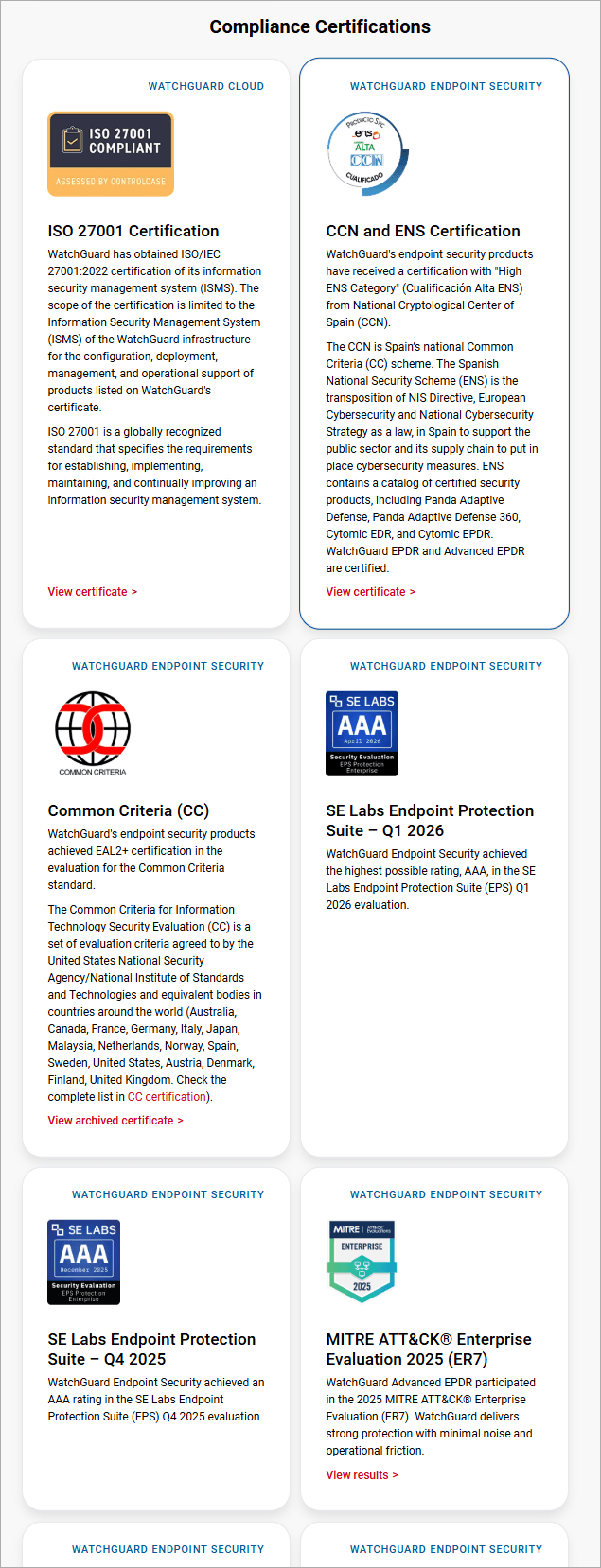
WatchGuard maintains an ongoing program of external certifications and independent audits that substantiate the controls described in this SDP, including adherence to security and quality frameworks applicable to the product and to the associated cloud platform. High-level covered areas include:
- Information security management, business continuity, and privacy controls applicable to the cloud console and to development/operations processes.
- Product/service certifications published by WatchGuard (independent labs, functional and security evaluations).
- Figure A.3.1 – WatchGuard Product Certifications. Contains the up-to-date inventory of external certifications/approvals relevant to Endpoint Security.
Product Lifecycle Policy (EOL/EOS)
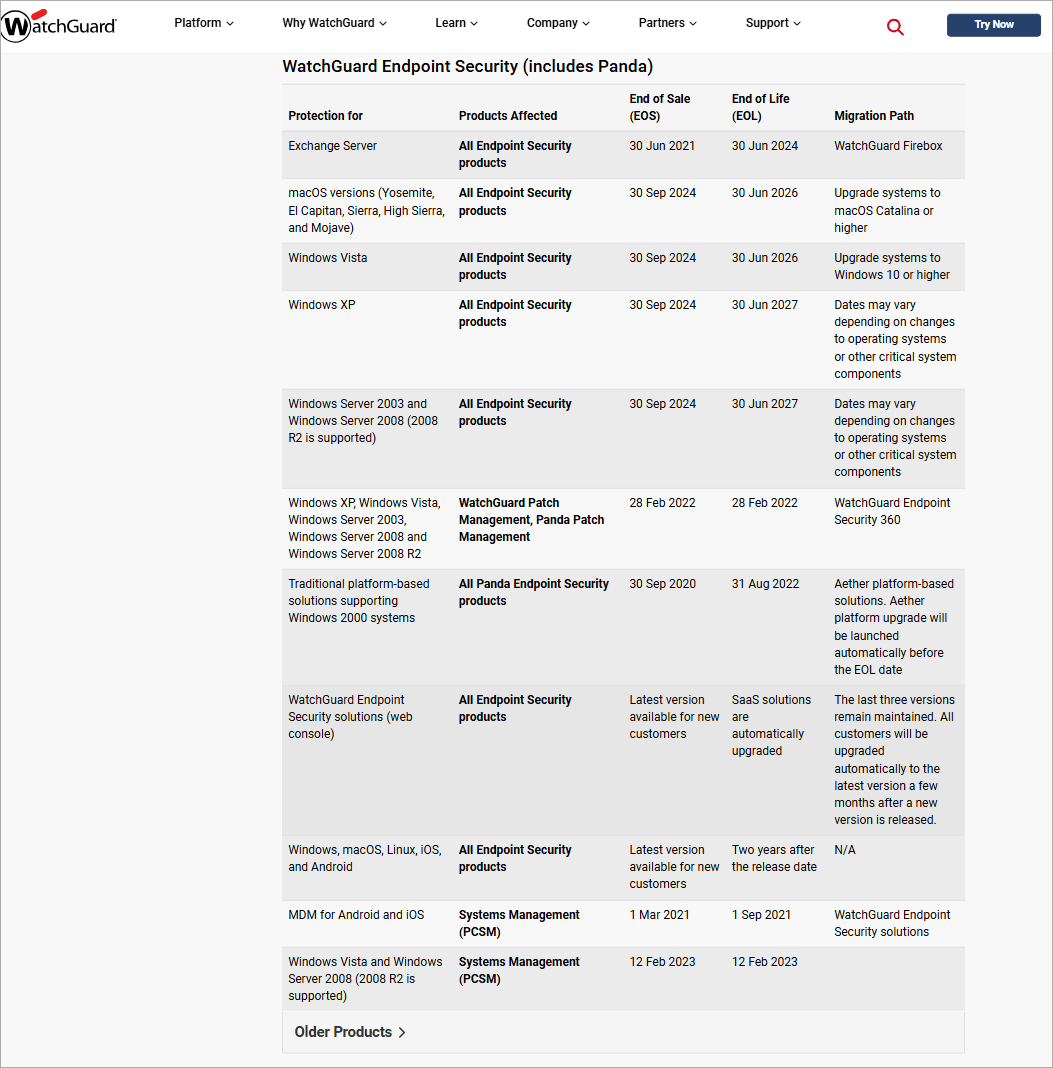
The lifecycle policy defines supported versions, end-of-support/end-of-service (EOL/EOS) dates, and migration plans.
- Operating Principles:
- Proactive communication of EOL/EOS milestones and recommended migration paths.
- For the cloud console, updates are applied automatically, and multiple versions may be maintained in parallel (per current policy) to enable controlled transition windows.
- Published Documents:
- Figure A.3.2 – End of Life Policy | WatchGuard Technologies. EOL/EOS table covering products/features, dates, and suggested migration paths.
- This information serves as a reference to plan rollouts, deprecations, and compatibility controls within the safe-deployment pipeline.
Appendix A - Images
Appendix B - Related Documentation
- Get Started with WatchGuard Endpoint Security:
https://www.watchguard.com/help/docs/help-center/en-us/Content/en-US/Endpoint-Security/installation/quick-start-set-up.html - Endpoint Security Installation Plan:
https://www.watchguard.com/help/docs/help-center/en-US/Content/en-US/Endpoint-Security/installation/installation-plan.html - Best Practices — Post-Deployment Tips for Endpoint Security:
https://www.watchguard.com/help/docs/help-center/en-US/Content/en-US/Endpoint-Security/installation/deployment-tips.html - Endpoint Security Upgrade Process:
https://www.watchguard.com/help/docs/help-center/en-US/Content/en-US/Endpoint-Security/installation/upgrade-process.html - Uninstall the Endpoint Software:
https://www.watchguard.com/help/docs/help-center/en-US/Content/en-US/Endpoint-Security/installation/uninstall-client-software.html - Restart Scenarios for Managed Endpoints:
https://www.watchguard.com/help/docs/help-center/en-us/Content/en-US/Endpoint-Security/installation/restart-endpoint-scenarios.html - Endpoint Security Installation Requirements:
https://www.watchguard.com/support/release-notes/Cloud/Content/en-US/Endpoint-Security/OS-requirements_endpoint-security.html - Patch Management:
https://www.watchguard.com/wgrd-products/endpoint-security/patch-management