TimbreStealer Malware Targets Mexico Companies with Advanced Evasion Techniques
WatchGuard telemetry identified a campaign associated to TimbreStealer, which is known to target companies based in Mexico. This research, conducted by Euler Neto and Cristóbal Tárraga, describes behaviors similar to those observed in a previous campaign documented by Cisco Talos in 2024, which uses sophisticated techniques to evade detection and make analysis difficult. One more new finding seen in this campaign is the use of DLL Side-Loading technique using malicious DLLs with large sizes instead of executable files.
Initial Analysis
The initial vector of this campaign is a Phishing that delivers a ZIP file hosted in DigitalOcean URLs accessed directly via the IP (e.g. hxxps://68[.]183[.]155[.]111). The ZIP files have filenames with, among the names, references to CONTENIDO, COMPROBANTES and CFDI, which stands for “Comprobante Fiscal Digital por Internet”, an electronic invoicing system mandated in Mexico, which requires all taxpayers to issue digital invoices that are validated by an authorized certification provider (PAC) before they are considered legally valid.

Figure 1. File downloaded from a link sent in a Phishing email
Inside the ZIP files can have the legitimates EdgeUpdate or the GoogleUpdater, followed by a malicious DLL that uses the DLL Side-loading technique using the name msedgeupdate.dll or goopdate.dll, respectively. One interesting point is the size of the DLLs, which lies between 45 and 50 MB, while the legitimate ones have less than 500 KB.
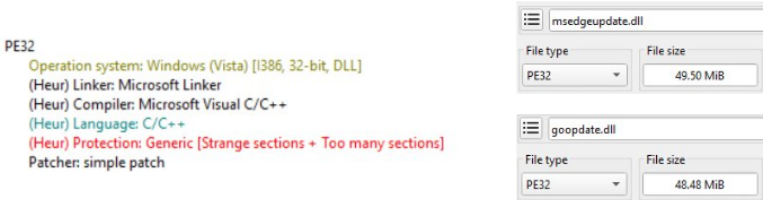
Figure 2. Information of the analyzed artifact
The DLL has 27 sections, with names that are a 4-byte hex value, and among these sections, only 5 five of them are not zeroed. Some of these sections that have entropy equal to zero are used as allocated memory regions, that the malware uses to store dynamically generated content. Since each section name varies for each binary, we will name by number the sections that will be mentioned in the analysis.
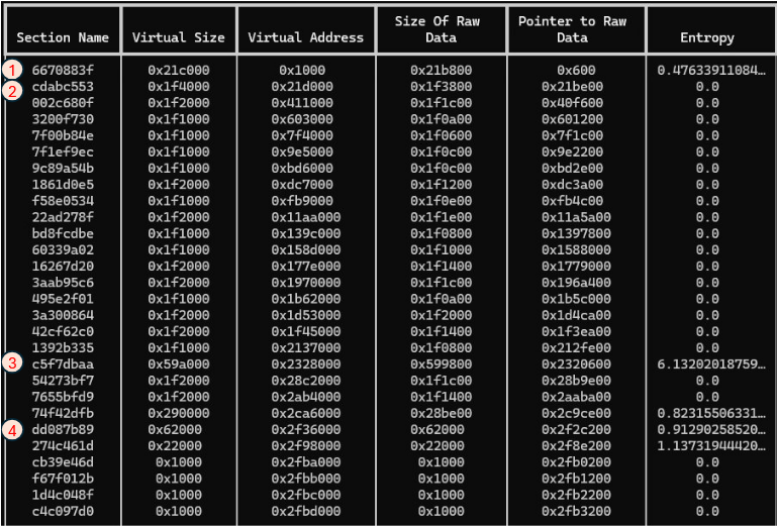
Figure 3. Sections of the malicious DLL and the number of mentioned sections in the analysis
Inside Section 4, there are two functions that will be used and perform RC4 decryption. We will refer them as Section 4 Decrypt 01 and Section 4 Decrypt 02. Both are called inside of another function that works as a wrap that jumps to the offset where these functions are.
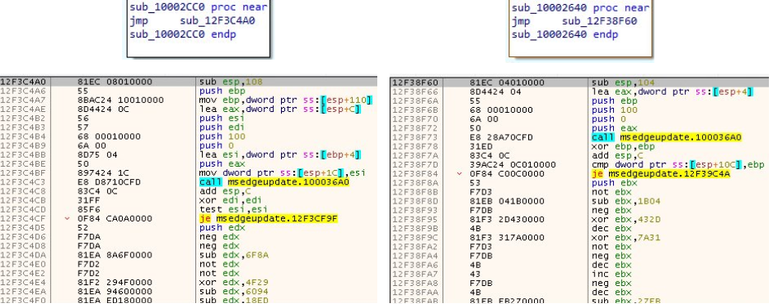
Figure 4. Two RC4 decrypt functions in Section 4. Decrypt 01 (left) and Decrypt 02 (right)
The Export functions have random names and almost of them have the same code. The malware actions all occur on the DLLEntry function.
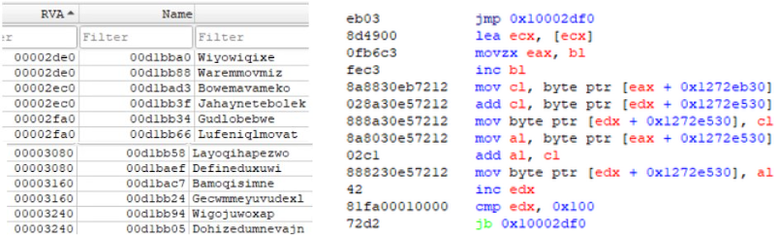
Figure 5. DLL Export functions, with random names
Section 1 has a code that parses the lists of the loader inside the PEB structure, which indicates that it doesn’t depend on GetModuleHandle to obtain the identifies of the loaded DLLs. There’s also a function that manually obtains the Export Table. With that, we can see that the malware has its own API resolver.

Figure 6. Part of the code present in Section 1
At the beginning of DLLEntry has a very long sequence of instructions that manipulates bytes in two arrays at computed offsets and performs small arithmetic/bit operations in the byte arrays ds:byte_1026E040 and ds:byte_1026E140, which are, initially, zeroed. These byte arrays are in Section 2.
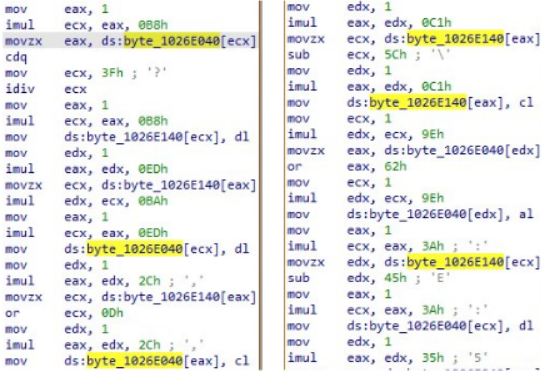
Figure 7. Part of the code in DLLEntry that uses two-byte arrays
The content of the variables changes during execution.
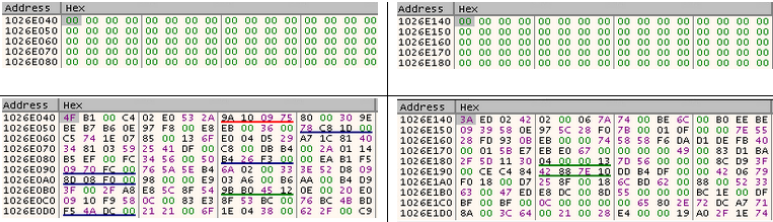
Figure 8. The two-byte arrays with its content being fulfilled
Now, it begins many decryption routines. First, with Section 4 Decrypt 01, where it’s used to obtain the strings “Zw” and “ntdll.dll”, which suggests that an internal syscall table or exports of functions that starts with “Zw” from ntdll.dll to resolve calls without imports dependency.
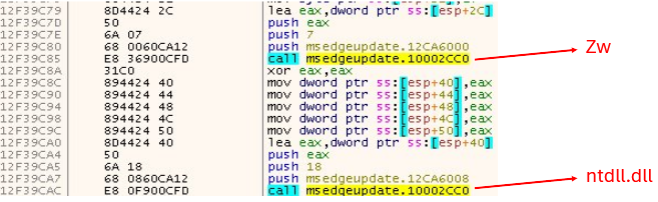
Figure 9. Section 4 Decrypt 01 being used to show the string “Zw” and “ntdll.dll”
It suggests that it prepares the load environment to search for DLLs in System32 to avoid visible dependencies in the Import Tables.

Figure 10. One of the actions associated to environment definition
There are some GUIDs that are decrypted in the processes:
- 03181d83-2ce6-4f7b-94da-052fdb2477c9
- 1bf83058-12ca-4a5d-a0f3-6d8193c89d01
- c2876b15-6ac4-4858-a428-ff1e91bcd03d
- 457664ea-fbe4-47d3-915e-1815ebe4f8a5
- 45be6628-7b1e-4615-8b55-0754c998a883
- 5723cb8d-4efd-4767-9af3-b7474210649d
- 1359c04f-c6f6-4cd7-8fc0-d45e08b7fde2
- ef755501-c7d3-4dc1-925b-3f175f576d1b
- 3093ce1e-080d-4593-9abf-2027ac08bb3a
- b4ffe0c9-c9c4-4aa7-abeb-fb214e43fbf5
- e73bf13f-c7e2-4860-adf7-020ac562cbbc
After these decryption operations, some actions are performed in Section 3, which seems to have encrypted content on it.
The function 10004020 generates a 256 bytes-length key after some operations using pre-defined values.
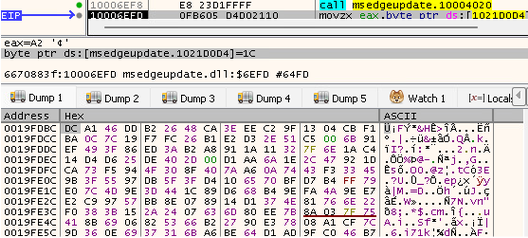
Figure 11. Generation of 256-byte key used in Section 3
The generated key is passed as argument together with the offset in Section 3 and 0x3A7C00, which is the size of the content that will be decrypted. The function used is Section 4 Decrypt 02.

Figure 12. Section 4 Decrypt 02 being used to decrypt the payload
Decrypted payload
After the decryption process, is generated a byte sequence that starts to “80 00 00 00”. If we interpret 0x80 as an offset, we can jump to an address that starts with “00 00 00 00” but the following bytes are a sequence similar to the PE format, with the difference that this format starts with “50 45 00 00”, which converting to ASCII means “PE”. These two bytes were replaced to zero to difficult the analysis in identifying the format.
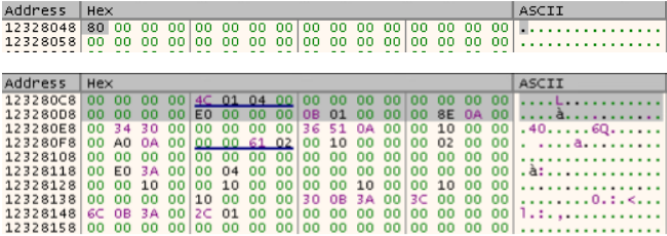
Figure 13. PE-like bytes in the decrypted payload
Parsing the bytes according to the PE format, some information that we can obtain are the following:
- Machine: 0x014c (i386 – 32 bits)
- Number of sections: 4
- Optional magic: 0x10b (PE32)
- Entry RVA: 0x000A5136
- SizeOfImage: 0x003AE000
With the information, it’s possible to map 4 sections. The last section ends with 0x3A3200 + 0x4A00, which is equals to 0x3A7C00, the argument passed to be used in Section X Decrypt 2.

Figure 14. PE-like bytes in the decrypted payload
After these operations, there’s a call to an offset in the generated payload. In this offset there’s valid x86 code, with 3 calls to functions inside of it and a call to exit the execution.

Figure 15. Main operation present in the decrypted payload
One interesting fact is that even after this call, there’s more code in the main function, but these instructions will not be executed because the execution will be terminated when the payload is executed.

Figure 16. Code flow in DllEntry, showing that there is more code besides the ExitProcess
Here, there is another function that decrypts information using RC4, which is the function 10014610, but, this time, the key changes each time that the function is called.
After some strings being obtained with the decrypted function, two interesting calls are made to the functions sub_1000c990 and sub_1002d390.
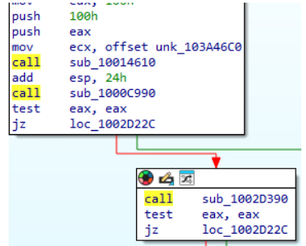
Figure 17. Calls to the functions sub_1000c990 and sub_1002d390
1000c990 tries to get the desktop window’s owning process ID and runs an additional check against the process ID.
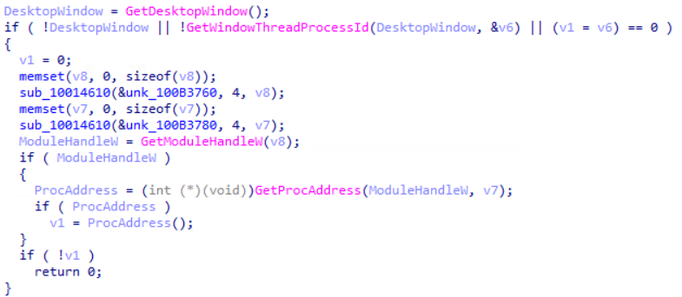
Figure 18. 1000c990 checking the window’s process ID
1002d390 uses GetSystemDefaultUILanguage to retrieve the language identifier for the user interface language set as the default for the current user. The value 25 (0x19) corresponds to the primary language constant LANG_RUSSIAN with no specific sublanguage encoded.
GetTimeZoneInformation is used to get the local time-zone and checks if system time-zone bias is between 300 and 480, which means a local time between UTC-5 and UTC-8, the timezone used in Mexico.
So, this function returns true if UI language is not Russian, system time-zone is some used in Mexico and the current epoch time lies between a predefined datetime.
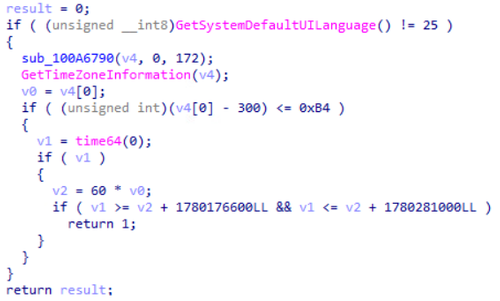
Figure 19. 1002d390 checking OS language and timezone
As mentioned previously, the decrypted payload has another function that decrypts content using RC4 but this time the keys are not static. In some cases, there’s a global mutable key that changes depending on the call and the order of the execution, requiring a correct order of execution to decrypt the content.
There’s the dispatcher 1002D9C0 that can be called 4 times, and each time receives a selector to decrypt a specific blob.
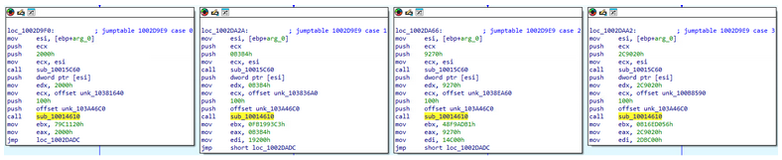
Figure 20. Dispatcher in 1002D9C0
The first blob is a small loader that contains some APIs that suggests an auxiliar code for dynamic resolution. The names and APIs decrypted are:
- Ntdll.dll
- Kernel32.dll
- LoadLibraryA
- GetProcAddress
- RtlAllocateHeap
- RtlReAllocateHeap
- RtlFreeHeap
- CreateActCtx
The second blob contains APIs that suggest modules and process enumeration. That APIs are:
- CreateToolhelp32Snapshot
- Module32FirstW
- Module32NextW
- OpenSCManagerW
- EnumServicesStatus
The third blob has some validations and changes the global key, possibly to let an internal condition for the fourth blob, which is a little more complex and has another two blobs inside of it, one big and another small.
The bigger one has, what it seems, icons, as already seen in the Cisco Talos report, where the icons are used to extract the final payload. The smaller one has a routine that decrypts a .data section, which has another PE with a modified header to difficult analysis.
Collection
If the previous checks are succeeded, it starts a browser collection, which starts checking for folders associated to Google Chrome and Microsoft Edge.
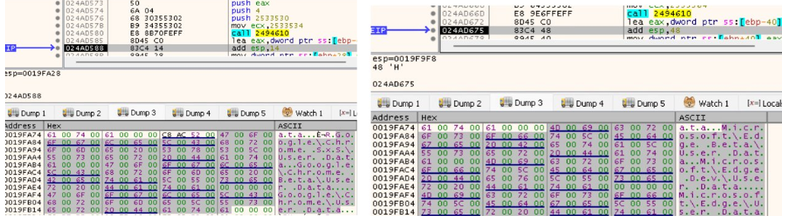
Figure 21. Google Chrome and Microsoft Edge being defined as targets
If the folders are valid, it starts to collect the files from these folders.
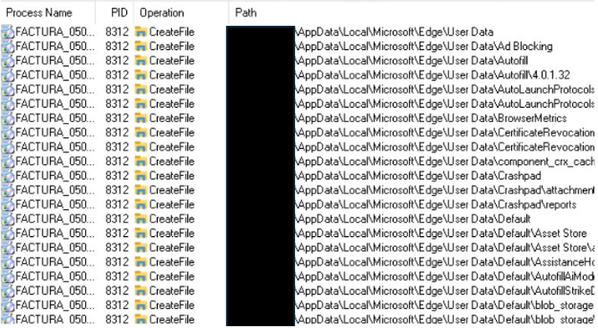
Figure 22. Operations being made to collect data in the browsers
It performs SQL queries in the browser’s databases, focusing on the history. Also, it allows temporary writing on the tables and uses VACUUM to rebuild the database into a new file, possibly for collection.

Figure 23. SQL queries used in the malware actions
Continuing the browser collection, it also collects the history from Mozilla Firefox. After that, it collects information from the mail applications Thunderbird and Postbox.
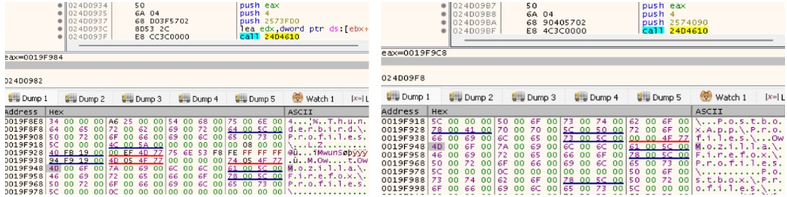
Figure 24. Mozila Firefox, Thunderbird and Postbox being defined as targets
In addition to that, it searches for the directories OneDrive, Dropbox, Documents, Downloads, AppData\Local, AppData\Roaming and Users.
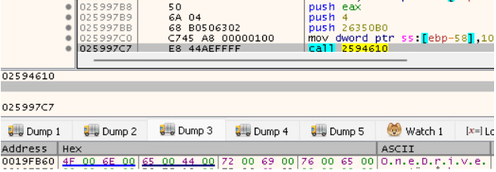
Figure 25. Applications like OneDrive and Dropbox also being defined as targets
So, the folders and registries related to browsers that are checked are the following:
- Google\Chrome\User Data
- Google\Chrome Beta\User Data
- Google\Chrome Dev\User Data
- Google\Chrome SxS\User Data
- Microsoft\ Edge\User Data
- Microsoft\ Edge Beta\User Data
- Microsoft\ Edge Dev\User Data
- Mozilla\Firefox\Profiles
- Thunderbird\Profiles
- Postbox\Profiles
- PostboxApp\Profiles
- SOFTWARE\Mozilla Mozilla Firefox
- SOFTWARE\Mozilla\Mozilla Thunderbird
The SQL tables and filenames associated with the browsers that are checked are the following:
- History
- Urls
- Visits
- Last_visit_time
- Visit_count
- Prefs.js
- Places.sqlite
And the other artifacts and directories that are checked are the following:
- Users
- AppData\Local
- AppData\Roaming
- Desktop
- Documents
- Downloads
- OneDrive
- Dropbox
Privilege Escalation
It was observed some actions associated to Privilege Escalation, where just one of them is executed during the execution.
One of them is the use of the “runas” command, which is called with ShellExecuteExW.
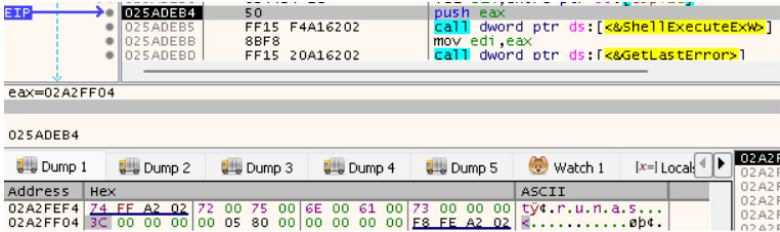
Figure 26. The use of “runas” during the execution
Another one is the use of FindWindowW to search for a window with the name “$$$Secure UAP Dummy Window Class For Interim Dialog”. If this window is found, SwitchToThisWindow is called to put this window in the foreground.
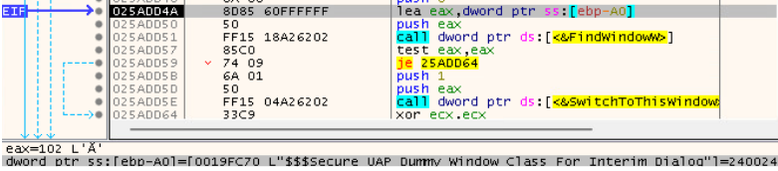
Figure 27. Window that is searched during the execution
The CoCreateInstance function creates and initializes a single COM object on the local system using a specified class identifier (CLSID) and returns a pointer to a requested interface.

Figure 28. Use of COM objects during the execution
Temporary PDF
In the case of the report made by Cisco Talos, the Phishing emails contain malicious link that, in case the access does not come from Mexico, a blank PDF is served instead of the malicious payload. But, in the case of this report, the malicious DLL is executed, and, depending on the parameters during the execution, the blank PDF can be shown.
When the PDF is created, it uses a descriptor which means denying all access (full control) to Network (NU) and allowing Read & Execute to Everyone. Like the previous campaign, the PDF is created in the TEMP folder with a name that starts with “XML-”.
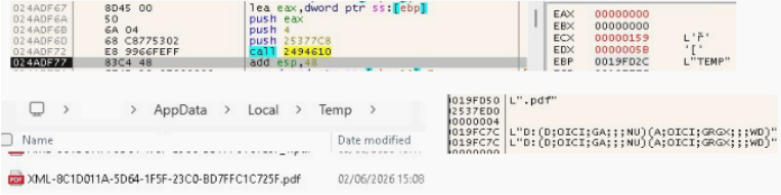
Figure 29. PDF created with its descriptor in the temporary folder
After that, it uses some CryptoAPIs. The APIs that are loaded are CryptAcquireContextW, CryptReleaseContext and CryptGenRandom.

Figure 30. Crypto APIs being loaded
CryptGenRandom is used to generate random content.

Figure 31. CryptoGenRandom being used
It was observed that for each blank PDF generated, a different sequence of random bytes is put at the end of the file.

Figure 32. Random bytes present at the end of the blank PDF
Diamond Model
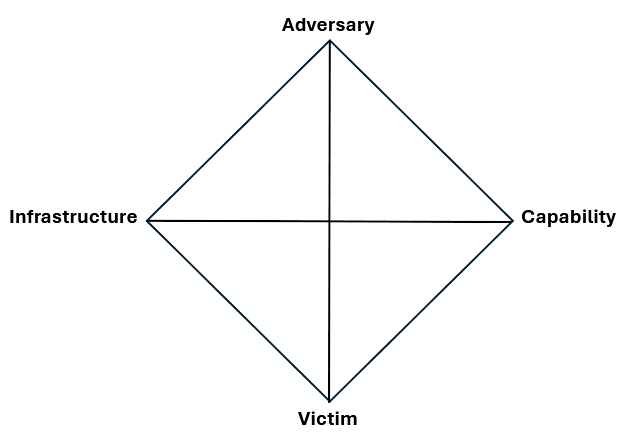
| Adversary |
TimbreStealer, an information-stealer trojan possibly Russian-based
|
| Capability |
|
| Infrastructure |
Malicious content being delivery using legitimate DigitalOcean infrastructure.
|
| Victim |
Companies in Mexico, lured via financial-tax themed phishing/spam
|
Defender Takeaways
TimbreStealer highlights how targeted information-stealing campaigns continue to evolve beyond simple credential theft. This campaign combines Mexico-specific social engineering, legitimate cloud infrastructure, DLL side-loading, multilayered encryption, geofencing, and anti-analysis techniques to make detection and reverse engineering significantly more difficult.
The use of tax and invoicing themes tied to CFDI shows a clear understanding of the victim environment, while the abuse of trusted updater components such as EdgeUpdate and GoogleUpdater reinforces how attackers blend malicious activity into legitimate-looking execution paths. Once active, TimbreStealer’s collection of browser, email, cloud storage, and user directory artifacts demonstrates a broad focus on harvesting data that can support account compromise, financial fraud, and future intrusion activity.
For defenders, this campaign is a reminder that highly targeted phishing remains one of the most effective entry points for malware delivery, especially when paired with trusted infrastructure and evasive execution methods. Organizations should closely monitor suspicious ZIP downloads, unusual DLL sizes or locations, unexpected updater behavior, browser database access, and activity tied to cloud-hosted payloads.
TimbreStealer is not just another infostealer. It is a layered, regionally targeted threat designed to evade analysis, validate its victim environment, and quietly extract valuable data. Security teams operating in Mexico, or supporting organizations with exposure in the region, should treat this campaign as a high-priority indicator of how financially themed phishing and advanced malware tradecraft are converging.
For continued insights from WatchGuard Threat Lab, follow WatchGuard on LinkedIn and subscribe to the Secplicity blog.