How Hackers Use WhatsApp and Telegram to Hijack Windows PCs
From Message to Machine Takeover: What Our Research Uncovered
- Messaging apps are being used to deliver malware: WatchGuard Red Cell researcher Euler Neto investigated four attack campaigns targeting Windows users in Southeast Asia through Telegram and WhatsApp.
- Malware hides in plain sight: Attackers disguise malicious files as documents, conceal payloads within PNG image files, and abuse legitimate Windows processes to evade security detection.
- Remote access is the objective: Telegram-based campaigns deploy remote access trojans (RATs), including a suspected Gh0stRAT variant and a Go-based RAT capable of surveillance, data theft, and cryptocurrency hijacking.
- Legitimate IT software is being weaponized: WhatsApp-based campaigns abuse Zoho's ManageEngine Endpoint Central to gain unauthorized remote control of infected devices.
- Trusted applications do not guarantee trusted behavior: The findings reinforce the importance of behavioral detection, endpoint protection, and visibility into unauthorized remote access activity.
Overview
What if an ordinary WhatsApp or Telegram message could give an attacker remote control of your computer?
WatchGuard Red Cell researcher Euler Neto investigated four malware campaigns targeting Windows users in Southeast Asia, particularly Cambodia and Malaysia. These campaigns exploit the familiarity of popular messaging platforms to distribute malicious files, evade security controls, and establish unauthorized remote access.
The investigation reveals two distinct approaches. Telegram-based campaigns deploy remote access trojans (RATs) using techniques such as DLL sideloading, concealed image payloads, process injection, and privilege escalation. WhatsApp-based campaigns take a different approach, weaponizing legitimate endpoint management software to remotely control compromised devices.
While the analyzed malware contains Chinese-language references, these findings alone do not establish attribution to a specific threat actor.
This research examines the attack chains, malware capabilities, defense evasion techniques, and associated infrastructure, highlighting how attackers turn trusted applications and legitimate software into instruments of compromise.
Delivery method: Telegram
Campaign 1
In the campaign targeting Cambodia, the files are being distributed via Telegram. Some users on Reddit talked about that, alerting other users to not open the file.
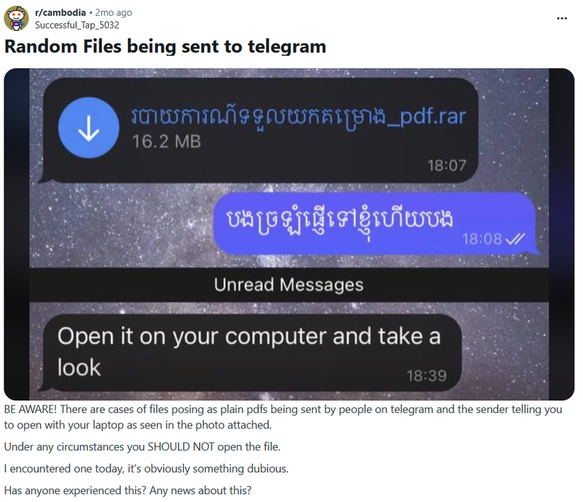
Figure 01 – Users in the Cambodia’s Reddit community talking about the phishing
The compacted file that is sent contains an executable which is an Inno Setup Installer.

Figure 02 – Campaign 1 Inno Installer and embedded files
- R543NHCW
It’s built on a copy of Microsoft’s Utilman.exe (the Ease of Access / Utility Manager program on the Windows logon screen). Its code is unreadable and its imports have seen redirected to the B.e file.
- B.e

Figure 03 – DLL with VMProtect in Campaign 1
This is a DLL protected with VMProtect that contains 181 export function but some of them are in the R543NHCW import functions.
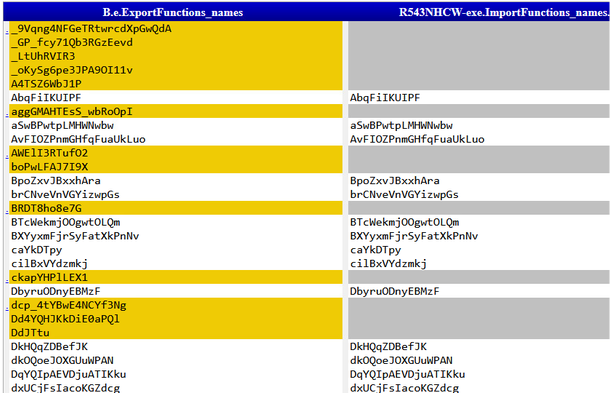
Figure 04 – Difference list between B.e export functions and R543NHCW import functions
The entry point has a chain of CALL instructions where the last CALL points to an executable section named “.S+P”.
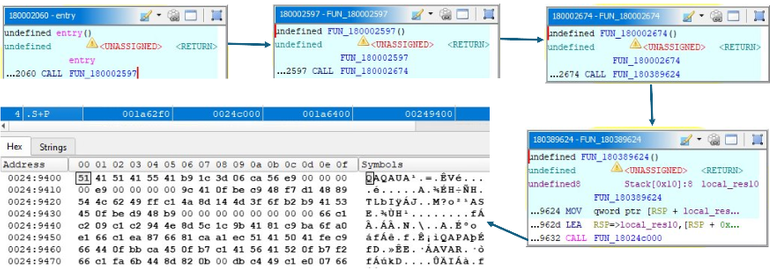
Figure 05 – Flow to execute bytes from section “.S+P”
It uses the mutex Global\woxNI8h. When executed, it has a check if this mutex already exists. If yes, it terminates the execution.
- S2kgmi.b
This is an 11MB file that starts with a valid 326x183 PNG image. The next bytes after the image can be separated into two data groups, which are ignored by the image viewers due to be after the marked data end. The first one is a 150-byte encrypted data and the second one, which is the most part of the entire file, contains 1349 data chunks, each one with 8192 bytes and the last one with 669. The chunks are composed of a header, in the first 8 bytes, and the encrypted data.
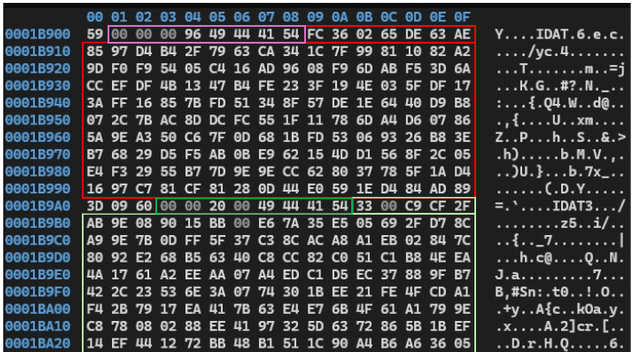
Figure 06 – Chunks of the first group (red, and the header in pink), and the first one of the second group (green, and the header in light green)
- Injections
Injection 1 – Privilege Escation
It has a routine to build an image and inject it in Edge’s elevation_service.exe, which runs as SYSTEM. It contains a RAT compressed with LZNT1 (which is decompressed with RtlDecompressBuffer).
The decompressed DLL contains a list of services that is possibly targets for the injection process and among them are Edge and Chrome elevation services. It also has Chinese and other third-party software like iQIYI, i4 Assistant, ExpressVPN and Sunlogin.
It also has a list of processes that can be injected into. In the list are the processes sihost.exe, taskhostw.exe, ctfmon.exe, RunTimeBroker.exe, SecurityHealthSystray.exe and LogonUI.exe
The code has some references to UAC Bypass with the utilization of the tool UACme. The references are related to the methods utilized in the tool, like the presence of CLSIDs and a IID associated with CMSTPLUA (Microsoft Connection Manager Profile Installer), which is used in some techniques involving UAC bypass due to its configuration to auto-elevate, and the use of Display Color Calibration.
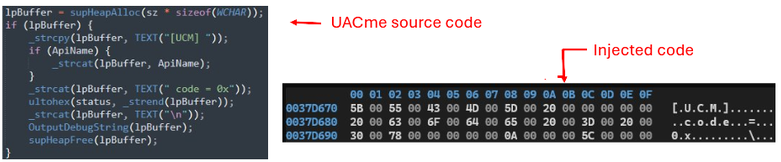
Figure 07 – Reference to UACme in the first injected payload
Among the strings we also can see persistence mechanism with the use of OnLogonTrigger and network filtering mechanism with the use of a filter syntax to detect connections.
One interesting reference in the code is 360Hvm64.sys, the kernel-mode driver from 360 Total Security (Qihoo 360), that manages hardware virtualization-based protection. But this driver is listed as vulnerable in Bring Your Own Vulnerable Driver (BYOVD) scenarios.
Injection 2 – Gh0stRAT
It has references to the DLLs plugin64.dll and sk.dll. Downloadable plugins are typical of Gh0stRAT, which has a Modular Payload Delivery.
There are APIs associated with keylogging also as strings in Chinese which are associated with the Gh0stRAT log format.
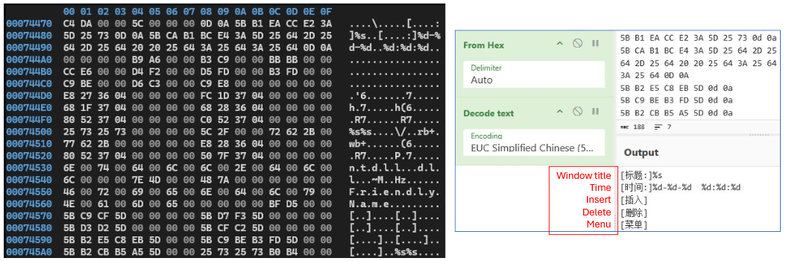
Figure 08 – Chinese strings in the second injected payload
It also uses APIs that are commonly used by malware for clipboard theft and screenshots and desktop access. There’s also the string “%s\shell\open\command”, suggesting remote shell and execution and a command-server protocol using the Chinese open-source networking library HP-Socket.
There’s another reference to a Chinese product, related to the driver 360Hvm64.sys (Qihoo 360’s hypervisor driver), and to the 360 Secure Browser profile, with the string “%s\360se6\User Data\Default”.
Some system profiling is seen with the use of WMI, MAC address, OS, memory and disk information, recently used programs (JumplistData). It’s also present a configuration format with IP/port, IP1/port1,IP2/port2, group, version and other.
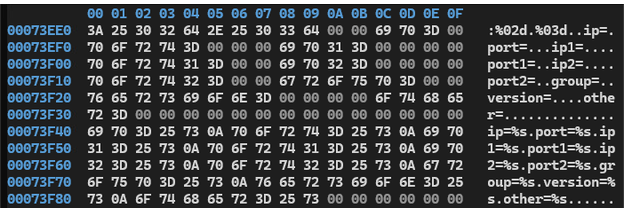
Figure 09 – Config in the second injected payload
Analyzing the C2 communication, we can confirm that the RAT establishes a connection with the IP 137[.]220[.]156[.]123 in port 53 and the connection comes from legitimate processes where the code is injected. If the connection is closed manually, “Injection 1” detects it and injects the code into another legitimate process in a pre-defined list, as we saw previously.
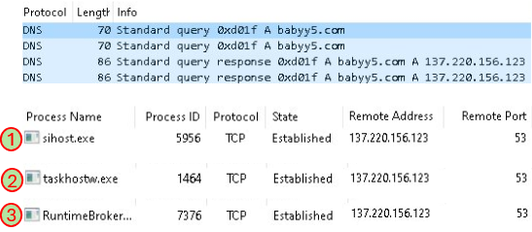
Figure 10 – Different processes that are injected when the connection is closed
The use of a PNG alongside with a vulnerable driver that has reference to Qihoo 360 and with chain of legitimate injected processes was already documented by Acronis, also targeting Cambodia.
Campaign 2
This campaign also starts with an Inno Installer, but this time, it makes use of DLL sideloading with DingTalk, an Instant messaging software developed by Alibaba Group.
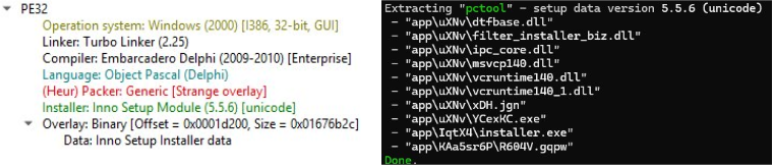
Figure 11 – Campaign 2 Inno Installer and embedded files
- Filter_installer_biz.dll

Figure 12 – Export function in filter_installer_biz.dll
The malicious DLL has some red flags of suspicious, like the information in version info saying that the file belongs to Microsoft, an empty import table and no DllMain, with all the logic sitting in the one export function.
When the export function is called, a lock-protected one-time flag makes sure it only runs once, similar to Campaign 1, where this is made with mutex. It resolves LdrLoadDll from ntdll’s export table and loads it, skipping the use of LoadLibrary and any hooks on it.
The malware also uses two advanced EDR bypass techniques which call for System Service Numbers (SSN) directly. SSNs are numeric identifiers used by Windows to route system calls from user-mode code to kernel services, and they can vary between Windows versions and builds.
Calling SSNs directly can avoid EDR detections due to the bypass of the traditional monitoring of the APIs.
First, it checks ntdll’s export directory and keeps only names that start with “Nt” or “Zw”. Each name is hashed and it tries to obtain the syscall number with the use of the Hell’s Gate technique, that can be identified by the presence of the bytes “4C 8B D1 B8 xx xx 00 00”, where “xx xx” is the code of the SSN to be called. In the implementation of the malware, if the SSN matches, the syscall number is read directly.
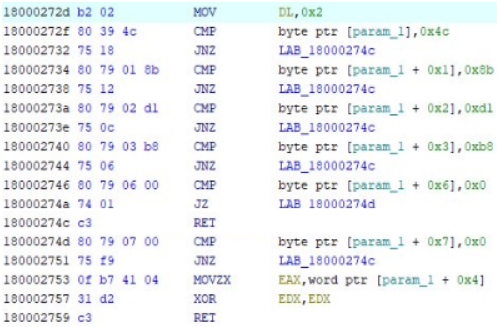
Figure 13 – Hell's gate code in filter_installer_biz.dll
If it doesn’t match, it uses another technique, Tartaru’s Gate, which checks neighboring stubs inside “.text”. This check is made in the 500 stubs in both directions, up and down.

Figure 14 – Tartaru’s gate code in filter_installer_biz.dll
Afterwards, or if the hash isn’t found on the table, it starts the loop again and sleeps for 1 hour indefinitely. The loop is made probably to not call attention with crash reports or suspicious exits, sitting idle with long sleeps to avoid sandbox analysis.
- xDH.jgn
It has 1000 exports and 998 of them, even pointing to different RVAs, call the same routine. So, the main logic lies in DllMain.
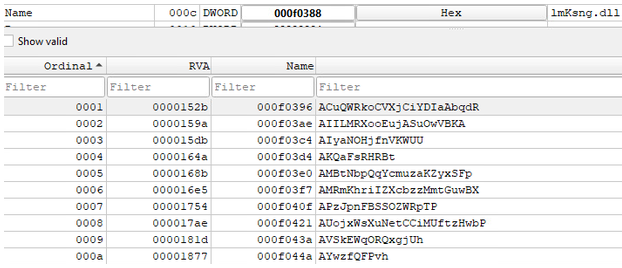
Figure 15 – Decoy xDH.jgn export functions
The “.rdata” section has a high entropy due to the presence of encrypted content that we will see in more detail later.
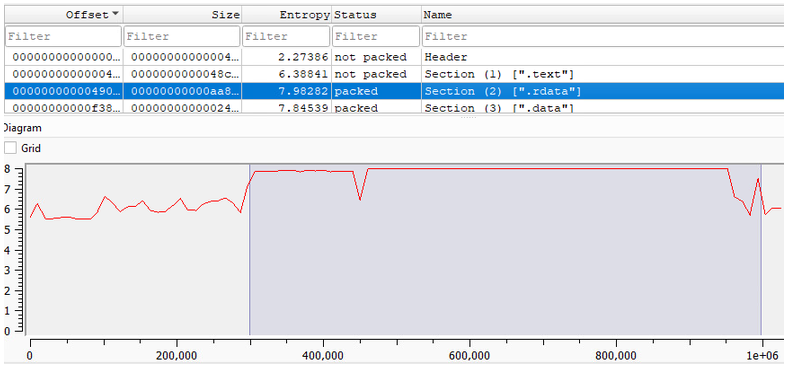
Figure 16 – Graph showing “.rdata” high entropy
It has data until offset 0x108a, where it starts the same image contained in R604V.gqpw. After that, another STEGR1 parser starts, which is made with a walk, reading the bytes until it finds the string “IEND”. The next bytes are the shellcode.
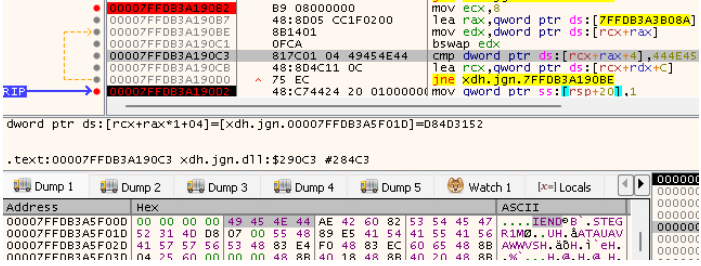
Figure 17 – Check for string “IEND” in the PNG to load the shellcode
In the “.text” is the main logic, which starts performing some anti-analysis checks. After that, it starts the setup routine, where it gets the payload from “.rdata” and tries to inject it, primarily, in Edge’s elevation_service.exe, in case it falls, injects into vsssvc.exe.
Stage 1: Shellcode
The routine that resolves the APIs walks the module’s PE export-name table, hashes each name, compares it with a hash passed as argument that is XORed, returning the matching function’s address.
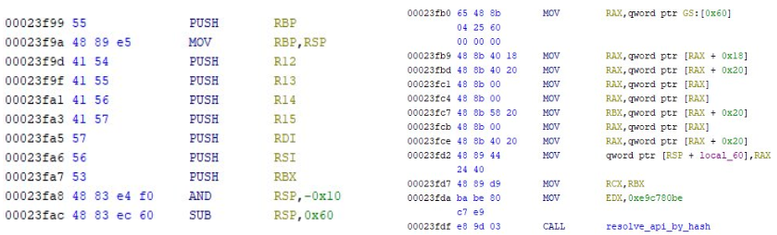
Figure 18 – Shellcode API resolving by hash
The API functions resolved this way are: CreateMutexA, GetCurrentProcessId, GetLastError, CreateThread, WaitForSingleObject, VirtualAlloc, VirtualProtect, FlushInstructionCache and RtlDecompressBuffer.
After that, it performs a decryption of a data block with RC4 and a decompression of a LZNT1 content using RtlDecompressBuffer. It generates a reflective loader.
The reflective loader loads the PE stored in the offset 0x1000, maps the sections, resolves the imports with LoadLibrary and GetProcAddress and sets the memory protection for each section.
Stage 2: Loader
It defines some Defender exclusions and creates persistence with schtasks, creating the services ting3k and svc2, that checks and repairs.
Also, it uses icalcs to hide the install folder and loads the RAT from R604V.gqpw.
- R604V.gqpw
It’s a PNG file with a 256x256 image, but it has an overlay that starts in the offset 0x23f8f. The first bytes in the overlay form the ASCII string “STEGR1”.
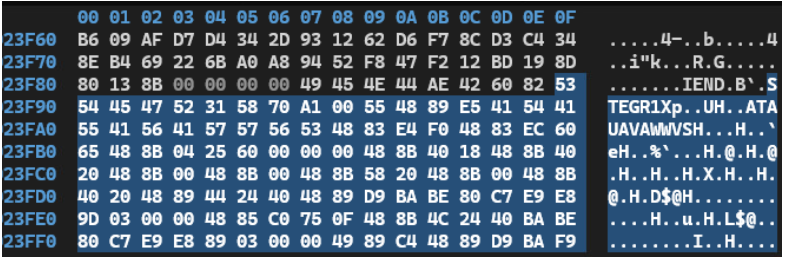
Figure 19 – Payload embedded in the PNG overlay of R604V.gqpw
The information is decoded with the same RC4 and LZNT1 process mentioned before. The payload obtained is the RAT, which is injected into ctfmon.exe and into svchost.exe. If ctfmon restarts or has some change in the payload, it’s injected again.
Stage 3: Go RAT

Figure 20 – Go RAT file information
The RAT has the following modules:
Remote desktop: remote desktop through DXGI/GDI capture, mouse, keyboard and touch injection.
Terminal: remote shell.
File manager: browse, upload, download, zip, rename, delete.
Keylogger: capture user activity.
Clipboard: detects wallet addresses in the clipboard and swaps them for the attackers.
Telegram: steals Telegram sessions and patch Telegram.exe on disk.
Browser cleaner: browse profile handling.
Plugin loader: load extra plugin DLLs in memory.
Antivirus: checks for security products.
Process: process and window lists.
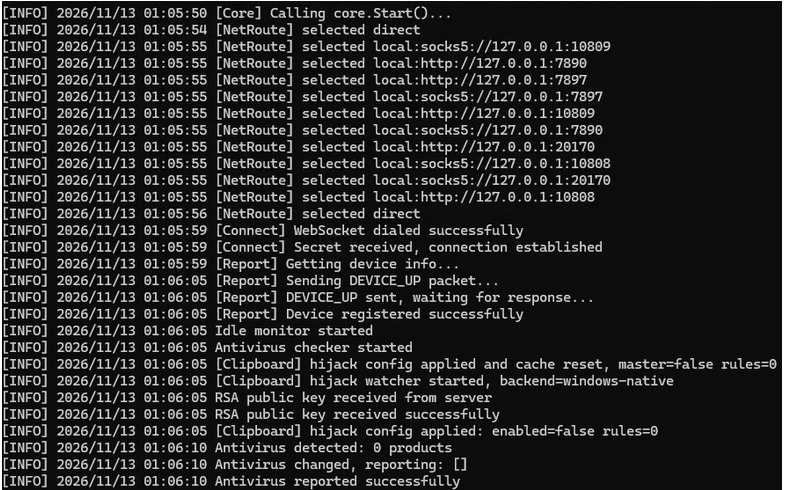
Figure 21 – Go RAT Informational log
It establishes a C2 connection to xiksjha[.]cc and creates a keylog file in C:\Users\Public\Pictures\Runtime\Bin.
Delivery method: WhatsApp
There’s also campaigns that uses a Messaging App to distribute the malware, but this time the application used is WhatsApp and targets users in Malaysia.
Campaign 1
In one of the campaigns, there’re two different files being distributed, one of them has the filename in the format PDF_<rand>_2026<num>.VHDX (a Windows virtual hard drive file) and the other one has the filename in the format DOC_<rand>_2026<num>.IMG (a raw disk image that contains storage device's data content).
Both contain a legitimate executable and a malicious DLL which is executed using DLL Side-Loading. In the VHDX file the DLL is arphadump.dll and in the IMG file, active_desktop_render_x64.dll.

Figure 22 – VHDX and IMG distributed files in Campaign 1
The two DLLs are formed by decoy export functions, in the case of active_desktop_render_x64.dll, the only valid function is SetDesktopMonitorHook, while in arphadump.dll, all the export function points to a call for the same function.
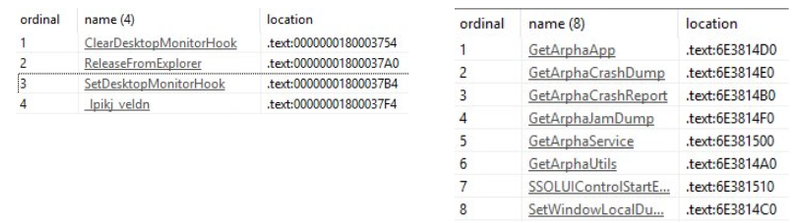
Figure 23 – Difference of malicious DLLs export functions
Both download a ZIP file from cakkaao[.]com. In the case of active_desktop_render_x64, the ZIP is saved in the folder C:\Users\Public\79b365bd, and, in arphadump.dll, it’s saved in C:\cool.
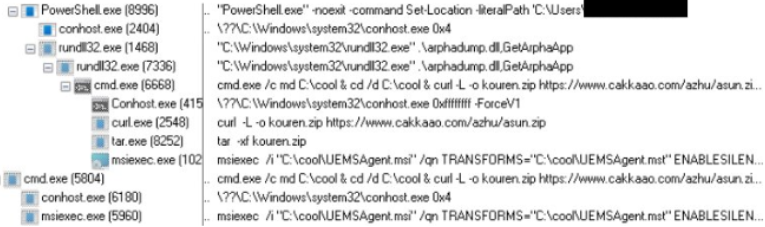
Figure 24 – Process tree of the execution
They check for admin privileges with TokenElevation, and, in case it has no privileges, it calls “runas” with ShellExecuteW. In both cases, many requests are made to convince the users to accept it.
It creates a mutex with a random name that contains hex-characters and stops if this mutex already exists.
Active_desktop_render_x64.dll hides the API names, which are resolved during the execution, while in arphadump.dll, the APIs are listed normally.
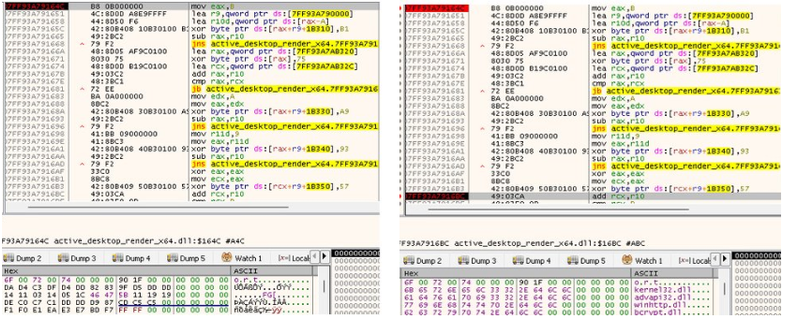
Figure 25 – Difference of API name load in active_desktop_render_x64.dll (left) and arphadump.dll (right)
The ZIP file downloaded contains a legitimate Zoho’s ManageEngine Endpoint Central (UEMS) agent, with a configuration file pointing to IP 134[.]122[.]155[.]188 using port 8383, with the hostname WIN-J9L8BUJ64Q4.
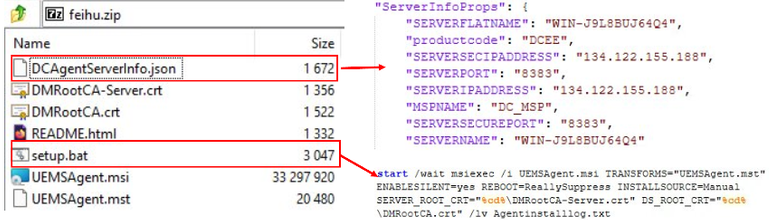
Figure 26 – Server Info and CommandLine used in downloaded UEMS agent
After installation, it uses the legitimate RMM to control the infected host.
In active_desktop_render_x64.dll, it checks if the server was installed and it’s running. If so, it sends a POST request to hxxp://45[.]64[.]52.172:8080/api/dropper/report. The body is in JSON format and has the following fields: run_id, exit_code, svc_found, svc_running, group. The fields run_id and group suggest a campaign or affiliate ID.
The IP where the connection is made has a service using the port 8080 that points to a Telegram bot named Seven8889_bot.
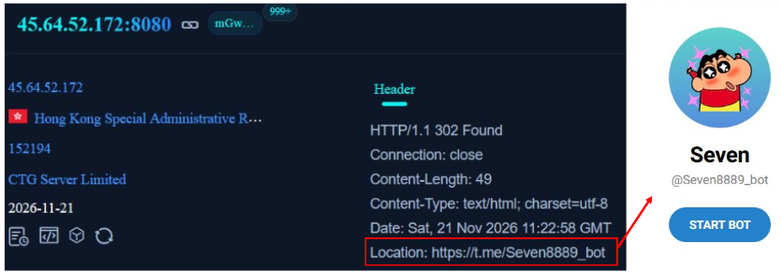
Figure 27 – Report back IP with a reference to Telegram bot Seven8889_bot
Campaign 2
The other campaign has a ZIP file with the name in the format <date>_<num>PDF.zip. Inside, it has a VBS with the same filename.
The script has a banner claiming to be a “HP Printer Management Agent”. It starts deleting itself, which doesn’t interfere in the execution, due to the script be already loaded in memory.
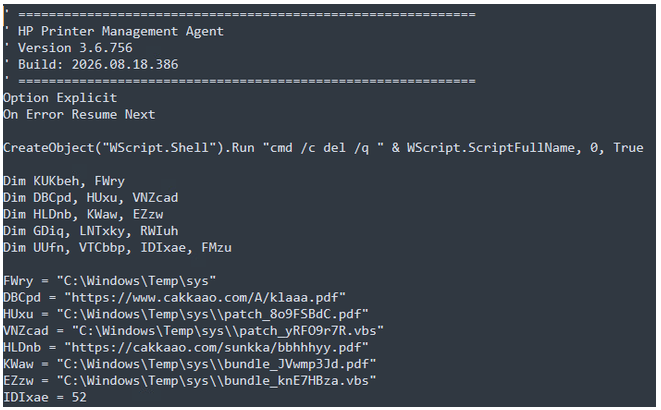
Figure 28 – Start of VBS script in Campaign 2
It has some variables with URLs of the domain cakkaao[.]com and with system paths. These variables are used in functions which has comments written in Chinese.
In the first stage, it downloads the file klaaa.pdf to %TEMP%\sys, copies it to another file with the extension .vbs, runs it hiding the error messages (//B) and deletes the .pdf. The comment suggests that the goal of the script is to achieve UAC Bypass.
The dropped VBS (klaaa.pdf) targets the register key HKLM\SOFTWARE\Microsoft\Windows\CurrentVersion\Policies\System\ConsentPromptBehaviorAdmin. It has a loop that checks if this key value is equal to 0, which means an elevation of privileges without prompt. During the loop, it brings the admin prompt using “runas”, with a certain delay between each request, asking the user to accept, and, if succeed, it changes the value of ConsentPromptBehaviorAdmin to 0.
In the second stage, it downloads the file bbhhhyy.pdf and performs the same steps as the stage 1. After that, it deletes all the files, related to the two stages, including the directory %TEMP%\sys.
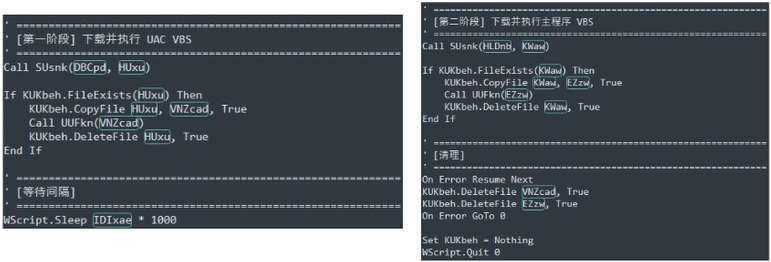
Figure 29 – The two stages in the Campaign 2 VBS
The file downloaded in stage 2 is the main program. It also has a fake banner, claiming to be “NVIDIA Driver Manager” and downloads a file from cakkoo[.]com/sunkka/setup[.]exe in the directory C:\ProgramData\Update.
It’s the same Zoho’s ManageEngine installer, but this time, pointing to 137.220.205.167, on the same port, 8383, and using the hostname WIN-OS31TGCPP9P.
It has another version of this script that also downloads Zoho’s ManageEngine installer pointing to the same IP in the last stage. But, this time, the script has some pads to difficult signature matching and has a fake banner claiming to be “Windows Module”.
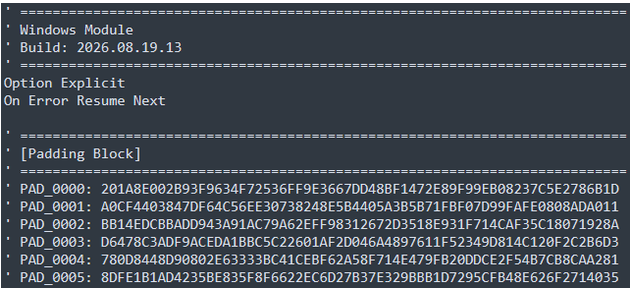
Figure 30 – Start of variant of VBS script int Campaign 2
It has a function that implements a Base64 decoder, which is used with two strings. The first one is decoded as “C:\Users\Public\Videos\Temp” and another one as “hxxps://hello[.]cakkao[.]com/778888/sunllo.zip” (URL sanitized for this report). The ZIP as the UEMS installer and it’s important to mention that the path in the URL has a name similar to the bot seen in Campaign 1.
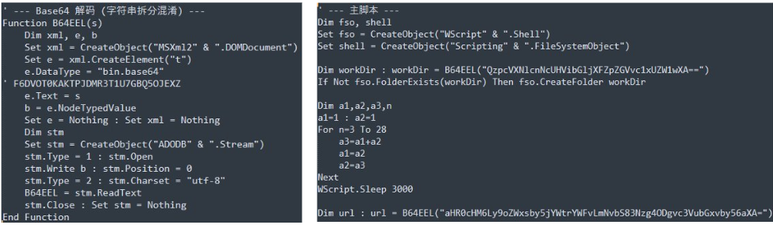
Figure 31 – Base64 function implemented in VBS variant of Campaign 2
Diamond Model
| Adversary |
Both campaigns consist of threat actor(s) that uses Chinese language in some comments, in the keylogger and in the status of the RAT.
Deliver method: Telegram The payload probably belongs to Gh0stRAT due to the keylogger log format, in-memory plugins (plugin64.dll and sk.dll). Tooling and targets: HP-socket networking, Qihoo 360, Huorong and service lists of Chinese software. Gh0stRAT source has been public for years and many Chinese-speaking groups use variants of it.
|
| Capability |
Deliver method: Telegram Inno Setup Installer which has a legitimate file and a malicious DLL with VMProtect as a loader, with an injector stage that uses UACMe bypasses and a final stage that consists of a RAT. RAT capabilities: remote desktop, remote shell, keylogger, file manager, process and windows control, plugins loaded in memory, clipboard hijacking, browser credential stealing, and, in case of campaign 2, Telegram patching Payload extracted from a PNG file by the use of the string “STEGR1” indicating the start.
Deliver method: WhatsApp Unusual first payload delivered with VHDX and IMG files Final payload: legitimate Zoho’s UEMS agents with different IPs and hostnames, pointing to port 8383. This agent allows attackers to control the victim’s machines with RAT capabilities.
|
| Infrastructure |
Deliver method: Telegram IP 137[.]220.156.123 with port 53. Protocol: HP-Socket TcpPackClient. Domain xiksjha[.]cc with port 443.
Deliver method: WhatsApp Taiwan-based IPs with port 8383 that uses server-specific ManageEngineCA root certificates. Dropper reporting: 45[.]64.52.172 with port 8080, that points to the Telegram bot Seven889_bot.
|
| Victim |
Windows users located in Southeast Asia, in special, Cambodia and Malaysia.
|
What Defenders Can Learn from These Attacks
Trusted applications do not always translate to trusted activity. The campaigns investigated by WatchGuard Red Cell demonstrate how threat actors can exploit everyday messaging platforms, conceal malicious payloads within seemingly harmless files, and weaponize legitimate IT management software to gain unauthorized access to Windows endpoints.
For defenders, the key takeaway is that identifying malicious software alone is no longer enough. Understanding how legitimate applications behave, what they execute, and where they connect is equally critical.
These findings highlight five defensive priorities for MSPs, SOC analysts, and security teams:
- Look beyond email phishing: Extend security awareness and threat monitoring to messaging platforms such as WhatsApp and Telegram.
- Detect behavior, not just signatures: Monitor suspicious process injection, privilege escalation, and attempts to evade endpoint security controls.
- Monitor legitimate remote management tools: Identify unauthorized installations and unusual remote access activity involving trusted IT software.
- Strengthen endpoint and network visibility: Investigate unexpected outbound connections and potential command-and-control (C2) communications.
- Enforce least-privilege access: Restrict unauthorized software execution and administrative privileges to reduce the attack surface.
Ultimately, defenders must shift from asking "Is this application legitimate?" to asking "Is this application's behavior legitimate?"
See Beyond the Disguise. Defend Against What's Next.
Follow WatchGuard on LinkedIn and subscribe to Red Cell Chronicles for original threat research, emerging attack techniques, and actionable defensive intelligence to help you recognize the threats others might overlook.