Silver Fox SEO Poisoning: How Fake Software Downloads Spread Gh0stRAT
This original threat research was conducted and authored by Ryan Estes and Hugo Gimenez of WatchGuard Red Cell.
Key Research Findings
- Silver Fox and SEO poisoning: WatchGuard Red Cell investigated a malicious oCam software installer delivered through a suspected SEO poisoning campaign. The installer delivered the legitimate application alongside hidden malware, making the threat difficult for users to recognize.
- Gh0stRAT malware and antivirus evasion: Analysis of a related installer uncovered a Gh0stRAT variant that adapts its installation to whichever of the three Chinese antivirus products it finds running, execute malicious code in memory, and conceal its command-and-control (C2) address.
- Endpoint security stopped the attack within 90 seconds: Two layers of endpoint detection and response (EDR) disrupted the attack. Cloud-based malware classification blocked the malicious loader, while behavioral detection prevented an attempt to weaken Microsoft Defender through PowerShell.
Technical Analysis
In early Q4, 2026, WatchGuard Red Cell investigated and analyzed a suspicious installer claiming to install a Windows screen recording tool called OhSoft oCam. The initial download, a link ending in ocam.zip, arrived through what appears to be SEO poisoning. The link delivers a file named Ocam_setup.exe. We did not reverse-engineer that file; instead, we uncovered a similar campaign targeting the same application with similar telemetry, and this is the analysis of that application.
Silver Fox, also tracked as SwimSnake, Valley Thief, and Void Arachne, is a threat group whose known activity dates back to 2019. It initially focused on Chinese-speaking targets and has since expanded to Southeast Asia, Japan and India, spreading remote access trojans through phishing and fake download sites promoted with SEO poisoning. It is usually described as financially driven, though some researchers also link it to espionage. The Chinese antivirus checks and the Chinese-language Telegram step in this sample are consistent with that profile.
On to the analysis. The Setup executable used Inno Setup to compile.
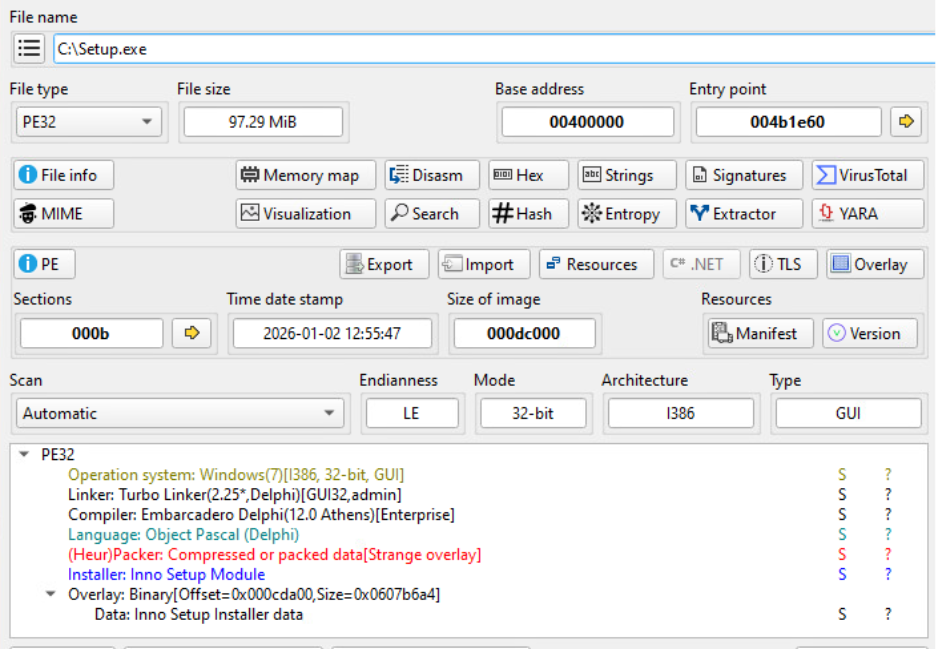
Operating under the assumption we believe this is malicious; we can go right into extracting the Inno Setup Module.
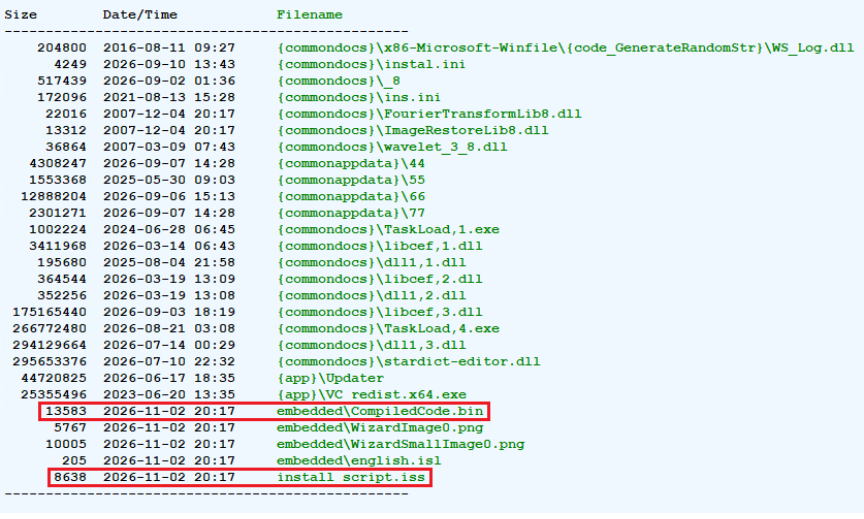
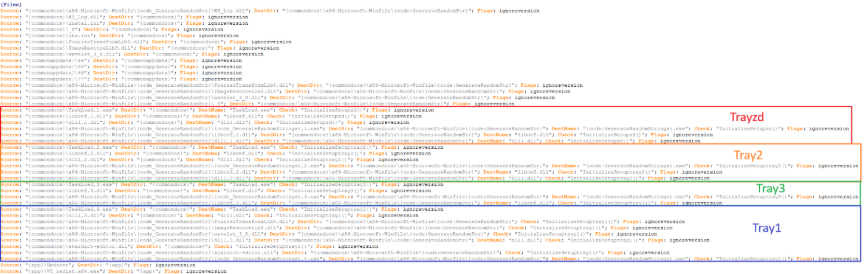
For now, the focus is the installer script (install_script.iss) and the Pascal script (CompiledCode.bin). The installer script contains a list of files and their destinations, among a few other setup functions. For this installer, the script has what appears to be four bundles of files, which the author called trays, each invoked with a corresponding numbered function (InitializeSetuptray#).
We can get more granular information about these files by looking at the Pascal script, CompiledCode.bin. The script checks if one of three applications are running, all three being Chinese-based antivirus applications.
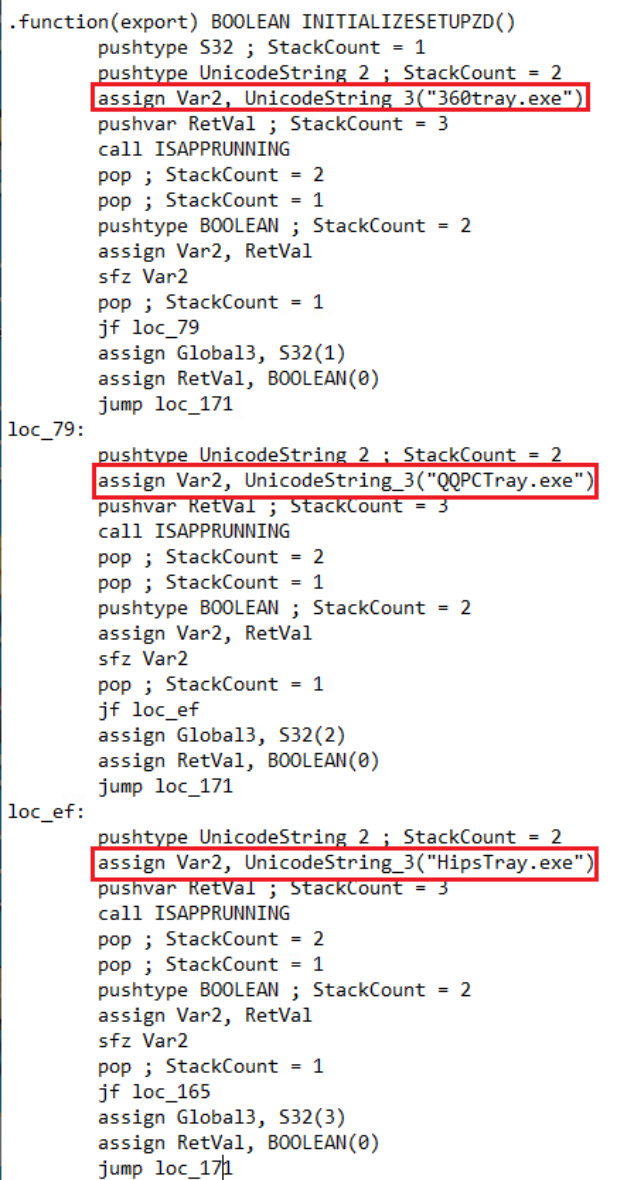
Once the installer executes, it checks if any of the three antivirus applications are running. If one is, the installer drops the files from the corresponding tray and skips the others. These are the four trays:
Tray1: 360tray.exe (360)
- TaskLoad,4.exe → TaskLoad.exe
- dll1,3.dll → dll1.dll
- stardict-editor.dll
Tray2: QQPCTray.exe (QQ)
- TaskLoad,2.exe → TaskLoad.exe
- Libcef,2.dll → libcef.dll
- dll1,2.dll → dll1.dll
Tray3: HipsTray.exe (Huorong)
- TaskLoad,3.exe → TaskLoad.exe
- Libcef,3.dll → libcef.dll
- dll1,2.dll → dll1.dll
Trayzd (Default Tray)
- TaskLoad,1.exe → TaskLoad.exe
- Libcef,1.dll → Libcef.dll
- dll1,1.dll → dll1.dll
The rest of the files are installed no matter which tray is called, and all resulting files end up in the Public Documents folder.
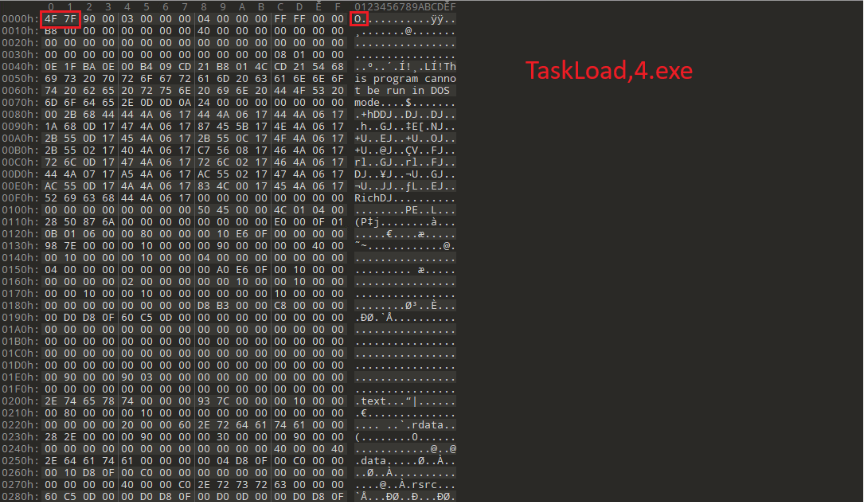
All payload files in each tray also have the first 2 bytes corrupted to avoid file detections. For example, here's the hex of TaskLoad,4.exe (below). It’s obviously a portable executable but is missing the MZ magic bytes. All executables become functional after making the change to 4D 5A (MZ).
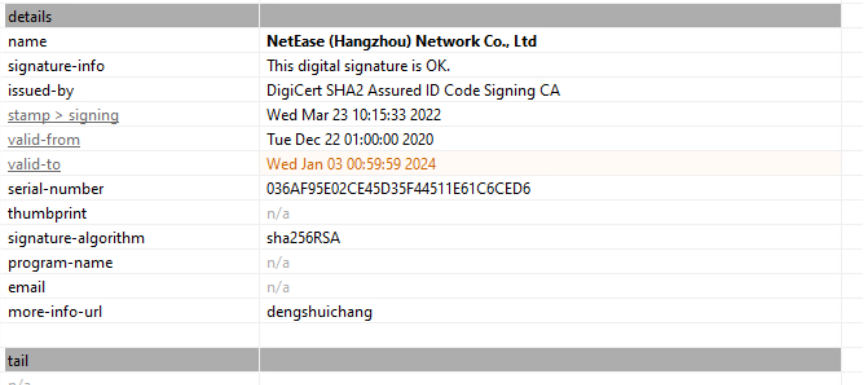
Execution begins with TaskLoad.exe. It’s signed with a legitimate, but expired, certificate from NetEase (Hangzhou) Network Co., Ltd. TaskLoad.exe sideloads libcef.dll, whose only job is to read the _8 file and send it to dll1.dll. In the 360 tray, TaskLoad.exe sideloads stardict-editor.dll and performs the same actions.
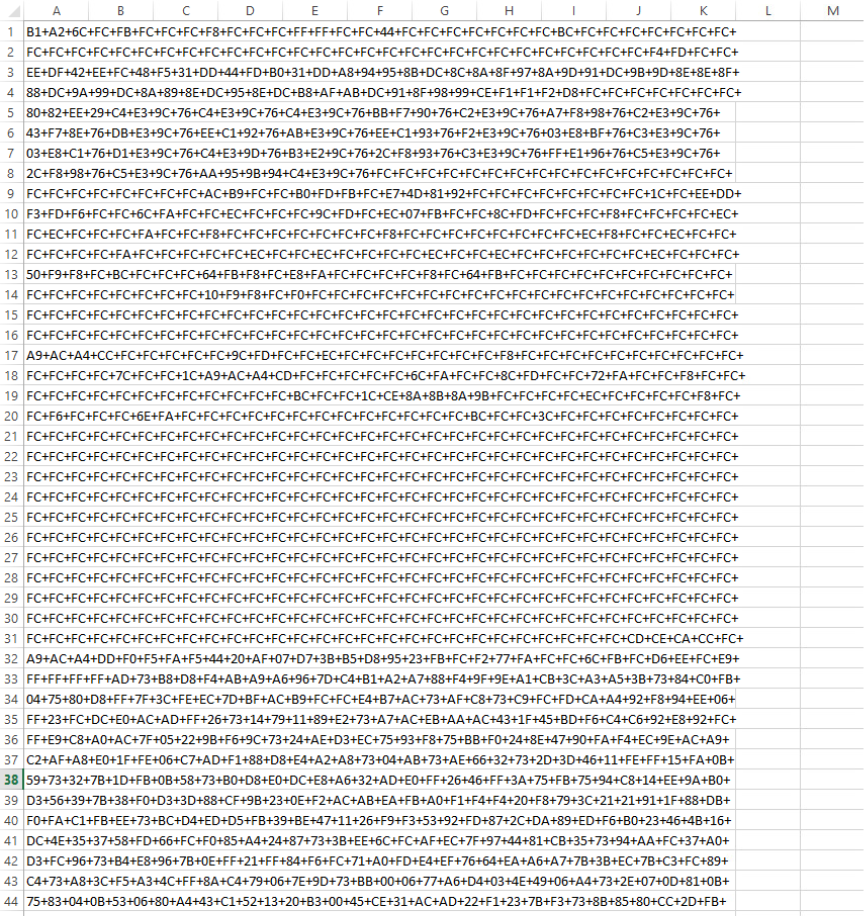
The _8 file claims to be a csv and contains hex bytes combined with ‘+’ signs. The pattern of the hex bytes resembles a portable executable.
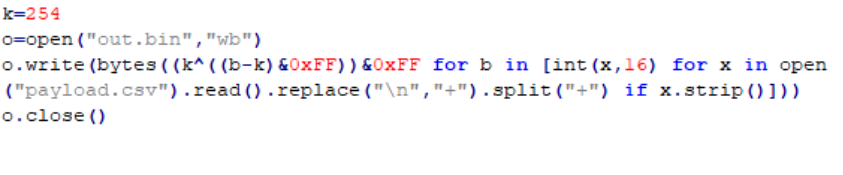
The _8 binary is passed into a decoder, shown below.
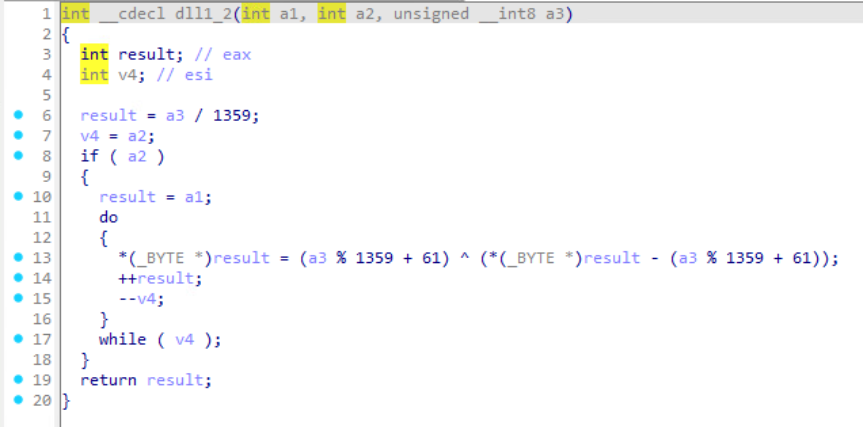
A simple decoder script dumps the resulting payload.
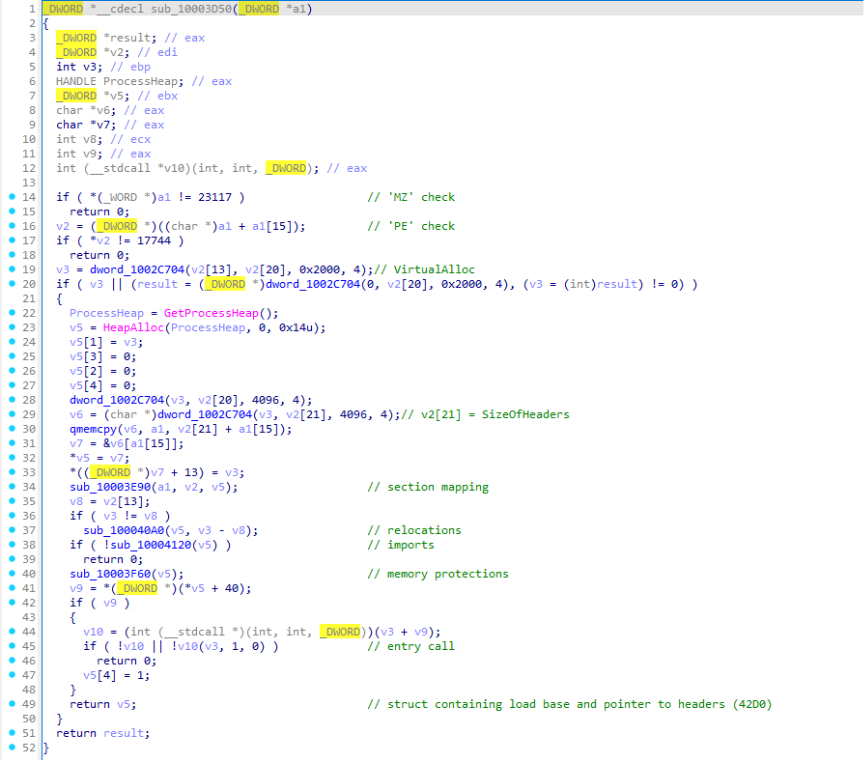
Before that, however, the payload is manually mapped and loaded in, ensuring the file never touches disk. These functions are denoted in the comments in the pseudocode below. Other functions apply relocations, resolve imports, set memory protections, walk the image export table, and call the loaded DLLs; a full custom loader.
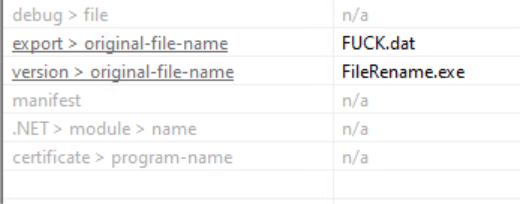
The resulting payload is a UPX-packed portable executable called FileRename.exe, with an original name of FUCK.dat.
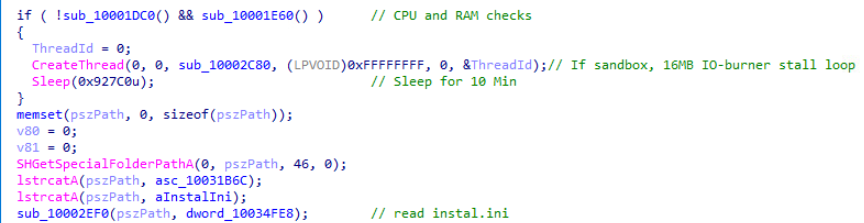
FileRename.exe’s only export, conveniently named _8 also, begins by checking for a sandbox. If detected, it creates a thread to burn sandbox compute. Then it sleeps for 10 minutes, reducing automated sandbox effectiveness. If the sandbox doesn’t run for at least 10 minutes, then nothing meaningful happens.
It then reads the final 140 bytes of instal.ini, which shipped with the installer.
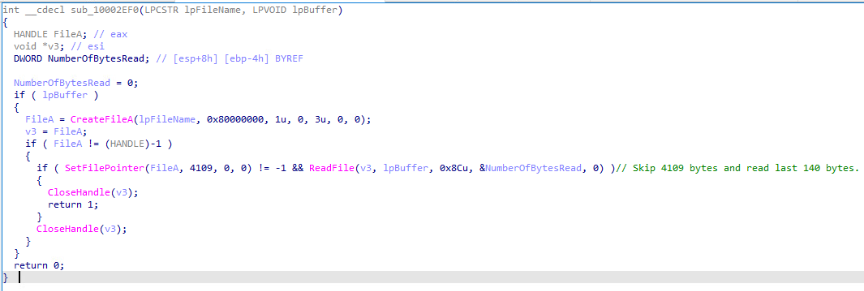
The highlighted portion shows the 140-byte blob at the end of instal.ini
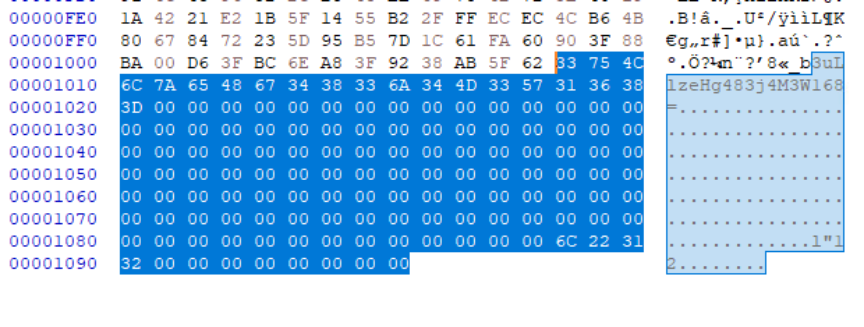
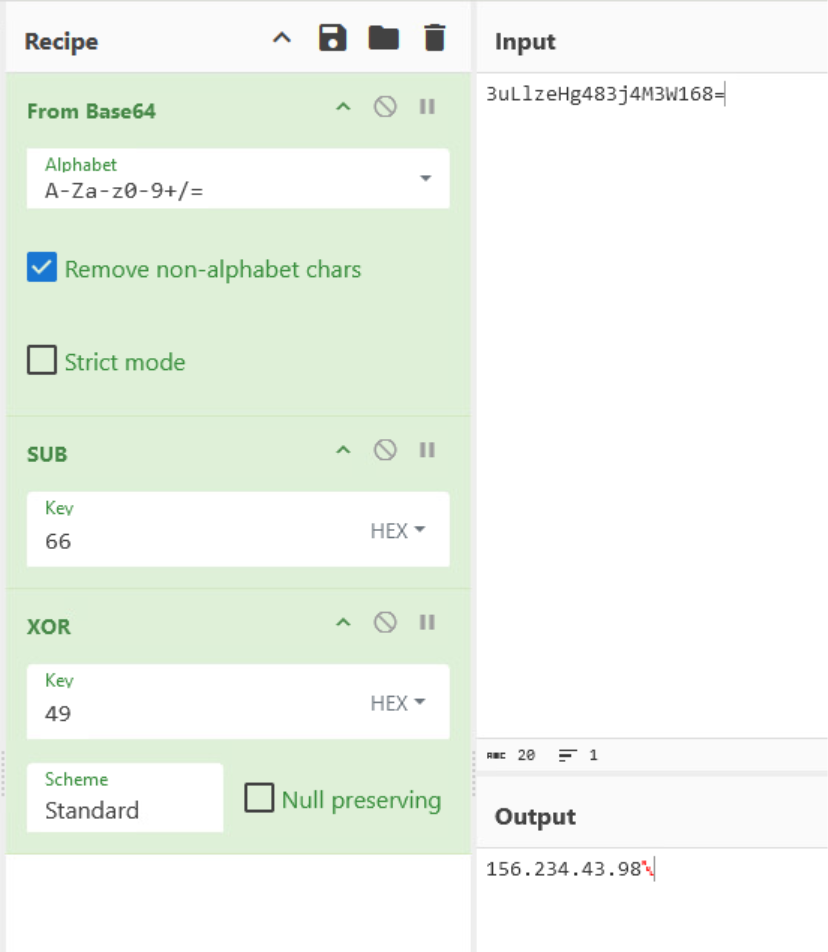
The first several characters are Base64 encoded. Decoding them, subtracting 0x66 from each byte and then XORing it with 0x49 gives the C2 IP address: 156[.]234[.]43[.]98.
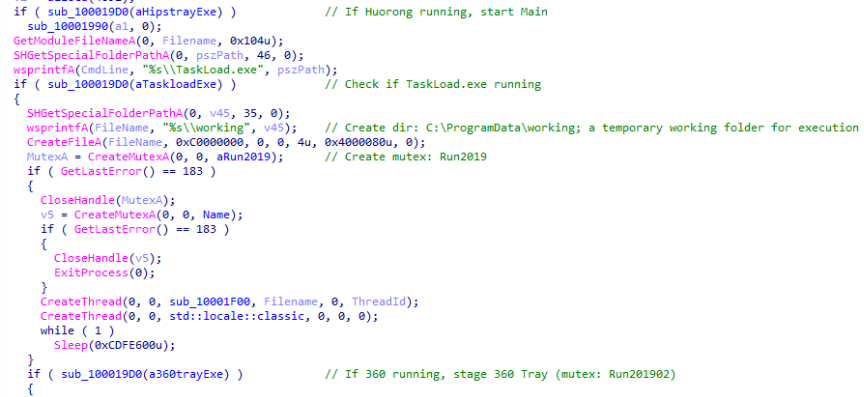
Once the C2 is read in, the main export function of FileRename runs, which is mostly staging for, yet another dropped payload. It performs additional checks for the antivirus trays, creates a temporary working directory, and creates one of two mutexes depending on which tray is running: Run2019 or Run201902.
For certain campaign IDs, another step exists interacting with Telegram and executes before passing onto the next stage.
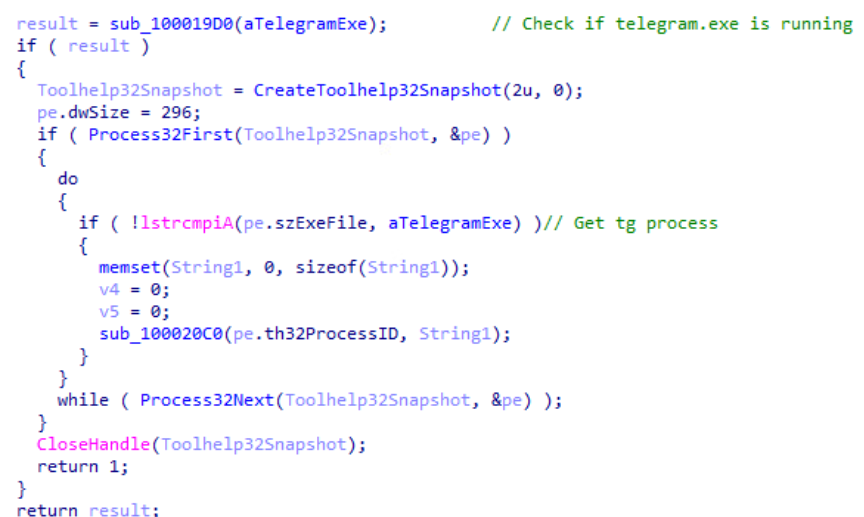
The final function opens Telegram in Chinese and opens the tdata folder of the victim, effectively opening a planted account.
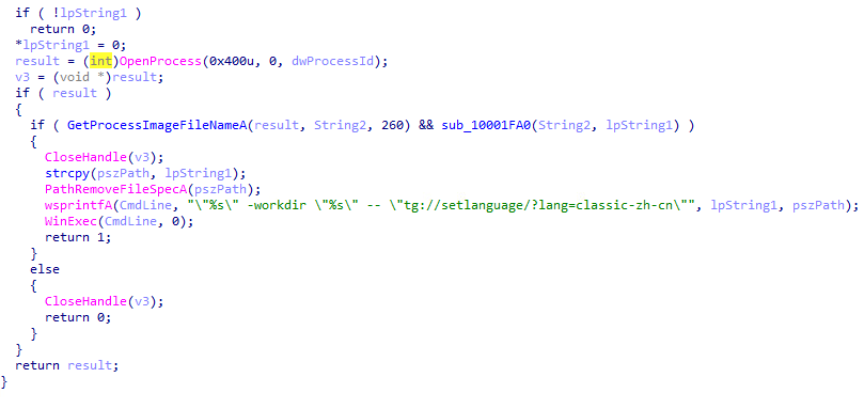
In the Huorong check shown earlier, the call to Main refers to Main in the next stage, not this file. This is also where the third stage drops from the second stage loader. It’s an encrypted blob embedded in the file that runs through an XOR routine.
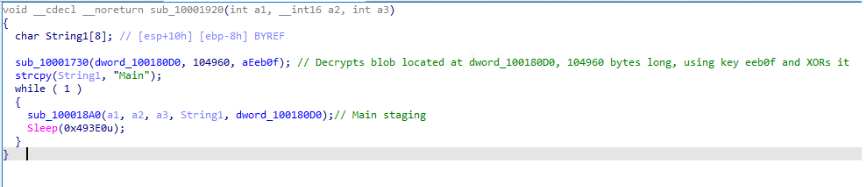
XOR routine.
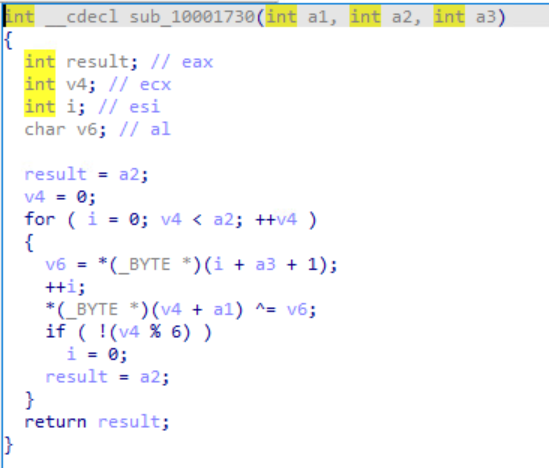
Extracting the blob uses the following information:
- Hex bytes at dword address
- Blob size: 104960
- Key: EB0F followed by two null bytes (454230460000)
- XOR routine: i % 6, beginning with second character.
The resulting file is another UPX-packed DLL named FUCK.dat with the only export being Main.
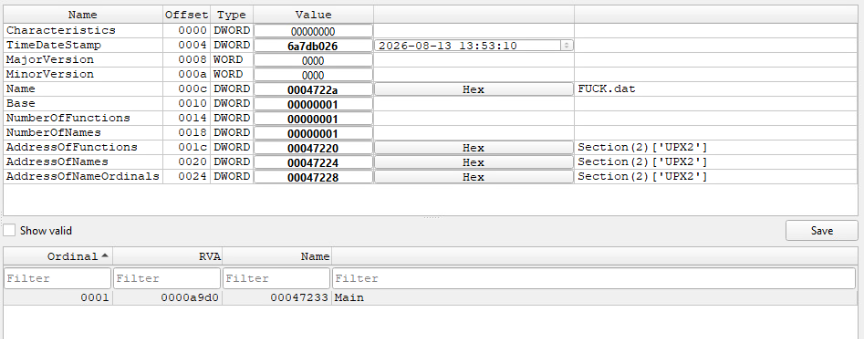
Navigating to Main reveals right away Gh0stRAT signatures, RC4 decryption, and other build artifacts. Some capabilities were skipped for brevity’s sake.
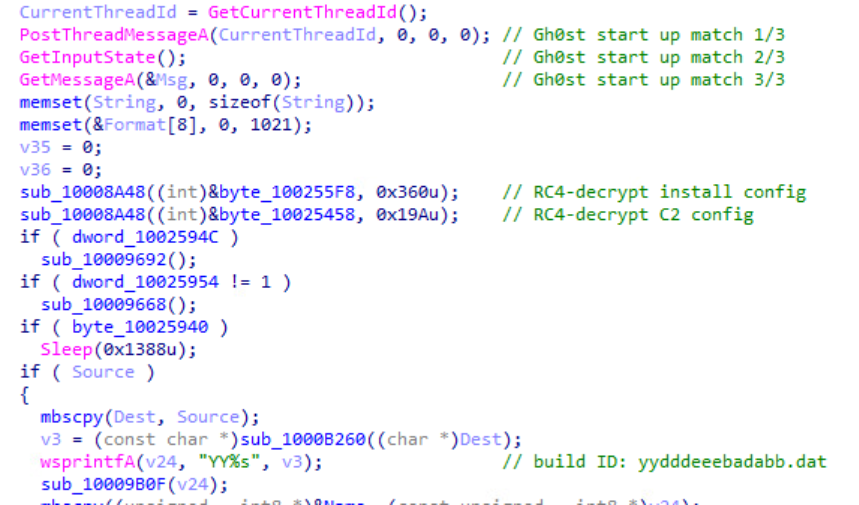
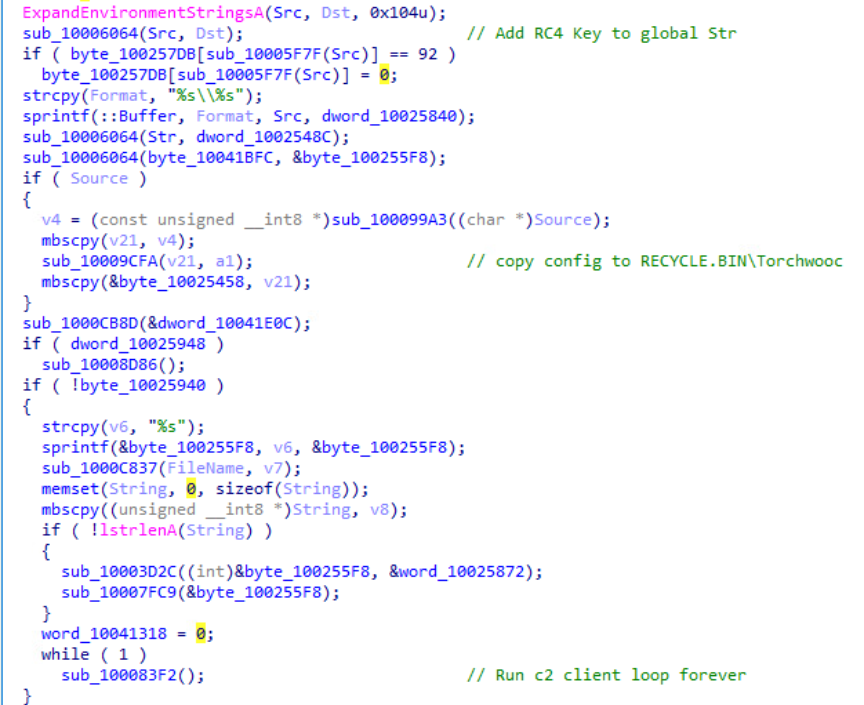
The RC4 key is shown below (2020412020202020202020206B2020202020202020202000)
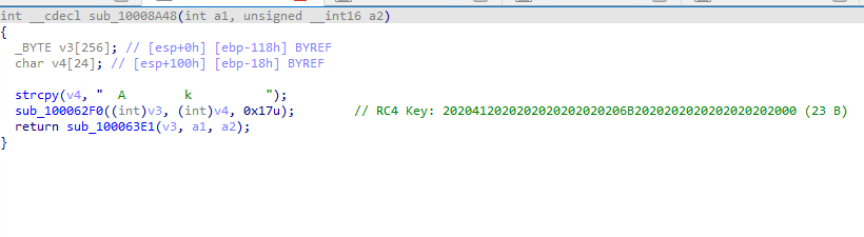
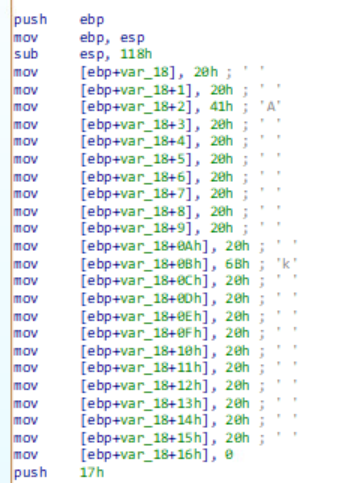
We can use this key to decrypt the configs.

The install config (first line) contains two loopback addresses, both replaced by the C2 address at runtime, the RC4 key for C2 traffic, and a build tag that’s a time stamp.
The second string array contains, in order:
- the default service name, replaced with the YY file name from earlier at runtime
- the service display name
- the service description
- the install folder
- the installed file name
- group name (shown in attacker panel)
- Unknown
The now confirmed Gh0stRAT variant uses opcodes to perform commands via a plugin that was dropped with the installer. The plugin uses the name ‘44.’
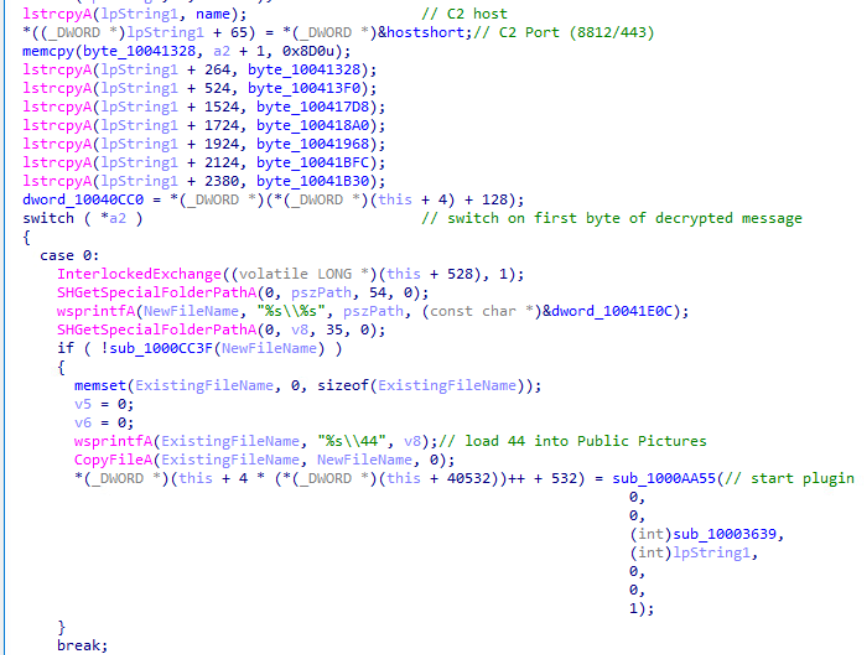
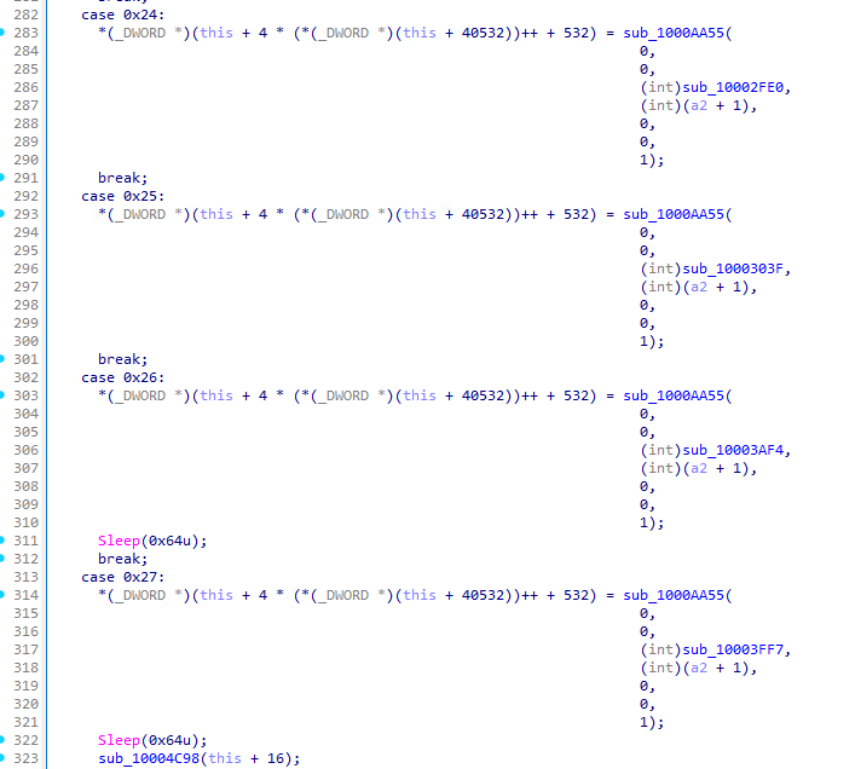
The dispatcher accepts 40 opcodes, but only 35 are used. Of those 35, 12 are built-in and 23 are built within the plugin. The 23 plugin opcodes live in 44. Consys21.png, a plugin DLL disguised as an image, supports them.
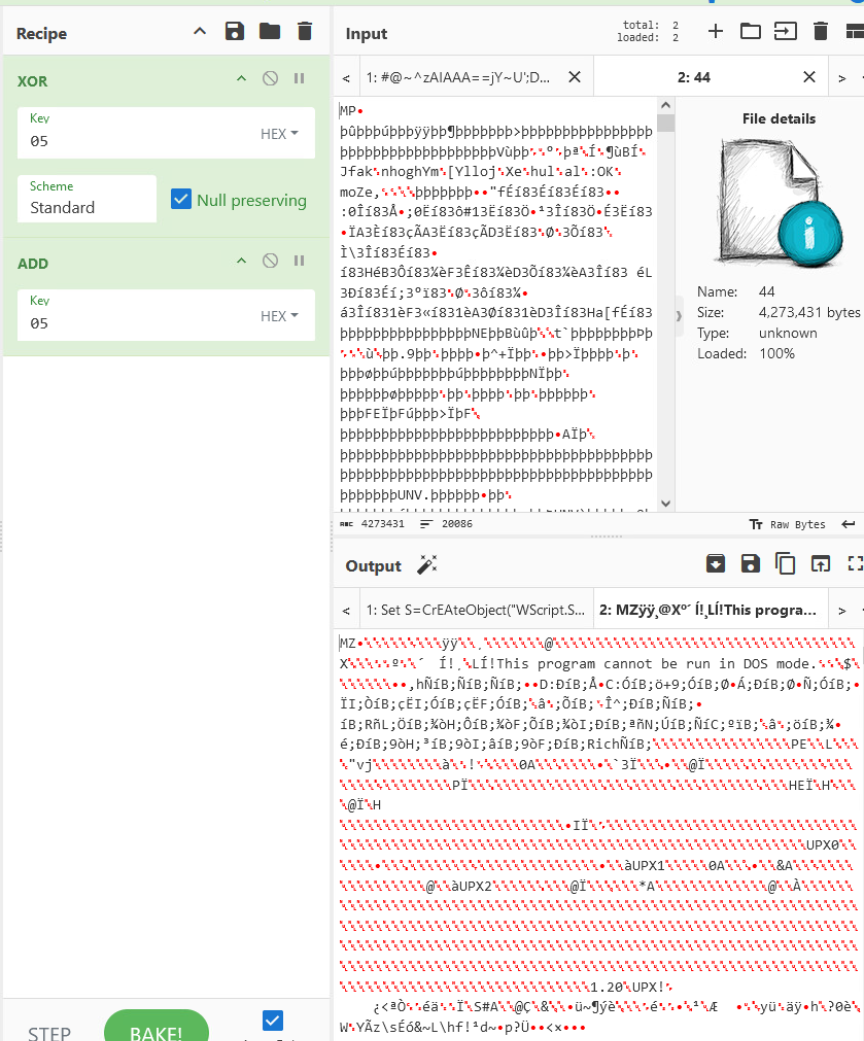
The 44 file was also encoded; decoding it takes XOR 0x05 followed by ADD 0x05. However, after uncovering the original DLL, the plugin.dll file name gives it away, as do the export DLLs.
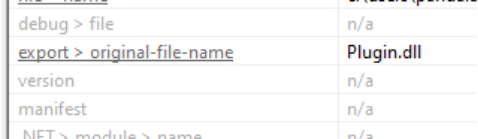
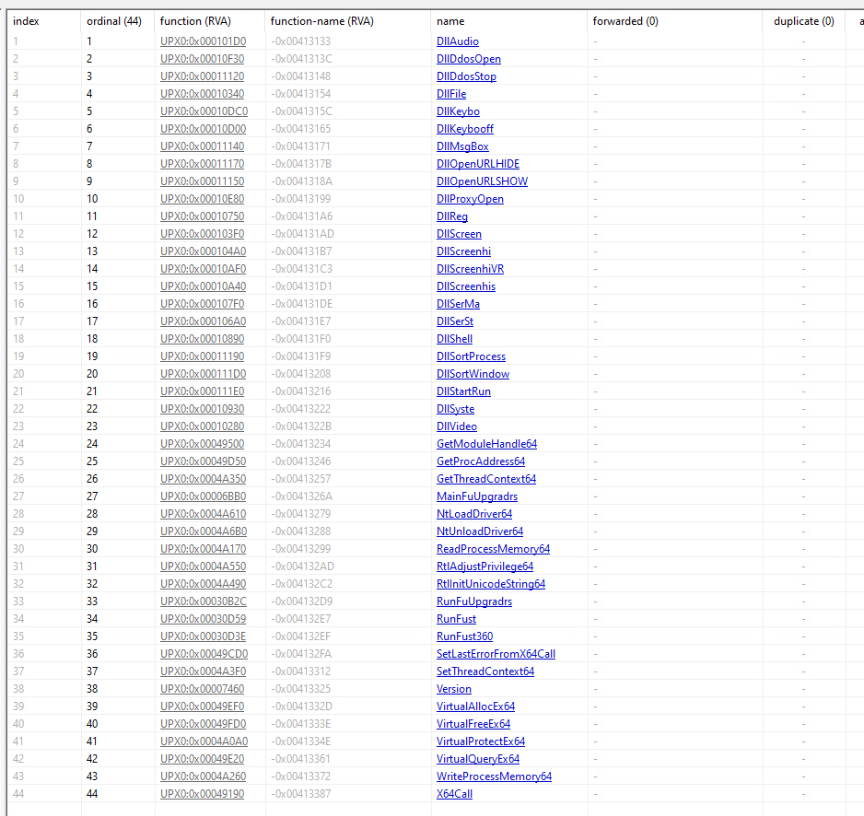
The opcode table exists below, separated by the command set and the plugin commands
Default Commands
| Opcode | Command |
| 0x00 | Start plugin |
| 0x08 | Shutdown/logoff |
| 0x09 | Uninstall |
| 0x0A | Download and run |
| 0x0D | Set label |
| 0x0E | Heartbeat reply |
| 0x0F | Set group |
| 0x10/0x11 | Push and run |
| 0x12 | Push only |
| 0x21 | Open path/URL |
| 0x26 | Update/replace |
| 0x27 | Activity report |
Plugin Commands
| Opcode | Command |
| 0x00 / 0x20 | DllStartRun |
| 0x01 | DllFile |
| 0x02 | DllScreen |
| 0x03 | DllVideo |
| 0x04 | DllKeybo |
| 0x05 | DllAudio |
| 0x06 | DllSyste |
| 0x07 | DllShell |
| 0x0B | DllOpenURLHide |
| 0x0C | DllOpenURLShow |
| 0x13 | DllMsgBox |
| 0x15 | DllSerSt |
| 0x16 | DllSerMa |
| 0x17 | DllReg |
| 0x18 | DllDdosOpen |
| 0x19 | DllDdosStop |
| 0x1D | dllSortProcess |
| 0x1E | DllSortWindow |
| 0x1F | DllProxyOpen |
| 0x23 | DllScreenhi |
| 0x24 | DllScreeniVR |
| 0x25 | DllScreenhis |
The image below shows the list of applications it checks to see if they are running.
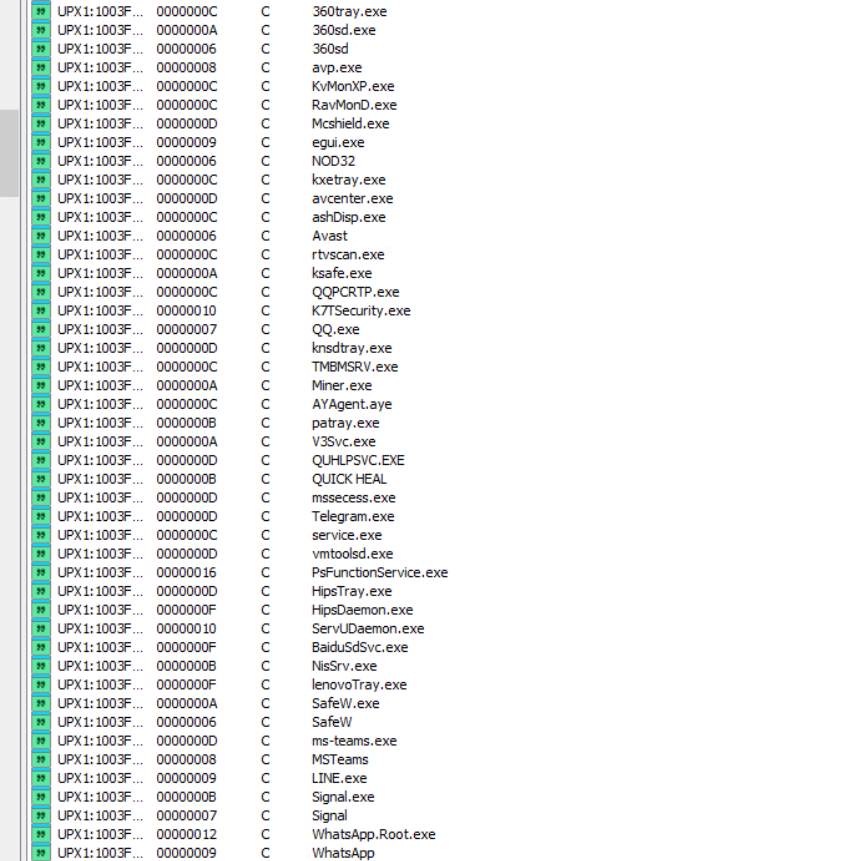
Some capabilities were intentionally omitted for brevity’s sake. However, most of the main functionalities were discussed.
How It Reached the Endpoint
That installer reached one of the endpoints we investigated, which let us see how the chain starts and where it stopped. In mid-September 2026, a user on that endpoint searched Google for oCam and opened its page on a third-party download portal. The download that followed came from a host outside the portal, on Cloudflare Workers: the download link at the end of this post. We found no ad domain in that path. That is consistent with the SEO poisoning described above, though our telemetry can't show whether the search result was manipulated, and without the browser's download metadata we can't rule an ad out.
Despite the .zip in its name, the link served a Windows executable of about 114 MB (113,685,436 bytes), which Chrome saved as Ocam_setupcnb781.exe. VirusTotal knows it as Ocam_setup.exe, the first indicator in the list below. It was an Advanced Installer package: it ran an embedded MSI silently and installed the genuine oCam, so the user got a working app. Alongside it, the MSI dropped Setup.exe, the same kind of Inno Setup stage described in the analysis above.
The First 90 Seconds
The key stages of the infection chain occurred within roughly 90 seconds of the user launching the installer.
| Seconds after launch | Event |
| 0 | The user runs the downloaded installer |
| 18 | The embedded MSI starts Setup.exe |
| 29 | Setup.exe launches its Inno Setup engine, Setup.tmp |
| 38 | Setup.tmp starts PowerShell with -ExecutionPolicy Bypass to disable Controlled Folder Access and add broad Microsoft Defender exclusions |
| 53 | dll1.dll lands in C:\Users\Public\Documents |
| 55 | The EDR behavior engine blocks the PowerShell process |
| 63 | A renamed copy of a legitimate executable starts |
| 70 | It loads libcef.dll |
| 71 | It tries to load dll1.dll, and the load is blocked |
| 91 | dll1.dll is quarantined |
The PowerShell command targeted C:\ProgramData, C:\Program Files, C:\Program Files (x86), C:\Users and the user's AppData\Roaming folder. VirusTotal's behavior analysis of the same Setup.exe matches Sigma rules for an insecure PowerShell execution policy and for Defender exclusions added through PowerShell. If you find this chain in your own environment, check Defender's exclusion list and the Controlled Folder Access setting, because the command ran for several seconds before it was blocked. The host executable then relaunched itself as TaskLoad.exe and retried, and it tried again about three minutes later. Every attempt to load dll1.dll was blocked.
Each Layer Caught a Different Piece
Two EDR layers each caught a different piece, and cloud classification is what stopped the chain. It identified dll1.dll as malicious, so every attempt to load it was blocked, and the file was quarantined 38 seconds after it landed. The behavior engine stopped the PowerShell step, which maps to MITRE ATT&CK T1562.001 (Impair Defenses: Disable or Modify Tools).
The installer stage and libcef.dll ran. The executable that loaded libcef.dll is a legitimate binary, seen since 2022 and renamed, which is exactly why sideloading works. Per the analysis above, libcef.dll's job is to hand the payload to dll1.dll, and VirusTotal lists dll1.dll among the imports of this libcef.dll. Here, dll1.dll never loaded, so the chain stopped there.
None of the processes in the chain opened a network connection, and the endpoint telemetry shows no injection, no persistence and no further activity. In the environment we examined, the indicators appeared on that one device only.
How This Connects to the Analysis Above
The sample on the endpoint we investigated isn't the one analyzed above, but the two line up closely. Both use the same file names (TaskLoad.exe, libcef.dll, dll1.dll, WS_Log.dll, FourierTransformLib8.dll, ImageRestoreLib8.dll and wavelet_3_8.dll), and both stage files in the Public Documents folder. The hashes of Setup.exe and dll1.dll differ, so these are different samples. VirusTotal lists 50 files that execute the libcef.dll from the endpoint we investigated, including installers named after other applications, which suggests oCam is one lure among many (as of November 16, 2026).
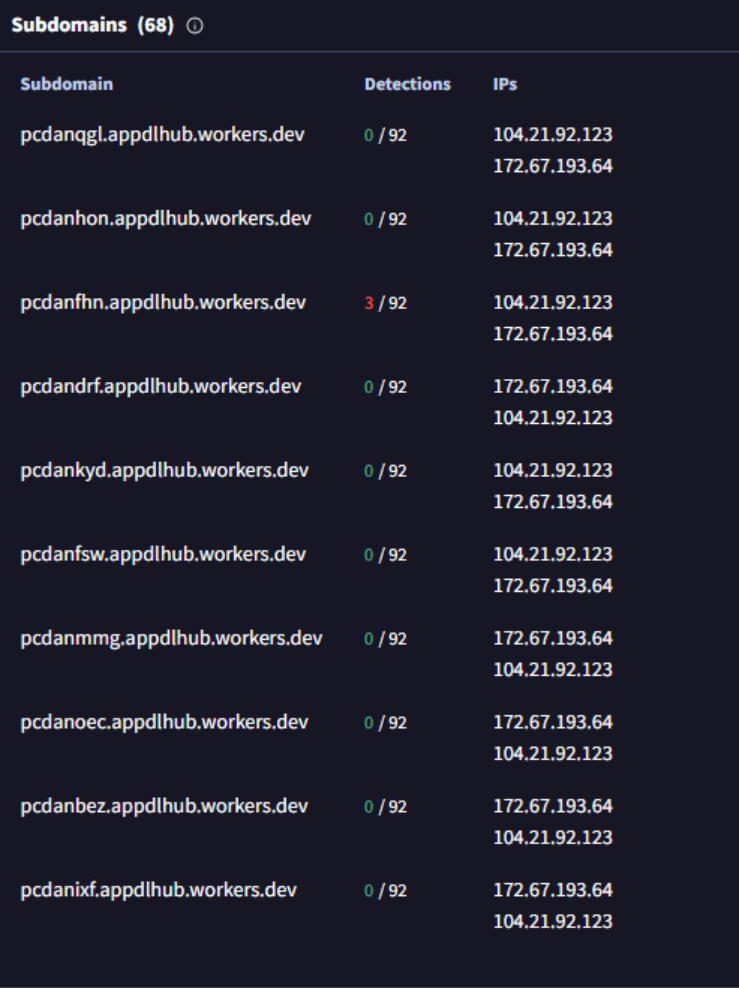
VirusTotal subdomains for appdlhub.workers[.]dev, captured November 17, 2026. Most show no detections, and all resolve to the same shared Cloudflare IP addresses.
What to Hunt For
These signals cover the chain from the installer to the payload and its command and control.
| Signal | Why it matters |
| An installer process, such as an Inno Setup engine (Setup.tmp), starting PowerShell with -ExecutionPolicy Bypass and Defender preference changes | An attempt to weaken defenses before the payload lands |
| A legitimate executable running from C:\Users\Public\Documents, named TaskLoad.exe or a random string | Reused as a sideloading host |
| libcef.dll, stardict-editor.dll or dll1.dll loaded from C:\Users\Public\Documents\ | The sideloaded loader pair; stardict-editor.dll replaces libcef.dll when 360 is present |
| A file named _8 in C:\Users\Public\Documents\ | The encoded payload that the sideloaded DLL passes to dll1.dll |
| Mutexes Run2019 or Run201902 | Created by the second-stage loader |
| A file named 44 copied to C:\Users\Public\Pictures\ | The plugin DLL, which the C2 command handler stages there before starting it |
| Requests to hostnames under appdlhub.workers[.]dev | The download infrastructure on Cloudflare Workers; Workers share Cloudflare IP addresses, so match the hostname |
| Connections to 156[.]234[.]43[.]98 | The C2 address decoded from instal.ini in the analyzed sample, also contacted by the analyzed Setup.exe in VirusTotal sandbox runs |
Indicators of Compromise
This incident
These come from the endpoint we investigated. The link delivered Ocam_setup.exe, which Chrome saved as Ocam_setupcnb781.exe. Setup.exe, libcef.dll and dll1.dll also appear under Analyzed sample with different hashes; they are different builds of the same components.
- Ocam_setup.exe: ecb5d5968d77e77b397ef18a077612d8f732a3f9cb78c7d8066c94bd9e580281
- Setup.exe: 4675678c2314159e1efdbf2f26debc2858acad0d00d5ba3d1f6e5a7081c476dc
- libcef.dll: 8e6d7eb780d6e05a7728061d06bab9dabc280c4906b3f07a577d737924bbada6
- dll1.dll: f1fb4db77fcc50d839523d8df7a0d04a5110320cce1718cf3728ea1be7b2a6f8
- Domain: dl2.appdlhub.workers[.]dev
- Domain: pcdanouk.appdlhub.workers[.]dev
- Domain (all subdomains): *.appdlhub.workers[.]dev (VirusTotal lists 68 subdomains, including more than a dozen named pcdan plus three letters, as of November 17, 2026)
- Staging folder: C:\Users\Public\Documents\x86-Microsoft-Winfile\ (a name that resembles a Microsoft folder; files sit in a randomly named subfolder)
Analyzed sample
Files from the similar campaign analyzed above.
- 20260819 (27).exe: 7f36fe6224fb7e6f6fdbfafa5eac99f5dedfc82fb5363bd046a4be9557b96f60
- Setup.exe: 3a9d8e1f3f7b9f1f8eb5bd03de44abfd5ba2b2b08a263e9362f8c1dcdd8dee53
- a10 (wavelet_3_8.DLL): 2514913f8a6f4671a058304651289b0babe47d81c044212b3140ed1c1b643b09
- 77 (%ALLUSERSPROFILE%\is-qhjrfevuqx.tmp): 25b3981176cec03b0d842008c2f8b0bfb064dfe53bb43ae01653bfe013cac299
- .rsrc/1033/RCDATA/HELPER_EXE_AMD64: 388a796580234efc95f3b1c70ad4cb44bfddc7ba0f9203bf4902b9929b136f95
- Updater: 408632e9f0a1e3e224747442017677e3ac11f6370fc90154f70ae6c7f25259e7
- ins.ini: 4d55f55c35dcca832d6a854edcb28df0517feb65de9757e00c741d3180bfb856
- 55: 4ecdf80bcace65f8feecd4b1acb97510ed2fa3abbddfcc6d5bd720829db29806
- TaskLoad.exe: 4fcf6394b14e24d830b04209a0ede1dcc911d199740a55d12c8ab8aeabb84073
- C:\Users\user\AppData\Local\Temp\is-5PT1PURS2X.tmp\executable.tmp: 55c4913ee154821dd43812e49e28ba9248103644a59a5f4704c6a64cffa83a8d
- ImageRestoreLib8.dll: 6feeb95115d7d8a51403996fee1ad219a52151662d3a01a2d17cfb77dbd51f3b
- FourierTransformLib8.dll: 9bd52ec7e7750500de33df995fcc7e68ed1da70d125579cf76ae8f787577ef75
- WS_Log.dll: ed2c6bc3e77a404b8cf61176844ad19c1fdcae19881206631e3f0831a4bd919a
- _8 (%PUBLIC%\documents\is-ac6odv6cvl.tmp): f4d68918fe8b7ef0a5b0e53a7c62216e67ccca27e2000a8ba6dcd03140b0c2b9
- 66: 95e04537263f52975b63f004f4d576380b23d47309e43e95b16fceb80d4ef836
- instal.ini: a5eb53004c797fbc0117056221b18a7bdf04335029a72c7c8d03d2234baf44ae
- 44: c337899c72e2de6f7049aaf53826f4d34f159adddbc9fbb07e524a70e91104ea
- libcef,1.dll: d2d6a47a8ae96fcae7ea96683a9b700c2f28793495c0b1e3050c5af8c7c7486b
- dll1,1.dll: e85d448b73b1bfae42d7b16d34892d47ce8a055cfe405082b5fa7f36bf5cfd5c
Reference
Antiy CERT: SwimSnake (Silver Fox) analysis. Antiy tracks Silver Fox as SwimSnake and has documented its use of SEO poisoning to push counterfeit download sites to the top of search results.
Download link
hxxps://pcdanouk.appdlhub.workers[.]dev/dl/1789406854/e29425023df9d35fc69425ea750d15cf1211409452df20f9f72829cdc75fe3f0/r0AD6qs/361/ocam.zip (MALWARE LINK)
Turning Attacker Tactics Into Defensive Advantage
For MSPs and security defenders, this investigation highlights three critical priorities:
- Use approved software sources: Treat installers from third-party download portals as untrusted.
- Monitor suspicious installer behavior: Flag installers that launch scripting engines, particularly when they attempt to modify security settings.
- Hunt for disguised threats: Investigate legitimate executables running from public folders, as they may be used to conceal malicious activity.
A trusted application does not always mean a trusted download. Understanding how attackers exploit everyday behaviors is critical to staying ahead of evolving threats.
Go beyond the headlines and see how cyberattacks actually unfold. Follow WatchGuard on LinkedIn and subscribe to Red Cell Chronicles for original threat research, real-world attack investigations, and actionable intelligence that helps you anticipate, detect, and defend against emerging threats.