Applies To: Cloud-managed Fireboxes
Some of the features described in this topic are available only to participants in the WatchGuard Cloud Beta program. If a feature described in this topic is not available in your version of WatchGuard Cloud, it is a beta-only feature.
Firebox security services protect your network from intrusions, phishing attempts, malware, ransomware, and other types of attacks. Four tiers of security services packages are available for your Firebox:
Standard Support
Standard Support licenses are included with all WatchGuard devices. Standard Support includes full VPN capabilities and built-in SD-WAN. With a Standard Support license, you can add your Firebox to WatchGuard Cloud as a cloud-managed or locally-managed device. Live Status is available. There is no data retention or reporting available with Standard Support.
Basic Security Suite
In addition to the services available with a Standard Support license, the Basic Security Suite license includes:
- Intrusion Prevention Service
- Gateway AntiVirus
- WebBlocker
- Application Control
- spamBlocker
- Reputation Enabled Defense
- Tor Exit Node Blocking
Prime Security Suite
In addition to the services available with a Basic Security Suite license, the Prime Security Suite license includes:
- APT Blocker
- DNSWatch
Prime Security Suite is available only on Firebox models that support it. Older Firebox models remain eligible for Basic Security Suite and Total Security Suite. For the list of models that support Prime Security Suite, go to Security Services on WatchGuard.com.
Total Security Suite
The Total Security Suite license includes all services offered with the Prime Security Suite license, plus:
- IntelligentAV
- Network Management
- WatchGuard EDR Core
With all tiers, you can add your Firebox to WatchGuard Cloud as a cloud-managed device or as a locally-managed device with cloud reporting. For information on how to add a device to WatchGuard Cloud, go to Get Started — Add a Device to WatchGuard Cloud.
Security Services in the Total Security Suite
Available with an active Total Security Suite, security services work together with policies to control which traffic the Firebox allows or denies between networks. In the Security Services settings, you enable and configure security services. Security services enable the Firebox to block network threats and specific content types.
For a cloud-managed Firebox, you can configure these security services settings:
- Content Scanning (APT Blocker, Gateway AntiVirus, IntelligentAV)
- Network Blocking (Blocked Ports, Blocked Sites, Botnet Detection, Intrusion Prevention Service, Tor Exit Node Blocking)
- Exceptions
- Geolocation
- Content Filtering (Application Control, WebBlocker)
- TLS Encryption
- Network Management
On the Device Configuration page for a Firebox, the Security Services section shows a summary of configured settings. Security services are enabled on cloud-managed Fireboxes by default with recommended settings.
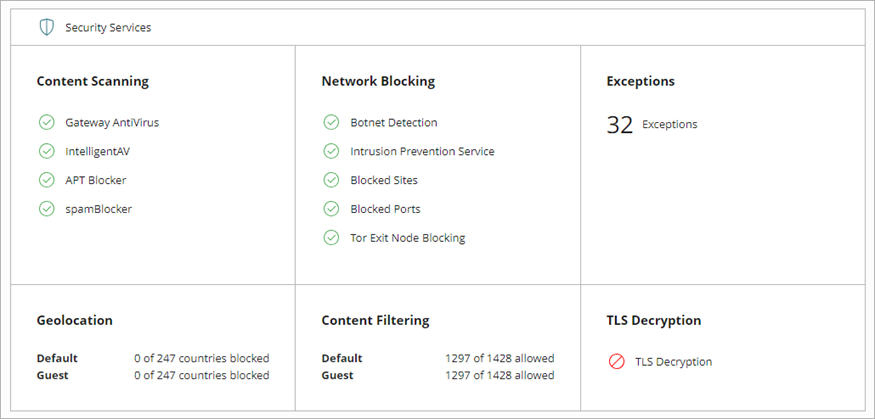
To review and configure these settings, click a widget in the Security Services section.
Basic Security Suite, Prime Security Suite, and Standard Support licenses include fewer services. Unsupported security services are read-only in WatchGuard Cloud.
For more information, go to:
- Content Scanning in WatchGuard Cloud
- Network Blocking on Cloud-Managed Fireboxes
- Add Exceptions on a Cloud-Managed Firebox
- Add Geolocation Actions in WatchGuard Cloud
- Content Filtering in WatchGuard Cloud
- Download the Certificate for TLS Decryption
For Content Scanning, Content Filtering, Geolocation, and Tor Exit Node Blocking to apply to traffic through the Firebox, you must also enable these services in firewall policies. For information about policy settings, go to Configure Security Services in a Firewall Policy on a Cloud-Managed Firebox.
About Security Services Precedence (Total Security Suite)
Add a Cloud-Managed Firebox to WatchGuard Cloud