Applies To: Cloud-managed Fireboxes, Locally-managed Fireboxes
This topic describes common problems and solutions for issues with the TAP adapter that the Mobile VPN with SSL client requires to establish connections. Because the TAP adapter creates the virtual network interface, issues with the TAP adapter might prevent the establishment of the SSL VPN tunnel. Without a functional TAP adapter, the connection process stops before SSL VPN authentication completes.
Other third-party OpenVPN clients might also install a TAP adapter used by the Mobile VPN with SSL client. Sometimes, third-party OpenVPN clients remove the adapter if you uninstall the client.
Symptoms
When the TAP adapter is missing or disabled on the client computer, these symptoms might occur:
- Mobile VPN with SSL connections stall or fail at tunnel setup.
- The Mobile VPN with SSL client authenticates, but the connection fails when it tries to set up the tunnel.
- Client logs indicate that the virtual interface is missing.
- Client logs show TAP initialization failures, binding errors, or interface creation failures.
- The TAP adapter does not appear in Device Manager > Network Adapters in Windows.
- The TAP adapter appears in Device Manager > Network Adapters, but its Status is Disabled.
Diagnostic Steps
- In Windows, right‑click Start and select Device Manager.
- Expand Network Adapters.
- Locate TAP‑Windows-Adapter V9.
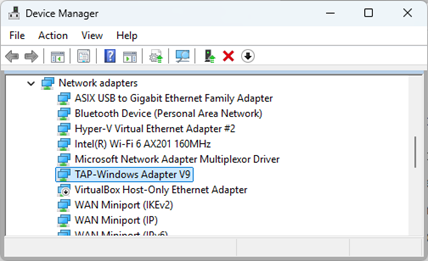
- Verify that the adapter is present and enabled.
Possible Causes and Solutions
| Possible Cause | Solution |
|---|---|
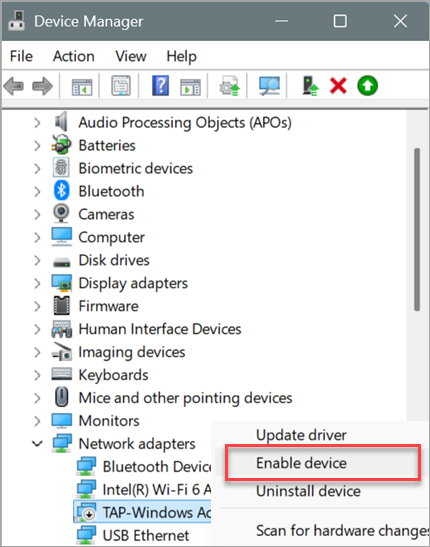
| The TAP adapter is disabled. |
Enable the TAP adapter:
|
| TAP adapter is corrupted or missing |
Perform a clean uninstall of the Mobile VPN with SSL client, then reinstall the client to restore the TAP adapter. For more information, go to How do I uninstall Mobile VPN with SSL and remove all related files? |
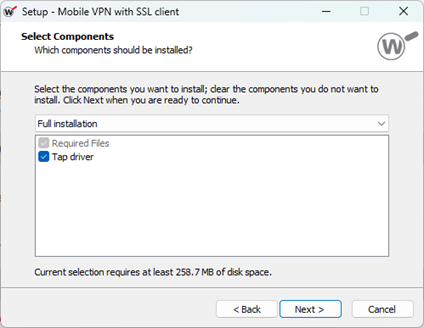
| Tap driver installation fails. |
Reinstall the Mobile VPN with SSL client with elevated rights:
For more information, go to Install the Mobile VPN with SSL Client. |
| Security software blocks TAP driver components. |
Add exclusions in any security software, then reinstall the Mobile VPN with SSL client. Add exceptions for:
Typical installation locations:
|
Related Log Messages
When there is an issue with the TAP adapter, you might experience these types of Mobile VPN with SSL client log messages:
- TAP initialization or binding failures.
- Virtual adapter creation errors.
- Connection attempts that fail with logs, such as:
SSL VPN Error: connect() failed. ret = -1 errno=10061