Applies To: Cloud-managed Fireboxes, Locally-managed Fireboxes
When the WatchGuard SSLVPN Service fails to start, stops unexpectedly, or does not install correctly on the client system, Mobile VPN with SSL functionality becomes unavailable. Because this service initiates and maintains the SSL tunnel, any failure of the service prevents tunnel creation. As a result, VPN connection attempts fail, often before authentication or negotiation stages.
Symptoms
When the WatchGuard SSLVPN Service is not running you might experience these symptoms:
- Mobile VPN with SSL connections fail as soon as they start.
- The WatchGuard SSLVPN Service shows a status of Stopped or Disabled in the Windows Services list.
- The WatchGuard SSLVPN Service does not appear in the Windows Services list.
Diagnostic Steps
On the affected device:
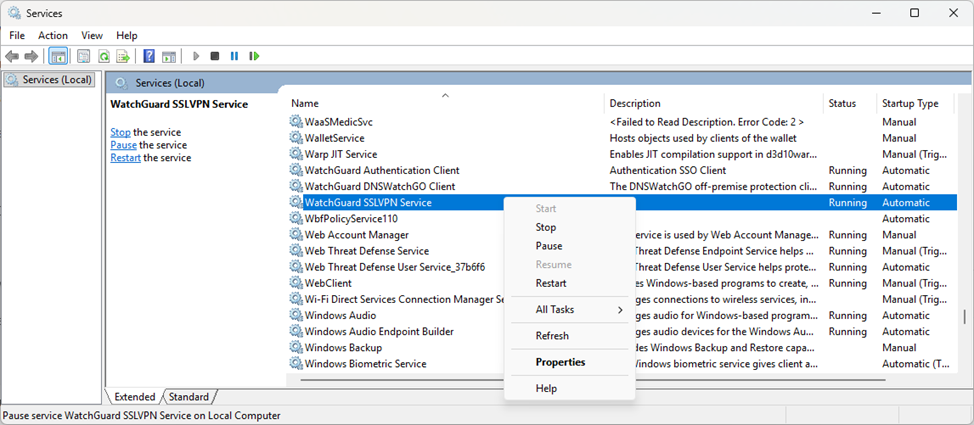
- To open the Windows Services window, press Win and R, type services.msc, and click OK.
- Locate the WatchGuard SSLVPN Service.
- Verify the status of the service.
Possible Causes and Solutions
Common causes and solutions include:
| Possible Cause | Solution |
|---|---|
| Service crashed. |
To restart the WatchGuard SSLVPN Service:
|
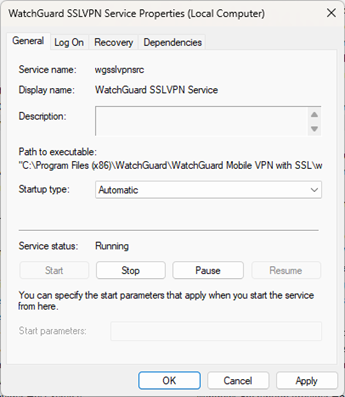
| Service does not start at system startup. |
To start the service at startup:
|
| Service missing or removed. | Reinstall the Mobile VPN with SSL client. For more information, go to Install the Mobile VPN with SSL Client. |