Applies To: PSInfoViewer
PSInfo collects support-related information in a .7Z file. With PSInfoViewer, you can review this information to help troubleshoot problems on your endpoints that run supported WatchGuard products.
If you have reviewed the information package in PSInfoViewer and require assistance, you can open a support case directly from PSInfoViewer.
To create a support case and upload the PSInfo .7Z file:
- Click Contact WatchGuard Support.
The Contact WatchGuard Support dialog box opens.
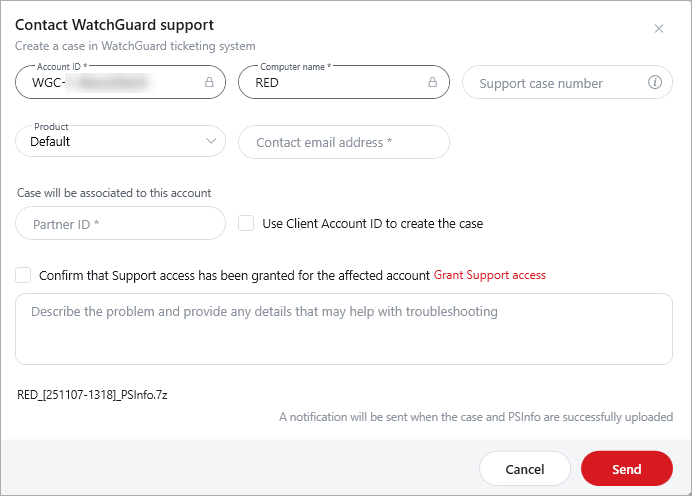
- Review the Account ID and Computer Name from the PSInfo file.
- Enter the support case number if there is already a case number.
- Select a product from the drop-down list.
- Type the Contact Email Address and Partner ID.
- Enter a description of the problem.
- To associate the case with the client account, select the Use Client Account ID to Create the Case check box.
- Make sure that Support Access is enabled for the account, then select the Confirm That Support Access Has Been Granted for the Affected Account check box.
- Click Send.
To enable WatchGuard Support to view the affected account, you must enable Support access. For more information, go to Support Access to WatchGuard Cloud Accounts.