Applies To: WatchGuard CloudDR
Issue rule templates in WatchGuard CloudDR are available as a beta feature.
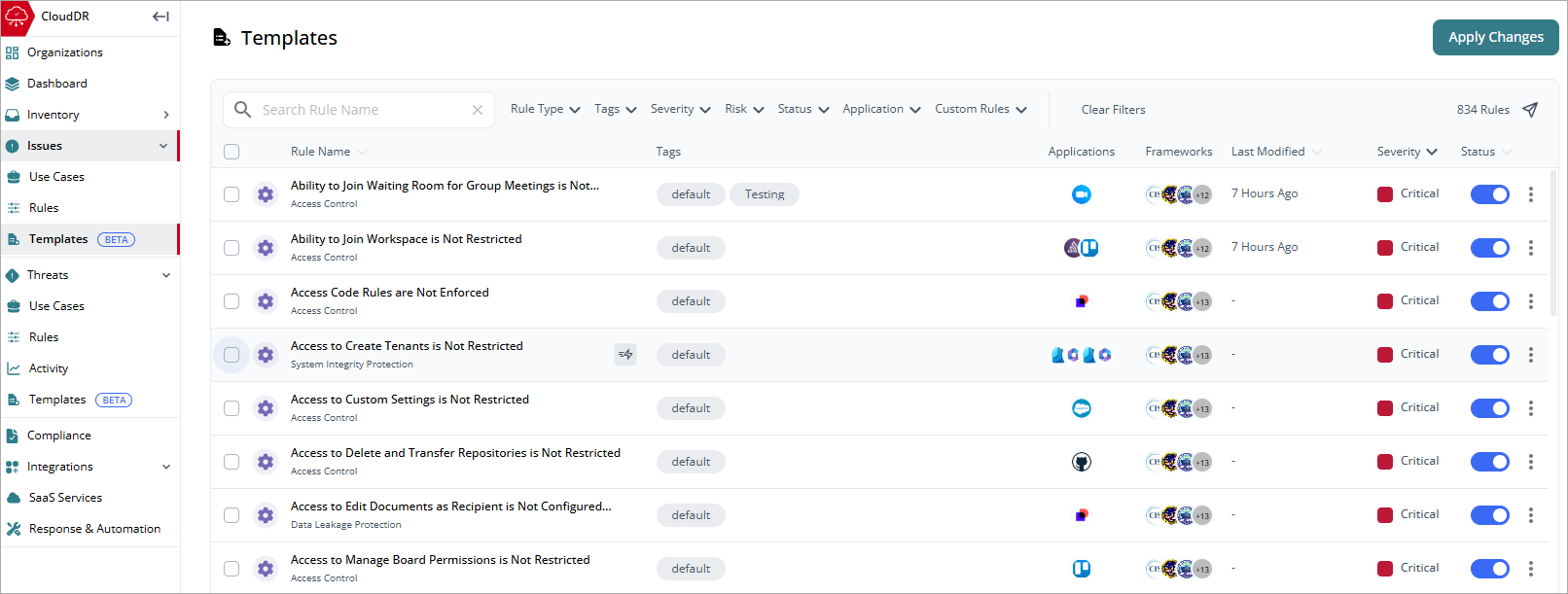
On the Issues > Templates page, Service Providers can centrally manage and apply issue rules to their Subscriber accounts. Templates use a tag-based assignment model. When a rule tag matches an organization tag, CloudDR deploys that rule template to the organization.
Create a Rule Template
Before you add tags to a rule on the Templates page, you should add tags to your organizations. Tags act as logical groups that help you organize organizations and determine which template rules apply to them. For information on how to add a tag to an organization, go to About Organizations in WatchGuard CloudDR.
To create a rule template:
- Select Issues > Templates.
- From the list, select a built-in rule that you want to apply tags to.
The Rule details page opens. - Next to Applied Tags, click
 .
.

- Below the Tags text box, select the tags you want to apply. You can select more than one tag. You can also enter a new tag in the text box. If you enter a new tag, make sure to assign the new tag to the organizations.

- Click Save.
- To make additional changes to the rule, from the templates list, select the rule. Make changes as required. Click Update Rule.
If you cannot edit the details in a rule, create a duplicate of the rule and customize it. - On the Templates page, click Apply Templates.

Changes to rules and tag assignments are automatically saved as you make them. Updates are not deployed to organizations until you click Apply Templates.
Duplicate a Rule
If you cannot edit the details of a rule you want to use as a template (for example, the rule pass criteria), then you can duplicate the rule and make changes.
To duplicate a rule:
- Select the rule you want to duplicate.
- On the Rules details page, click Duplicate Rule.
- In the Rule Name text box, type a new name for the rule.
- Click Create New Rule.
The new rule shows in the templates list. - From the templates list, select the new rule.
 shows in the row for custom rule templates.

- To edit the details and rule pass criteria, click .
For information on how to edit the rule pass criteria in a threat rule, go to Edit Rule Pass Criteria in WatchGuard CloudDR. - Add tags to the rule.
- Click Update Rule.
- On the Templates page, click Apply Templates.
CloudDR deploys the rule template to the tagged organizations.
Manage Templates
The templates list includes all available system rules, including this information:
- Rule Name — The name and category of the rule. Point to a rule name to show a detailed description of the rule.
- Tags — Text descriptors applied to the rule and organizations. A rule can have multiple tags. Tags enable CloudDR to apply a rule to an organization with the same tag.
- Applications — The cloud applications where the rule is in use.
- Frameworks — The compliance frameworks applicable to the rule.
- Last Modified — The date when the last activity on the issue (opened or resolved) occurred.
- Severity — The severity level of the issue rule.
- Status — Enable or disable a single rule template. To enable or disable multiple rules, select the check boxes next to the rules, then click Enable Rules or Disable Rules.
To search for a specific rule template in the list, enter the rule name in the Search Rule Name text box.
You can filter the list by:
- Rule Type
- Tags
- Severity
- Risk
- Status
- Application
- Custom Rules
Change Rule Severity
You can change the severity for an existing rule or create a new rule.
To change the rule severity:
- Click
 in the row.
 - Select Change Severity.
- From the drop-down list, select a new severity level.
- Click Update Rule.
- To create a new rule, click Create New Rule.
Enable and Disable Rules on the Templates Page
To enable or disable multiple rules in the list:
- On the Templates page, select the rules you want to update.
- Click Enable Rules or Disable Rules.
- Confirm that you want to enable or disable the rules.
Rule Details Page
To view detailed information about a rule template, select a rule from the list. The rule details page opens.
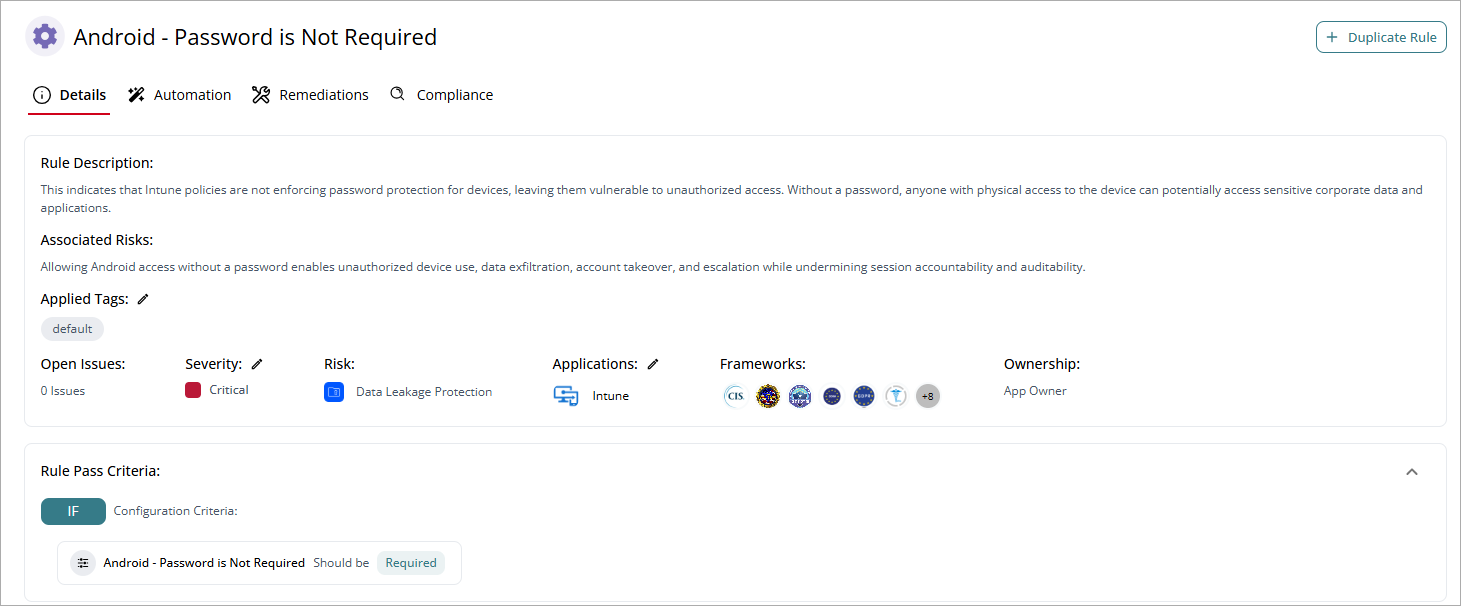
If you cannot edit details of the rule (for example, the rule pass criteria), then you can duplicate the rule and make changes. For more information, go to Duplicate a Rule.
The rule details page includes information on these tabs:
Select a tab to view additional information for the rule.
On the Details page, you can review the Rule Description and Associated Risks, as well as a summary of the number of Open Issues, their Severity, Risk, the affected Applications, and Ownership. You can edit the Severity and Applications in the rule. You can also view and edit the tags applied to the rule template.
In the Rule Pass Criteria section, you cannot edit the values. To make changes, you can create a duplicate of the rule, or edit the rule directly on the Rules page.
For information on how to duplicate a rule, go to Duplicate a Rule.
For information on how to edit the rule pass criteria in an issue rule, go to Edit Rule Pass Criteria in WatchGuard CloudDR.
On the Automation page, you can set up a quick action to run when a new issue opens for the rule. For information on automation, go to Add Autofix Automation for Issues in WatchGuard CloudDR.
Template rules support tag-specific automations.This enables different organizations to initiate different response actions while they share the same overall rule framework. For example:
- Organizations with the New tag could send an email notification when a rule triggers.
- Organizations with the Default tag could automatically remediate the same issue.
On the Remediations page, you can view the general instructions to resolve or remediate issues for an application.
On the Compliance page, you can view the compliance frameworks associated with the rule and the percentage of passed checks. For more information, go to Manage Compliance in CloudDR.