Applies To: WatchGuard CloudDR
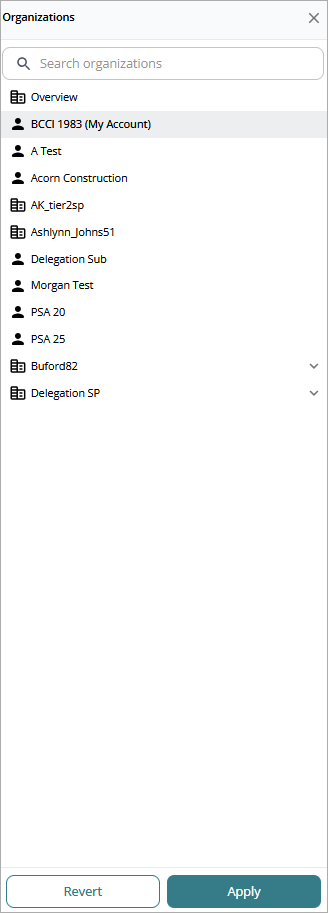
An organization is a WatchGuard Cloud account with a CloudDR license. Organizations enable Service Providers to detect, prioritize, and address potential security risks in cloud applications for their managed accounts in the CloudDR management UI. These accounts can include accounts to which you have delegated access.
To view a different organization in the CloudDR management UI, select a different account from Account Manager. The management UI updates to reflect data for the account you select.
Delegated accounts are not included in the aggregated overview. To view information on a delegated account, select the delegated account from Account Manager.
To open a list of your CloudDR organizations, from WatchGuard Cloud:
- In Account Manager, select Overview or a Service Provider account.
- Select Monitor > CloudDR.
- From the CloudDR pane, select Organizations.
In a multi-tier hierarchy, there could be multiple tiers or levels of Service Provider accounts. You can filter the list of organizations by Parent Organization to see the organizations associated with a specific Service Provider account.
Apply Template Tags to an Organization
Tags in CloudDR are text descriptors applied to a issue and threat rules and to organizations. A rule can have multiple tags. Tags enable CloudDR to apply a rule to an organization with the same tag. For more information, go to Templates for Service Providers (Beta).
To add a tag to an organization:
- On the Organizations page, select an organization.
- Click Apply Tags.
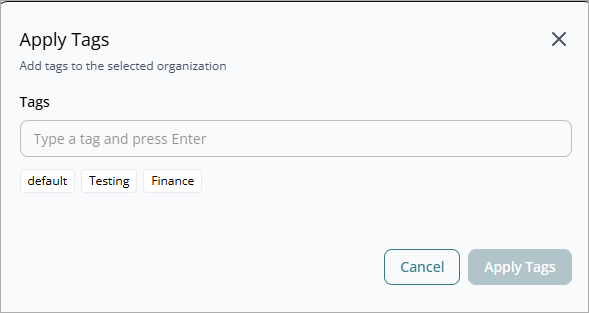
- Select an existing tag below the Tags text box, or enter the name of a new tag.
An organization can have more than one tag assigned. - Click Apply Tags.
Get Started with WatchGuard CloudDR