Define Advanced Phase 2 Settings
Applies To: Locally-managed Fireboxes
In the advanced Phase 2 settings, you can change the Phase 2 proposal type, authentication method, encryption method, and expiration settings. For more information about the available algorithms, go to About IPSec Algorithms and Protocols.

- On the Edit Mobile VPN with IPSec page, select the IPSec Tunnel tab.
- In the Phase 2 Settingssection, click Advanced.
The Phase 2 Advanced Settings appear.
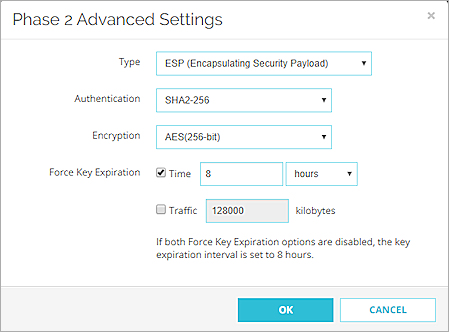
- Configure the Phase 2 options, as described in the Phase 2 Options section.
We recommend you select the default settings if the IPSec VPN client on your device is compatible with these settings. If you configure the native IPSec VPN client on iOS, macOS, or Android, go to Use the macOS or iOS Native IPSec VPN Client and Use Mobile VPN with IPSec with an Android Device for recommended settings. - Click OK.
- Click Save.
- Select VPN > Mobile VPN > IPSec.
- Select an IPSec configuration and click Edit.
- Select the IPSec Tunnel tab.
- Click Proposal.
The Phase 2 Proposal dialog box appears.
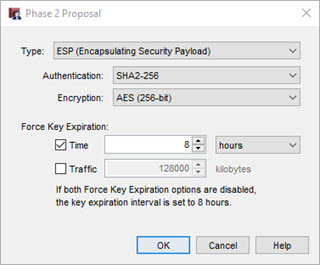
- Configure the setting options, as described in the Phase 2 Options section.
We recommend you select the default settings if the IPSec VPN client on your device is compatible with these settings. If you configure the native IPSec VPN client on iOS, macOS, or Android, go to Use the macOS or iOS Native IPSec VPN Client and Use Mobile VPN with IPSec with an Android Device for recommended settings. - Save the configuration to the Firebox.
Phase 2 Options
Type
Only the ESP proposal method is supported.
Authentication
Select an encryption method from the drop-down list. The options are listed from the most simple and least secure to the most complex and most secure.
- MD5
- SHA1
- SHA2-256 (default setting)
- SHA2-384
- SHA2-512
We recommend the SHA-2 variants, SHA-256 , SHA2-384, and SHA-512, which are stronger than SHA-1.
SHA2 is supported for VPN connections from the WatchGuard IPSec Mobile VPN client v11.32. SHA2 is not supported for VPN connections from Android or iOS devices, and is not supported by older versions of the WatchGuard IPSec VPN client.
Encryption
Select an encryption method. The options are listed from the most simple and least secure, to the most complex and most secure.
- DES
- 3DES
- AES (128-bit)
- AES (192-bit)
- AES (256-bit) (default setting)
We recommend AES encryption. For the best performance, choose AES (128-bit). For the strongest encryption, choose AES (256-bit). We do not recommend DES or 3DES.
Force Key Expiration
To force the gateway endpoints to generate and exchange new keys after a quantity of time or amount of traffic passes, configure the settings in the Force Key Expiration section.
- Select the Time check box to expire the key after a quantity of time. Type or select the quantity of time that must pass to force the key to expire.
- Select the Traffic check box to expire the key after a quantity of traffic. Type or select the number of kilobytes of traffic that must pass to force the key to expire. The default value is 128000 KB. The minimum value is 24576 KB.
- If both Force Key Expiration options are disabled, the key expiration interval is set to 8 hours.
The Force Key Expiration for Traffic is not enabled by default. We recommend you use the default Time-based key expiration. Traffic-based key expiration might cause frequent tunnel key expiration and disrupt traffic depending on tunnel usage. If you use traffic-based key expiration, make sure you set an appropriate value to avoid frequent key expiration.