Applies To: WatchGuard Cloud
As a WatchGuard tier-1 Service Provider, if you enable PSA integration in WatchGuard Cloud, you can configure notification rules across multiple Subscriber accounts from the PSA Ticketing page. For information about how to enable PSA integration, go to About PSA Tool Integration with WatchGuard Cloud.
Notification rules determine which events generate alerts that can open and close tickets in your connected PSA tool. When WatchGuard Cloud generates an alert, the alert appears on the PSA Alerts page as an active alert until you acknowledge it. For more information about PSA alerts, go to Manage PSA Alerts.
Notification rules for ThreatSync, Endpoint Security, Firebox, License alerts, and WatchGuard Cloud support closed-loop ticketing, which automates ticket updates between WatchGuard Cloud and the PSA tool. For AuthPoint, access points, FireCloud, WatchGuard NDR, and WatchGuard SaaS DR, you can use notification rules to send data to the PSA tool but you must manually close the ticket in the PSA tool.
For more information about closed-loop ticketing, go to About Closed-Loop Ticketing with PSA Integration.
If you have an existing PSA integration for your cloud-managed Firebox or a locally-managed Firebox added to WatchGuard Cloud for reporting, we recommend you disable the integration in the Firebox configuration to prevent duplicate tickets or synchronization conflicts. For more information, go to About Firebox Technology Integrations (cloud-managed Fireboxes) or Technology Integrations (locally-managed Fireboxes).
Your operator role determines what you can see and do in WatchGuard Cloud. You must be a tier-1 Service Provider and your role must have the Manage Integrations and Manage Tenants permissions to configure this feature. For more information, go to Manage WatchGuard Cloud Operators and Roles.
You can assign multiple managed accounts to the PSA ticketing notification rules.
To open the PSA ticketing settings in WatchGuard Cloud:
- From Account Manager, select Overview.
- Select Administration > PSA Ticketing.
The PSA Ticketing page opens.
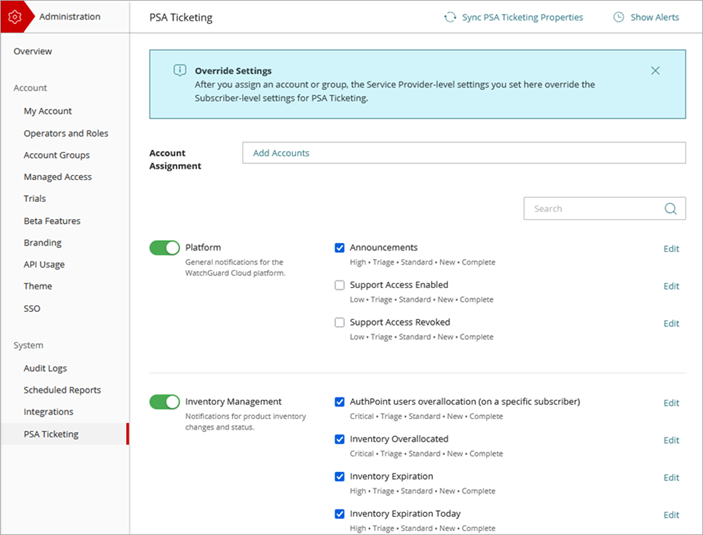
You can configure PSA ticket notifications for events from these sources:
- WatchGuard Cloud platform events, including announcements, license expiration and allocation, and account and operator management. For more information, go to Configure Platform PSA Ticketing Notifications.
- ThreatSync Incidents, WatchGuard NDR events, and connectivity updates for SaaS integrations with ThreatSync. For more information, go to Configure ThreatSync PSA Ticketing Notifications.
- Device notifications for access points and Fireboxes. For more information, go to Configure Device PSA Ticketing Notifications.
- FireCloud exceptions and content filtering events. For more information, go to Configure FireCloud PSA Ticketing Notifications.
- AuthPoint authentications and identity-related events. For more information, go to Configure AuthPoint PSA Ticketing Notifications.
- Endpoint Security installation and protection-related events. For more information, go to Configure Endpoint Security PSA Ticketing Notifications.