Applies To: WatchGuard Cloud
The security strength score in WatchGuard Cloud provides a consolidated, percentage-based score (from 0% through 100%) of the overall security posture of an account. It evaluates active deployments, security configurations, and licensed product coverage to help administrators and Service Providers identify vulnerabilities, prioritize remediation, and track security improvements over time. A higher security strength score indicates stronger alignment with recommended security configurations and protections.
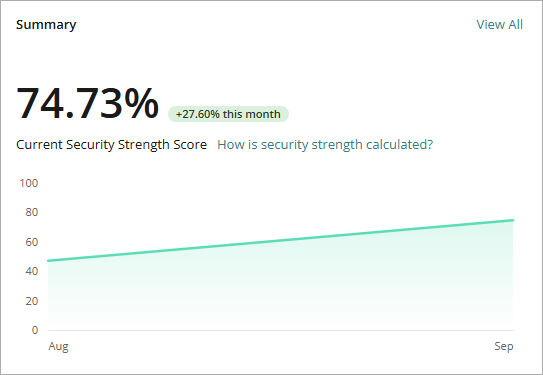
How WatchGuard Cloud Calculates the Security Strength Score
WatchGuard Cloud calculates a security strength score for each account. For each product, WatchGuard Cloud multiplies the product weight by the health percentage for that product, then adds the scores together.
Security Strength Score = Σ (product weight × product health %) across WatchGuard products
Where:
- Product weight — The percentage of the overall score assigned to a product. An account can have a security strength score of 100% only when it has all contributing WatchGuard products, and each product shows 100% health.
- Product health — A percentage that each product calculates based on the risks detected for assets in the account.
Product Weight
WatchGuard Cloud assigns each product a maximum weight contributing to the 100% total score. Unlicensed products contribute 0% toward the total 100%. WatchGuard Cloud includes trial licenses the same way as commercial licenses based on the risks detected for protected assets.
| Product | Weight |
|---|---|
|
WatchGuard Endpoint Security (Elite or 360: 18% | Prime: 16% | Basic: 13.5%) |
Up to 18% |
|
Firebox |
Up to 18% |
|
AuthPoint (Multi-Factor Authentication | Total Identity Security) |
16% |
|
Managed Services |
Up to 12% |
| FireCloud | 12% |
| CloudDR | 8% |
| Patch Management | 5% |
| WatchGuard NDR | 5% |
| Access Points | 4% |
| Full Encryption | 2% |
If an account has more than one Firebox license (Support, Basic, or Total Security), WatchGuard Cloud uses the highest applicable Firebox license weight.
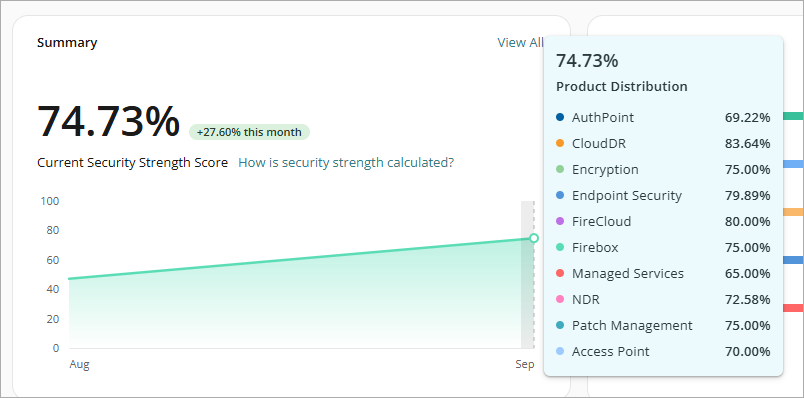
To view the security strength score calculated for an individual product, in the Summary widget, point to the green line on the chart.
Product Health
WatchGuard Cloud calculates the product health for each product with this formula:
Product health = 100% − Σ (risk impact % × affected assets / total assets)
The score reflects risks in these categories:
- Misconfigurations — Security settings that deviate from recommended configurations
- Protection not activated — Available security features that are not enabled
- Assets not protected — Endpoints, devices, or users without adequate coverage
- Critical tasks not automated — Actions such as automated patch deployment or response actions that are not configured
- Exposure — Vulnerabilities, open ports, firmware not upgraded, and more that increase exposure to attacks
Only misconfiguration and eligible deployment risks contribute to product health. Exposure-related items (such as vulnerability exploitability and attack paths) do not affect the calculation.
The affected asset number includes all assets reported by the product as affected by a risk. This includes assets whose impact is suppressed because the risk was inherited from a parent asset. Security Strength Score calculations consider only assets whose impact is not suppressed. When you resolve a risk on some assets, it might not affect the Security Strength Score if those assets are excluded from score calculations.
Each risk has a criticality with a different impact on the product health calculation:
- Critical — For example, protection not installed, multi-factor authentication (MFA) disabled, or an exploited vulnerability
- High — For example, an important protection disabled, or critical patches missing for more than 30 days
- Medium — For example, a misconfiguration or protection that is not upgraded
When related risks apply to the same asset, WatchGuard Cloud counts only the highest-impact risk for that asset. For example, if an endpoint has protection not installed (100% impact) and anti-tamper disabled (5% impact), the endpoint contributes 100% impact, not 105%.
How Alert Status Affects the Security Strength Score
On the Security Strength dashboard, you can update the status of a security alert. Status changes that affect the security strength score take effect immediately.
- Risk Accepted — You accept the risk and choose not to act on the recommendation. The item contributes to the security strength score.
- Resolved Through Third-Party Provider — A third-party solution mitigates the risk. WatchGuard Cloud restores the associated product weight or risk impact toward the security strength score.
- Resolved Independently — An internal tool or alternate method mitigates the risk. WatchGuard Cloud restores the associated product weight or risk impact toward the security strength score.
- Remediation Planned — The current security strength score does not change. The dashboard can show a projected score that includes planned actions.
Security Strength Score Examples
This section provides examples to illustrate how WatchGuard Cloud calculates the security strength score.
Risk impact percentages in these examples are sample values.
Full Product Suite with Minor Endpoint Issues
A customer account subscribes to all WatchGuard top-tier products. This means that the customer account could have a potential security strength score of 100%. All products are at 100% health, except for Endpoint Security 360 (18% weight), which manages 100 endpoints. WatchGuard Cloud identifies these risks:
- 8 endpoints — Protection down >24 hours (Critical — 100% impact)
- 30 endpoints — Anti-phishing disabled (High — 30% impact)
Endpoint Health Calculation
Risk impact for endpoints: (100% × 8/100) + (30% × 30/100) = 8.00% + 9.00% = 17.00%
Endpoint Security Product Health: 100% – 17.00% = 83.00%
Endpoint Security 360 Weight: 83.00% × 18.00% = 14.94%
All Other Products Weight: 100% – 18.00% = 82.00%
Overall Security Strength Score: 82.00% + 14.94% = 96.94%
MSP with Partial Coverage and Third-Party Exclusions
A managed service provider (MSP) manages 200 endpoints, 80 users, and 2 Fireboxes, with licenses for Endpoint Security Elite, Firebox Total Security Suite, and AuthPoint Total Identity Security. The customer does not have licenses for other WatchGuard products.
Product Health Calculations
Endpoint Security Elite (18% weight, 200 endpoints)
Risk impact for 8 devices without protection: 100% × 8/200 = 4.00%
Risk impact for 30 devices with anti-phishing disabled: 30.00% × 30/200 = 4.50%
Product health: 100% – 8.50% = 91.50%
Weighted contribution: 18.00% × 91.50% = 16.47%
Firebox Total Security Suite (18% weight, 2 devices)
Risk impact for 1 Firebox with Transport Layer Security (TLS) decryption disabled: 30% × 1/2 = 15.00%
Product health: 100% – 15.00% = 85.00%
Weighted contribution: 18.00% × 85.00% = 15.30%
AuthPoint Total Identity Security (16.00% weight, 80 users)
Risk impact for 15 users without MFA configured: 100% × 15/80 = 18.75%
Product health: 100% – 18.75% = 81.25%
Weighted contribution: 16.00% × 81.25% = 13.00%
Unlicensed products contribute 0.00% of the possible 48% weight allotted.
Security Strength Score Calculations
Initial security strength score: 16.47% + 15.30% + 13.00% = 44.77%
Adjusted score when the MSP marks Patch Management (5.00%) and WatchGuard NDR (5.00%) as Resolved through Third-Party Provider: 44.77% + 5.00% + 5.00% = 54.77%
Projected security strength score if active risks are all resolved (planned action): 18.00% + 18.00% + 16.00% + 5.00% + 5.00% = 62.00%
About the Security Strength Dashboard