The Firebox T175 delivers next-level security throughput and modern interfaces in a compact tabletop form factor, and includes these features:
- 2 x 2.5 GbE RJ45 Ethernet ports
- 4 x 1 GbE RJ45 Ethernet ports
- 2 x SFP+/SFP ports that support 10 Gbps/1 Gbps with compatible SFP+/SFP transceivers
- A 1G Copper SFP transceiver is included with the Firebox
- Dual DC power inputs for optional power redundancy
Firebox Management in WatchGuard Cloud
You can locally-manage your Firebox with Fireware Web UI or WatchGuard System Manager (WSM), or you can manage your Firebox in WatchGuard Cloud.
WatchGuard Cloud enables you to monitor and configure your WatchGuard products in one place. You can set up your devices and configure and manage security and networking policies across multiple Fireboxes with flexible templates. For Service Providers, a multi-tier architecture makes it easy to manage inventory across your accounts.
- Go to Quick Start — Set Up a New Firebox for information on how to set up your new Firebox.
- If you want to manage your Firebox in WatchGuard Cloud, select Cloud-Managed as the configuration method in the Web Setup Wizard.
- If you want to locally-manage your Firebox, select Locally-Managed as the configuration method in the Web Setup Wizard.
- You can also set up your Firebox directly in WatchGuard Cloud as a new cloud-managed device. When you connect your Firebox to the network and start your new device with factory-default settings, the Firebox automatically connects to WatchGuard Cloud and gets the device configuration. For more information, go to Add a Cloud-Managed Firebox to WatchGuard Cloud.
Fireware
The Firebox runs WatchGuard’s next generation UTM operating system—Fireware. Fireware delivers exceptional protection against today's sophisticated threats to make sure that your business stays connected. For more information on the features of Fireware, go to Firebox Feature Comparison — Locally-Managed and Cloud-Managed.
Upgrade Your Firebox
For the best experience, make sure you upgrade your Firebox to the latest available version of Fireware. To upgrade Fireware, use one of these methods:
- To upgrade a Firebox managed in WatchGuard Cloud, select your Firebox and click Upgrade to firmware <version>. For more information, go to Manage Firmware Versions for Devices in WatchGuard Cloud.
- To upgrade a locally-managed Firebox, in Fireware Web UI, select System > Upgrade OS. For more information, go to Upgrade Fireware or WatchGuard System Manager.
Package Contents
- Firebox device
- Power adapter (100~240 V) with regional power plug blades (US, EU, UK, AU)
- 1G Copper SFP transceiver
- Wall mount parts kit
About Your Hardware
Hardware Specifications
| Firebox T175 | |
|---|---|
| Processor | AMD V1500P/R2N14 Quad-Core Zen+ 2.2 GHz processor |
| Memory | 4 GB DDR4 SODIMM |
| Flash Memory |
64 MB NOR Flash |
| Storage | 16 GB eMMC |
| Network Interfaces |
2 x 2.5G RJ45 4 x 1G RJ45 2 x 10G SFP+ |
| I/O Interfaces |
2 x USB-A 3.2 1 x USB-C Serial Port |
| Power Input |
2 x DC Power Input |
| Power Supply | Input: 100-240 V, 50-60 Hz Output: 12 V, 5 A, 60 W |
| Dimensions |
D = 230 mm (9.06") |
| Weight | 1.17 kg (2.59 lbs) |
| Power Consumption | 48 W (Max) |
| Operating Temperature and Humidity |
0° to 40°C (32° to 104°F) 0% to 95% non-condensing |
| Non-Operating Temperature and Humidity |
-25°C to 75°C (-13°F to 167°F) 0% to 95% non-condensing |
| Mean-time Between Failures (MTBF) | 571,133 hours |
TPM (Trusted Platform Module)
This hardware contains a TPM chip for use with secure WatchGuard Cloud registration of the device.
Environmental Requirements
To safely install your Firebox, we recommend that you:
- Install the Firebox indoors.
- Deploy the Firebox in a secure area, such as a locked room, to block the device from people who do not have permission to use the device.
- Connect the Firebox to a conditioned power supply to prevent damage from sudden power changes.
- Do not place other devices directly on the Firebox if you have installed the Firebox in a rack.
For installation and additional safety instructions, go to the Rack Mount Instructions.
Hardware Description
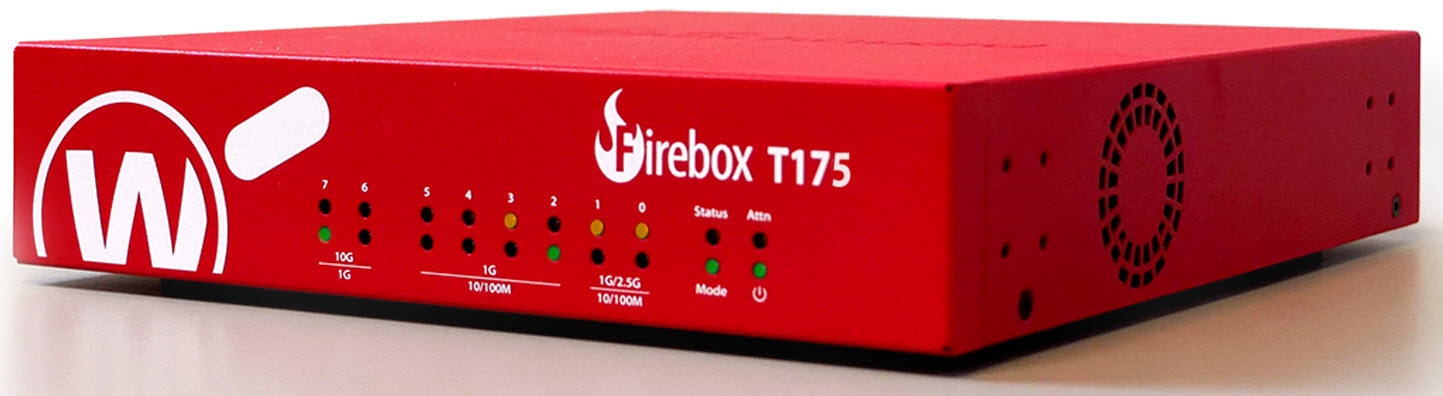
Front View
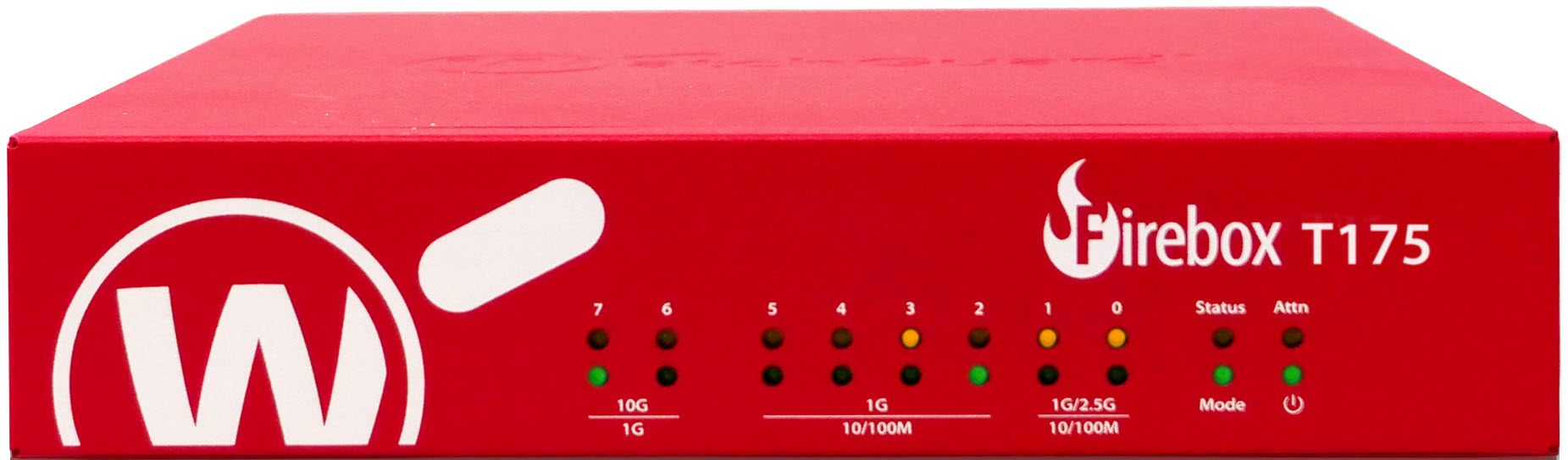
Status
The Status indicator is red when there is a management connection to the device. The Status indicator is lit for 30 seconds after you connect to the device with Fireware Web UI or the command line interface. It is also lit when the device is polled by WatchGuard System Manager.
Mode
The Mode indicator shows the status of the external network connection. If the device can connect to the external network and send traffic, the indicator is green. The indicator flashes if the device cannot send traffic to the external network.
Attn
The Attn (Attention) indicator is yellow when you start the device with the Reset button pressed. For more information, go to Restore Factory-Default Settings.
Power ( )
)
The Power indicator is lit to indicate power status. It is green when the Firebox is powered on.
Network Interface Status Indicators
The Firebox has seven network interfaces. There are two status indicators for each interface on the front of the device. The indicator flashes to indicate network activity. The flashing speed increases as the data sent or received increases.
2.5G Interfaces (0 to 1)
- Yellow (upper) — 2.5 Gbps or 1000 Mbps (2.5G)
- Green (lower) — 10 Mbps or 100 Mbps (10/100M)
1G Interfaces (2 to 5)
- Yellow (upper) — 1000 Mbps (1G)
- Green (lower) — 10 Mbps or 100 Mbps (10/100M)
10G SFP+/SFP Interfaces (6 and 7)
- Yellow (upper) — 10 Gbps (10G)
- Green (lower) — 1 Gbps (1G)
Rear View
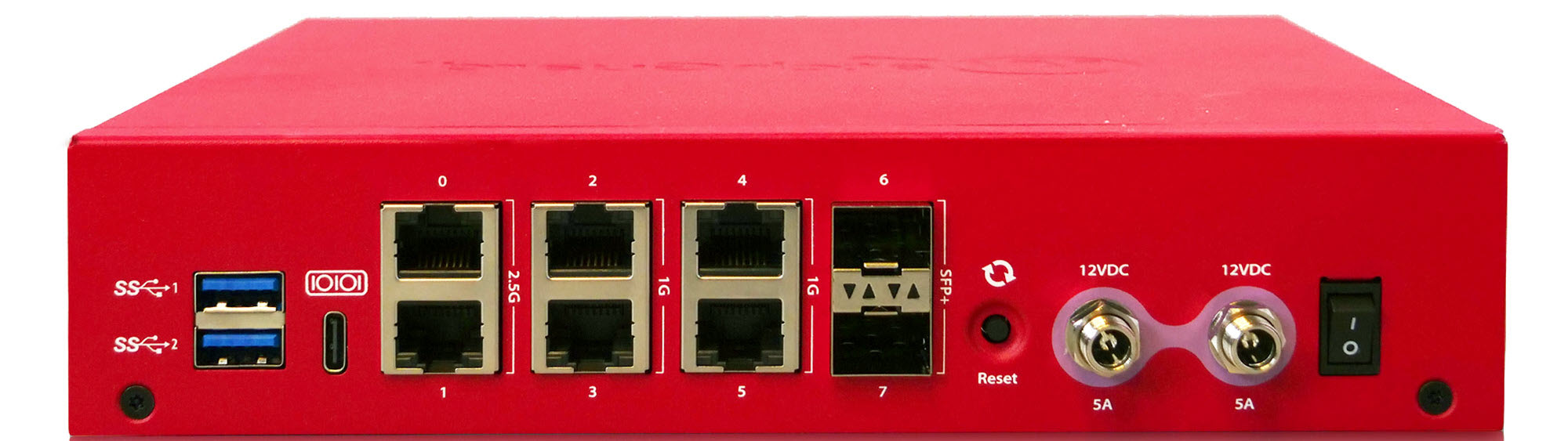
USB Ports ( )
)
The device has two USB-A 3.2 ports. You can connect a USB storage device for USB backup and restore or to store a support snapshot. For more information, go to Use a USB Drive for System Backup and Restore.
USB Serial Console Port ( )
)
The USB-C serial console port enables serial connections to the device. A USB cable is not included. For information on how to connect to the Fireware command line interface with the serial port, go to the Fireware CLI Reference Guide available from the Product Documentation web site.
Network Interfaces
The Ethernet interfaces have standard RJ45 connectors.
- Interface 0 to 1 supports 2.5 Gbps and 10/100/1000 Mbps.
- Interface 2 to 5 supports 1 Gbps and 10/100 Mbps.
- IInterface 6 and 7 SFP+ supports 10 Gbps and 1 Gbps with compatible SFP+/SFP transceivers.
A 1G Copper SFP transceiver is included with the Firebox.
Left indicator (Activity) — The left LED indicator on the interface port flashes yellow to indicate network activity. The flashing speed increases as the data sent or received increases.
Right indicator (Connection) — The right LED indicator on the interface port indicates the connection status:
2.5G Interfaces
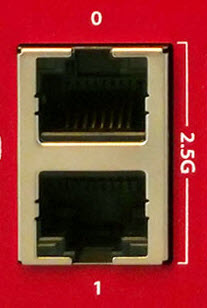
- Yellow — 2.5 Gbps
- Green — 1000 or 100 Mbps
- Not lit — No link
1G Interfaces
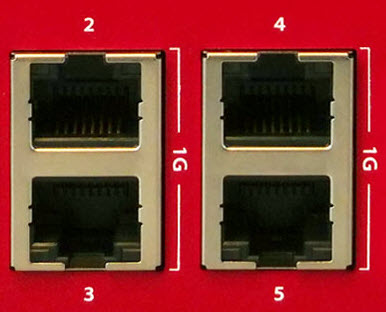
- Yellow — 1 Gbps
- Green — 10 or 100 Mbps
- Not lit — No link
10G SFP+/SFP Interfaces
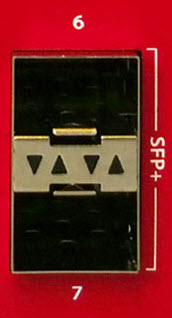
- Yellow — 10 Gbps
- Green — 1 Gbps
- Not lit — No link
Reset Button
This button resets the device to factory-default settings. For more information on how to use the reset button, go to Restore Factory-Default Settings.
Power Inputs
An AC power adapter is included with the Firebox. Use only the supplied AC power adapter.
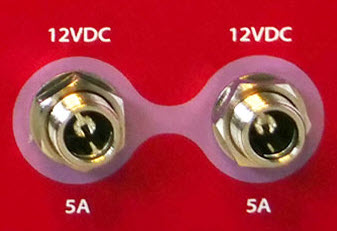
Connect the AC adapter to the device and to a power source:
- The device includes two power inputs.
- You can plug the power adapter into either power input.
- You can add a second AC power adapter for redundancy with the second power input.
WARNING: The power adapter is only for WatchGuard products, and not usable for other equipment.
Power Switch
Use the power switch to control the power supplied to the device.
AC Power Adapter
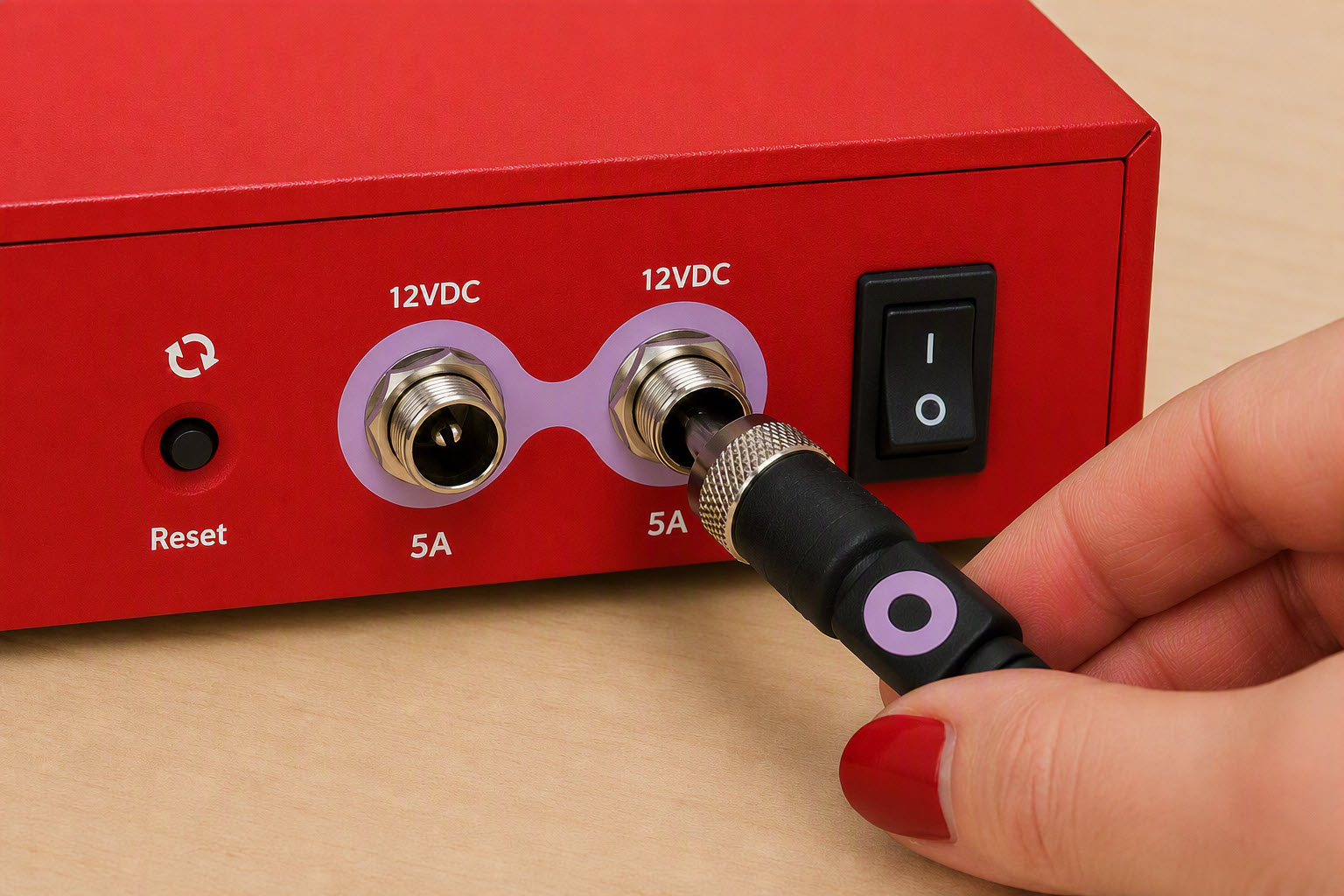
The included AC power adapter supplies power for the Firebox. The power supply connector has a screw-type retention mechanism. To prevent a disruption in the power supply, tighten the screw on the connector.
The AC power adapter includes four regional power plug blades (US, EU, UK, AU). Use the correct power plug for your region of operation.
Before you connect the adapter, verify that the color band on the cord matches the color ring around the power plug on the Firebox (purple).
To safely connect the power supply:
- Make sure the power switch is in the OFF position.
- Insert the silver connector on the power cord into one of the power input ports on the Firebox.
- Tighten the screw until the connector is securely attached to the Firebox.
Side Views
The Firebox includes the following on the sides of the device:
Kensington Lock Slot
A Kensington security lock slot is available for use with a security cable to secure your device.
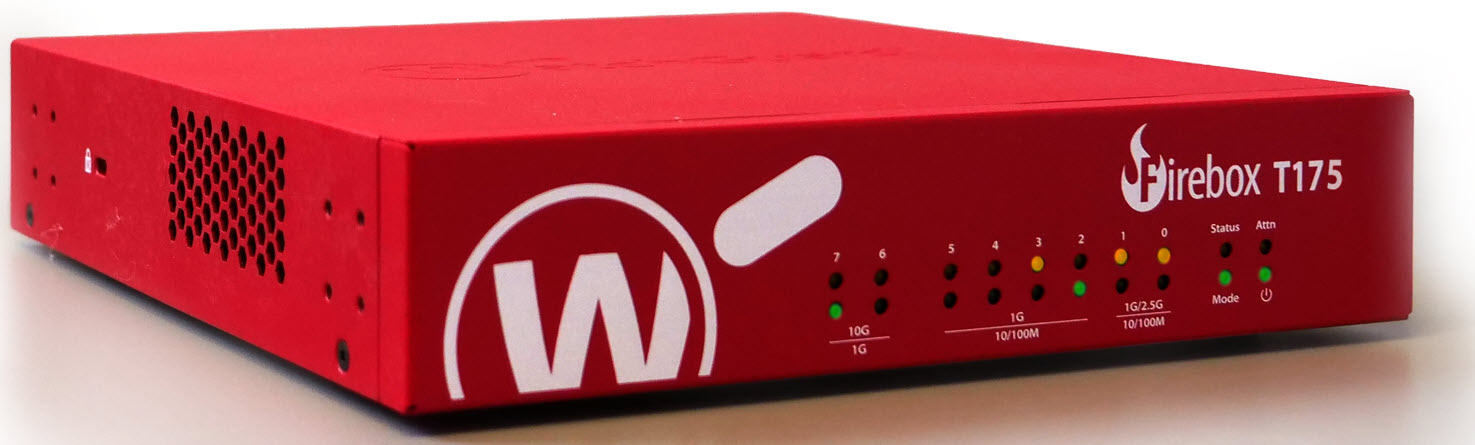
Cooling Fan
The Firebox has a fan that decreases the internal temperature of the device. The device adjusts the fan speed based on the temperature. You can view the current fan speed from the Fireware CLI with the command diagnose hardware system. For more information on how to use the CLI, go to the Fireware Command Line Reference Guide.
Temperature (CPU Tj) Fan Speed (%) RPM (Approximate) 40° C or less 26% 4,370 RPM 45° C 40% 6,850 RPM 60° C 50% 8,600 RPM 80° C 80% 14,000 RPM 100° C 90% 15,500 RPM
Wall Mount Instructions
You can mount the Firebox on a wall. Use the cross holes on the bottom of the Firebox to mount the device to a wall with screws and anchors.
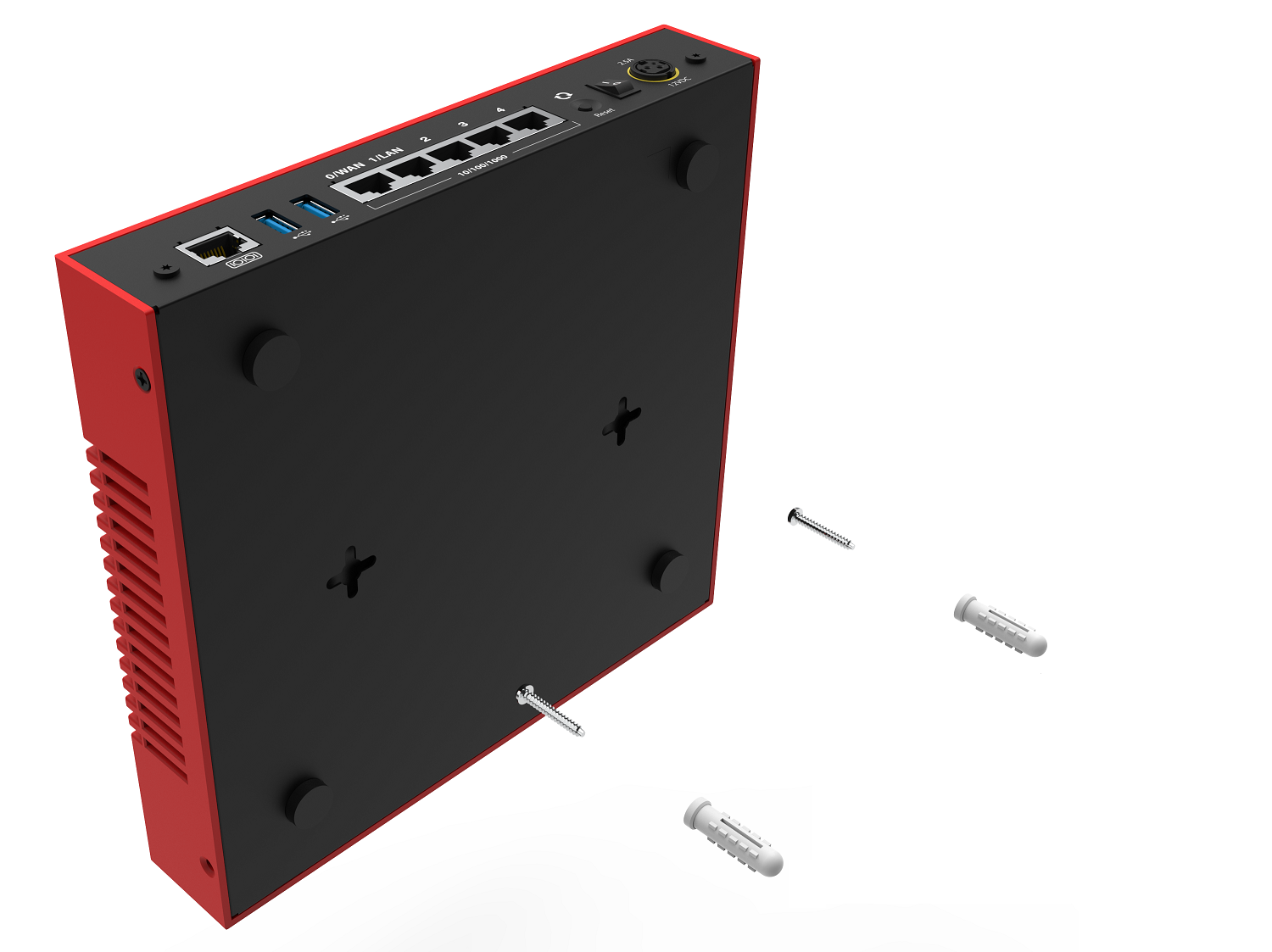
- Determine where the Firebox will be placed and mark the location for the two mounting holes (109 mm / 4.29 inches apart).
- Drill the two mounting holes and hammer the anchors into the holes.
- Insert and tighten the screws into the anchors. Leave part of the screw exposed so you can place the Firebox on the screws.
- Align the screws with the holes on the bottom of the Firebox and place the Firebox on the screws.
- Slide the Firebox to secure the screws in the slots of the mounting holes.
- Adjust the screws as necessary to make sure the Firebox is safely secured to the wall.
Rack Mount Instructions
An optional rack mount kit with ear brackets (WG9032) is available for the Firebox that enables you to install the device in a network rack.
The rack mount kit includes:
- 1 short ear bracket
- 1 long ear bracket
- 8 small screws
To install the Firebox in a rack:
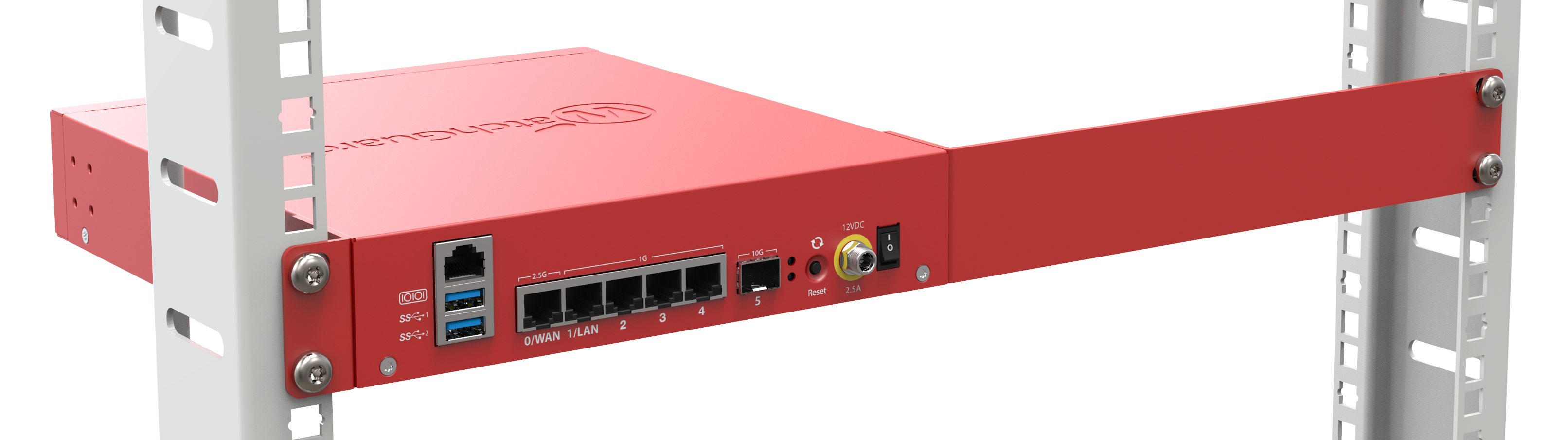
- Use the included screws to attach the short and long ear brackets to the sides of the Firebox before you install the device in the rack. You can install the long or short bracket on either side of the Firebox as required
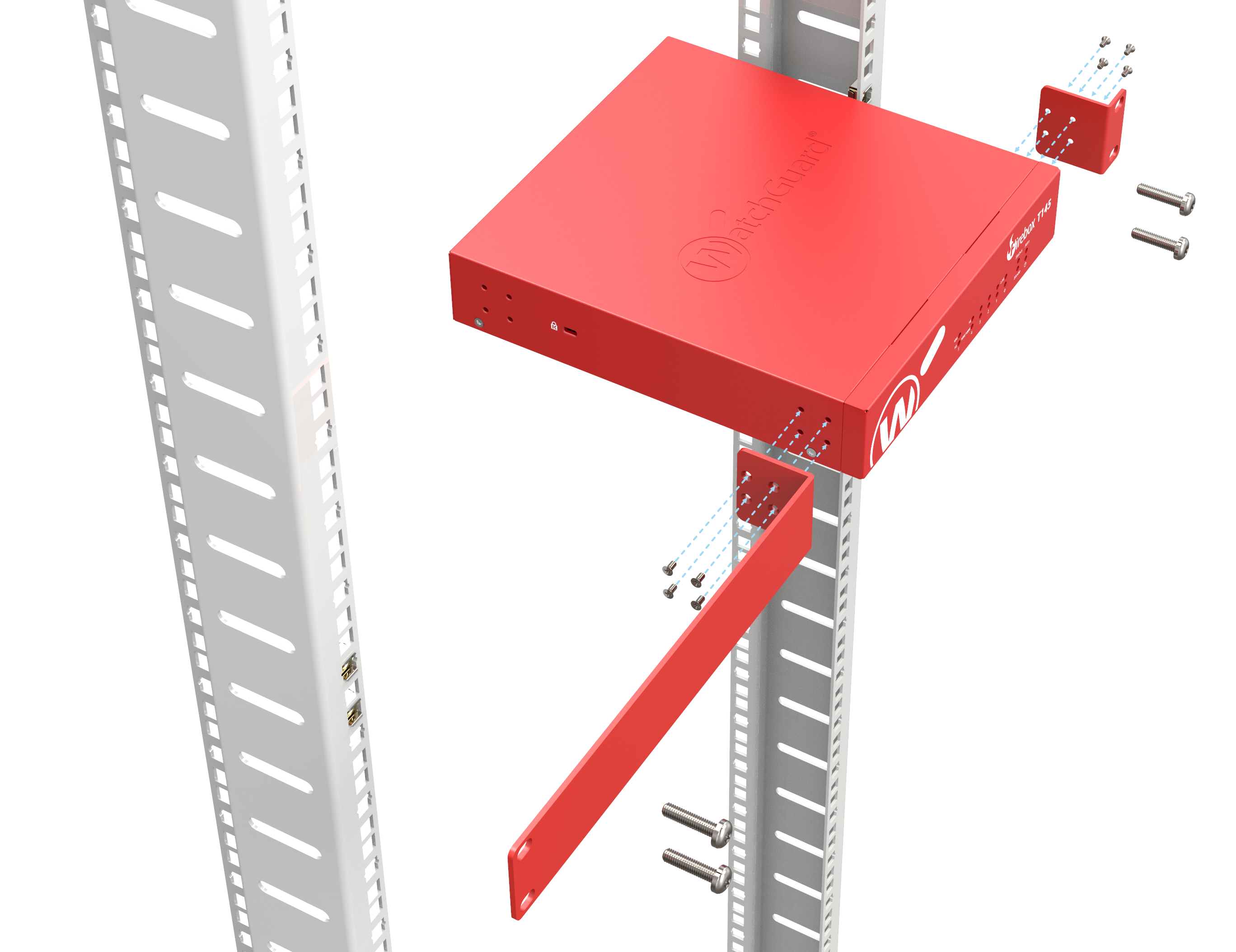
- Position the Firebox in the network rack so that the holes in the brackets align with the holes in the front of the rack.
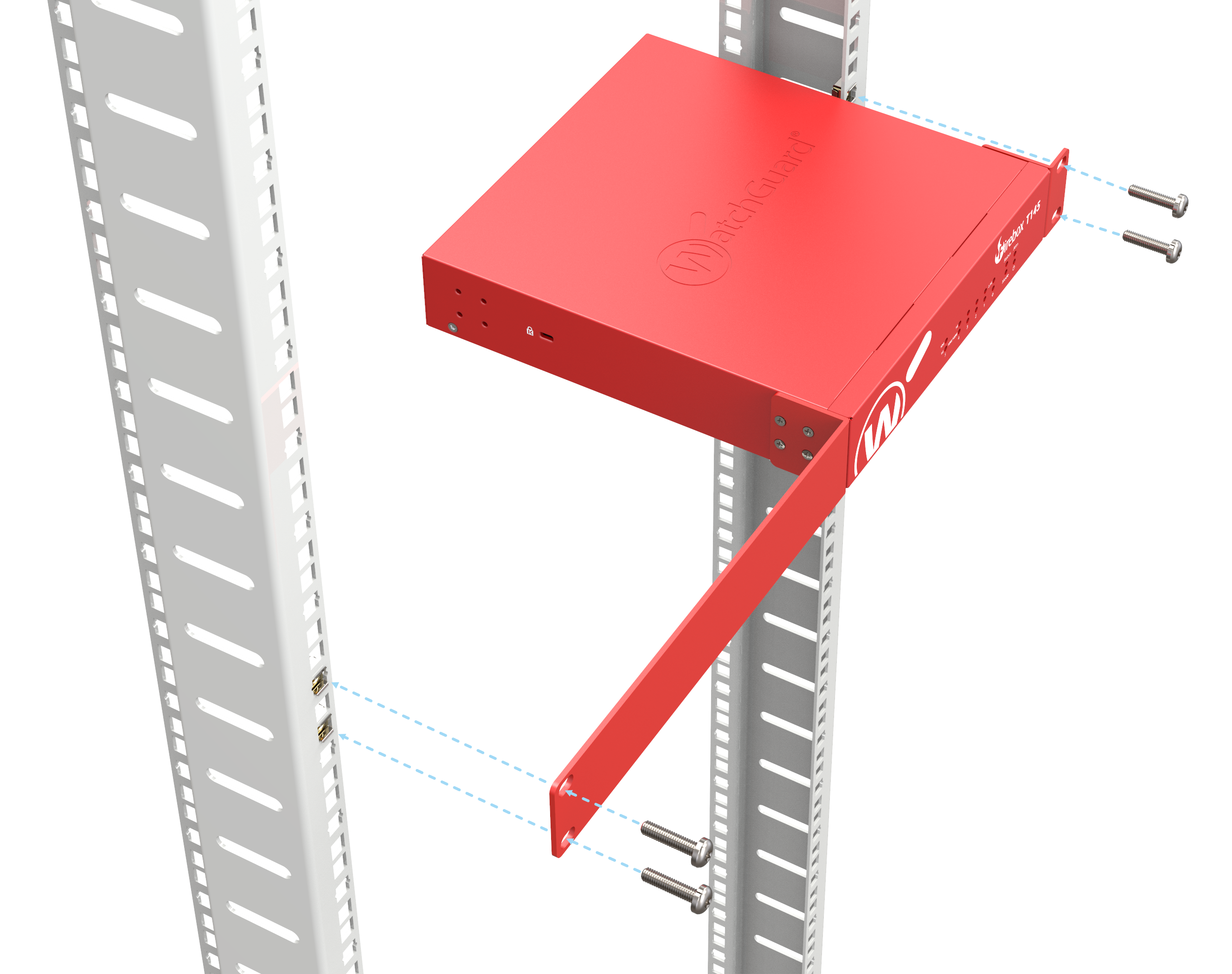
- Use rack screws (not included) to securely attach the brackets to the front of the rack.
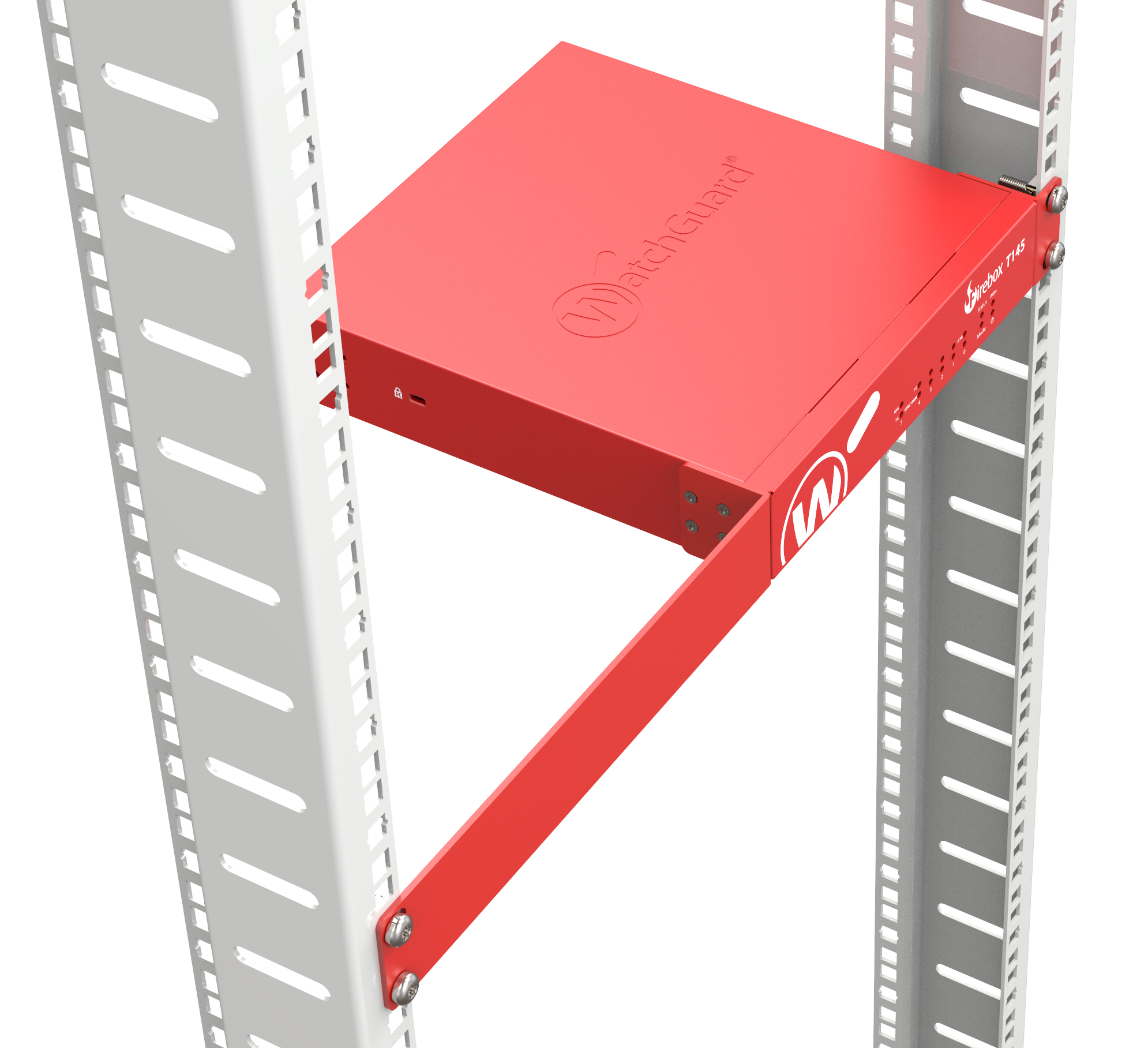
You can install the ear brackets on the front or the rear of the Firebox depending on which side you want to access from the front of the rack.
Precautions
WARNING: Do not place other devices directly on the Firebox, or use the Firebox as a shelf or work space.
When you install the device in a rack, make sure you consider these factors:
Elevated Operating Ambient Temperature
If you install the device in a closed or multi-unit rack assembly, the operating ambient temperature of the rack environment might be greater than room ambient. Make sure the ambient temperature of the rack environment is within the certified operating range specified in this Hardware Guide.
Reduced Air Flow
When you install the device in a rack, make sure that the amount of air flow required for safe operation of the equipment is not compromised.
Mechanical Loading
When you mount the device in the rack, avoid hazardous conditions caused by uneven mechanical loading.
Circuit Overloading
Make sure you connect the device to the power supply circuit in such a way that there is no overloading of the circuits, and no impact on overcurrent protection and supply wiring.
Reliable Grounding
Make sure all rack-mounted equipment is correctly grounded. For example, make sure you use power strips instead of direct connections to the branch circuit.
Restore Factory-Default Settings
If you have a problem in your configuration file that you cannot correct, or you cannot access the device, you can restore the device to factory-default settings and start with a new configuration. For example, if you do not know the administrator account passphrase, or if a power interruption causes damage to the Fireware operating system, you can restore the Firebox to the factory-default settings and build your configuration again.
To reset the Firebox to factory-default settings:
- Power off the Firebox.
- Press and hold the Reset button on the back of the Firebox.
- Power on the Firebox while you continue to hold the Reset button.
- Continue to hold the Reset button until the Attn indicator on the front of the Firebox begins to flash.
- Release the Reset button.
- Wait until the Attn indicator stays lit and does not flash.
- Power off the Firebox.
- Power on the Firebox.
The Firebox restarts with factory-default settings.
Notices
All WatchGuard products are designed and tested to meet strict safety requirements. These requirements include product safety approvals and other global compliance standards. Please read these instructions carefully before operating the product, and refer to them as needed to ensure the continued safe operation of your product.
For security, privacy, legal compliance, certifications, and environmental information, visit the WatchGuard Trust Center.
Safety Warning
- The AC power adapter is intended for use with WatchGuard products only. Do not use it with other equipment.
- Do not place objects on the power cord.
- Do not obstruct the ventilation openings. These openings prevent overheating of the machine.
- Never push objects of any kind into slots or openings on this equipment. Making a contact with a voltage point or shorting out a part may result in fire or electrical shock.
- When removing or installing an appliance, follow the general installation safety instructions.
- You must disconnect the AC power cord from the Firebox before you remove the cover of the Firebox for any reason.
- There is risk of explosion if the battery is replaced by an incorrect type. Dispose of used batteries according to the manufacturer’s instructions.
- Class I Equipment. This equipment must be earthed. The power plug must be connected to a properly wired earth ground socket outlet. An improperly wired socket outlet could place hazardous voltages on accessible metal parts.
- All Ethernet cables are designed for intra-building connection to other equipment. Do not connect these ports directly to communication wiring or other wiring that exits the building where the appliance is located.
- Disconnect the power source prior to defeating or bypassing the equipment protection means (like enclosure), and to restore the equipment protection means before restoring power.
Disclaimer
WatchGuard shall not be held liable if the end user alters, modifies, or repairs any WatchGuard hardware appliance.
Avis
Tous les produits WatchGuard sont conçus et testés pour répondre à des exigences strictes en matière de sécurité. Ces exigences comprennent les homologations de sécurité des produits ainsi que d’autres normes de conformité internationales. Veuillez lire attentivement ces instructions avant d’utiliser le produit et vous y référer au besoin afin d’assurer le fonctionnement sûr et continu de votre produit.
Pour des informations sur la sécurité, la confidentialité, la conformité légale, les certifications et l’environnement, consultez le WatchGuard Trust Center.
Remarques sur la sécurité
- L’adaptateur secteur est destiné à être utilisé uniquement avec les produits WatchGuard. Ne l’utilisez pas avec d’autres équipements.
- Ne placez pas d'objets sur le cordon d'alimentation.
- Ne pas obstruer les ouvertures de ventilation. Ces ouvertures évitent la surchauffe de la machine.
- N'introduisez jamais d'objets d'aucune sorte dans les fentes ou les ouvertures de cet équipement. Établir un contact avec un point de tension ou court-circuiter une pièce peut entraîner un incendie ou un choc électrique.
- Lors de la dépose ou de l'installation d'un appareil, respectez les consignes générales de sécurité d'installation.
- Vous devez débrancher le cordon d'alimentation CA du Firebox avant de retirer le couvercle du Firebox pour quelque raison que ce soit.
- Il y a un risque d'explosion si la batterie est remplacée par un type incorrect. Jetez les piles usagées conformément aux instructions du fabricant.
- Équipement de classe I. Cet équipement doit être mis à la terre. La fiche d’alimentation doit être branchée à une prise correctement câblée avec mise à la terre. Une prise mal câblée pourrait appliquer des tensions dangereuses sur les parties métalliques accessibles.
- Tous les câbles Ethernet sont conçus pour un raccordement à l’intérieur d’un bâtiment à d’autres équipements. Ne connectez pas ces ports directement à du câblage de communication ou à tout autre câblage qui sort du bâtiment où l’appareil est installé.
- Débranchez la source d’alimentation avant de neutraliser ou de contourner les dispositifs de protection de l’équipement (comme le boîtier), et rétablissez ces dispositifs de protection avant de rebrancher l’alimentation.
Clause de non-responsabilité
WatchGuard décline toute responsabilité si l'utilisateur final altère, modifie ou répare tout appareil matériel WatchGuard.
Hinweise Zur Sicherheit
Alle WatchGuard-Produkte werden entwickelt und getestet, um strenge Sicherheitsanforderungen zu erfüllen. Diese Anforderungen umfassen Sicherheitszertifizierungen für Produkte sowie weitere internationale Compliance-Standards. Bitte lesen Sie diese Anweisungen sorgfältig durch, bevor Sie das Produkt in Betrieb nehmen, und ziehen Sie sie bei Bedarf heran, um den sicheren und dauerhaften Betrieb Ihres Produkts zu gewährleisten.
Informationen zu Sicherheit, Datenschutz, rechtlicher Compliance, Zertifizierungen und Umwelt finden Sie im WatchGuard Trust Center.
Sicherheitshinweis
- Das Netzteil ist ausschließlich für die Verwendung mit WatchGuard-Produkten vorgesehen. Verwenden Sie es nicht mit anderen Geräten.
- Legen Sie keine Gegenstände auf das Netzkabel.
- Verdecken Sie nicht die Lüftungsöffnungen. Diese Öffnungen verhindern eine Überhitzung der Maschine.
- Stecken Sie niemals Gegenstände jeglicher Art in die Schlitze oder Öffnungen des Geräts stecken. Der Kontakt mit einem spannungsführenden Punkt oder das Kurzschließen eines Bauteils kann zu einem Brand oder elektrischen Schlag führen.
- Beim Entfernen oder Installieren eines Gerätes, nach den allgemeinen Installation Sicherheitshinweise.
- Sie müssen das Netzkabel von der Firebox trennen, bevor Sie die Abdeckung der Firebox aus irgendeinem Grund entfernen.
- Es besteht Explosionsgefahr, wenn die Batterie durch einen falschen Typ ersetzt wird. Entsorgen Sie gebrauchte Batterien gemäß den Anweisungen des Herstellers.
- Gerät der Klasse I. Dieses Gerät muss geerdet werden. Der Netzstecker muss an eine ordnungsgemäß verdrahtete Steckdose mit Schutzerdung angeschlossen werden. Eine falsch verdrahtete Steckdose kann gefährliche Spannungen an zugänglichen Metallteilen verursachen.
- Alle Ethernet-Kabel sind für die Verbindung innerhalb eines Gebäudes mit anderen Geräten ausgelegt. Schließen Sie diese Ports nicht direkt an Kommunikationsleitungen oder andere Verkabelungen an, die das Gebäude verlassen, in dem sich das Gerät befindet.
- Trennen Sie die Stromversorgung, bevor Sie Schutzvorrichtungen des Geräts (z. B. das Gehäuse) außer Kraft setzen oder umgehen, und stellen Sie sicher, dass diese Schutzvorrichtungen wieder aktiviert sind, bevor Sie die Stromversorgung wiederherstellen.
Haftungsausschluss
WatchGuard haftet nicht, wenn der Endbenutzer eine Hardware-Appliance von WatchGuard ändert, modifiziert oder repariert.
Avisos
Todos os produtos WatchGuard são projetados e testados para atender a requisitos rigorosos de segurança. Esses requisitos incluem certificações de segurança de produtos e outras normas globais de conformidade. Leia atentamente estas instruções antes de operar o produto e consulte-as sempre que necessário para garantir a operação segura e contínua do seu produto.
Para informações sobre segurança, privacidade, conformidade legal, certificações e meio ambiente, visite o WatchGuard Trust Center.
Aviso de Segurança
- O adaptador de alimentação CA destina-se ao uso exclusivo com produtos WatchGuard. Não o utilize com outros equipamentos.
- Não coloque objetos sobre o cabo de alimentação.
- Não obstrua as aberturas de ventilação. Essas aberturas evitam o superaquecimento do equipamento.
- Nunca insira objetos de qualquer tipo nas aberturas ou fendas deste equipamento. O contato com pontos de tensão ou curto-circuito de componentes pode resultar em incêndio ou choque elétrico.
- Ao remover ou instalar um equipamento, siga as instruções gerais de segurança de instalação.
- Você deve desconectar o cabo de alimentação CA do Firebox antes de remover a tampa por qualquer motivo.
- Há risco de explosão se a bateria for substituída por um tipo incorreto. Descarte as baterias usadas de acordo com as instruções do fabricante.
- Equipamento de Classe I. Este equipamento deve ser aterrado. O plugue de alimentação deve ser conectado a uma tomada devidamente aterrada. Uma tomada mal conectada pode colocar tensões perigosas nas partes metálicas acessíveis.
- Todos os cabos Ethernet são projetados para conexão interna ao edifício com outros equipamentos. Não conecte essas portas diretamente a fiações de comunicação ou outras fiações que saiam do edifício onde o equipamento está localizado.
- Desconecte a fonte de energia antes de desativar ou contornar os meios de proteção do equipamento (como o gabinete) e restaure esses meios de proteção antes de restabelecer a energia.
Isenção de Responsabilidade
A WatchGuard não se responsabiliza caso o usuário final altere, modifique ou repare qualquer equipamento de hardware da WatchGuard.
Avisos
Todos los productos WatchGuard están diseñados y probados para cumplir con estrictos requisitos de seguridad. Estos requisitos incluyen certificaciones de seguridad del producto y otras normas globales de cumplimiento. Lea atentamente estas instrucciones antes de operar el producto y consúltelas cuando sea necesario para garantizar el funcionamiento seguro y continuo de su producto.
Para información sobre seguridad, privacidad, cumplimiento legal, certificaciones y medio ambiente, visite el WatchGuard Trust Center.
Aviso de seguridad
- El adaptador de alimentación de CA está destinado para su uso únicamente con productos WatchGuard. No lo utilice con otros equipos.
- No coloque objetos sobre el cable de alimentación.
- No obstruya las aberturas de ventilación. Estas aberturas evitan el sobrecalentamiento del equipo.
- Nunca introduzca objetos de ningún tipo en las ranuras o aberturas de este equipo. El contacto con puntos de voltaje o el cortocircuito de componentes puede provocar incendios o descargas eléctricas.
- Al retirar o instalar un equipo, siga las instrucciones generales de seguridad de instalación.
- Debe desconectar el cable de alimentación de CA del Firebox antes de retirar la cubierta por cualquier motivo.
- Existe riesgo de explosión si la batería se reemplaza por un tipo incorrecto. Deseche las baterías usadas de acuerdo con las instrucciones del fabricante.
- Equipo de Clase I. Este equipo debe estar conectado a tierra. El enchufe de alimentación debe conectarse a una toma de corriente con conexión a tierra adecuada. Una toma mal cableada puede generar voltajes peligrosos en partes metálicas accesibles.
- Todos los cables Ethernet están diseñados para conexiones dentro del edificio con otros equipos. No conecte estos puertos directamente a cableado de comunicaciones u otro cableado que salga del edificio donde se encuentra el equipo.
- Desconecte la fuente de alimentación antes de anular o eludir los mecanismos de protección del equipo (como la carcasa), y restablezca dichos mecanismos antes de volver a conectar la alimentación.
Descargo de responsabilidad
WatchGuard no se hace responsable si el usuario final altera, modifica o repara cualquier equipo de hardware de WatchGuard.
注意事項
すべての WatchGuard 製品は、厳格な安全要件を満たすように設計および試験されています。これらの要件には、製品安全認証およびその他の国際的なコンプライアンス基準が含まれます。製品を使用する前に、本説明をよくお読みください。また、製品を安全に継続して使用するために、必要に応じて参照してください。
セキュリティ、プライバシー、法令遵守、認証、および環境に関する情報については、WatchGuard Trust Center をご覧ください。
安全上の警告
- この AC 電源アダプターは、WatchGuard 製品専用です。他の機器には使用しないでください。
- 電源コードの上に物を置かないでください。
- 通気口を塞がないでください。これらの開口部は、機器の過熱を防ぐためのものです。
- 本装置のスロットや開口部に、いかなる物も挿入しないでください。電圧がかかっている箇所に接触したり、部品を短絡させたりすると、火災や感電の原因となることがあります。
- 機器を取り外したり設置したりする際は、一般的な設置時の安全上の注意事項に従ってください。
- Firebox のカバーを取り外す前には、理由の如何を問わず、必ず Firebox から AC 電源コードを取り外してください。
- 不適切な種類のバッテリーと交換すると、爆発するおそれがあります。使用済みのバッテリーは、メーカーの指示に従って廃棄してください。
- クラス I 機器。本機器は接地する必要があります。電源プラグは、適切に配線された接地極付きコンセントに接続してください。不適切に配線されたコンセントを使用すると、触れることのできる金属部分に危険な電圧が現れるおそれがあります。
- すべての Ethernet ケーブルは、同一建物内の他の機器との接続を目的として設計されています。これらのポートを、通信配線や、機器が設置されている建物の外部へ出ているその他の配線に直接接続しないでください。
- 機器の保護機構(筐体など)を無効化または迂回する前に電源を切断してください。また、電源を再投入する前に、機器の保護機構を元の状態に戻してください。
免責事項
WatchGuard ハードウェアアプライアンスに対してエンドユーザーが変更、改造、または修理を行った場合、WatchGuard は一切の責任を負いません。
注意事項
所有 WatchGuard 產品均經過設計與測試,以符合嚴格的安全要求。這些要求包括產品安全認證以及其他全球合規標準。請在操作本產品之前仔細閱讀本說明,並在需要時參閱,以確保持續安全地使用本產品。
如需有關安全性、隱私權、法規遵循、認證及環境資訊,請造訪 WatchGuard Trust Center。
安全警告
- 本 AC 電源變壓器僅供 WatchGuard 產品使用。請勿將其用於其他設備。
- 請勿在電源線上放置任何物品。
- 請勿阻塞通風口。這些開口可防止設備過熱。
- 切勿將任何物品插入本設備的插槽或開口。接觸帶電部位或使零件短路可能導致火災或觸電。
- 安裝或拆卸設備時,請遵循一般安裝安全指示。
- 因任何原因拆卸 Firebox 外殼之前,必須先將 AC 電源線從 Firebox 上拔除。
- 如果使用不正確類型的電池進行更換,可能有爆炸風險。請依照製造商的說明處置廢棄電池。
- I 類設備。本設備必須接地。電源插頭必須連接至正確配線並接地的電源插座。配線不正確的插座可能會使可接觸的金屬部件帶有危險電壓。
- 所有 Ethernet 網路線均設計為建築物內部設備之間的連接使用。請勿將這些連接埠直接連接至通訊線路或其他延伸至設備所在建築物外部的線路。
- 在停用或繞過設備保護措施(例如機殼)之前,請先中斷電源;並在恢復供電之前,先將設備保護措施恢復原狀。
免責聲明
若終端使用者變更、改裝或維修任何 WatchGuard 硬體設備,WatchGuard 概不負責。
注意事项
所有 WatchGuard 产品均经过设计和测试,以满足严格的安全要求。这些要求包括产品安全认证以及其他全球合规标准。请在操作本产品之前仔细阅读本说明,并在需要时参考,以确保持续安全地使用本产品。
有关安全、隐私、法律合规、认证和环境信息,请访问 WatchGuard Trust Center。
安全警告
- 本 AC 电源适配器仅供 WatchGuard 产品使用。请勿用于其他设备。
- 请勿在电源线上放置任何物品。
- 请勿堵塞通风口。这些开口用于防止设备过热。
- 切勿将任何物体插入本设备的插槽或开口。接触带电部位或使部件短路可能导致火灾或触电。
- 安装或拆卸设备时,请遵循一般安装安全说明。
- 因任何原因拆卸 Firebox 外壳之前,必须先将 AC 电源线从 Firebox 上断开。
- 如果使用不正确类型的电池进行更换,可能存在爆炸风险。请按照制造商的说明处理废旧电池。
- I 类设备。本设备必须接地。电源插头必须连接到接线正确并已接地的电源插座。接线不正确的插座可能会使可接触的金属部件带有危险电压。
- 所有 Ethernet 网线均设计用于建筑物内部设备之间的连接。请勿将这些端口直接连接到通信线路或其他延伸至设备所在建筑物外部的线路。
- 在停用或绕过设备保护装置(例如机壳)之前,请先断开电源;并在恢复供电之前,先将设备保护装置恢复原状。
免责声明
如果最终用户变更、改装或维修任何 WatchGuard 硬件设备,WatchGuard 概不承担责任。
FCC (USA)
This device complies with part 15 of the FCC Rules. Operation is subject to the following two conditions: (1) This device may not cause harmful interference, and (2) this device must accept any interference received, including interference that may cause undesired operation.
This equipment has been tested and found to comply with the limits for a Class B digital device, pursuant to part 15 of the FCC Rules. These limits are designed to provide reasonable protection against harmful interference in a residential installation.
This equipment generates, uses and can radiate radio frequency energy and, if not installed and used in accordance with the instructions, may cause harmful interference to radio communications. However, there is no guarantee that interference will not occur in a particular installation. If this equipment does cause harmful interference to radio or television reception, which can be determined by turning the equipment off and on, the user is encouraged to try to correct the interference by one or more of the following measures:
- Reorient or relocate the receiving antenna.
- Increase the separation between the equipment and receiver.
- Connect the equipment into an outlet on a circuit different from that to which the receiver is connected.
- Consult the dealer or an experienced radio/TV technician for help.
FCC Caution:
Any changes or modifications not expressly approved by the party responsible for compliance could void the user’s authority to operate this equipment.
This transmitter must not be co-located or operating in conjunction with any other antenna or transmitter.
This device meets all the other requirements specified in Part 15E, Section 15.407 of the FCC Rules.
Radiation Exposure Statement:
This equipment complies with FCC radiation exposure limits set forth for an uncontrolled environment. This equipment should be installed and operated with minimum distance of 20cm between the radiator & your body.
ISED / IC (Canada)
This device complies with ISED’s licence-exempt RSSs. Operation is subject to the following two conditions: (1) This device may not cause harmful interference, and (2) this device must accept any interference received, including interference that may cause undesired operation.
Le présent appareil est conforme aux CNR d’ ISED applicables aux appareils radio exempts de licence. L’exploitation est autorisée aux deux conditions suivantes: (1) le dispositif ne doit pas produire de brouillage préjudiciable, et (2) ce dispositif doit accepter tout brouillage reçu, y compris un brouillage susceptible de provoquer un fonctionnement indésirable.
Caution
(i) the device for operation in the band 5150-5250 MHz is only for indoor use to reduce the potential for harmful interference to co-channel mobile satellite systems;
(ii) where applicable, antenna type(s), antenna models(s), and worst-case tilt angle(s) necessary to remain compliant with the e.i.r.p. elevation mask requirement set forth in section 6.2.2.3 shall be clearly indicated.
Avertissement
Le guide d’utilisation des dispositifs pour réseaux locaux doit inclure des instructions précises sur les restrictions susmentionnées, notamment :
(i) les dispositifs fonctionnant dans la bande 5150-5250 MHz sont réservés uniquement pour une utilisation à l’intérieur afin de réduire les risques de brouillage préjudiciable aux systèmes de satellites mobiles utilisant les mêmes canaux;
(ii) lorsqu’il y a lieu, les types d’antennes (s’il y en a plusieurs), les numéros de modèle de l’antenne et les pires angles d’inclinaison nécessaires pour rester conforme à l’exigence de la p.i.r.e. applicable au masque d’élévation, énoncée à la section 6.2.2.3, doivent être clairement indiqués.
Radiation Exposure Statement
This equipment complies with ISED radiation exposure limits set forth for an uncontrolled environment. This equipment should be installed and operated with minimum distance 20cm between the radiator & your body.
Déclaration d'exposition aux radiations
Cet équipement est conforme aux limites d'exposition aux rayonnements ISED établies pour un environnement non contrôlé. Cet équipement doit être installé et utilisé avec un minimum de 20cm de distance entre la source de rayonnement et votre corps.
For indoor use only. Pour une utilisation en intérieur uniquement.
UKCA (United Kingdom)
This device is in conformity with the relevant legislation of the United Kingdom. To view the full UK Declaration of Conformity for this device, go to the WatchGuard Trust Center.
Product:
- WatchGuard Model: Firebox T175
- Hardware Model: SS2AE8
UK Regulations:
- Electrical Equipment (Safety) Regulations 2016
- Electromagnetic Compatibility Regulations 2016
- The Restriction of the Use of Certain Hazardous Substances in Electrical and Electronic Equipment Regulations 2012 (as amended)
- Waste Electrical and Electronic Equipment Regulations 2013
- UK REACH Regulations (SI 2019/758, as amended)
Standards:
- IEC 62368-1:2018
- EN 55032:2015/A11:2020
- FCC 47 CFR Part 15, Subpart B:2024
- ICES-003 issue7
- CISPR 32:2015+AMD1:2019
- VCCI-CISPR 32:2016
- AS/NZS CISPR 32:2015/AMD1:2020
- EN 55035:2017/A11:2020
- EN IEC 61000-3-2:2019+A1:2021+A2:2024
- EN 61000-3-3:2013+A1:2019+A2:2021
- IEC 61000-4-2:2025 (Edition 3.0)
- IEC 61000-4-3:2020 (Edition 4.0)
- IEC 61000-4-4 Edition 3.0 2012-04
- IEC 61000-4-5:2014 + AMD1:2017 (Edition 3.0)
- IEC 61000-4-6:2023 (Edition 5.0)
- IEC 61000-4-8 Edition 2.0 2009-09
- IEC 61000-4-11 Edition 3.0 2020-01
CE (European Union)
This device is in conformity with the relevant legislation of the European Union. To view the full EU Declaration of Conformity for this device, go to the WatchGuard Trust Center.
Product:
- WatchGuard Model: Firebox T175
- Hardware Model: SS2AE8
EU Directives:
- Low Voltage (2014/35/EU)
- Electromagnetic Compatibility (2014/30/EU)
- RoHS (2011/65/EU and 2015/863/EU RoHS)
- WEEE Directive 2012/19/EU
- REACH EC 1907/2006
Standards:
- IEC 62368-1:2018
- EN 55032:2015/A11:2020
- FCC 47 CFR Part 15, Subpart B:2024
- ICES-003 issue7
- CISPR 32:2015+AMD1:2019
- VCCI-CISPR 32:2016
- AS/NZS CISPR 32:2015/AMD1:2020
- EN 55035:2017/A11:2020
- EN IEC 61000-3-2:2019+A1:2021+A2:2024
- EN 61000-3-3:2013+A1:2019+A2:2021
- IEC 61000-4-2:2025 (Edition 3.0)
- IEC 61000-4-3:2020 (Edition 4.0)
- IEC 61000-4-4 Edition 3.0 2012-04
- IEC 61000-4-5:2014 + AMD1:2017 (Edition 3.0)
- IEC 61000-4-6:2023 (Edition 5.0)
- IEC 61000-4-8 Edition 2.0 2009-09
- IEC 61000-4-11 Edition 3.0 2020-01
RoHS Statement
The Restriction of Hazardous Substances 2.0 (RoHS 2.0) in Electrical and Electronic Equipment Directive was passed into law by the European Union (EU). It affects manufacturers, sellers, distributors and recyclers of electrical and electronic equipment containing lead, cadmium, mercury, hexavalent chrome, polybrominated diphenylether (PBDE), polybrominated biphenyl (PBB), Bis (2-ethylhexyl) phthalate (DEHP), Butyl benzyl phthalate (BBP), Dibutyl phthalate (DBP) and Diisobutyl phthalate (DIBP). After June 4, 2015 the use of these materials are banned in new products sold in Europe.
WatchGuard declares that all products listed herein comply with European Union RoHS Directive (RoHS 2.0 2011/65/EU and 2015/863/EU) requirements taking the following Annex III exemptions: [stating the list of exemptions, 6(c) ,7(a) ,7(C)-1].
Access Points: AP130, AP230W, AP330, AP340, AP332CR, AP430CR, AP432
Firebox: N5V, T25, T25-W, T45, T45-PoE, T45-W-PoE, T45-CW, T85-PoE, T115-W, T125, T125-W, T145, T145-W, T175, T185, M290, M295, M390, M395, M495, M590, M595, M690, M695, M4850, M5850, M6850
| Substances Listed | Limit |
|---|---|
| Cadmium(Cd) | ≤ 0.01% (100 ppm) |
| Hexa‐valent Chromium (Cr6+) | ≤ 0.1% (1000 ppm) |
| Lead (Pb) | ≤ 0.1% (1000 ppm) * |
| Mercury (Hg) | ≤ 0.1% (1000 ppm) |
| Polybrominated biphenyis (PBB) | ≤ 0.1% (1000 ppm) |
| Polybrominated diphenylethers (PBDE or PBBE) | ≤ 0.1% (1000 ppm) |
| Bis (2-ethylhexyl) phthalate (DEHP) | ≤ 0.1% (1000 ppm) |
| Butyl benzyl phthalate (BBP) | ≤ 0.1% (1000 ppm) |
| Dibutyl phthalate (DBP) | ≤ 0.1% (1000 ppm) |
| Diisobutyl phthalate (DIBP) | ≤ 0.1% (1000 ppm) |
* (contains Lead > 0.1% by weight because of exempted applications)
7a lead in high melting temperature type solders (i.e. lead based alloys containing 85 % by weight or more lead)
7(c) I. Electrical and electronic components containing lead in a glass or ceramic other than dielectric ceramic in capacitors, e.g. piezo electronic devices, or in a glass or ceramic matrix compound.
WEEE Statement
WatchGuard asks that all our products to be recycled at the end of their current use to comply with local waste compliance requirements.
WatchGuard supports the EU Waste Electrical and Electronic Equipment (WEEE) Directive (2012/19/EU). That means that WEEE may not be disposed as unsorted municipal waste but is to be collected separately.
WatchGuard products are therefore labeled with this symbol:
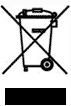
The WEEE symbol on your WatchGuard equipment indicates that it should not be disposed of by the end user with unsorted municipal waste, but in a manner consistent with required EU Directives, and the local transposition of the Directive in the end user's jurisdiction. The symbol is placed per CENELEC standard EN50419.
WEEE may contain hazardous substances which may negatively affect the environment and human health when disposed of through normal channels. Batteries that are not enclosed in the waste equipment must be separated from it and disposed of separately before being handed in at a collection point. Old batteries, and in certain cases also the waste equipment, can likewise be returned free of charge to the point of sale. You are responsible for deleting any personal data on the waste equipment. WatchGuard is committed to reduce the negative environmental and human health effects of WEEE which will help prevent potential negative consequences for the environment and human health. If you are a consumer please use your local recycling option. This is usually your municipal refuse site.
Japan VCCI Notice (Class A ITE)
これはVCCI評議会の基準に基づくクラスA製品です。本製品がラジオやテレビ受信機の近くで使用され
ている場合は、電波障害を引き起こすことがあります。インストールして、取扱説明書に従って
機器を使用しています VCCI-A
China Class A Notice
警告:未避免電磁干擾,本產品不應安裝或使用於住宅環境。
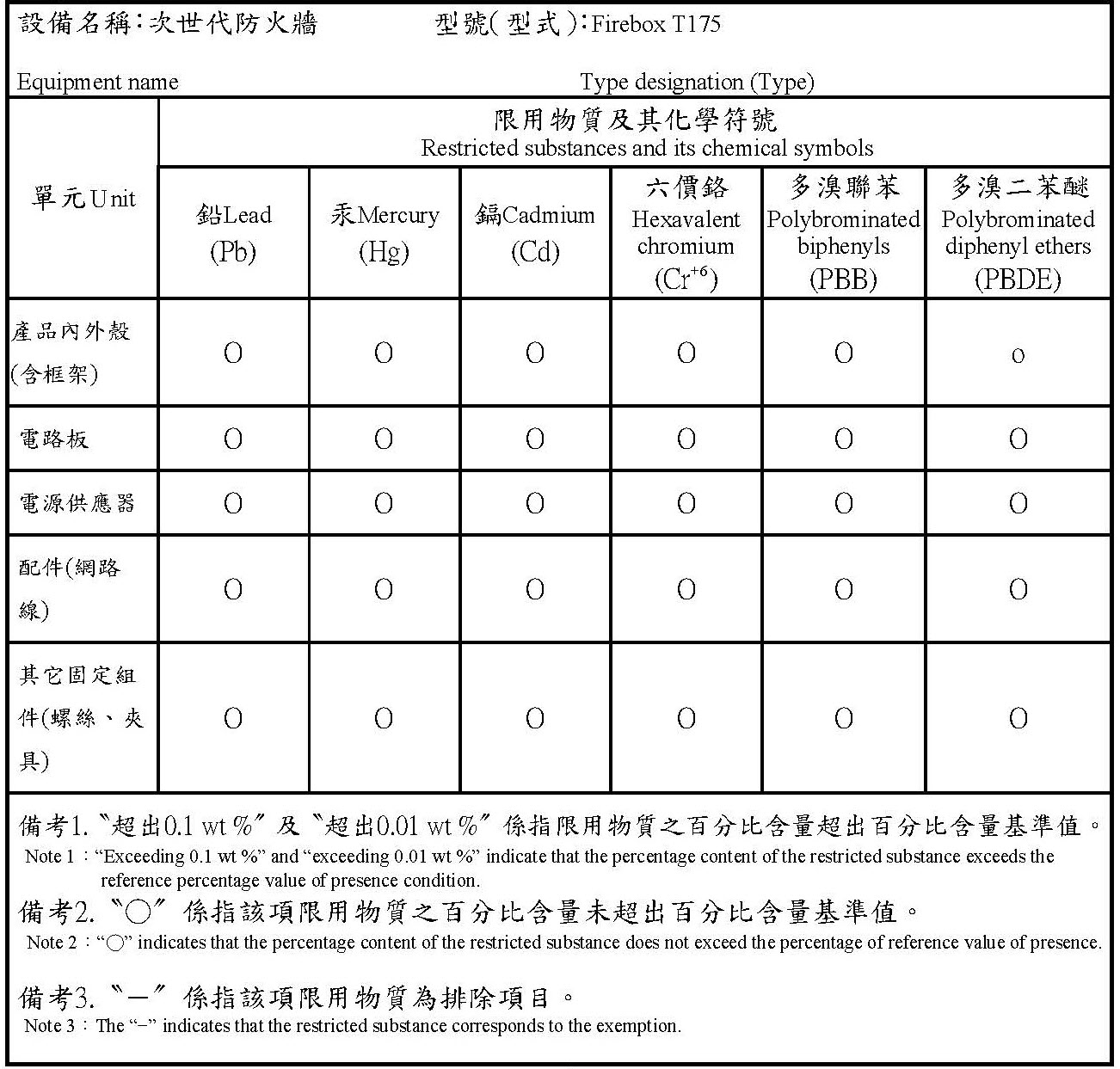
Taiwan RoHS
Taiwan Class A Notice
警告使用者:這是甲類產品,應使用並正確安裝。本產品可能會造成無線電干擾,在這種情況下,用
戶可能需要採取適當的措施。
警示 本電池如果更換不正確會有爆炸的危險,請勿自行更換電池
Taiwan NCC
低功率電波輻射性電機管理辦法
第十二條 經型式認證合格之低功率射頻電機 , 非經許可 , 公司﹑商號或使用者均不得擅自變更頻率﹑
加大功率或變更原設計之特性及功能。
第十四條 低功率射頻電機之使用不得影響飛航安全及干擾合法通信;經發現有干擾現象時 , 應立即停
用 , 並改善至無干擾時方得繼續使用。前項合法通信 , 指依電信法規定作業之無線電通信。 低功率射
頻電機須忍受合法通信或工業、科學及醫療用電波輻射性電機設備之干擾。
電磁波曝露量MPE標準值(MPE) 1mW/cm2,送測產品實值為0.338 mW/cm2
無線資訊傳輸設備避免影響附近雷達系統之操作
Taiwan BSMI CNS 15936 Type A Notice
警告:為避免電磁干擾,本產品不應安裝或使用於住宅環境。
Brazil Notice
Este equipamento não tem direito à proteção contra interferência prejudicial e não pode causar interferência em sistemas devidamente autorizados.
Mexico Notice
La operación de este equipo está sujeta a las siguientes dos condiciones:
(i) es posible que este equipo o dispositivo no cause interferencia perjudicial y
(ii) este equipo o dispositivo debe aceptar cualquier interferencia, incluyendo la que pueda causar su operación no deseada.
Limited Hardware Warranty
This Limited Hardware Warranty (the “Warranty”) applies to the enclosed hardware product, not including any associated software, which is licensed pursuant to a separate end-user license agreement and warranty (the “Product”). BY USING THE PRODUCT, YOU (either an individual or a single entity) AGREE TO THE TERMS HEREOF.
If you do not agree to these terms, please return this package, along with proof of purchase, to the authorized dealer from which you purchased it for a full refund. WatchGuard Technologies, Inc. (“WatchGuard”) and you agree as set forth below or on the reverse side of this card, as applicable.
- LIMITED WARRANTY. WatchGuard warrants that upon delivery and for one (1) year thereafter (the “Warranty Period”): (a) the Product will be free from material defects in materials and workmanship, and (b) the Product, when properly installed and used for its intended purpose and in its intended operating environment, will perform substantially in accordance with WatchGuard applicable specifications.
This warranty does not apply to any Product that has been: (i) altered, repaired or modified by any party other than WatchGuard except for the replacement or inclusion of specified components authorized in, and performed in strict accordance with, documentation provided by WatchGuard; or (ii) damaged or destroyed by force majeure events, accidents, power spikes or similar events or by any intentional, reckless or negligent acts or omissions of any party. You may have additional warranties with respect to the Product from the manufacturers of Product components. However, you agree not to look to WatchGuard for, and hereby release WatchGuard from any liability for, performance of, enforcement of, or damages or other relief on account of, any such warranties or any breach thereof.
- REMEDIES. If any Product does not comply with the WatchGuard warranties set forth in Section 1 above, WatchGuard will, following the receipt of the product you claim is defective and at its option, either (a) repair the Product, or (b) replace the Product with a like or similar product; provided, that you will be responsible for returning the Product and for all costs of shipping and handling. Repair or replacement of the Product shall not extend the Warranty Period. Any Product, component, part or other item replaced by WatchGuard becomes the property of WatchGuard. WatchGuard shall not be responsible for return of or damage to any software, firmware, information or data contained in, stored on, or integrated with any returned Products.
- DISCLAIMER AND RELEASE. THE WARRANTIES, OBLIGATIONS AND LIABILITIES OF WATCHGUARD, AND YOUR REMEDIES, SET FORTH IN PARAGRAPHS 1 AND 2 ABOVE ARE EXCLUSIVE AND IN SUBSTITUTION FOR, AND YOU HEREBY WAIVE, DISCLAIM AND RELEASE ANY AND ALL OTHER WARRANTIES, OBLIGATIONS AND LIABILITIES OF WATCHGUARD AND ALL OTHER RIGHTS, CLAIMS AND REMEDIES YOU MAY HAVE AGAINST WATCHGUARD, EXPRESS OR IMPLIED, ARISING BY LAW OR OTHERWISE, WITH RESPECT TO ANY NONCONFORMANCE OR DEFECT IN THE PRODUCT (INCLUDING, BUT NOT LIMITED TO, ANY IMPLIED WARRANTY OF MERCHANTABILITY OR FITNESS FOR A PARTICULAR PURPOSE, ANY IMPLIED WARRANTY ARISING FROM COURSE OF PERFORMANCE, COURSE OF DEALING, OR USAGE OF TRADE, ANY WARRANTY O NONINFRINGEMENT, ANY WARRANTY OF UNINTERRUPTED OR ERROR-FREE OPERATION, ANY OBLIGATION, LIABILITY, RIGHT, CLAIM OR REMEDY IN TORT, WHETHER OR NOT ARISING FROM THE NEGLIGENCE (WHETHER ACTIVE, PASSIVE OR IMPUTED) OR FAULT OF WATCHGUARD OR FROM PRODUCT LIABILITY, STRICT LIABILITY OR OTHER THEORY, AND ANY OBLIGATION, LIABILITY, RIGHT, CLAIM OR REMEDY FOR LOSS OR DAMAGE TO, OR CAUSED BY OR CONTRIBUTED TO BY, THE PRODUCT).
- LIMITATION AND LIABILITY. WATCHGUARD’S LIABILITY (WHETHER ARISING IN CONTRACT (INCLUDING WARRANTY), TORT (INCLUDING ACTIVE, PASSIVE OR IMPUTED NEGLIGENCE AND STRICT LIABILITY AND FAULT) OR OTHER THEORY) WITH REGARD TO ANY PRODUCT WILL IN NO EVENT EXCEED THE PURCHASE PRICE PAID BY YOU FOR SUCH PRODUCT. THIS SHALL BE TRUE EVEN IN THE EVENT OF THE FAILURE OF ANY AGREED REMEDY. IN NO EVENT WILL WATCHGUARD BE LIABLE TO YOU OR ANY THIRD PARTY (WHETHER ARISING IN CONTRACT (INCLUDING WARRANTY), TORT (INCLUDING ACTIVE, PASSIVE OR IMPUTED NEGLIGENCE AND STRICT LIABILITY AND FAULT) OR OTHER THEORY) FOR COST OF COVER OR FOR ANY INDIRECT, SPECIAL, INCIDENTAL, OR CONSEQUENTIAL DAMAGES (INCLUDING WITHOUT LIMITATION LOSS OF PROFITS, BUSINESS, OR DATA) ARISING OUT OF OR IN CONNECTION WITH THIS WARRANTY OR THE USE OF OR INABILITY TO USE THE PRODUCT, EVEN IF WATCHGUARD HAS BEEN ADVISED OF THE POSSIBILITY OF SUCH DAMAGES. THIS SHALL BE TRUE EVEN IN THE EVENT OF THE FAILURE OF ANY AGREED REMEDY.
- MISCELLANEOUS PROVISIONS. This Warranty will be governed by the laws of the state of Washington, U.S.A., without reference to its choice of law rules. The provisions of the 1980 United Nations Convention on Contracts for the International Sales of Goods, as amended, shall not apply. You agree not to directly or indirectly transfer the Product or use of the product or associated documentation to any country to which such transfer would be prohibited by the U.S. Export laws and regulations. If any provision of this Warranty is found to be invalid or unenforceable, then the remainder shall have full force and effect and the invalid provision shall be modified or partially enforced to the maximum extent permitted by law to effectuate the purpose of this Warranty. This is the entire agreement between WatchGuard and you relating to the Product, and supersedes any prior purchase order, communications, advertising or representations concerning the Product AND BY USING THE PRODUCT YOU AGREE TO THESE TERMS. IF THE PRODUCT IS BEING USED BY AN ENTITY, THE INDIVIDUAL INDICATING AGREEMENT TO THESE TERMS BY USING THE PRODUCT REPRESENTS AND WARRANTS THAT (A) SUCH INDIVIDUAL IS DULY AUTHORIZED TO ACCEPT THE WARRANTY ON BEHALF OF THE ENTITY AND TO BIND THE ENTITY TO THE TERMS OF THIS WARRANTY; (B) THE ENTITY HAS THE FULL POWER, CORPORATE OR OTHERWISE, TO ENTER INTO THE WARRANTY AND PERFORM ITS OBLIGATIONS UNDER THE WARRANTY AND; (C) THE WARRANTY AND THE PERFORMANCE OF THE ENTITY’S OBLIGATIONS UNDER THE WARRANTY DO NOT VIOLATE ANY THIRD-PARTY AGREEMENT TO WHICH THE ENTITY IS A PARTY.
No change or modification of the Warranty will be valid unless it is in writing and is signed by WatchGuard.