Applies To: Cloud-managed Fireboxes, Locally-managed Fireboxes
Windows computers with ARM-based processors do not support the Mobile VPN with SSL client for Windows. For example, systems powered by Qualcomm Snapdragon CPUs.
The Mobile VPN with SSL client depends on kernel‑mode drivers and networking components built for x86/x64 architectures. These components cannot run on Windows with ARM processors, and Windows does not provide emulation for kernel‑mode drivers. As a result, the Mobile VPN with SSL client for Windows cannot install correctly or establish a VPN connection on ARM‑based Windows devices.
This limitation applies to:
- Windows 10 on ARM
- Windows 11 on ARM
Symptoms
When you try to install or use the Mobile VPN with SSL client on an ARM-based Windows computer, you might experience these symptoms:
- The Mobile VPN with SSL client installer fails to launch, exits unexpectedly, or never completes.
- The Mobile VPN with SSL client launches, but the VPN connection fails immediately.
- The Mobile VPN with SSL client attempts to connect but silently fails with no error message.
- No VPN tunnel is established.
- No VPN traffic is routed through the Firebox.
Although Windows on ARM can emulate many x86 user‑mode applications, it cannot emulate the kernel‑mode drivers required by the WatchGuard Mobile VPN with SSL client.
Diagnostic Steps
To confirm the processor architecture and system type, on the affected Windows device:
- Select Start > Settings > System > About.
- From Device Specifications, review the Processor and System Type fields.
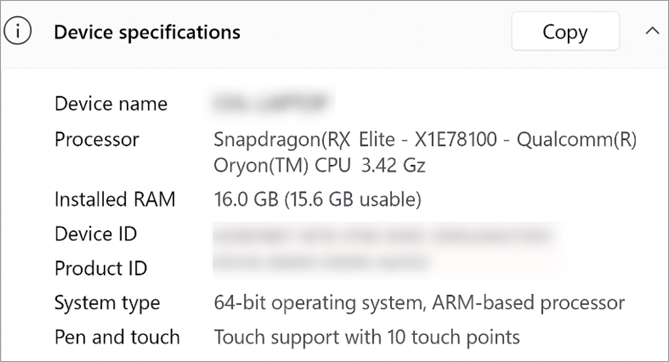
Common examples of ARM-based systems include devices with a Qualcomm Snapdragon processor and an ARM-based processor system type.
Possible Causes and Solutions
| Possible Cause | Solution |
|---|---|
| The Windows device uses an ARM processor, which the Mobile VPN with SSL client does not support. |
OpenVPN works on Windows on ARM because it uses standard TAP virtual network drivers that Microsoft and OpenVPN build and sign for ARM‑compatible Windows systems. Install the OpenVPN client and then use a selective re-install of the Mobile SSL with SSL client. For more information, go to this KB article Mobile VPN with SSL client not supported on Windows devices with ARM processors. |
Related Log Messages
The Mobile VPN with SSL client does not generate log messages because it cannot establish a connection on Windows ARM devices.