Applies To: WatchGuard Cloud-managed Access Points (AP130, AP330, AP332CR, AP430CR, AP432)
The Top Clients report shows the most active clients associated to WatchGuard access points on your wireless network.
To view the Top Clients report, in WatchGuard Cloud:
- Select Monitor > Devices.
- Select a cloud-managed access point or a folder that contains your access points.
- From the Devices menu, select Access Points > Top Clients.
- To select the report date range, click
 .
. - From the SSID drop-down list, select a specific SSID to view, or select All SSIDs.
- Click
 to download a PDF version of the report.
For information on how to schedule a report, see Schedule WatchGuard Cloud Reports.
Top Clients Report
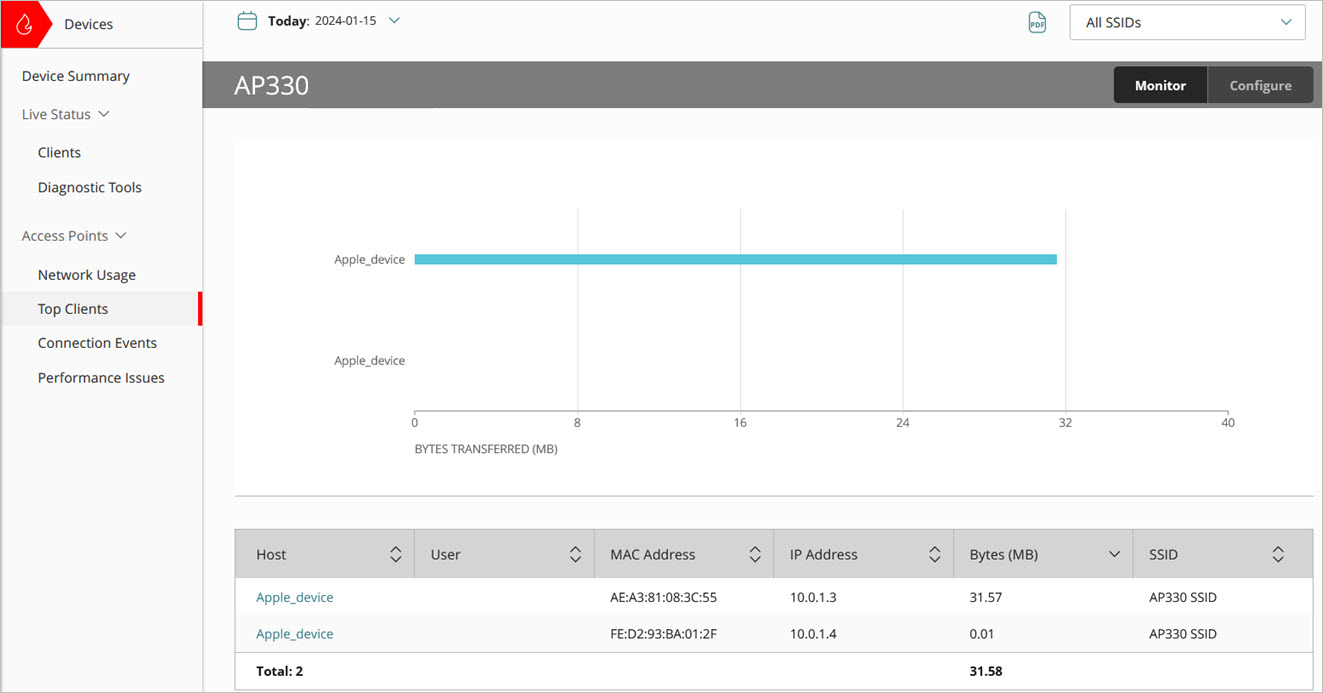
The Top Clients report includes a bar graph of wireless client activity that indicates the amount of data (in megabytes) transferred for each client.
A table includes this additional data:
- Host — The host name of the wireless client.
- User — The name of the authenticated user of the wireless client. If the authenticated name of the client is not available, the field will be blank.
- MAC Address — The MAC address of the wireless client.
- IP Address — The IP address of the wireless client.
- Bytes (MB) — The amount of data transferred by the client in megabytes.
- SSID — The SSID to which the wireless client is associated.
Access Point Connection Events Report
Access Point Connection Issues Report