Applies To: WatchGuard Cloud
Hey Rai is a natural-language conversational panel available to Service Providers in WatchGuard Cloud. You can use Hey Rai to ask questions and perform actions for incidents, security strength, endpoints, policies, and account activity. To open Hey Rai, click the Rai button in WatchGuard Cloud.
Note: Hey Rai uses generative AI. AI-generated output may be inaccurate, incomplete, or out of date. Review and verify all output before relying on it or taking action based on it, including changes to configurations or security policies.
Hey Rai uses Rai Tokens. Both read and write tools draw from the same shared pool. For more information, go to About Hey Rai Tokens and Licensing.
Hey Rai UI
The Rai button appears by default in the lower-right corner of WatchGuard Cloud. To open the Hey Rai UI, click the Rai button.
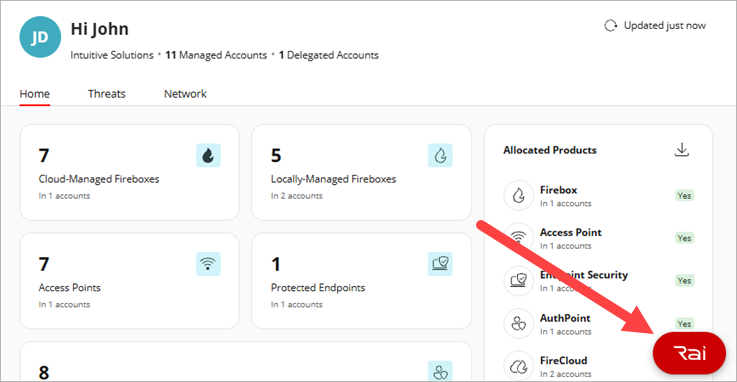
By default, Hey Rai opens as a floating window.
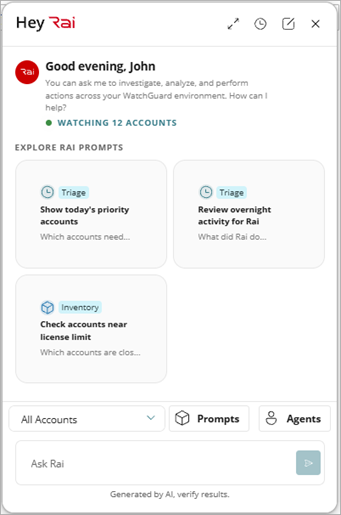
To switch the layout, click  in the Hey Rai UI. These Hey Rai layout options are available:
- Floating — A moveable, floating window overlay in the browser
- Sidebar — A docked panel on the side of the browser window
- Full Screen — A full screen layout in the browser window
You can close Hey Rai at any time in your session. When you reopen Hey Rai in the same browser session, the conversation resumes from where you left it. Type a question or instruction in the text box, and Hey Rai responds in the conversation thread.
Note: Rai maintains conversational context within the current session. Follow-up questions that refer to prior answers do not require you to restate earlier context.
Session context resets when you click New Chat, when the browser session ends or times out, or when you exit WatchGuard Cloud. Every response in Hey Rai includes a copy option. You can also download your full conversation as a .MD file.