Applies To: WatchGuard Cloud
On the Administration > Rai > Usage page in WatchGuard Cloud, you can set token Rai Token limits for operators, and monitor usage, active sessions, and tool calls for Hey Rai and external AI clients connected to the MCP server.
Based on your permissions, the Rai Usage page opens in one of these views:
- Admin view — Available to operators with the Owner permission, or with the Rai Admin granular permission under Account Administration. The Admin view shows organization-wide data, Rai Token budget data, active sessions, and per-operator breakdowns.
- Operator view — Available to other operators with Hey Rai and MCP server access. The Operator view shows data for the operator, including their personal Rai Token pool.
Your operator role determines what you can see and do in WatchGuard Cloud. For more information, go to Manage WatchGuard Cloud Operators and Roles and Default Permissions for Built-in Roles.
To open the Rai Usage page, in WatchGuard Cloud:
- Select Administration > Rai.
- Select the Usage tab.
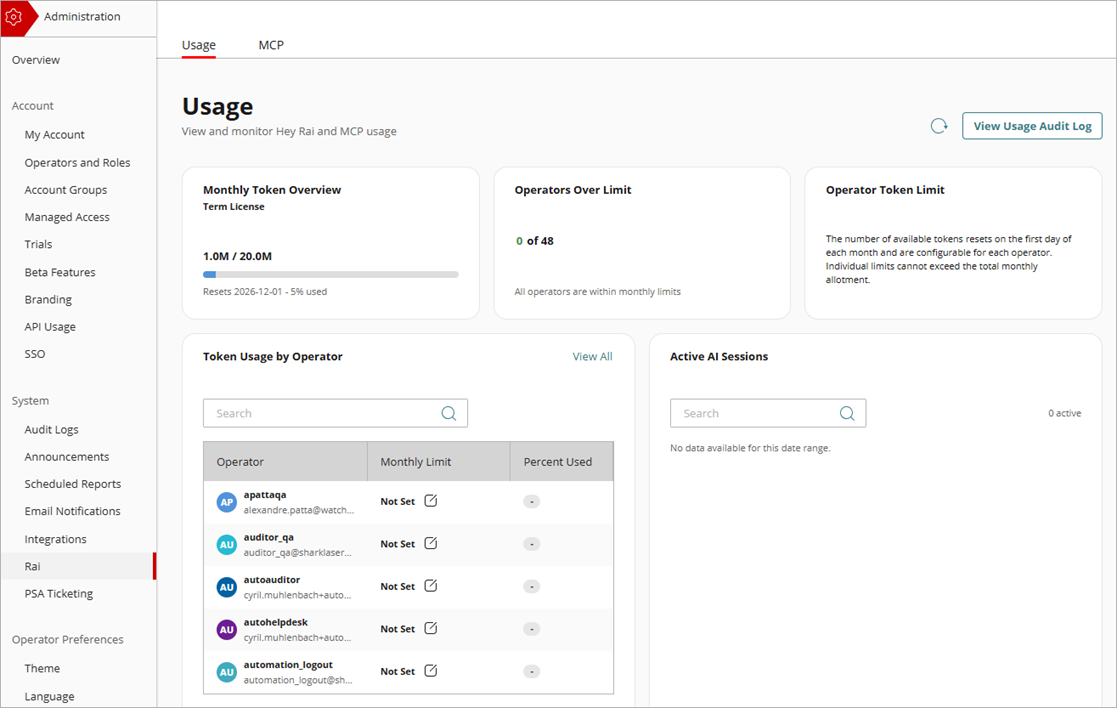
Click  to update data. Click View Usage Audit Log to view a full list of all Hey Rai and MCP tool usage for the current month.
Rai Token Budget Information (Admin View Only)
From the Admin view, you can see Rai Token overview for your entire organization, how many operators are at or over their monthly limit, and operator token limits. You can view and edit monthly token limits by operators on the Token Usage by Operator widget.
Active AI Sessions (Admin View Only)
The Active AI Sessions widget shows current active sessions data for all AI clients, including the AI client name, operator, start time, and last tool call. You can revoke external sessions from this widget. When you revoke an external AI client session, you invalidate the refresh token for that client and they must log in again to start a new session. Hey Rai sessions appear on the Active AI Sessions widget, but cannot be revoked.
KPI Widgets (Admin and Operator Views)
KPI widgets shown on the Rai Usage page include:
- Total Tool Requests
- Token Usage
- Error Rate
- Requests Timeline
- Requests by Operator (Admin View)
- My Rai Token Pool (Operator View)
- Frequently Called Tools
- Token Usage Log
Usage Audit Log and Token Usage Log (Admin and Operator Views)
The Usage Audit Log and Token Usage Log provide audit trails tool calls and token usage. Write-action approval and decline events from Hey Rai appear in these logs. From the Admin view, you can review data for all operators. From the Operator view, you can see only your own tool calls and usage. Both the Usage Audit Log and Token Usage Log can be exported as a CSV file.