Applies To: WatchGuard Cloud
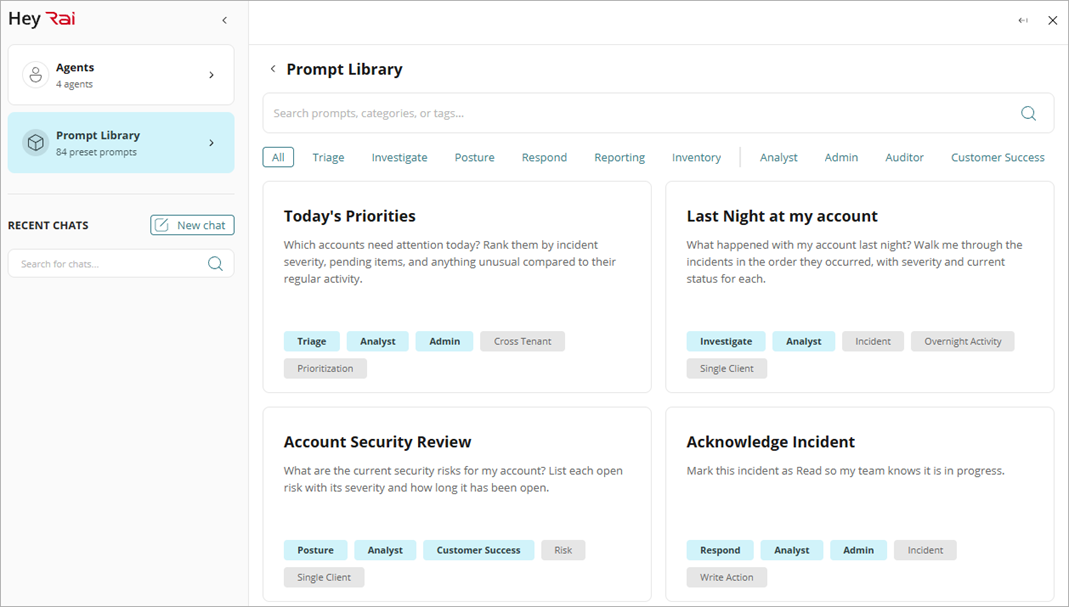
Hey Rai includes predefined prompts you can use to ask activity or inventory questions, investigate incidents, explore platform security strength, perform actions, and create reports.
Note: Hey Rai uses generative AI. AI-generated output may be inaccurate, incomplete, or out of date. Review and verify all output before relying on it or taking action based on it, including changes to configurations or security policies.
There are two kinds of prompts in Hey Rai:
Read-only
A read-only prompt asks Rai to look up, summarize, or explain information. It does not change anything in WatchGuard Cloud, so the prompt runs without approval.
Write
A write prompt asks Rai to change something in WatchGuard Cloud, such as incident status, an endpoint, blocked traffic, or a license. Write prompts require Hey Rai in-chat approval.
You can sort prompts in the Hey Rai library by category and role, or search for specific prompts by category, role, tag, or keyword.
To view the prompt library, click Prompts in the Hey Rai UI. To run a prompt, click it.
Roles
In Hey Rai, Admin, Analyst, Auditor, and Customer Success represent the four operational roles designed to handle repetitive, information-heavy tasks so human teams can focus on high-judgment, client-facing work. You can sort prompts in the Hey Rai library by role.
- Admin — The Rai Admin role manages operations, deploys configurations, schedules maintenance, and manages user accounts and permissions.
- Analyst — The Rai Analyst role detects threats in real time, performs alert triage, monitors inventory, and investigates incidents.
- Auditor — The Rai Auditor role verifies policies, monitors compliance, audits, and reports on security strength.
- Customer Success — The Rai Customer Success role focuses on client relationships, value demonstration, and data assembly for reports.
Categories
The prompts in the Hey Rai library are divided into categories that correspond to the stages of a security workflow. Each category in the Hey Rai prompt library focuses on one central question. These are the Hey Rai prompt categories:
- Triage — What needs attention right now, across accounts?
- Investigate — What happened, why, and what is the evidence?
- Posture — Am I protected, and where are the gaps?
- Respond — What should I do?
- Reporting — What information can I send based on what Rai knows?
- Inventory — What do I own, who has access, and where does it stand?
Triage
Prompts in the Triage category cover priorities, open critical incidents, overnight activity, trends, and items that still need a response. Roles associated with the Triage category include Analyst, Admin, Auditor, and Customer Success.

| Prompt Name | Prompt Type | Prompt Details | Associated Roles |
|---|---|---|---|
| Today's Priorities | Read-only | Which accounts need attention today? Rank them by incident severity, pending items, and anything unusual compared to their regular activity. | Analyst, Admin |
| Overnight Recap | Read-only | What did Rai do overnight? List each action taken across my accounts, the triggers, and anything that still needs my response. | Analyst, Auditor |
| Open Critical Incidents | Read-only | Which accounts have open critical incidents right now? Include how long each has been open and the latest status. | Analyst |
| Weekly Activity Leaders | Read-only | Which accounts had the most security activity this week? Show incident counts and how they compare to the previous week. | Analyst, Admin |
| Today's Signals | Read-only | What signals were detected in my accounts today? Group them by account and severity. | Analyst |
| Downward Trends | Read-only | Which accounts show downward security trends? Compare to last week’s incident volume, open risks, and security strength score. | Analyst, Admin |
| Threat Patterns | Read-only | Did the same threat pattern appear in more than one account environment this week? If so, show me which accounts and how the pattern spread. | Analyst |
| Weekly Threat Summary | Read-only | Give me a summary of all the threat activity across my accounts this week. Highlight anything that needs follow-up. | Analyst, Customer Success |
| Action Recap | Read-only | What actions were taken across my accounts in the last 24 hours? Include who or what initiated each one and the outcome. | Analyst, Auditor |
| Pending Approvals | Read-only | Which actions still need my approval? Show what each action does, which account it affects, and how much time remains in the approval window. | Admin, Analyst |
| Recent Incidents | Read-only | Summarize any new incidents from the last 24 hours so I can catch up quickly. | Analyst |
Investigate
Prompts in the Investigate category cover one incident, account, user, device, or indicator, and the timeline, signals, severity, and history. Roles associated with the Investigate category include Analyst, Auditor, and Customer Success.
| Prompt Name | Prompt Type | Prompt Details | Associated Roles |
|---|---|---|---|
| Last Night at [account] | Read-only | What happened with [account] last night? Walk me through the incidents in the order they occurred, with severity and current status for each. | Analyst |
| Incident Lookup | Read-only | Tell me about incident [incident ID]. What happened, which entities were involved, and where does it stand now? | Analyst |
| Incident Formation | Read-only | What signals combined to form this incident? List each signal, the source, and how they combined. | Analyst |
| Critical Risk Rationale | Read-only | Why was this incident labeled critical? Explain the specific risk factors and entities involved. | Analyst |
| Incident Lifecycle | Read-only | When did this incident start, and is it still active? Show me the lifecycle, from the first signal to the most recent action. | Analyst, Auditor |
| Account Incident History | Read-only | Has [account] had incidents like this before? Show me similar past incidents and how they were resolved. | Analyst |
| False Positive Check | Read-only | Is this a confirmed threat or could it be a false positive? Weigh the evidence from both sides for me. | Analyst |
| Evidence Review | Read-only | What is the evidence behind this incident? List all the evidence so I can verify it myself. | Analyst, Auditor |
| Incident Action History | Read-only | Show me the history of actions taken on this incident. Include who approved each one and when. | Auditor, Analyst |
| Involved Devices | Read-only | Which devices were involved in incident [incident ID]? Include their current protection and isolation status. | Analyst |
| Indicators of Compromise (IOC) | Read-only | Is this IOC associated with any known threat activity across my environments or in threat intelligence? | Analyst |
| User Activity | Read-only | Show all activity related to [user] across my environments. | Analyst |
| Frequent Appearances | Read-only | Which users appear most often in my incident queue? Rank them and summarize what they were involved in. | Analyst |
| Active Endpoint Threats | Read-only | Show me all endpoints with active threats. Group them by account and order them by severity. | Analyst |
| Malware Trends | Read-only | Which endpoints have the most malware detections this month? Show the top endpoints and what was detected. | Analyst |
| Explain Incident Type | Read-only | What does this incident type mean? Explain it in plain language and tell me why it matters for my accounts. | Analyst, Customer Success |
| Explain Lateral Movement | Read-only | What is lateral movement and why does it matter? Explain how it typically shows up and what to watch for. | Analyst, Customer Success |
Posture
Prompts in the Posture category cover security strength, open risks, policy coverage, multi-factor authentication (MFA), and protection status. Roles associated with the Posture category include Analyst, Admin, Auditor, and Customer Success.
| Prompt Name | Prompt Type | Prompt Details | Associated Roles |
|---|---|---|---|
| Account Security Review | Read-only | What are the current security risks for [account]? List each open risk with its severity and how long it has been open. | Analyst, Customer Success |
| Security Strength Summary | Read-only | Show me the security strength summary for [account]. Include endpoint protection, network policy, and identity coverage. | Analyst, Customer Success |
| Lowest Security Strength | Read-only | Which of my accounts have the lowest security strength score? Rank them and show what drives each score. | Admin, Analyst |
| Below Average Accounts | Read-only | Which accounts have security strength scores below [threshold]? Show the score and the largest gap for each. | Admin, Analyst |
| Security Strength Trend | Read-only | Compare [account]'s security strength to last month. What improved, what got worse, and what needs review? | Analyst, Customer Success |
| Policy Assignments | Read-only | What policies are assigned to [account]? List each policy and what it applies to. | Admin, Analyst |
| Recent Policy Updates | Read-only | Show me recent policy updates for [account], including what changed and when. | Admin, Auditor |
| Explain Policy | Read-only | What does this policy cover? Explain the rules and effects in plain language. | Customer Success, Analyst |
| MFA Gaps | Read-only | Which users in my accounts do not have MFA? Group them by account so I can plan a rollout. | Admin, Analyst |
| Protection Status | Read-only | What is the protection status for [account]? Cover every managed device and flag anything unprotected or out of date. | Analyst, Customer Success |
| Isolated Endpoints | Read-only | List all endpoints currently isolated for [account]. Include when each was isolated and why. | Analyst, Auditor |
| Flagged IPs | Read-only | Which IP addresses have been flagged across my accounts recently? Show which clients they touched and whether any are still active. | Analyst |
Respond
Prompts in the Respond category perform an action, such as incident closure, endpoint isolation, an IP address block, or license allocation. Each action requires approval in the Hey Rai UI. Roles associated with prompts in the Respond category include Analyst, Admin, Auditor, and Customer Success.
| Prompt Name | Prompt Type | Prompt Details | Associated Roles |
|---|---|---|---|
| Acknowledge Incident | Write | Mark this incident as Read so my team knows it is in progress. | Analyst, Admin |
| Close Incident | Write | Confirm no work remains open on this incident, then mark it as Closed. | Analyst, Admin |
| Isolate Endpoint | Write | Isolate this endpoint from the network to contain the threat. Confirm when isolation is complete. | Analyst, Admin |
| Release Endpoint | Write | Stop isolating this endpoint. Confirm it is safe to reconnect before you continue. | Analyst, Admin |
| Quarantine File | Write | Quarantine this file on [endpoint] so that it cannot run. Confirm when successful. | Analyst, Admin |
| Restore File | Write | Confirm this was a false positive, then restore this file on [endpoint]. | Analyst, Admin |
| Kill Process | Write | Kill this process on [endpoint]. Confirm that it terminated successfully. | Analyst, Admin |
| Run Threat Scan | Write | Run an on-demand threat scan on [endpoint] and report the results. | Analyst, Admin |
| Block IP | Write | Block this IP address for [account]. Confirm that the block is active. | Analyst, Admin |
| Unblock IP | Write | Unblock this IP address for [account]. Confirm that the original reason for the block is resolved before you unblock. | Analyst, Admin |
| Block Domain | Write | Block this domain for [account]. Confirm that the block is active. | Analyst, Admin |
| Unblock Domain | Write | Confirm that it is safe to remove the block, then unblock this domain for [account]. | Analyst, Admin |
| Block Access Point | Write | Block connections to this access point for [account]. Confirm when the block is complete. | Analyst, Admin |
| Unblock Access Point | Write | Unblock connections to this access point for [account]. Confirm when the unblock is complete. | Analyst, Admin |
| Block User | Write | Block this user account to stop further activity. Confirm that the block is in place. | Analyst, Admin |
| Unblock User | Write | Confirm that the underlying issue is resolved, then unblock this user account. | Analyst, Admin |
| Enable MFA | Write | Enable MFA for this user account. Confirm that enrollment is underway. | Analyst, Admin |
| Start Trial | Write | Start a trial of [product] for [account]. Confirm when the trial is active. | Admin, Customer Success |
| End Trial | Write | End the trial of [product] for [account]. Summarize any usage before the trial closes. | Admin, Customer Success |
| Allocate Licenses | Write | Allocate [N] users from [product] license to [account]. Confirm the new allocation totals. | Admin |
| Deallocate Licenses | Write | Deallocate [N] users from [product] license from [account]. Confirm updated allocation. | Admin |
| Enable Support Delegation | Write | Enable support delegation for [account] so that WatchGuard Support can assist directly. Confirm when support delegation is active. | Admin, Auditor |
Reporting
Prompts in the Reporting category cover summaries, quarterly business review (QBR) points, customer emails, and shift handoffs. Roles associated with prompts in the Reporting category include Analyst, Admin, Auditor, and Customer Success.
| Prompt Name | Prompt Type | Prompt Details | Associated Roles |
|---|---|---|---|
| Weekly Account Summary | Read-only | Summarize this week's activity for [account] in a format I can share. Include incidents, actions taken, and current security strength. | Customer Success, Analyst |
| One-Paragraph Update | Read-only | Give me a one-paragraph summary of [account]'s recent security activity that I can send to their IT director. | Customer Success |
| Quarterly Value Recap | Read-only | Summarize what Rai did for [account] this quarter: incidents handled, actions taken, and time saved. Make it QBR-ready. | Customer Success |
| QBR Highlights | Read-only | What should I highlight in [account]'s QBR this quarter? Pick the three most compelling points from their security activity. | Customer Success |
| Executive Incident Brief | Read-only | Give me an executive summary of this incident for an account email: what happened, what we did, and what happens next. | Customer Success, Analyst |
| Plain-Language Summary | Read-only | Give me a plain-language summary of this incident that I can share with a non-technical account contact. | Customer Success |
| Business Impact Brief | Read-only | Explain the business impact of this incident in plain language: what was at risk, what was prevented, and what it means for the account. | Customer Success |
| Resolution Update | Read-only | Draft a status update for [account] on the incident we resolved today. Include the fix and any follow-up they should expect. | Customer Success |
| Incident to Email | Read-only | Turn this incident summary into a professional email that I can send to the account with minimal edits. | Customer Success |
| Review Call Prep | Read-only | Prepare talking points for my monthly review call with [account]. Include their security activity since our last call. | Customer Success |
| Shift Handoff | Read-only | Summarize the last eight hours of activity across all accounts for a shift handoff: pending items, approvals that need a response, and anything to watch. | Analyst, Admin |
| Operator Access | Read-only | Which operators have access to [account]? List each operator and their role. | Admin, Auditor |
Inventory
Prompts in the Inventory category cover accounts, licenses, trials, and devices. These prompts return information. Roles associated with prompts in the Inventory category include Analyst, Admin, and Customer Success.
Note: Write prompts related to inventory, such as license and trial changes, are included in the Respond category.
| Prompt Name | Prompt Type | Prompt Details | Associated Roles |
|---|---|---|---|
| My Accounts | Read-only | Show me all accounts I manage, with their region and account type. | Admin |
| Allocation Summary | Read-only | What is my current license allocation summary? Show allocated versus available for every product. | Admin |
| Remaining Licenses | Read-only | How many users do I have available to allocate, listed by product license? | Admin |
| Account License Profile | Read-only | Which product licenses does [account] have, and how many users are available in each? | Admin, Customer Success |
| Near License Limit | Read-only | Which accounts are close to the limits of their product licenses? Flag anyone above 90% utilization so I can plan ahead. | Admin, Customer Success |
| Unused Licenses | Read-only | Show me unused licenses across my accounts so I can reallocate inventory or adjust the license size before renewal. | Admin |
| Active Trials | Read-only | Which accounts have active trials? Include the product and when each trial ends. | Admin, Customer Success |
| Fleet Inventory | Read-only | Show me device inventory across all my accounts. Group results by account and device type. | Admin, Analyst |
| Account Device List | Read-only | Show me device inventory for [account]. Include hardware, OS, and protection status for each device. | Admin, Analyst |
| Account Breakdown | Read-only | What is the full inventory breakdown for [account]: devices, licenses, and anything unallocated? | Admin, Customer Success |