Applies To: Endpoint Security Elite, Endpoint Security 360, Endpoint Security Prime, WatchGuard EDR, WatchGuard EDR Core, Endpoint Security Basic
You can use the PSInfo Query URL Category tool to find the category of a website URL that your endpoint security product allows or blocks. This tool helps you to determine whether a URL is correctly categorized. If you believe that a website is incorrectly categorized or uncategorized, you can request a category change.
To view the category of a URL:
- Run PSInfo.exe. For more information about PSInfo, go to About PSInfo.
The PSInfo dialog box opens. - Select the Tools tab.
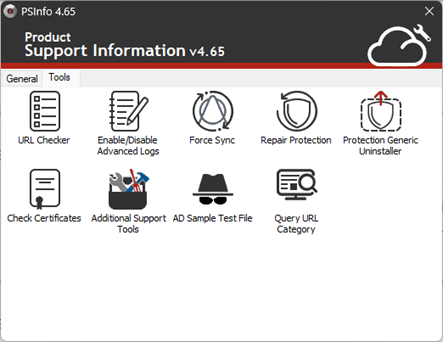
- Double-click Query URL Category.
The Query URL Category dialog box opens. - In the Query URL category text box, type the website URL. You can only add one URL at a time.

- Click Check.
The URL query is sent to WatchGuard and the category results appear.

- If the website URL is in the correct category, click Exit.
- To find the category of another website URL, click Clear.
- To report an incorrect URL category classification, click Report.
Request a URL Category Change
To contact Support and request a change of category for a website URL:
- Click Report.
The page refreshes and Contact Email Address and Problem Description text boxes appear. - Enter your email address in the text box.
- In the Problem description text box, type the reason you want to request a category change.

- Click Submit.
The change request is sent to WatchGuard. - Click OK.

Support sends an email confirmation to the email address that you provide. The email contains a Support case number and further instructions.
