Applies To: WatchGuard Advanced Reporting Tool
You can use the Key Security Indicators tab on the Security Incidents dashboard to identify possible attacks and unusual behavior. This tab shows incidents and calendars when the most malware and exploits were detected on the network.
Your operator role determines what you can see and do in WatchGuard Cloud. Your role must have the Access Advanced Security Information permission to view or configure this feature. For more information, go to Manage WatchGuard Cloud Operators and Roles.
To identify attacks and unusual behavior In the WatchGuard Endpoint Security management UI:
- In WatchGuard Cloud, select Monitor > Endpoint Security.
- Select Status.
- From the left pane, select Advanced Visualization Tool.
- In the tab that opens, from the left pane, select Advanced Reporting > Security Incidents.
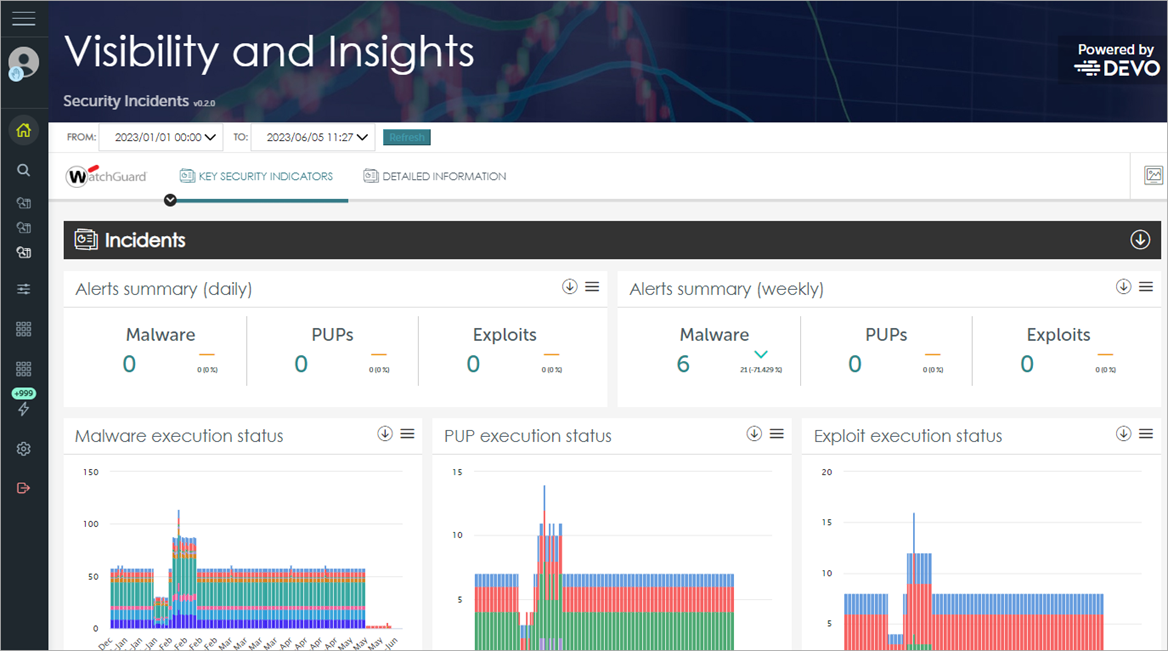
- Select the date range for the data you want to see. Click Refresh.

- On the Key Security Indicators tab, in the Incidents section, review the Alerts Summary tiles.
These summary tiles show the change in the number of detected incidents compared to the previous day (Daily) and the previous week (Weekly). - In the Malware Execution Status tile, review the chart to determine if any malware executed in the last 7 days that you should investigate.
- In the PUP Execution Status tile, review the chart to determine if any PUPs executed in the last 7 days that you should investigate.
PUPs can lead to data exfiltration, increased network traffic, and injected advertising. WatchGuard Endpoint Security provides tools to remove PUPs and increase baseline security and integrity. - In the Exploit Execution Status tile, review the chart to determine if any exploits executed in the last 7 days that you should investigate.
Hackers often exploit unpatched software. WatchGuard Endpoint Security includes up-to-date filters to detect possible exploits. The Patch Management tool provides insights into which security patches you can install to prevent future exploitation. - In the Malware, PUPs and Exploits section, review the calendars to determine if you should investigate any days.
The Malware calendar shows the days of the year when most malware detections occurred on the network.
The Exploits calendar shows the days of the year when most exploit detections occurred on the network.