Applies To: DNSWatch in WatchGuard Cloud
References to DNSWatch in this topic relate to DNSWatch in WatchGuard Cloud. To learn about the legacy DNSWatch UI, go to About WatchGuard DNSWatch in Fireware Help.
When you enable DNSWatch in WatchGuard Cloud, these separate actions occur:
- Firebox Registration — The Firebox contacts the DNSWatch servers and registers itself. After the Firebox is registered, it receives the IP addresses of two DNSWatch DNS servers and a Blackhole Server.
- DNS Forwarding — The Firebox forwards all outbound DNS queries to the DNSWatch DNS servers unless another DNS setting configured on the Firebox has precedence. For more information, go to Precedence for DNSWatch in WatchGuard Cloud.
The Firebox intercepts all DNS requests on port 53 and forwards them to a DNSWatch DNS Server, even if the DNS request was addressed to another DNS server. For more information, go to Enable DNSWatch on Your Firebox.
Registration and Status Errors
For locally-managed Fireboxes, you can view the registration status of your Firebox on the DNSWatch configuration page in Fireware Web UI. The DNSWatch page shows the Firebox registration status, and shows whether there are any errors related to the DNSWatch service. It also shows the IP addresses of DNSWatch DNS servers.
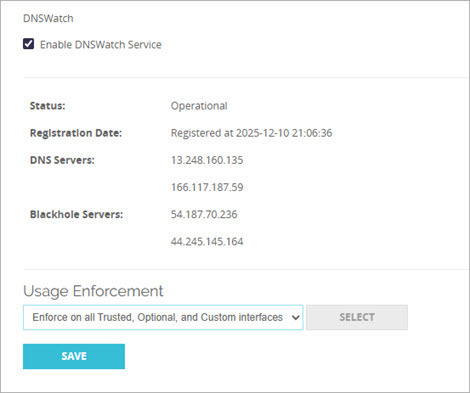
If the Firebox is registered and there are no DNSWatch errors, the DNSWatch page in Fireware Web UI shows:
Registration Date: Registered at <date and time>
Status: Operational
If registration fails, or if any other error affects the DNSWatch service, the Status line includes an error message that can be useful for troubleshooting.
Shared Public IP Addresses
To use DNSWatch in WatchGuard Cloud, the same public IP address cannot be associated with Fireboxes activated for two different accounts in the WatchGuard account.
If you enable DNSWatch on Fireboxes activated in two different WatchGuard accounts, and those Fireboxes use the same public IP address, DNSWatch associates the public IP address with the first Firebox that successfully registered with DNSWatch.
Any other Firebox with the same public IP address that is registered to a different DNSWatch account will receive an error and not receive the IP address of DNSWatch DNS servers. Make sure no other Fireboxes that use the same public IP address are activated to a different account in the WatchGuard account.
Recommendations
- Only enable DNSWatch on the gateway Firebox in a nested Firebox environment under a single account. This is typically the Firebox closest to the ISP equipment or public IP address.
- Do not enable DNSWatch on Fireboxes in different accounts using a shared public IP address. Choose one of the Fireboxes from one account to enable DNSWatch.
- Do not enable DNSWatch on Fireboxes that use a primary external interface that is behind an Internet service provider NAT (multiple individual networks behind a single or small group of public addresses).
Troubleshoot DNSWatch Protection On a Client
To troubleshoot DNSWatch protection from a client on a protected network, you must know:
- The IP address of your Firebox internal (trusted, optional, or custom) interface
- The IP address of a publicly available DNS server. For example, 8.8.8.8.
- The DNSWatch test domain: test.strongarm.io
By default, the domain test.strongarm.io is blocked by DNSWatch in WatchGuard Cloud. You can browse to test.strongarm.io to view the message users receive when DNSWatch denies a request.
- A safe domain: (for example) www.salesforce.com
- The URL of a Firebox subscription service excluded from DNSWatch: rp.cloud.threatseeker.com
- The domain of the DNSWatch Blackhole: blackhole.dnswatch.watchguard.com
To verify that your network is protected by DNSWatch and that DNS resolution works correctly, perform these tests:

- From a computer protected by your Firebox, open a command prompt window.
- Run this command:
nslookup test.strongarm.io <FIREBOX TRUSTED INTERFACE> - Examine the results. If the Firebox used the DNSWatch DNS server to resolve the domain, the result looks like this:
$ nslookup test.strongarm.io 10.0.1.1
Server: 10.0.1.1
Address: #53
Non-authoritative answer:test.strongarm.io canonical name = blackhole.dnswatch.watchguard.com.
Name: blackhole.dnswatch.watchguard.com
Address: 54.187.70.236
If the result does not include the IP address of the DNSWatch Blackhole Server, the Firebox did not forward the DNS request to DNSWatch. Do not continue to troubleshoot until you confirm that your Firebox forwards traffic to DNSWatch.
- From a computer protected by your Firebox, open a command prompt window.
- Run this command:
nslookup test.strongarm.io 8.8.8.8 - Examine the results. If the Firebox used the DNSWatch DNS server to resolve the domain, the result looks like this:
$ nslookup test.strongarm.io 8.8.8.8
Server: 8.8.8.8
Address: 8.8.8.8#53
Non-authoritative answer:
test.strongarm.io canonical name = blackhole.dnswatch.watchguard.com.
Name: blackhole.dnswatch.watchguard.com
Address: 54.187.70.236
If Test 1 was successful, but you do not receive the IP address of the DNSWatch Blackhole Server with this test, Usage Enforcement is not enabled on the network. To enforce DNSWatch use on your network, you must enable DNSWatch before you continue. For more information, go to Enable DNSWatch on Your Firebox.
- From a computer protected by your Firebox, open a command prompt window.
- Run the nslookup command for a legitimate domain. For example:
nslookup www.salesforce.com - Examine the results, which look like this:
$ nslookup www.salesforce.com
Server: 10.0.0.1
Address: 10.0.0.1#53
Non-authoritative answer:
www.salesforce.com canonical name = www.gslb.salesforce.com.
Name: www.gslb.salesforce.com
Address: 96.43.144.26
Name: www.gslb.salesforce.com
Address: 96.43.145.26
- Compare this result to the same test on a system not protected by your Firebox. If the results match, then DNSWatch correctly resolved the DNS requests.
- From a computer protected by your Firebox, open a command prompt window.
- Run the nslookup command for one of the WatchGuard domains that is excluded from DNSWatch. For example:
nslookup rp.cloud.threatseeker.com - Examine the results, which look like this:
$ nslookup rp.cloud.threatseeker.com 10.0.0.1
Server: 10.0.0.1
Address: 10.0.0.1#53
Non-authoritative answer:
Name: rp.cloud.threatseeker.com
Address: 208.87.234.140
- Compare this result to the same test on a system not protected by your Firebox. If the results match, then DNSWatch correctly resolved the DNS request.
If these tests all produce the expected results, your network is protected by DNSWatch in WatchGuard Cloud.
Quick Start — Set Up DNSWatch in WatchGuard Cloud