Applies To: DNSWatch in WatchGuard Cloud
References to DNSWatch in this topic relate to DNSWatch in WatchGuard Cloud. To learn about the legacy DNSWatch UI, go to About WatchGuard DNSWatch in Fireware Help.
When enabled on your Firebox, DNSWatch in WatchGuard Cloud adds two DNSWatch server IP addresses to your Firebox configuration:
- 166.117.187.59
- 13.248.160.135
When you enable DNSWatch enforcement on an internal interface, the Firebox redirects all outbound DNS requests from that interface to DNSWatch DNS servers.
When one of the DNSWatch servers is not available, the Firebox sends requests to the other DNSWatch server.
DNSWatch Configuration Precedence
With DNSWatch in WatchGuard Cloud, a DNSWatch configuration created at the Service Provider level might not meet the needs of a specific Subscriber account or Firebox. In these cases, you might subscribe a Firebox to more than one DNSWatch configuration.
When a Firebox is subscribed to more than one configuration, precedence follows these rules:
- When SafeSearch is enabled on one DNSWatch configuration but not others, the Firebox enforces SafeSearch rules.
- When Block DNS Resolution to Private IP Addresses is enabled on one configuration but not others, the Firebox blocks DNS resolution to private IP addresses.
- When a domain is marked as malicious in one DNSWatch configuration but not others, the Firebox treats the domain as malicious, blocks the domain, and returns the security block page.
- When a domain is blocked and not marked as malicious in one DNSWatch configuration but not others, the Firebox blocks the domain and returns the content filter block page.
- When a content filter category is blocked in one DNSWatch configuration, but allowed in others, the Firebox blocks the category and returns the content filter block page.
- When a content filter category is blocked in one DNSWatch configuration, but a specific domain in that blocked category is allowed in another configuration, the Firebox allows the specific domain.
- When a domain is blocked in one DNSWatch configuration but the same domain is allowed in other configurations, the Firebox allows the domain.
DNSWatch Server Precedence
When DNSWatch is enabled, DNSWatch servers take precedence over these DNS servers:
- Default DNS servers configured on your Firebox (DNSWatch does not take precedence over a local DNS server that appears first in the Network DNS server list in the Firebox configuration)
- DHCP/Interface DNS servers configured on your Firebox
- DNS servers assigned by your ISP (when the Firebox is a DHCP or PPPoE client)
- Forwarders to public DNS servers configured on a local DNS server
- DNS servers manually configured on a network host
These factors affect whether the Fireboxes sends DNS requests from your network to DNSWatch:
- Contents of the Firebox DNS resolver cache. The Firebox DNS resolver runs only if DNSWatch enforcement is enabled, or if the DNS forwarding feature is enabled.
- Conditional DNS forwarding rules configured on the Firebox.
- DNSWatch enforcement setting. When enforcement is enabled, the Firebox redirects all outbound DNS requests from your network to DNSWatch, even if hosts on your network are manually configured with different DNS servers.
Default DNS Server
The Firebox sends DNS requests to the first server in the default DNS server list before other servers in the list. DNSWatch does not take precedence over a local DNS server if that server appears first in the default DNS server list.
For cloud-managed Fireboxes, you configure default DNS servers as Public DNS servers. For locally-managed Fireboxes, you configure the default DNS servers as Network (Global) DNS servers.
When you enable DNSWatch on a cloud-managed Firebox, enforcement is enabled by default. When you enable DNSWatch on a locally-managed Firebox, you select the usage enforcement option (enabled or disabled). For more information, go to Configure Firebox DNS Settings (cloud-managed Fireboxes) or About DNS on the Firebox (locally-managed Fireboxes).

- DNSWatch DNS servers take precedence over DNS servers in the default DNS server list on the Firebox. There is one exception: DNSWatch does not take precedence over a local DNS server that appears first in the default DNS server list.
- DNS requests initiated or received by the Firebox are resolved by the Firebox cache, sent to DNS servers specified in conditional DNS forwarding rules, or sent to DNSWatch (in that order).
- DNSWatch DNS servers take precedence over DNS servers in the Network DNS server list on the Firebox for DNS requests initiated by the Firebox itself, or for DNS requests addressed to the Firebox IP address. There is one exception: DNSWatch does not take precedence over a local DNS server that appears first in the Network DNS server list.
- DNS requests addressed to IP addresses other than the Firebox IP address or DNSWatch IP addresses are not sent to DNSWatch.
- If the DNS forwarding feature is disabled, DNS requests initiated by or addressed to the Firebox are sent to DNSWatch.
- If the DNS forwarding feature is enabled, DNS requests initiated by or addressed to the Firebox are resolved by the Firebox cache, sent to DNS servers that are specified in conditional DNS forwarding rules, or sent to DNSWatch (in that order).
DHCP Server
On a cloud-managed Firebox, you can configure the DHCP server to assign IP addresses on the network. On a locally-managed Firebox, the interface DNS server is an optional DNS server that you can specify when you configure an interface as a DHCP server.
- DNS requests are sent to the interface DNS server instead of DNSWatch.
- DNSWatch DNS servers take precedence over the DNS servers specified in the interface settings.
- DNS requests for external resources are resolved by the Firebox cache, sent to DNS servers specified in conditional DNS forwarding rules, or sent to DNSWatch (in that order).
DNS Server from an ISP
When your Firebox is configured as a DHCP or PPPoE client, it receives DNS server settings from your ISP.
- DNSWatch DNS servers take precedence over servers from your ISP.
- Your Firebox gets DNS servers from your ISP and saves that information.
Forwarders on a Local DNS Server
Local DNS servers resolve queries for host names on your private networks and contact other DNS servers to resolve queries for public host names. There are two methods that your DNS server can use to resolve queries for public host names: forwarders and root hints.
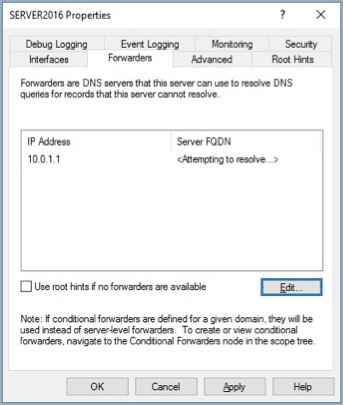
DNSWatch is not compatible with root hints. On a Windows server, if you have both forwarders and root hints configured, root hints are used if forwarders do not respond. For the best results with DNSWatch, we recommend that you clear the Use root hints if no forwarders are available option on the Forwarders tab of the Windows server.
- DNSWatch takes precedence over public DNS forwarders specified on your local DNS server.
- Because the Firebox monitors port 53 traffic when enforcement is enabled, DNS requests for public domains are sent to DNSWatch even if the request was addressed to a public forwarder specified in your local DNS server settings.

- DNS requests for public domains sent to the local DNS server are forwarded to the Firebox, which forwards the requests to DNSWatch.
Manually Configured DNS Servers on a Host
A host on your network might be manually configured with DNS server settings.
- DNSWatch takes precedence over public DNS servers manually configured on the host.
- Because the Firebox monitors port 53 traffic when enforcement is enabled, DNS requests for public domains are sent to DNSWatch even if the request was addressed to a different DNS server.
- DNS requests for public domains are sent to the DNS server specified in the host settings. DNS requests do not redirect to DNSWatch.
- To protect this host with DNSWatch, if you do not want to enable DNSWatch enforcement, we recommend you change the manually configured DNS servers on that host to the Firebox IP address or the DNSWatch server IP addresses.
- DNS requests for public domains are sent to the Firebox, which forwards the requests to DNSWatch.