Applies To: WatchGuard SaaS DR, Total NDR
WatchGuard SaaS DR enables you to monitor user activity from third-party Software as a service (SaaS) and cloud environments, such as Microsoft 365.
WatchGuard SaaS DR uses collection agents to collect user activity logs from third-party SaaS environments to enable WatchGuard SaaS DR to monitor, respond to, and report on, anomalous user activity and logins by authorized and unauthorized users.
WatchGuard SaaS DR for Microsoft 365 threat detection includes:
- Defense controls in three main categories:
- Exfiltration by an Internal Actor
- Suspicious Access Behavior
- Suspicious Login Activity
- Microsoft 365 Defense Goal Report
- Microsoft 365 user activity monitoring
- Microsoft 365 user remediation
For more information about WatchGuard SaaS DR, go to these sections:
Licensing
To use WatchGuard SaaS DR, you must purchase and activate a WatchGuard SaaS DR license or a Total NDR license. WatchGuard SaaS DR is licensed for each user.
For more information about licensing, go to About WatchGuard SaaS DR Licenses and About Total NDR Licenses.
To gain visibility into all areas of your network, we strongly recommend you activate a WatchGuard NDR or Total NDR license.
Reports
Reports are a critical part of monitoring your organization for threats. WatchGuard SaaS DR for Microsoft 365 provides the Microsoft 365 Defense Goals Report to help you monitor user activity, unusual logins, and suspicious file sharing activity for your Microsoft 365 users.
For more information, go to WatchGuard NDR Reports.
To add the default WatchGuard NDR reports, additional defense control reports, plus the ability to generate custom reports, we recommend you add a WatchGuard NDR license and a WatchGuard Compliance Reporting license. You can also purchase the Total NDR license that includes all NDR licenses and includes Compliance Reporting. For more information about Total NDR, go to About Total NDR.
For more information, go to WatchGuard NDR Reports and About WatchGuard Compliance Reporting.
Add a NDR Cloud Integration
To add a cloud integration, you use the NDR Integrations UI in WatchGuard Cloud. To add a NDR cloud integration, select Configure > NDR Integrations.
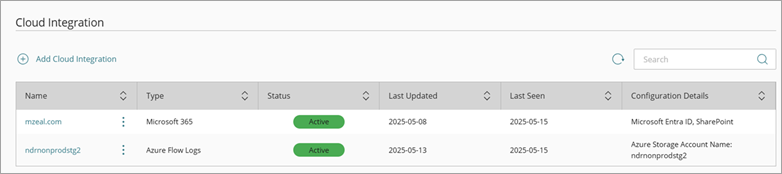
For more information, go to Configure a WatchGuard SaaS DR Integration — Microsoft 365.
NDR UI
To configure and monitor WatchGuard SaaS DR, you use the NDR UI in WatchGuard Cloud. To connect to WatchGuard Cloud, go to cloud.watchguard.com.
Available pages and features vary and depend on your license type. Throughout this documentation, NDR refers generally to all products. If you do not see a page or feature in the NDR UI, it is not supported by your product.
Monitor WatchGuard SaaS DR
To monitor your NDR cloud integration, use these pages:
- Network Summary — Provides an overview of trends in your network and includes links to detailed information about policy alerts, and user activity. For more information, go to About the NDR Network Summary Page.
- Policy Alerts — Shows alerts for policy violations on your network. For more information, go to About Policy Alerts.
- Users — Shows details about user activity, threat detection, and user remediation in Microsoft 365. This page is available with a WatchGuard SaaS DR or Total NDR license. For more information, go to About WatchGuard SaaS DR Licenses, About Total NDR Licenses, and WatchGuard NDR and WatchGuard SaaS DR Users.
- NDR Audit Logs — Shows details of configuration activity performed for WatchGuard SaaS DR policies, zones, users, IP addresses, and SaaS collector changes. For more information, go to NDR Audit Logs.
Configure WatchGuard SaaS DR
To configure WatchGuard SaaS DR, select Configure > NDR.
You can use these pages to configure WatchGuard SaaS DR:
- Compliance Reports — Manage your network defense goals and objectives for the Microsoft 365 Defense Goal Report. For more information, go to Manage Network Defense Goals.
- Policies — Manage default policies and add policies with custom policy definitions for your network. For more information, go to Configure WatchGuard NDR and WatchGuard SaaS DR Policies and WatchGuard SaaS DR Policies.
- Zones — Manage zones in your network and create custom zones. For more information, go to Manage NDR Zones.
- Alerts — Specify which SaaS collector alerts, remediation alerts, and policy alerts generate email notifications. For more information, go to Configure WatchGuard NDR and WatchGuard SaaS DR Alerts and Notification Rules for Subscribers.
Perform Actions on Users
WatchGuard SaaS DR for Microsoft 365 includes both manual and automatic remediation actions.
You can perform these manual actions from the NDR UI:
- Enable User/Disable User — Enables or disables a user in Microsoft 365. When you select this action, the user is disabled or enabled in Microsoft 365. If you disable a Microsoft 365 user, they can no longer log in with their Microsoft 365 account.
For more information, go to WatchGuard NDR and WatchGuard SaaS DR Users.
To perform automatic remediation through WatchGuard SaaS DR policies, go to Add Custom NDR Policies — WatchGuard SaaS DR.