Applies To: Cloud-managed Fireboxes
SafeSearch is a feature included in web browser search engines that enables users to specify what level of potentially inappropriate content a search engine can return in search results. You can enable SafeSearch Enforcement on Outbound web traffic policies in WatchGuard Cloud for these web browser search engines:
- Yahoo
- Bing
When you enable the SafeSearch Enforcement feature, the strictest level of SafeSearch rules is enforced, regardless of the settings configured in the client web browser search engines.
YouTube
When SafeSearch Enforcement is enabled, you can select the level of enforcement used to restrict which videos are viewable by users on YouTube. YouTube offers two content restriction levels — Moderate and Strict. YouTube uses an algorithm to decide which videos to restrict.
SafeSearch uses the HTTP header request YouTube-Restrict: Strict or YouTube-Restrict: Moderate to set the YouTube content restriction level in the browser when users connect to these YouTube domains:
- www.youtube.com
- m.youtube.com
- youtubei.googleapis.com
- youtube.googleapis.com
- www.youtube-nocookie.com
Configure SafeSearch Enforcement
To enable and configure SafeSearch Enforcement on an Outbound policy:
- Add or edit an Outbound policy. For more information, go to Configure Firewall Policies in WatchGuard Cloud.
- Select the Web Traffic and Decrypt HTTPS Traffic check boxes.
Before you enable Decrypt HTTPS Traffic, make sure that network clients trust the certificate the Firebox uses to re-encrypt the content. To avoid browser errors for network clients, download the Firebox certificate and import it to all network clients. For more information, go to Download the Certificate for TLS Decryption.
- Enable SafeSearch Enforcement.
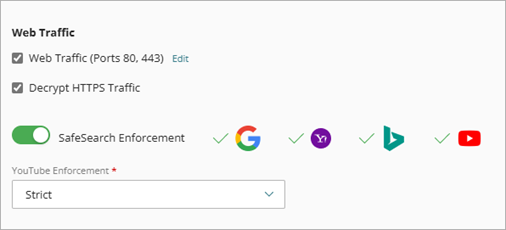
- From the YouTube Enforcement drop-down list, select a YouTube enforcement level (Moderate or Strict).
