Applies To: WatchGuard Open MDR
You can uninstall a specific WatchGuard MDR Syslog Collector from an endpoint, or you can remove both the WatchGuard Agent and the Syslog Collector from an endpoint at the same time.
Uninstall the WatchGuard MDR Syslog Collector
If you no longer want to use a specific Syslog Collector, you can uninstall it from the WatchGuard Agent page in the Managed Services portal.
To uninstall the Syslog Collector:
- Log in to your WatchGuard Cloud account.
- Select Monitor > Managed Services.
The Managed Services portal opens in a new browser tab. - If you are a Service Provider, select an account from the drop-down list.
- In the upper, right corner of the Managed Services portal, click
 .
. - From the drop-down list, select Onboarding.
- From the navigation menu, select WatchGuard Agent.
The WatchGuard Agent Syslog Collector page opens and shows a list of endpoints with the WatchGuard Agent installed.
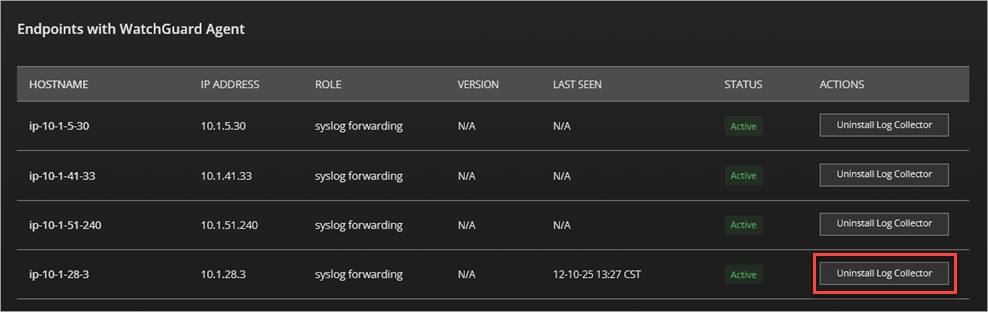
- In the Actions column for the endpoint, click Uninstall Log Collector
The WatchGuard Agent uninstalls the Log Collector.
Uninstall the WatchGuard Agent
If you want to uninstall both the WatchGuard Agent and the Syslog Collector, you can uninstall the WatchGuard Agent from your Linux system.
To uninstall the WatchGuard Agent and the Syslog Collector from your Linux system, run this command:
/usr/local/management-agent/repositories/ma/install --remove
Configure Third-Party Firewall Syslog Collection for WatchGuard Open MDR