WatchGuard AP340 Hardware Guide
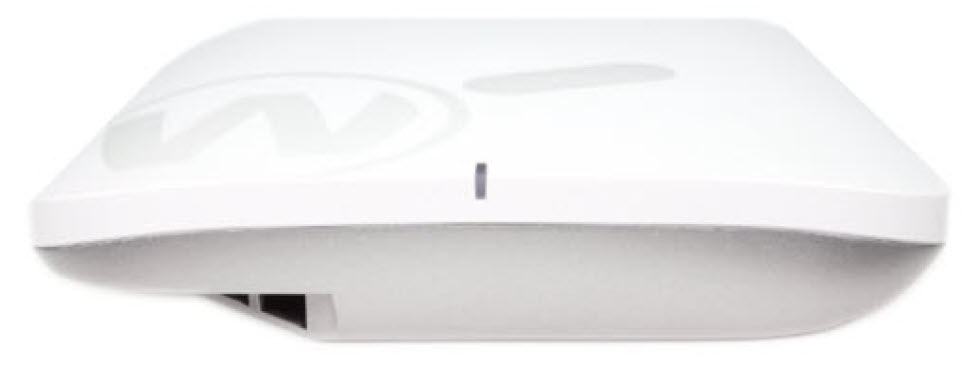
The WatchGuard AP340 is a 2x2 Wi-Fi 7 802.11be secure wireless access point that delivers fast, reliable, and secure wireless connectivity for modern workplaces, distributed organizations, and Managed Service Providers (MSPs).
The AP340 includes these features:
- A 10 GbE LAN port provides high throughput and PoE+ (802.3at) power for the device.
- Wireless radios support up to 688 Mbps data rate on the 2.4 GHz band, 2882 Mbps on the 5 GHz band, and 5764 Mbps on the 6 GHz band.
- Dedicated radio for security scanning and airspace monitoring.
Access Point Management
You manage WatchGuard access points with Wi-Fi in WatchGuard Cloud. WatchGuard Cloud delivers a simplified platform for Wi-Fi management to easily deploy, configure, and report on your access points and wireless networks. Go to Get Started with Wi-Fi in WatchGuard Cloud for information on how to add a new access point to WatchGuard Cloud.
About Your Hardware
Hardware Specifications
| Hardware | Description |
|---|---|
| Processor |
Quad-core 1.5 GHz ARM Cortex-A53 processor |
| Memory |
2 GB DDR4 RAM |
| Radio Type and Frequency Band |
|
|
Antennas
|
Wi-Fi Radios
Scanning Radio Antenna 7
Antenna 8
|
| Wireless Security |
WPA3 PSK, WPA2 PSK, WPA3/WPA2 PSK, WPA3 Enterprise, WPA2 Enterprise, OWE |
|
Ethernet Interfaces |
1 x 10 GbE Ethernet port (supports 10 Gbps, 5 Gbps, 2.5 Gbps, 1Gbps) |
|
Power Interface |
|
|
Power Consumption |
AP340: 24 W (maximum) |
|
Dimensions |
190 mm x 190 mm x 39.5 mm (7.48” x 7.48” x 1.56”) |
|
Weight |
AP340: 753.5 g (1.661 lb) |
Environmental Requirements
To safely install your WatchGuard access point, we recommend that you:
- Install the device indoors
- Make sure the device has adequate clearance for air flow and cooling
Other environmental requirements:
|
Operating Temperature |
0°C to 40°C (32°F to 104°F) |
|
Operating Humidity |
5% to 95% non-condensing |
|
Non-operating Temperature |
-40°C to 80°C (-40°F to 176°F) |
|
Non-operating Humidity |
0% to 95%, non-condensing |
Hardware Description
The access point has these connections on the side and bottom panel of the device.

Bottom Panel Connections
Reset Button
Resets the access point to factory-default settings. For more information, go to Reset Access Point to Factory-Default Settings.
DC 12V
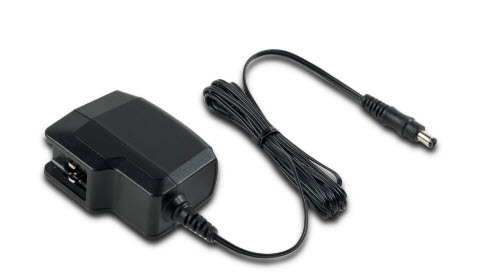
If PoE power is unavailable, you can power the device with the optional 12V DC power adapter (WG9009).
LAN (10G, PoE+)
This port is a 10 GbE LAN port (supports 10 Gbps, 5 Gbps, 2.5 Gbps, 1Gbps) that connects the access point to a wired LAN connection through a switch or hub. This port also provides PoE (802.3at) power for the device.
Console
Console port for a serial connection to the device command line interface.
Kensington Security Slot
The Kensington security lock slot is for use with a security cable to secure your device.
LED Indicator
During the initial device startup, the AP340 LED indicator will be solid orange, and will blink briefly after approximately 25-30 seconds before it continues with the normal boot sequence.
Wi-Fi in WatchGuard Cloud access points have LED indicators that can show different status conditions while booting, activation validation, feature key download, WatchGuard Cloud device registration, and the connection to WatchGuard Cloud.
The access point briefly passes through each stage until the device is connected to WatchGuard Cloud and shows a solid blue LED indicator. If the access point remains in the same state for a long period of time without a solid blue LED indicator status, there might be a network issue, activation or feature key issue, or a problem with your WatchGuard Cloud account.
Check the following table for the status of the LED indicators and how to troubleshoot the issue.
| LED Color | Status | Troubleshooting |
|---|---|---|
| Solid Red or Orange | Device is booting |
If the access point remains in this state, the access point processes might not have started, or there might be an issue with the access point firmware.
|
|
AP340 Only Flashing Red(Medium: 500 milliseconds) |
Low PoE power | If the LED on the AP340 flashes red every 500ms, the access point is receiving insufficient PoE power (802.3af). Wireless radios are disabled while wired network connectivity remains active to report device status. Connect the device to an appropriate PoE power source or PoE injector that supports 802.3at or higher. |
|
Flashing Red or Orange |
Validate access point activation and download feature key |
If the access point remains in this state:
|
| Flashing Red or Orange (Medium: 500 milliseconds) |
WatchGuard Cloud device registration |
If the access point remains in this state:
|
| Flashing Red or Orange (Slow: 2 seconds) |
Connection to WatchGuard Cloud servers |
If the access point remains in this state, it cannot connect to WatchGuard Cloud:
For more information, go to Access Point cannot connect to WatchGuard Cloud or does not appear in your WatchGuard Cloud account. |
| Solid Blue | Successfully connected to WatchGuard Cloud | Device is online and connected to WatchGuard Cloud. |
| Flashing Blue | Flash LED action from WatchGuard Cloud | LED flashes blue for 60 seconds for identification. |
| Flashing Blue and Red | Access point failed system integrity check | If the device LEDs flash alternating blue and red every second, the device has failed a system integrity check and has rebooted in failsafe mode. You must contact WatchGuard Support to replace the device. |
Reset Access Point to Factory-Default Settings
You can reset an access point to factory-default settings with the reset button on the device. Before you begin, make sure the access point is successfully booted with no solid orange or red LEDs. If the device is not successfully booted, this procedure will only reboot the access point.
To reset an access point with the reset button:
- Use a paper clip or other small object to press the reset button through the hole on the device.
- Press and hold the reset button for at least 10 seconds or more until all LEDs turn off.
- Release the reset button.
- After a few seconds, the LEDs will show solid red or orange. This indicates the device is reset, and the device will then reboot to factory-default settings.
You can also reset the device from the access point command line interface (CLI). For more information, go to Access Point Command Line Interface.
Mount and Connect the Access Point
Your package includes these items:
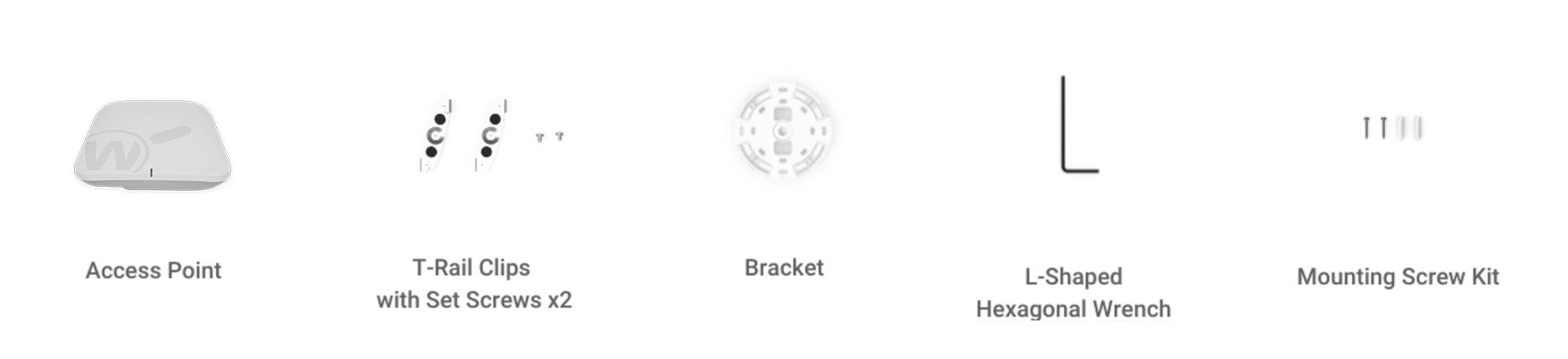
The MAC address and serial number of your access point are printed on a label on the back of the device. Make sure you record this information before you mount the access point.
Ceiling Mount (T-rail)
To mount the access point on a ceiling with a t-rail system:
- Use the outermost screw hole of the bracket to mark the distance where the T-bar should be fixed on the T-rail.
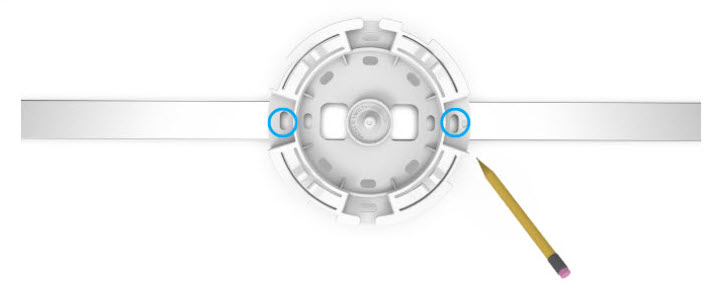
- Loosen the fixed screws on the T-bar with the included hex wrench. Align the center screw hole of the T-bar with the position marked on the T-rail, then tighten the fixed screws on the T-bar with the hex wrench.
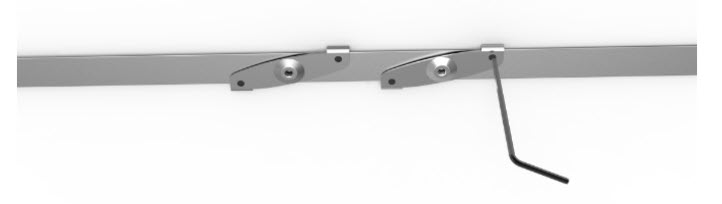
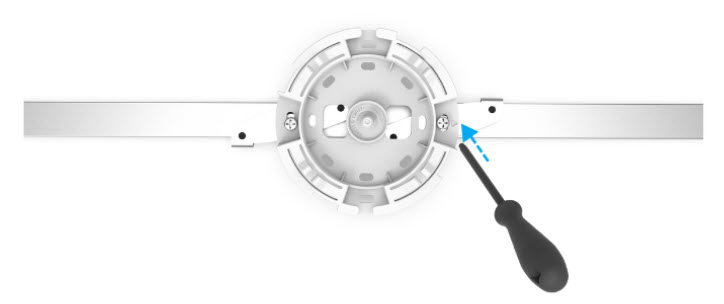
- Use the short screws from the mounting screw kit to affix the bracket onto the T-bar.
- To mount the access point on the bracket, rotate the device clockwise 45 degrees to secure the device on the bracket.
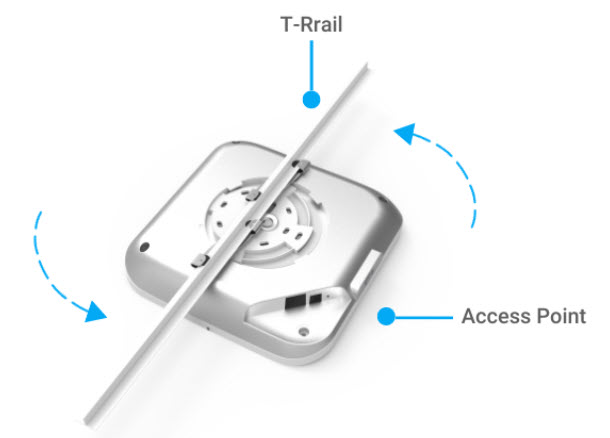
To remove the device from the mounting bracket, push down on the device and rotate counterclockwise 45 degrees to unlock and release the device.
Ceiling or Wall Mount
To mount the access point directly on a ceiling or wall:
- Determine where the access point will be placed and mark the location for the two mounting holes.
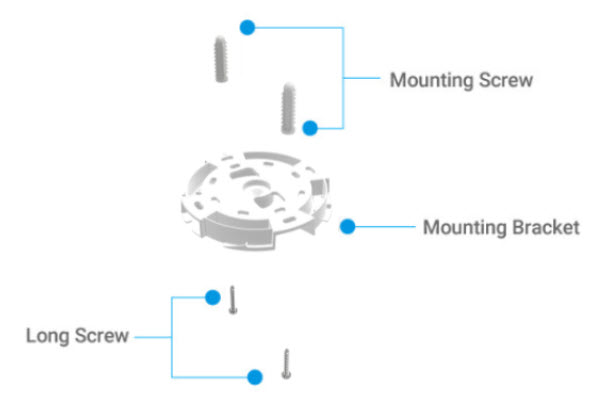
- Drill two mounting holes and hammer the anchors into the holes until they are flush with the wall.
- Attach the mounting bracket to the ceiling or wall with the included long screws into the anchors.
- To mount the access point on the mounting bracket, rotate the device clockwise 45 degrees to secure the device on the bracket.
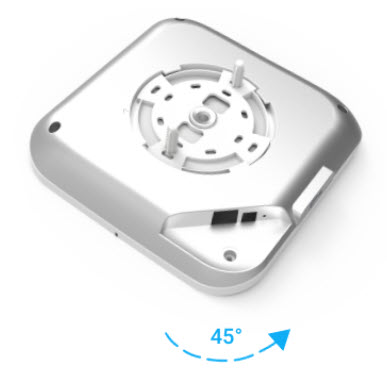
To remove the device from the mounting bracket, push down on the device and rotate counterclockwise 45 degrees to unlock and release the device.
Connect the Access Point
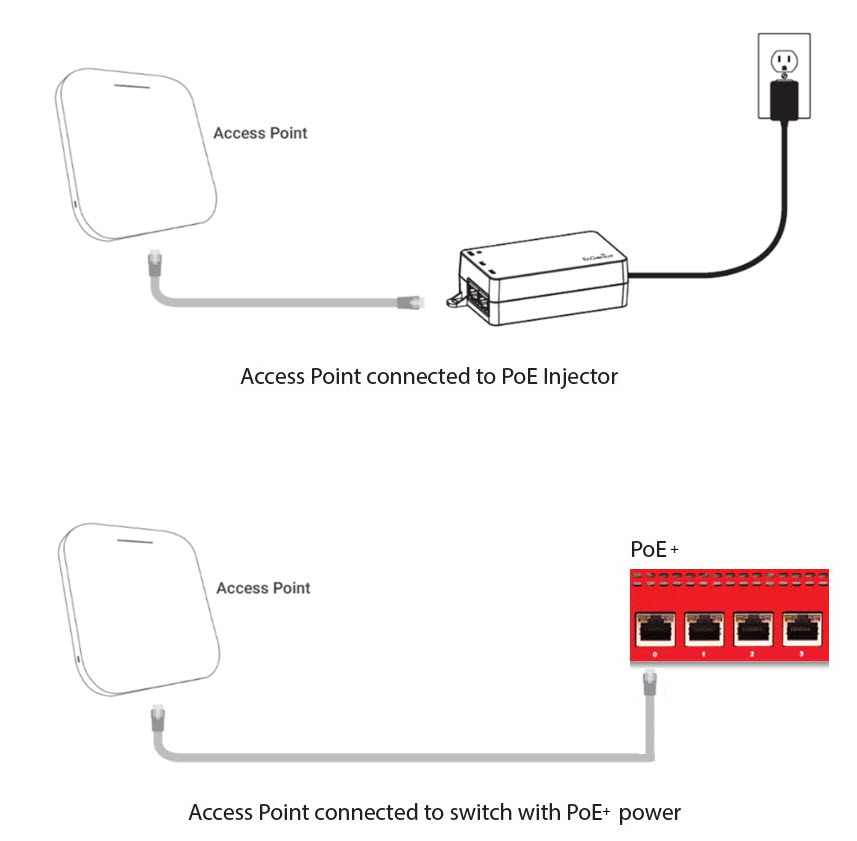
Plug one end of the Ethernet cable from your network into the LAN (10G, PoE+) port on the bottom panel of the access point.
Make sure the other end of the Ethernet cable is connected to your network through a hub, switch, or injector with PoE+ (802.3at) power enabled.
Caution: If the LED on the AP340 flashes red every second, the access point is receiving insufficient PoE power (802.3af). Wireless radios are disabled while wired network connectivity remains active to report device status. Connect the device to an appropriate PoE power source or PoE injector that supports 802.3at or higher.
Power Adapter (Optional)
An optional AC power adapter supplies 12V DC power to the device.
| AC Power Adapter Specs | |
|---|---|
|
WatchGuard Part Number |
WG9009 |
|
AC Input Voltage Rating |
100-240V, 50-60Hz |
|
Output Voltage |
DC 12V, 2.5A |
|
Region Specific Adapter Plugs |
US, UK, AU/NZ, EMEA (all included) |
|
Temperature |
Operating: 0 - 40°C (32 – 104°F) |
|
Humidity |
Operating: 5% – 95% |
|
Dimensions |
69 mm x 32.6 mm x 49.5 mm (2.7" x 1.28" x 1.5") |
Ethernet Power Injector (Optional)
You can power the access point with an optional Ethernet Power Injector. The PoE+ power injector enables you to power the access point through an existing Ethernet connection. With this device, you do not have to position your access point near a power outlet.
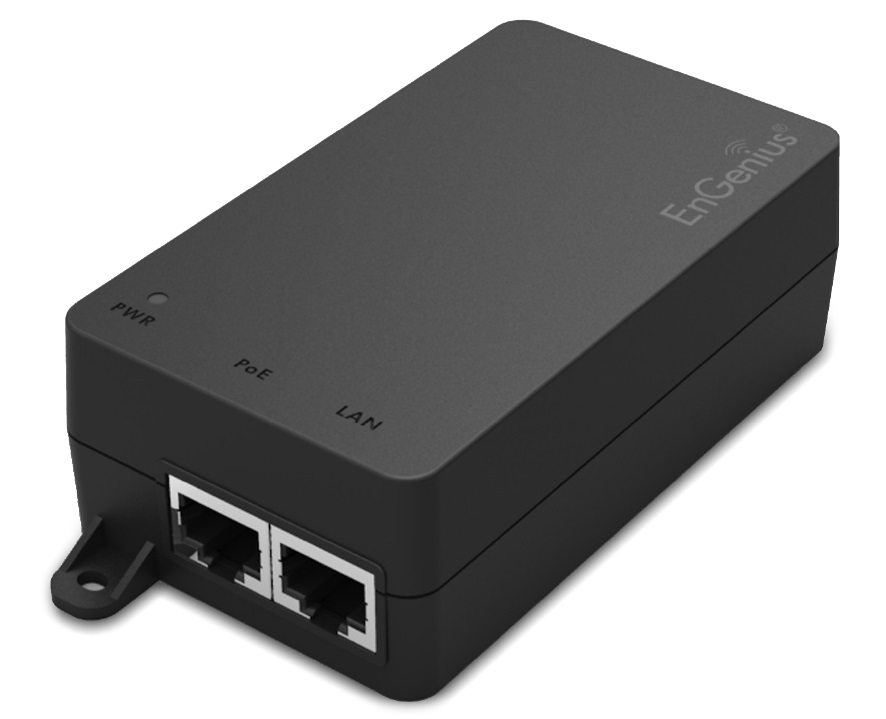
This device complies with IEEE 802.3at/af PoE specifications. Do not use any PoE adapters that are not IEEE 802.3at/af compliant as they may damage your device.
To connect an Ethernet Power Injector to the WatchGuard access point:
- Plug the Ethernet Power Injector into an AC power source.
- Connect an Ethernet cable from your network backbone (for example, a PoE-capable router, switch, or hub) to the LAN connector on the Ethernet Power Injector.
- Connect an Ethernet cable from the LAN (PoE) Ethernet interface on the access point to the PoE connector on the Ethernet Power Injector.
The table provides the specifications for the power adapter.
| Ethernet Power Injector Specs | |
|---|---|
| WatchGuard Part Number | 802.3at PoE+ Injector with AC cord (US) (WG8599) 802.3at PoE+ Injector with AC cord (EU) (WG8600) 802.3at PoE+ Injector with AC cord (UK) (WG8601) 802.3at PoE+ Injector with AC cord (AUS) (WG8602) |
| Specification | IEEE 802.3at/af |
| AC Input Voltage Rating |
100-240VAC |
| Input Current | 0.8A max for 100VAC |
| Output Power |
30W maximum |
| Ethernet Interfaces | LAN: RJ-45 for 10/100/1000/2500 Mbps data POE: RJ-45 for 10/100/1000/2500 Mbps data and power Voltage: Pin4, 5:54V, Pin7, 8:Return |
| Indicator | Power: Green |
| Temperature |
Operating: 0 - 40°C (32 - 104°F) |
| Humidity |
5% - 90% (Operating and storage) |
| Dimensions |
L = 99 mm (3.9") |
| Weight | 149.6 g (0.33 lbs) |
Notices
All WatchGuard products are designed and tested to meet strict safety requirements. These requirements include product safety approvals and other global compliance standards. Please read these instructions carefully before operating the product, and refer to them as needed to ensure the continued safe operation of your product.
For security, privacy, legal compliance, certifications, and environmental information, visit the WatchGuard Trust Center.
Safety Warning
- Do not place objects on the power cord.
- Do not obstruct the ventilation openings. These openings prevent overheating of the machine.
- Never push objects of any kind into slots or openings on this equipment. Making a contact with a voltage point or shorting out a part may result in fire or electrical shock.
- When removing or installing an device, follow the general installation safety instructions.
- This device is for indoor use only.
Power Source Requirements
This product is intended to be supplied by a Listed Power Adapter or DC power source marked “L.P.S.” (or Limited Power Source or PS2) rated 12V DC, 2A minimum, maximum ambient temperature (Tma)=40°C, or supplied by a Listed PoE Adapter marked “L.P.S.” (or Limited Power Source or PS2) rated 54V DC, 0.6A minimum, maximum ambient temperature (Tma)=40°C. For more information regarding approved power sources, please contact WatchGuard Technologies.
Connect the PoE interface only to PoE networks, without routing to the outside plant.
If protective earthing is used as a safeguard, the instructions shall require connection of the equipment protective earthing conductor to the installation protective earthing conductor (for example, by means of a power cord connected to a socket-outlet with earthing connection). To meet safety and electromagnetic interference (EMI) requirements, you must make sure the power source is connected to earth ground before you connect power to the access point.
Disclaimer
WatchGuard shall not be held liable if the end user alters, modify, or repairs any WatchGuard hardware appliance.
Avis
Tous les produits WatchGuard sont conçus et testés pour répondre à des exigences de sécurité strictes. Ces exigences comprennent les approbations de sécurité des produits et d'autres normes de conformité mondiales. Veuillez lire attentivement ces instructions avant d'utiliser le produit, et consultez-les si nécessaire pour assurer le fonctionnement continu et sûr de votre produit.
Pour obtenir des informations sur la sécurité, la confidentialité, la conformité légale, les certifications et l’environnement, consultez le WatchGuard Trust Center.
Alerte de sécurité
- Ne placez pas d'objets sur le cordon d'alimentation.
- Ne pas obstruer les ouvertures de ventilation. Ces ouvertures évitent la surchauffe de la machine.
- N'introduisez jamais d'objets d'aucune sorte dans les fentes ou les ouvertures de cet équipement. Établir un contact avec un point de tension ou court-circuiter une pièce peut entraîner un incendie ou un choc électrique.
- Lors du retrait ou de l'installation d'un appareil, respectez les consignes générales de sécurité d'installation.
- Cet appareil est destiné à une utilisation en intérieur uniquement.
Exigences relatives à la source d'alimentation
Ce produit est destiné à être alimenté par un adaptateur secteur répertorié ou une source d'alimentation CC portant la mention "L.P.S." (ou source d'alimentation limitée ou PS2) de 12 V CC, 2 A minimum, température ambiante maximale (Tma) = 40 °C, ou fourni par un adaptateur PoE répertorié marqué "L.P.S." (ou source d'alimentation limitée ou PS2) nominale 54 V CC, 0,6 A minimum, température ambiante maximale (Tma) = 40 °C. Pour plus d'informations sur les sources d'alimentation approuvées, veuillez contacter WatchGuard Technologies.
Connectez l'interface PoE uniquement aux réseaux PoE, sans routage vers l'installation extérieure.
Si la mise à la terre de protection est utilisée comme protection, les instructions doivent exiger la connexion du conducteur de mise à la terre de protection de l'équipement au conducteur de mise à la terre de protection de l'installation (par exemple, au moyen d'un cordon d'alimentation connecté à une prise de courant avec mise à la terre). Pour répondre aux exigences de sécurité et d'interférence électromagnétique (EMI), vous devez vous assurer que la source d'alimentation est connectée à la terre avant de connecter l'alimentation au point d'accès.
Clause de non-responsabilité
WatchGuard décline toute responsabilité si l'utilisateur final altère, modifie ou répare une appliance matérielle WatchGuard.
Hinweise Zur Sicherheit
Alle WatchGuard Produkte werden entwickelt und getestet, um strenge Sicherheitsanforderungen zuerfüllen. Diese Anforderungen umfassen Produktsicherheit Zulassungen und andere globale Compliance-Standards. Bitte lesen Sie die folgenden Anweisungen sorgfältig, bevor Sie das Produkt, und bezeichnen sie als notwendig, um den sicheren Betrieb des Geräts zu gewährleisten.
Informationen zu Sicherheit, Datenschutz, gesetzlicher Konformität, Zertifizierungen und Umwelt finden Sie im WatchGuard Trust Center.
Sicherheitshinweis
- Legen Sie keine Gegenstände auf das Netzkabel.
- Verdecken Sie nicht die Lüftungsöffnungen. Diese Öffnungen verhindern eine Überhitzung der Maschine.
- Stecken Sie niemals Gegenstände jeglicher Art in die Schlitze oder Öffnungen des Geräts stecken. Der Kontakt mit einem spannungsführenden Punkt oder das Kurzschließen eines Bauteils kann zu einem Brand oder elektrischen Schlag führen.
- Beim Entfernen oder Installieren eines Gerätes, nach den allgemeinen Installation Sicherheitshinweise.
- Dieses Gerät ist nur für den Innenbereich bestimmt.
Anforderungen an die Stromquelle
Dieses Produkt ist für die Versorgung mit einem gelisteten Netzteil oder einer DC-Stromquelle mit der Kennzeichnung „L.P.S.“ vorgesehen. (oder Limited Power Source oder PS2) mit einer Nennleistung von mindestens 12 V DC, 2 A, maximale Umgebungstemperatur (Tma) = 40 °C oder über einen gelisteten PoE-Adapter mit der Kennzeichnung „L.P.S.“ (oder Limited Power Source oder PS2) Nennwert 54 V DC, 0,6 A Minimum, maximale Umgebungstemperatur (Tma) = 40 °C. Wenden Sie sich für weitere Informationen zu zugelassenen Stromquellen bitte an WatchGuard Technologies.
Verbinden Sie die PoE-Schnittstelle nur mit PoE-Netzwerken, ohne Routing zur Außenanlage.
Wenn eine Schutzerdung als Schutz verwendet wird, müssen die Anweisungen den Anschluss des Schutzerdungsleiters des Geräts an den Schutzerdungsleiter der Installation fordern (z. B. über ein Netzkabel, das an eine Steckdose mit Erdungsanschluss angeschlossen ist). Um die Sicherheits- und elektromagnetischen Interferenzanforderungen (EMI) zu erfüllen, müssen Sie sicherstellen, dass die Stromquelle geerdet ist, bevor Sie den Access Point an die Stromversorgung anschließen.
Haftungsausschluss
WatchGuard haftet nicht, wenn der Endbenutzer eine Hardware-Appliance von WatchGuard ändert, modifiziert oder repariert.
Avisos
Todos los productos WatchGuard están diseñados y probados para cumplir con estrictos requisitos de seguridad. Estos requisitos incluyen aprobaciones de seguridad del producto y otros estándares globales de cumplimiento. Lea atentamente estas instrucciones antes de operar el producto y consúltelas cuando sea necesario para garantizar el funcionamiento seguro y continuo del equipo.
Para obtener información sobre seguridad, privacidad, cumplimiento legal, certificaciones y medio ambiente, visite el WatchGuard Trust Center.
Advertencia de seguridad
- No coloque objetos sobre el cable de alimentación.
- No obstruya las aberturas de ventilación. Estas aberturas evitan el sobrecalentamiento del equipo.
- Nunca introduzca objetos de ningún tipo en las ranuras o aberturas de este equipo. El contacto con puntos de voltaje o un cortocircuito en alguna pieza podría provocar un incendio o una descarga eléctrica.
- Al retirar o instalar un dispositivo, siga las instrucciones generales de seguridad para la instalación.
- Este dispositivo es solo para uso en interiores.
Requisitos de la fuente de alimentación
Este producto debe ser alimentado por un adaptador de corriente certificado (Listed) o una fuente de alimentación de CC marcada como “L.P.S.” (o Limited Power Source o PS2), con una clasificación mínima de 12 V CC, 2 A, temperatura ambiente máxima (Tma) = 40 °C, o bien por un adaptador PoE certificado (Listed) marcado como “L.P.S.” (o Limited Power Source o PS2), con una clasificación mínima de 54 V CC, 0.6 A, temperatura ambiente máxima (Tma) = 40 °C. Para obtener más información sobre las fuentes de alimentación aprobadas, comuníquese con WatchGuard Technologies.
Conecte la interfaz PoE únicamente a redes PoE, sin enrutar hacia redes externas.
Si se utiliza la conexión a tierra de protección como medida de seguridad, las instrucciones deben requerir la conexión del conductor de puesta a tierra de protección del equipo al conductor de puesta a tierra de la instalación (por ejemplo, mediante un cable de alimentación conectado a un tomacorriente con conexión a tierra). Para cumplir con los requisitos de seguridad e interferencia electromagnética (EMI), debe asegurarse de que la fuente de alimentación esté conectada a tierra antes de suministrar energía al punto de acceso.
Descargo de responsabilidad
WatchGuard no será responsable si el usuario final altera, modifica o repara cualquier equipo de hardware de WatchGuard.
Avisos
Todos os produtos WatchGuard são projetados e testados para atender a rigorosos requisitos de segurança. Esses requisitos incluem aprovações de segurança do produto e outros padrões globais de conformidade. Leia atentamente estas instruções antes de operar o produto e consulte-as sempre que necessário para garantir a operação segura e contínua do dispositivo.
Para obter informações sobre segurança, privacidade, conformidade legal, certificações e meio ambiente, visite o WatchGuard Trust Center.
Aviso de Segurança
- Não coloque objetos sobre o cabo de alimentação.
- Não obstrua as aberturas de ventilação. Essas aberturas evitam o superaquecimento do equipamento.
- Nunca insira objetos de qualquer tipo nas ranhuras ou aberturas deste equipamento. O contato com pontos de tensão ou o curto-circuito de componentes pode resultar em incêndio ou choque elétrico.
- Ao remover ou instalar um dispositivo, siga as instruções gerais de segurança para instalação.
- Este dispositivo é destinado apenas para uso em ambientes internos.
Requisitos de Fonte de Alimentação
Este produto deve ser alimentado por um Adaptador de Energia certificado (Listed) ou por uma fonte de alimentação CC marcada como “L.P.S.” (ou Limited Power Source ou PS2), com classificação mínima de 12 V CC, 2 A, temperatura ambiente máxima (Tma) = 40°C, ou por um Adaptador PoE certificado (Listed) marcado como “L.P.S.” (ou Limited Power Source ou PS2), com classificação mínima de 54 V CC, 0,6 A, temperatura ambiente máxima (Tma) = 40°C. Para mais informações sobre fontes de alimentação aprovadas, entre em contato com a WatchGuard Technologies.
Conecte a interface PoE apenas a redes PoE, sem roteamento para redes externas.
Se o aterramento de proteção for utilizado como medida de segurança, as instruções devem exigir a conexão do condutor de aterramento de proteção do equipamento ao sistema de aterramento da instalação (por exemplo, por meio de um cabo de alimentação conectado a uma tomada com aterramento). Para atender aos requisitos de segurança e interferência eletromagnética (EMI), é necessário garantir que a fonte de alimentação esteja conectada ao terra antes de fornecer energia ao ponto de acesso.
Isenção de Responsabilidade
A WatchGuard não se responsabiliza caso o usuário final altere, modifique ou repare qualquer equipamento de hardware da WatchGuard.
注意事項
すべてのWatchGuard製品は、厳格な安全要件を満たすように設計およびテストされています。これらの要件には、製品安全認証およびその他の国際的なコンプライアンス基準が含まれます。製品を操作する前にこれらの指示をよくお読みいただき、安全な運用を継続するために必要に応じて参照してください。
セキュリティ、プライバシー、法令遵守、認証、および環境に関する情報については、WatchGuard Trust Center.をご覧ください。
安全上の警告
- 電源コードの上に物を置かないでください。
- 通気口をふさがないでください。これらの開口部は機器の過熱を防止します。
- この機器のスロットや開口部にいかなる物も差し込まないでください。電圧がかかっている箇所に接触したり、部品を短絡させたりすると、火災や感電の原因となることがあります。
- デバイスを取り外しまたは取り付ける際は、一般的な設置安全手順に従ってください。
- このデバイスは屋内専用です。
電源要件
本製品は、「L.P.S.」(または Limited Power Source または PS2)と表示された認定電源アダプターまたはDC電源(定格:12V DC、最小2A、最大周囲温度(Tma)=40°C)、あるいは「L.P.S.」(または Limited Power Source または PS2)と表示された認定PoEアダプター(定格:54V DC、最小0.6A、最大周囲温度(Tma)=40°C)による給電を前提としています。承認済み電源に関する詳細については、WatchGuard Technologiesまでお問い合わせください。
PoEインターフェースは、屋外配線に接続されていないPoEネットワークにのみ接続してください。
保護接地を安全対策として使用する場合は、機器の保護接地導体を設備の保護接地導体に接続する必要があります(例: 接地極付きコンセントに接続された電源コードを使用する場合)。安全性および電磁干渉(EMI)要件を満たすため、アクセスポイントに電源を接続する前に、電源が確実に接地されていることを確認してください。
免責事項
エンドユーザーがWatchGuardハードウェアアプライアンスを改造、変更、または修理した場合、WatchGuardは一切の責任を負いません。
注意事项
所有 WatchGuard 产品均按照严格的安全要求进行设计和测试。这些要求包括产品安全认证以及其他全球合规标准。在操作本产品之前,请仔细阅读这些说明,并在需要时参考这些说明,以确保产品持续安全运行。
有关安全、隐私、法律合规、认证和环境信息,请访问WatchGuard Trust Center.。
安全警告
- 请勿在电源线上放置任何物品。
- 请勿堵塞通风口。这些开口可防止设备过热。
- 切勿将任何物体插入本设备的缝隙或开口中。接触带电部位或使部件短路可能导致火灾或触电。
- 拆卸或安装设备时,请遵循一般安装安全说明。
- 本设备仅供室内使用。
电源要求
本产品应由标有“L.P.S.”(或 Limited Power Source 或 PS2)的认证电源适配器或直流电源供电,其额定值为 12V DC、最小 2A、最高环境温度(Tma)=40°C;或者由标有“L.P.S.”(或 Limited Power Source 或 PS2)的认证 PoE 适配器供电,其额定值为 54V DC、最小 0.6A、最高环境温度(Tma)=40°C。有关经批准电源的更多信息,请联系 WatchGuard Technologies。
PoE 接口只能连接到 PoE 网络,且不得连接到外部布线设施。
如果使用保护性接地作为安全措施,则必须将设备保护接地导体连接到安装环境中的保护接地导体(例如,通过连接到带接地插座的电源线实现)。为了满足安全和电磁干扰(EMI)要求,在为接入点接通电源之前,必须确保电源已正确接地。
免责声明
如果最终用户对任何 WatchGuard 硬件设备进行更改、修改或维修,WatchGuard 不承担任何责任。
注意事項
所有 WatchGuard 產品均依據嚴格的安全要求進行設計與測試。這些要求包括產品安全認證及其他全球合規標準。操作本產品之前,請仔細閱讀這些說明,並於需要時參閱,以確保產品能持續安全運作。
如需安全性、隱私權、法規遵循、認證及環境資訊,請造訪WatchGuard Trust Center.。
安全警告
- 請勿在電源線上放置任何物品。
- 請勿阻塞通風孔。這些開口可防止設備過熱。
- 切勿將任何物品插入本設備的插槽或開口中。接觸帶電部位或造成零件短路可能導致火災或觸電。
- 拆卸或安裝裝置時,請遵循一般安裝安全說明。
- 本裝置僅供室內使用。
電源要求
本產品應由標示為「L.P.S.」(或 Limited Power Source 或 PS2)的認證電源轉換器或直流電源供電,其額定值為 12V DC、最小 2A、最高環境溫度(Tma)=40°C;或由標示為「L.P.S.」(或 Limited Power Source 或 PS2)的認證 PoE 轉換器供電,其額定值為 54V DC、最小 0.6A、最高環境溫度(Tma)=40°C。如需有關核准電源的更多資訊,請聯絡 WatchGuard Technologies。
PoE 介面僅能連接至 PoE 網路,不得連接至室外佈線設施。
如果使用保護接地作為安全防護措施,則必須將設備的保護接地導體連接至安裝環境中的保護接地導體(例如,透過連接至具接地功能插座的電源線)。為符合安全及電磁干擾(EMI)要求,在將電源連接至存取點之前,您必須確保電源已正確接地。
免責聲明
若最終使用者變更、修改或維修任何 WatchGuard 硬體設備,WatchGuard 概不承擔任何責任。
FCC (USA)
This device complies with part 15 of the FCC Rules. Operation is subject to the following two conditions: (1) This device may not cause harmful interference, and (2) this device must accept any interference received, including interference that may cause undesired operation.
This equipment has been tested and found to comply with the limits for a Class B digital device, pursuant to part 15 of the FCC Rules. These limits are designed to provide reasonable protection against harmful interference in a residential installation.
This equipment generates, uses and can radiate radio frequency energy and, if not installed and used in accordance with the instructions, may cause harmful interference to radio communications. However, there is no guarantee that interference will not occur in a particular installation. If this equipment does cause harmful interference to radio or television reception, which can be determined by turning the equipment off and on, the user is encouraged to try to correct the interference by one or more of the following measures:
- Reorient or relocate the receiving antenna.
- Increase the separation between the equipment and receiver.
- Connect the equipment into an outlet on a circuit different from that to which the receiver is connected.
- Consult the dealer or an experienced radio/TV technician for help.
FCC Caution:
Any changes or modifications not expressly approved by the party responsible for compliance could void the user’s authority to operate this equipment.
This transmitter must not be co-located or operating in conjunction with any other antenna or transmitter.
Operations in the 5.15-5.25 GHz band are restricted to indoor usage only.
This device meets all the other requirements specified in Part 15E, Section 15.407 of the FCC Rules.
Radiation Exposure Statement:
This equipment complies with FCC radiation exposure limits set forth for an uncontrolled environment. This equipment should be installed and operated with minimum distance of 41cm between the radiator & your body.
6ID (Low-power Indoor Access Point)
- FCC regulations restrict the operation of this device to indoor use only.
- This device is prohibited from being operated on oil platforms, cars, trains, boats, and aircraft, except it can be operated in large aircraft while flying above 10,000 feet in the 5.925-6.425 GHz band.
- Transmitters in the 5.925-7.125 GHz band are prohibited from operating to control or communicate with unmanned aircraft systems.
The FCC ID on the certification label is Q6G-AP340.
ISED / IC (Canada)
This device complies with ISED’s licence-exempt RSSs. Operation is subject to the following two conditions: (1) This device may not cause harmful interference, and (2) this device must accept any interference received, including interference that may cause undesired operation.
Le présent appareil est conforme aux CNR d’ ISED applicables aux appareils radio exempts de licence. L’exploitation est autorisée aux deux conditions suivantes: (1) le dispositif ne doit pas produire de brouillage préjudiciable, et (2) ce dispositif doit accepter tout brouillage reçu, y compris un brouillage susceptible de provoquer un fonctionnement indésirable.
Caution
(i) the device for operation in the band 5150-5250 MHz is only for indoor use to reduce the potential for harmful interference to co-channel mobile satellite systems;
(ii) where applicable, antenna type(s), antenna models(s), and worst-case tilt angle(s) necessary to remain compliant with the e.i.r.p. elevation mask requirement set forth in section 6.2.2.3 shall be clearly indicated.
Avertissement
Le guide d’utilisation des dispositifs pour réseaux locaux doit inclure des instructions précises sur les restrictions susmentionnées, notamment :
(i) les dispositifs fonctionnant dans la bande 5150-5250 MHz sont réservés uniquement pour une utilisation à l’intérieur afin de réduire les risques de brouillage préjudiciable aux systèmes de satellites mobiles utilisant les mêmes canaux;
(ii) lorsqu’il y a lieu, les types d’antennes (s’il y en a plusieurs), les numéros de modèle de l’antenne et les pires angles d’inclinaison nécessaires pour rester conforme à l’exigence de la p.i.r.e. applicable au masque d’élévation, énoncée à la section 6.2.2.3, doivent être clairement indiqués.
Radiation Exposure Statement
This equipment complies with ISED radiation exposure limits set forth for an uncontrolled environment. This equipment should be installed and operated with minimum distance 24cm between the radiator & your body.
Déclaration d'exposition aux radiations
Cet équipement est conforme aux limites d'exposition aux rayonnements ISED établies pour un environnement non contrôlé. Cet équipement doit être installé et utilisé avec un minimum de 24cm de distance entre la source de rayonnement et votre corps.
For indoor use only. Pour une utilisation en intérieur uniquement
IC RSS-248 Section 7 RLAN devices Requirements (for all 6E)
- Devices shall not be used for control of or communications with unmanned aircraft systems.
- Devices shall not be used on oil platforms.
- Devices shall not be used on aircraft, except for the low-power indoor access points, indoor subordinate devices, low-power client devices, and very low-power devices operating in the 5925-6425 MHz band, that may be used on large aircraft as defined in the Canadian Aviation Regulations, while flying above 3,048 metres (10,000 feet).
- Devices shall not be used on automobiles.
- Devices shall not be used on trains.
- Devices shall not be used on maritime vessels
- Les dispositifs ne doivent pas être utilisés pour commander des systèmes d’aéronef sans pilote ni pour communiquer avec de tels systèmes.
- Les dispositifs ne doivent pas être utilisés sur les plateformes de forage pétrolier.
- Les dispositifs ne doivent pas être utilisés dans les aéronefs, à l'exception des points d'accès intérieurs de faible puissance, des dispositifs subordonnés intérieurs, des dispositifs clients de faible puissance et des dispositifs de très faible puissance fonctionnant dans la bande de 5 925 à 6 425 MHz, qui peuvent être utilisés dans les gros aéronefs tel qu'il est défini dans le Règlement de l'aviation canadien, et ce, lorsqu'ils volent à une altitude supérieure à 3 048 mètres (10 000 pieds).
- Les dispositifs ne doivent pas être utilisés dans les automobiles.
- Les dispositifs ne doivent pas être utilisés dans les trains.
- Les dispositifs ne doivent pas être utilisés sur les navires maritimes.
For Indoor AP(6ID)
- Operation shall be limited to indoor use only.
- Le fonctionnement doit être limitée à une utilisation à l'intérieur seulement.
The IC ID on the certification label is 4657A-AP340.
United Kingdom (UKCA)
Importer: XXX
The device is in conformity with the relevant legislation of United Kingdom: 2017 (S.I. 2017/1206)/ Regulations 2016 (S.I. 2016/1091)/ Regulations 2016 (S.I. 2016/1101). To view the full UK Declaration of Conformity for this device, visit the WatchGuard Trust Center.
Safety and Health Standards
- IEC 62368-1:2018
- EN IEC 62368-1:2020+A11:2020
- EN 62311:2020
- EN 50665:2017
- EN 50385:2017
EMC Standards
- EN 55032:2015+A11:2020
- EN 55035:2017+A11:2020
- EN IEC 61000-3-2:2019+A1:2021
- EN 61000-3-3:2013+A2:2021+AC:2022-01
Wireless (Radio) Standards
- EN 300 328 V2.2.2 (2019-07)
- EN 301 893 V2.1.1 (2017-05)
- EN 303 687 V1.1.1 (2023-06)
- ETSI EN 301 489-1 V2.2.3
- ETSI EN 301 489-17 V3.2.4
Radiation Exposure Statement
This equipment complies with radiation exposure limits set forth for an uncontrolled environment. This equipment should be installed and operated with minimum distance 20cm between the radiator & your body.
European Union (CE)
Importer: XXX
This device complies with Directive 2014/53/EU issued by the Commission of the European Community. To view the full EU Declaration of Conformity for this device, visit the WatchGuard Trust Center.
Standards:
- EN 55032:2015+A11:2020
- EN 55035:2017+A11:2020
- EN IEC 61000-3-2:2019+A1:2021
- EN 61000-3-3:2013+A2:2021+AC:2022-01
- ETSI EN 301 489-1 V2.2.3
- ETSI EN 301 489-17 V3.2.4
- EN 62311: 2020
- EN 50665:2017
- IEC 62368-1:2018 EN IEC 62368-1:2020+A11:2020
Wireless Standards:
- EN 300 328 V2.2.2 (2019-07)
- EN 301 893 V2.1.1 (2017-05)
- EN 303 687 V1.1.1 (2023-06)
- EN 50385:2017
Radiation Exposure Statement
This equipment complies with radiation exposure limits set forth for an uncontrolled environment. This equipment should be installed and operated with minimum distance 20cm between the radiator & your body.
This device has software that cannot affect compliance with the Radio Equipment Directive (RED) 2014/53/EU, even if the software is changed or replaced.
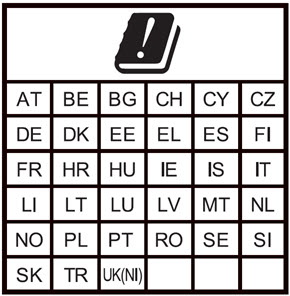
This device is restricted to indoor use when operating in the 5150-5350 MHz and 5945-6425 MHz frequency range in the indicated countries.
| Frequency Range | Maximum Output Power (EIRP) |
|---|---|
| 2400–2483.5 MHz | 19.96 dBm |
| 5150–5350 MHz | 22.94 dBm |
| 5470–5725 MHz | 29.99 dBm |
| 5945–6425 MHz | 22.92 dBm |
| English | This product is in compliance with Directive 2014/53/EU. |
| Български | Този продукт е в съответствие с Директива 2014/53/ЕС. |
| Česky | Tento produkt je v souladu se směrnicí 2014/53/EU. |
| Dansk | Dette produkt er i overensstemmelse med direktiv 2014/53/EU. |
| Deutsch | Dieses Produkt entspricht der Richtlinie 2014/53/EU. |
| Eesti | See toode vastab direktiivile 2014/53/EL. |
| Español | Este producto cumple con la Directiva 2014/53/UE. |
| Ελληνική | Το προϊόν αυτό συμμορφώνεται με την Οδηγία 2014/53/ΕΕ. |
| Français | Ce produit est conforme à la Directive 2014/53/UE. |
| Hrvatski | Ovaj proizvod je u skladu s Direktivom 2014/53/EU. |
| Italiano | Questo prodotto è conforme alla Direttiva 2014/53/EU. |
| Latviski | Šis produkts atbilst Direktīvai 2014/53/EU. |
| Lietuvių | Šis gaminys atitinka direktyvą 2014/53/ES. |
| Malti | Dan il-prodott huwa konformi mad-Direttiva 2014/53/UE. |
| Magyar | Ez za termék megfelel a 2014/53/EU irányelvnek. |
| Nederlands | Dit product is in overeenstemming met Richtlijn 2014/53/EU. |
| Norsk | Dette produktet er i samsvar med direktiv 2014/53/EU. |
| Polski | Ten produkt jest zgodny z dyrektywą 2014/53/UE. |
| Português | Este produto está em conformidade com a Diretiva 2014/53/UE. |
| Rumunski | Acest produs este în conformitate cu Directiva 2014/53/UE. |
| Slovensky | Tento produkt je v súlade so smernicou 2014/53/EÚ. |
| Slovensko | Ta izdelek je v skladu z Direktivo 2014/53/EU. |
| Suomi | Tämä tuote on direktiivin 2014/53/EU mukainen. |
| Svenska | Denna produkt överensstämmer med direktiv 2014/53/EU. |
Brazil ANATEL Notice
Este equipamento não tem direito à proteção contra interferência prejudicial e deve aceitar interferência recebida, incluindo interferência que possa causar operação indesejada.
CISPR 32 Statement
Este é um produto Classe A. Em um ambiente residencial, este produto pode causar interferência de rádio, podendo o usuário ser obrigado a tomar medidas adequadas.
Mexico NOM Notice
La operación de este equipo está sujeta a las siguientes dos condiciones:
(i) es posible que este equipo o dispositivo no cause interferencia perjudicial y
(ii) este equipo o dispositivo debe aceptar cualquier interferencia, incluyendo la que pueda causar su operación no deseada.
Japan
この装置には、電波法に基づく技術規則適合証明書の認定を受けた特定の無線装置が含まれています。
Japan VCCI Statement
この装置は、情報処理装置等電波障害自主規制協議会(VCCI)の基準に基づくクラス B 情報技術装置です。この装置は、家庭環境で使用することを目的としていますが、この装置がラジオやテレビジョン受信機に近接して使用されると、受信障害を引き起こすことがあります。取扱説明書に従って正しい取り扱いをして下さい。
Taiwan NCC Statement
取得審驗證明之低功率射頻器材,非經核准,公司、商號或使用者均不得擅自變更頻率、加大功率或變更原設計之特性及功能。低功率射頻器材之使用不得影響飛航安全及干擾合法通信;經發現有干擾現象時,應立即停用,並改善至無干擾時方得繼續使用。前述合法通信,指依電信管理法規定作業之無線電通信。低功率射頻器材須忍受合法通信或工業、科學及醫療用電波輻射性電機設備之干擾。
應避免影響附近雷達系統之操作。
「本產品電磁波曝露量(MPE)標準值1mW/cm2,送測產品實測值為0.347 mW/cm2,建議使用時至少距離人體20cm」
[警語內容]
本器材須經專業工程人員安裝及設定,始得設置使用,且不得直接販售給一般消費。
RoHS Statement
The Restriction of Hazardous Substances 2.0 (RoHS 2.0) in Electrical and Electronic Equipment Directive was passed into law by the European Union (EU). It affects manufacturers, sellers, distributors and recyclers of electrical and electronic equipment containing lead, cadmium, mercury, hexavalent chrome, polybrominated diphenylether (PBDE), polybrominated biphenyl (PBB), Bis (2-ethylhexyl) phthalate (DEHP), Butyl benzyl phthalate (BBP), Dibutyl phthalate (DBP) and Diisobutyl phthalate (DIBP). After June 4, 2015 the use of these materials are banned in new products sold in Europe.
WatchGuard declares that all products listed herein comply with European Union RoHS Directive (RoHS 2.0 2011/65/EU and 2015/863/EU) requirements taking the following Annex III exemptions: [stating the list of exemptions, 6(c) ,7(a) ,7(C)-1].
Access Points: AP130, AP230W, AP330, AP340, AP332CR, AP430CR, AP432
Firebox: N5V, T25, T25-W, T45, T45-PoE, T45-W-PoE, T45-CW, T85-PoE, T115-W, T125, T125-W, T145, T145-W, T175, T185, M290, M295, M390, M395, M495, M590, M595, M690, M695, M4850, M5850, M6850
| Substances Listed | Limit |
|---|---|
| Cadmium(Cd) | ≤ 0.01% (100 ppm) |
| Hexa‐valent Chromium (Cr6+) | ≤ 0.1% (1000 ppm) |
| Lead (Pb) | ≤ 0.1% (1000 ppm) * |
| Mercury (Hg) | ≤ 0.1% (1000 ppm) |
| Polybrominated biphenyis (PBB) | ≤ 0.1% (1000 ppm) |
| Polybrominated diphenylethers (PBDE or PBBE) | ≤ 0.1% (1000 ppm) |
| Bis (2-ethylhexyl) phthalate (DEHP) | ≤ 0.1% (1000 ppm) |
| Butyl benzyl phthalate (BBP) | ≤ 0.1% (1000 ppm) |
| Dibutyl phthalate (DBP) | ≤ 0.1% (1000 ppm) |
| Diisobutyl phthalate (DIBP) | ≤ 0.1% (1000 ppm) |
* (contains Lead > 0.1% by weight because of exempted applications)
7a lead in high melting temperature type solders (i.e. lead based alloys containing 85 % by weight or more lead)
7(c) I. Electrical and electronic components containing lead in a glass or ceramic other than dielectric ceramic in capacitors, e.g. piezo electronic devices, or in a glass or ceramic matrix compound.
WEEE Statement
WatchGuard asks that all our products to be recycled at the end of their current use to comply with local waste compliance requirements.
WatchGuard supports the EU Waste Electrical and Electronic Equipment (WEEE) Directive (2012/19/EU). That means that WEEE may not be disposed as unsorted municipal waste but is to be collected separately.
WatchGuard products are therefore labeled with this symbol:

The WEEE symbol on your WatchGuard equipment indicates that it should not be disposed of by the end user with unsorted municipal waste, but in a manner consistent with required EU Directives, and the local transposition of the Directive in the end user's jurisdiction. The symbol is placed per CENELEC standard EN50419.
WEEE may contain hazardous substances which may negatively affect the environment and human health when disposed of through normal channels. Batteries that are not enclosed in the waste equipment must be separated from it and disposed of separately before being handed in at a collection point. Old batteries, and in certain cases also the waste equipment, can likewise be returned free of charge to the point of sale. You are responsible for deleting any personal data on the waste equipment. WatchGuard is committed to reduce the negative environmental and human health effects of WEEE which will help prevent potential negative consequences for the environment and human health. If you are a consumer please use your local recycling option. This is usually your municipal refuse site.
Limited Hardware Warranty
This Limited Hardware Warranty (the “Warranty”) applies to the enclosed hardware product, not including any associated software, which is licensed pursuant to a separate end-user license agreement and warranty (the “Product”). BY USING THE PRODUCT, YOU (either an individual or a single entity) AGREE TO THE TERMS HEREOF.
If you do not agree to these terms, please return this package, along with proof of purchase, to the authorized dealer from which you purchased it for a full refund. WatchGuard Technologies, Inc. (“WatchGuard”) and you agree as set forth below or on the reverse side of this card, as applicable.
- LIMITED WARRANTY. WatchGuard warrants that upon delivery and for one (1) year thereafter (the “Warranty Period”): (a) the Product will be free from material defects in materials and workmanship, and (b) the Product, when properly installed and used for its intended purpose and in its intended operating environment, will perform substantially in accordance with WatchGuard applicable specifications.
This warranty does not apply to any Product that has been: (i) altered, repaired or modified by any party other than WatchGuard except for the replacement or inclusion of specified components authorized in, and performed in strict accordance with, documentation provided by WatchGuard; or (ii) damaged or destroyed by force majeure events, accidents, power spikes or similar events or by any intentional, reckless or negligent acts or omissions of any party. You may have additional warranties with respect to the Product from the manufacturers of Product components. However, you agree not to look to WatchGuard for, and hereby release WatchGuard from any liability for, performance of, enforcement of, or damages or other relief on account of, any such warranties or any breach thereof.
- REMEDIES. If any Product does not comply with the WatchGuard warranties set forth in Section 1 above, WatchGuard will, following the receipt of the product you claim is defective and at its option, either (a) repair the Product, or (b) replace the Product with a like or similar product; provided, that you will be responsible for returning the Product and for all costs of shipping and handling. Repair or replacement of the Product shall not extend the Warranty Period. Any Product, component, part or other item replaced by WatchGuard becomes the property of WatchGuard. WatchGuard shall not be responsible for return of or damage to any software, firmware, information or data contained in, stored on, or integrated with any returned Products.
- DISCLAIMER AND RELEASE. THE WARRANTIES, OBLIGATIONS AND LIABILITIES OF WATCHGUARD, AND YOUR REMEDIES, SET FORTH IN PARAGRAPHS 1 AND 2 ABOVE ARE EXCLUSIVE AND IN SUBSTITUTION FOR, AND YOU HEREBY WAIVE, DISCLAIM AND RELEASE ANY AND ALL OTHER WARRANTIES, OBLIGATIONS AND LIABILITIES OF WATCHGUARD AND ALL OTHER RIGHTS, CLAIMS AND REMEDIES YOU MAY HAVE AGAINST WATCHGUARD, EXPRESS OR IMPLIED, ARISING BY LAW OR OTHERWISE, WITH RESPECT TO ANY NONCONFORMANCE OR DEFECT IN THE PRODUCT (INCLUDING, BUT NOT LIMITED TO, ANY IMPLIED WARRANTY OF MERCHANTABILITY OR FITNESS FOR A PARTICULAR PURPOSE, ANY IMPLIED WARRANTY ARISING FROM COURSE OF PERFORMANCE, COURSE OF DEALING, OR USAGE OF TRADE, ANY WARRANTY O NONINFRINGEMENT, ANY WARRANTY OF UNINTERRUPTED OR ERROR-FREE OPERATION, ANY OBLIGATION, LIABILITY, RIGHT, CLAIM OR REMEDY IN TORT, WHETHER OR NOT ARISING FROM THE NEGLIGENCE (WHETHER ACTIVE, PASSIVE OR IMPUTED) OR FAULT OF WATCHGUARD OR FROM PRODUCT LIABILITY, STRICT LIABILITY OR OTHER THEORY, AND ANY OBLIGATION, LIABILITY, RIGHT, CLAIM OR REMEDY FOR LOSS OR DAMAGE TO, OR CAUSED BY OR CONTRIBUTED TO BY, THE PRODUCT).
- LIMITATION AND LIABILITY. WATCHGUARD’S LIABILITY (WHETHER ARISING IN CONTRACT (INCLUDING WARRANTY), TORT (INCLUDING ACTIVE, PASSIVE OR IMPUTED NEGLIGENCE AND STRICT LIABILITY AND FAULT) OR OTHER THEORY) WITH REGARD TO ANY PRODUCT WILL IN NO EVENT EXCEED THE PURCHASE PRICE PAID BY YOU FOR SUCH PRODUCT. THIS SHALL BE TRUE EVEN IN THE EVENT OF THE FAILURE OF ANY AGREED REMEDY. IN NO EVENT WILL WATCHGUARD BE LIABLE TO YOU OR ANY THIRD PARTY (WHETHER ARISING IN CONTRACT (INCLUDING WARRANTY), TORT (INCLUDING ACTIVE, PASSIVE OR IMPUTED NEGLIGENCE AND STRICT LIABILITY AND FAULT) OR OTHER THEORY) FOR COST OF COVER OR FOR ANY INDIRECT, SPECIAL, INCIDENTAL, OR CONSEQUENTIAL DAMAGES (INCLUDING WITHOUT LIMITATION LOSS OF PROFITS, BUSINESS, OR DATA) ARISING OUT OF OR IN CONNECTION WITH THIS WARRANTY OR THE USE OF OR INABILITY TO USE THE PRODUCT, EVEN IF WATCHGUARD HAS BEEN ADVISED OF THE POSSIBILITY OF SUCH DAMAGES. THIS SHALL BE TRUE EVEN IN THE EVENT OF THE FAILURE OF ANY AGREED REMEDY.
- MISCELLANEOUS PROVISIONS. This Warranty will be governed by the laws of the state of Washington, U.S.A., without reference to its choice of law rules. The provisions of the 1980 United Nations Convention on Contracts for the International Sales of Goods, as amended, shall not apply. You agree not to directly or indirectly transfer the Product or use of the product or associated documentation to any country to which such transfer would be prohibited by the U.S. Export laws and regulations. If any provision of this Warranty is found to be invalid or unenforceable, then the remainder shall have full force and effect and the invalid provision shall be modified or partially enforced to the maximum extent permitted by law to effectuate the purpose of this Warranty. This is the entire agreement between WatchGuard and you relating to the Product, and supersedes any prior purchase order, communications, advertising or representations concerning the Product AND BY USING THE PRODUCT YOU AGREE TO THESE TERMS. IF THE PRODUCT IS BEING USED BY AN ENTITY, THE INDIVIDUAL INDICATING AGREEMENT TO THESE TERMS BY USING THE PRODUCT REPRESENTS AND WARRANTS THAT (A) SUCH INDIVIDUAL IS DULY AUTHORIZED TO ACCEPT THE WARRANTY ON BEHALF OF THE ENTITY AND TO BIND THE ENTITY TO THE TERMS OF THIS WARRANTY; (B) THE ENTITY HAS THE FULL POWER, CORPORATE OR OTHERWISE, TO ENTER INTO THE WARRANTY AND PERFORM ITS OBLIGATIONS UNDER THE WARRANTY AND; (C) THE WARRANTY AND THE PERFORMANCE OF THE ENTITY’S OBLIGATIONS UNDER THE WARRANTY DO NOT VIOLATE ANY THIRD-PARTY AGREEMENT TO WHICH THE ENTITY IS A PARTY.
No change or modification of the Warranty will be valid unless it is in writing and is signed by WatchGuard.