Applies To: Locally-managed Fireboxes
Some of the features described in this version of Fireware Help are only available to participants in the WatchGuard Beta program. If a feature described in this topic is not available in your version of Fireware, it is a beta-only feature.
In Fireware v2026.5 or higher, you can enable Mapping of Address and Port using Encapsulation (MAP-E) on an external interface. MAP-E is an IPv6 transition technology (RFC 7597) that encapsulates IPv4 traffic in IPv6 so the Firebox can send IPv4 traffic across an IPv6 network. When you enable MAP-E, the Firebox operates as a MAP-E customer edge (CE) device and gets MAP-E mapping rules from your ISP.
Before you enable MAP-E, you must enable IPv6 for that interface. The Firebox uses the IPv6 address on the external interface to request MAP-E rules from the ISP.
Before You Begin
Note: MAP-E support is intended for ISP environments that use MAP-E, primarily Japanese ISPs. Get connection requirements from your ISP before you configure MAP-E.
Before you enable MAP-E, make sure that:
- The Firebox runs Fireware v2026.5 or higher.
- Your ISP supports MAP-E for your connection.
- IPv6 is enabled for the external interface that connects to the ISP. For more information, go to Configure IPv6 for an External Interface.
Enable MAP-E
To enable MAP-E for an external interface, from Fireware Web UI:
- Select Network > Interfaces.
The Network Interfaces page opens. - Select an external interface, then click Configure.
The interface configuration page opens. - Select the IPv4 tab.
- From the Configuration Mode drop-down list, select MAP-E.
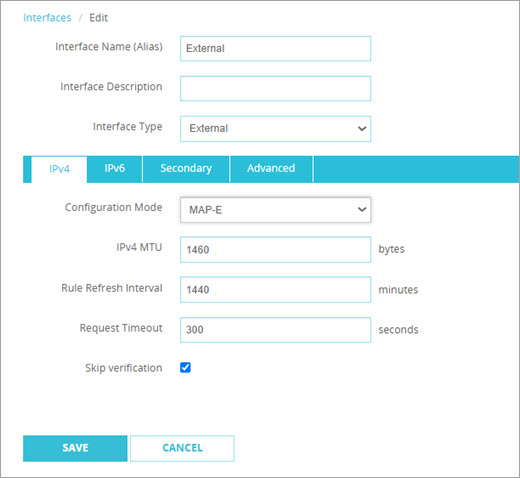
- Configure the MAP-E settings required by your ISP. For more information, go to MAP-E Settings.
- Click Save.
Note: If your ISP requires dynamic DNS updates through ipoe-static.ocn.ad.jp, configure Dynamic DNS for the external interface and select that provider. For Open Computer Network (OCN) static MAP-E service, you must complete this host name registration. OCN uses the host name for address resolution to map an IPv6 prefix change to the assigned IPv4 address. For more information, go to Configure Dynamic DNS.
To enable MAP-E for an external interface, from Policy Manager:
- Select Network > Configuration.
The Network Configuration dialog box opens. - Select an external interface, then click Configure.
The Interface Settings dialog box opens. - Select the IPv4 tab.
- Select Use MAP-E.
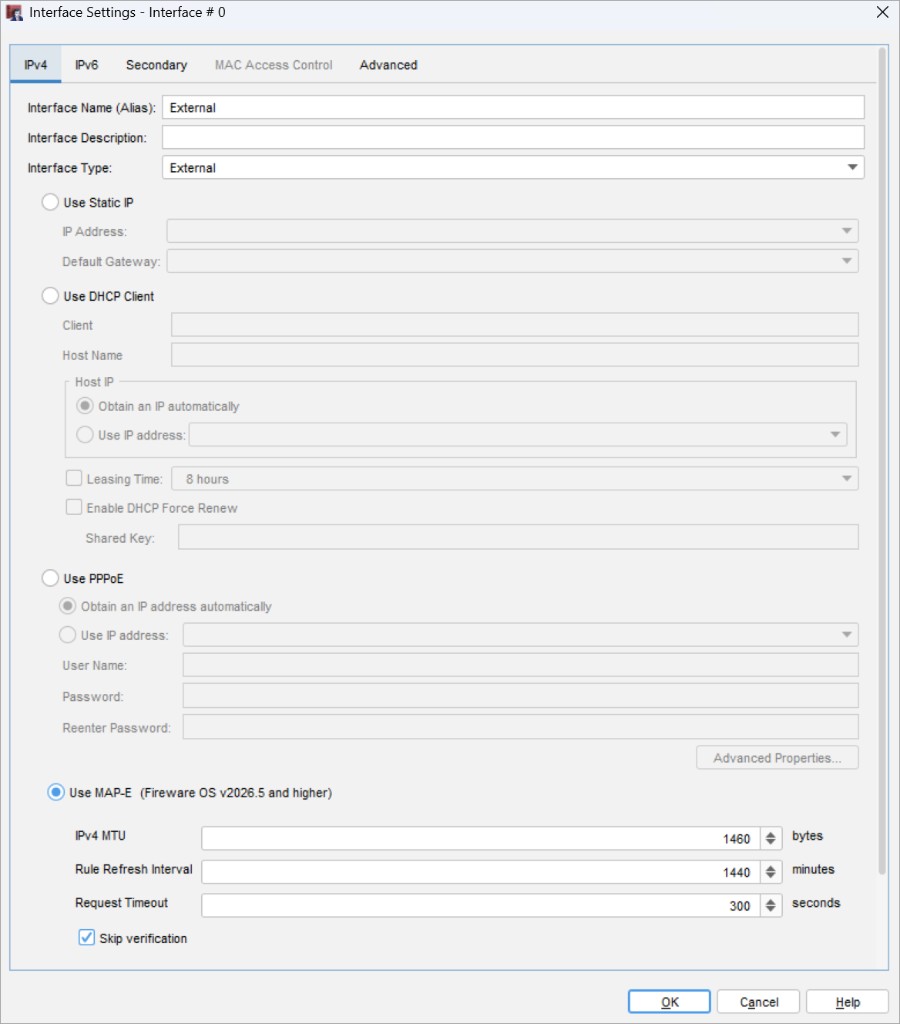
- Configure the MAP-E settings required by your ISP. For more information, go to MAP-E Settings.
- Click OK.
- Save the configuration to the Firebox.
Note: If your ISP requires dynamic DNS updates through ipoe-static.ocn.ad.jp, configure Dynamic DNS for the external interface and select that provider. For Open Computer Network (OCN) static MAP-E service, you must complete this host name registration. OCN uses the host name for address resolution to map an IPv6 prefix change to the assigned IPv4 address. For more information, go to Configure Dynamic DNS.
MAP-E Settings
When you enable MAP-E, the Firebox automatically retrieves MAP-E mapping rules from your ISP. Border Relay, prefix, and port-set values come from the ISP and are not typed in the configuration.
Configuration Mode / Use MAP-E
To enable MAP-E on the external interface, from Fireware Web UI, from the Configuration Mode drop-down list, select MAP-E. From Policy Manager, select Use MAP-E.
IPv4 MTU
Specify the maximum transmission unit (MTU) for this interface, in bytes. The default value is 1460. Use the MTU value provided by your ISP. The MTU value from your ISP already includes encapsulation overhead.
Rule Refresh Interval
Specify how often, in minutes, the Firebox retrieves updated MAP-E mapping rules from the rule server. The default value is 1440 minutes (24 hours). The supported range is 720–1440 minutes. This setting does not control DHCP renewal.
Request Timeout
(Optional) Specify the timeout, in seconds, for MAP-E rule requests to the rule server. If a rule request does not complete before this timeout, the request fails. If you leave this text box empty, the Firebox uses the default timeout of 300 seconds.
Skip Verification
To skip SSL certificate verification when the Firebox requests MAP-E rules from the rule server, select this check box. This option is selected by default.
Configure IPv6 for an External Interface
Configure an External Interface