Applies To: Endpoint Security Elite, Endpoint Security 360, Endpoint Security Prime, WatchGuard EDR, WatchGuard EDR Core, Endpoint Security Basic
You cannot install Endpoint Security on a computer with an antivirus or security product from another vendor.
If Endpoint Security has the uninstaller for a third-party product, it can uninstall it and then install Endpoint Security. To uninstall a third-party antivirus product, the computer might have to restart. If Endpoint Security does not have the uninstaller, the installation process stops.
If a computer is already protected with legacy Panda endpoint security product, Endpoint Security automatically uninstalls the communications agent, then installs the WatchGuard Agent. The WatchGuard Agent checks if a protection upgrade is required. If an upgrade is required, it installs the upgrade and restarts the computer.
For information on products that Endpoint Security can automatically uninstall, go to Programs Automatically Uninstalled by Endpoint Security.
Configure Automatic Removal of Other Security Products
You can configure Endpoint Security to automatically uninstall third-party security products when the software is installed or updated on a client computer. Once a day, the software checks this setting when it looks for an update.
Your operator role determines what you can see and do in WatchGuard Cloud. Your role must have the Configure Security for Workstations and Servers permission to view or configure this feature. For more information, go to Manage WatchGuard Cloud Operators and Roles.
To configure automatic removal of other security products during updates:
- In WatchGuard Cloud, select Configure > Endpoint Security.
- Select Settings.
- From the left pane, select Workstations and Servers.
- Select an existing security settings profile to edit, copy an existing profile, or in the upper-right corner of the page, click Add to create a new profile.
The Add Settings or Edit Settings page opens. - Type a Name and Description for the profile, if required.
- Select General.
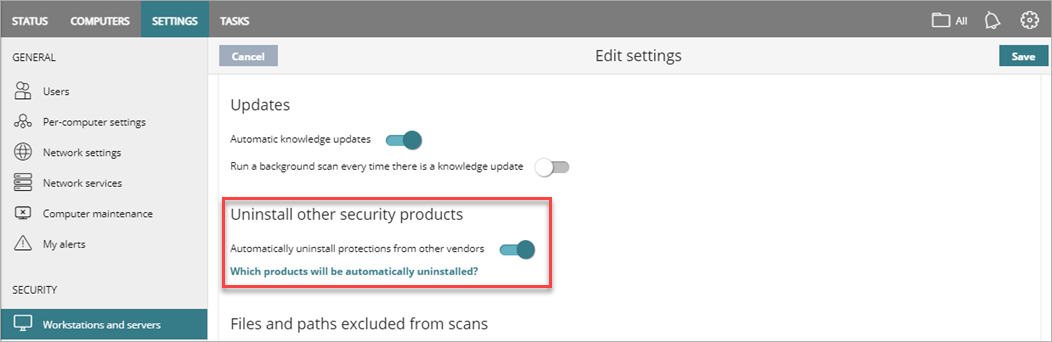
- To Automatically Uninstall Protections from Other Vendors, enable the toggle.
If WatchGuard Endpoint Security does not have the uninstaller, the installation process stops. You must uninstall the other security product manually. - Click Save.
- Select the profile and assign recipients, if required.
For more information, go to Assign a Settings Profile.