Applies To: WatchGuard CloudDR
The Application Logs page provides a central log repository for actions taken in WatchGuard CloudDR.
To open the Application Logs page for a single organization, from the CloudDR menu, select Settings. Select Application Logs.
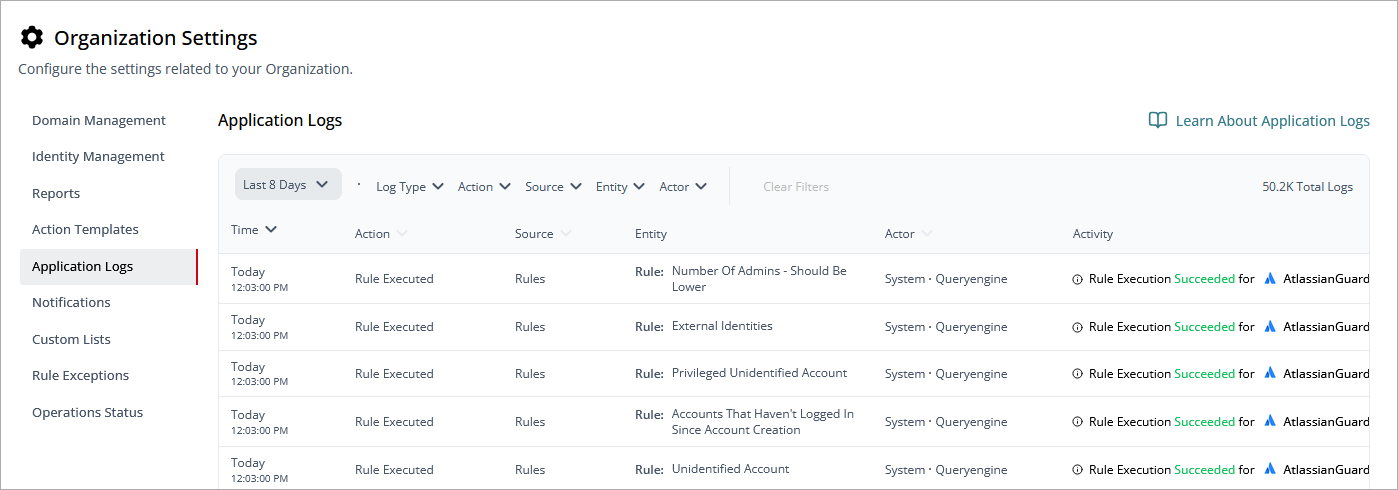
You can filter the log messages by time period, organization, log type, and more. In addition to the date and time when an activity occurred, log messages include these details:
Log Type
- Info: General information about system events or updates.
- Error: Indication of an error or failure in the system.
- Success: Confirmation of successful actions or processes.
- Warning: Alerts about potential issues needing attention.
Action
- Action Executed: A predefined task or operation was completed.
- Applications Exported: Applications data was exported successfully.
- Data Sync: Data synchronization process was performed.
- Integration Sync Completed: Integration sync finalized successfully.
- Integration Sync Initiated: Integration sync process was started.
- Automation Created: A new automation workflow was set up.
- Automation Edited: Changes were made to an existing automation.
- Automation Off: Automation was disabled.
- Automation On: Automation was enabled.
- Automation Removed: An automation workflow was deleted.
- Change App Owner: Ownership of an application was reassigned.
- Compliance Followed: Compliance rules were adhered to.
- Compliance Unfollowed: Compliance rules were disregarded.
- Delete Edited Rule: A previously edited rule was removed.
- Identity Demerge: A single identity was split into multiple records.
- Identity Merge: Multiple identities were combined into one.
- Issue Accepted: An issue was marked as accepted.
- Issue Archived: An issue was archived for record-keeping.
- Issue Attended: An issue was addressed or acted on.
- Issue Flagged: An issue was marked for attention or follow-up.
- Issues Reopened: Previously closed issues were reopened.
- Issue Restored: A deleted issue was brought back into view.
- Issue Set Due Date: A due date was assigned to an issue.
- Issue Unaccepted: Acceptance status of an issue was reversed.
- Issue Unattended: An issue was marked as pending or ignored.
- Issue Unflagged: A flag was removed from an issue.
- Issues Closed: Issues were marked as resolved and closed.
- Issues Opened: New issues were created or reported.
- Issues Resolved: Issues were fixed or addressed.
- New Rule Created: A new rule was defined in the system.
- Notification Created: A notification was generated.
- Notification Deleted: A notification was removed.
- Notification Edited: Changes were made to a notification.
- Notification Off: Notifications were disabled.
- Notification On: Notifications were enabled.
- Notification Removed: Notifications were deleted.
- Rule Criteria Updated: Rule parameters were modified.
- Rule Disabled: A rule was turned off.
- Rule Enabled: A rule was activated.
- Rule Executed: A rule was executed successfully.
- Rule Exported: Rule data was exported.
- Rule Flagged: A rule was flagged for attention.
- Rule Onboarded: A new rule was added to the system.
- Rule Severity Changed: Severity of a rule was updated.
- Rule Unflagged: A flag was removed from a rule.
- Shadow Apps Exported: Shadow application data was exported.
- Shadow Application Revoke Access: Access to a shadow application was revoked.
- Shadow Application Scope Risk Updated: Risk associated with shadow app scope was updated.
- Third Party Approval Status Updated: Third-party approval status was modified.
- Use Case Starred: A use case was marked as important.
- Use Case Unstarred: A use case was unmarked as important.
- Users Exported: User data was exported.
- User Claimed: A user claimed ownership of a resource or action.
Source
- Action: Originates from a user or system-triggered task.
- Application: Related to application-level events or changes.
- Compliance: Related to compliance activities or rules.
- Integration: Related to integrations or connected services.
- Issues: Related to issue management.
- Rules: Related to rule-based operations or activities.
- Third Party: Related to third-party services or approvals.
- Users: Related to user activities or exports.
Entity
- Action: A specific task or operation.
- Application: Related to managed applications.
- Compliance: Related to compliance rules or adherence.
- Issue: Related to reported or managed issues.
- Rule: Related to rules defined within the system.
- Tpa: Related to a third-party application or service.
- User: Related to system users or entities.
- Usecase: Related to scenarios or workflows for specific use cases.
Actor
- User: Actions performed by a user.
- System: Automated system-driven events.