Applies To: WatchGuard CloudDR
The Threats > Use Cases page acts as a centralized hub to manage threats to your cloud application security.
When you select Overview in Account Manager, the Use Cases page includes cumulative information for all managed accounts. Each use case shows as a widget on the page.
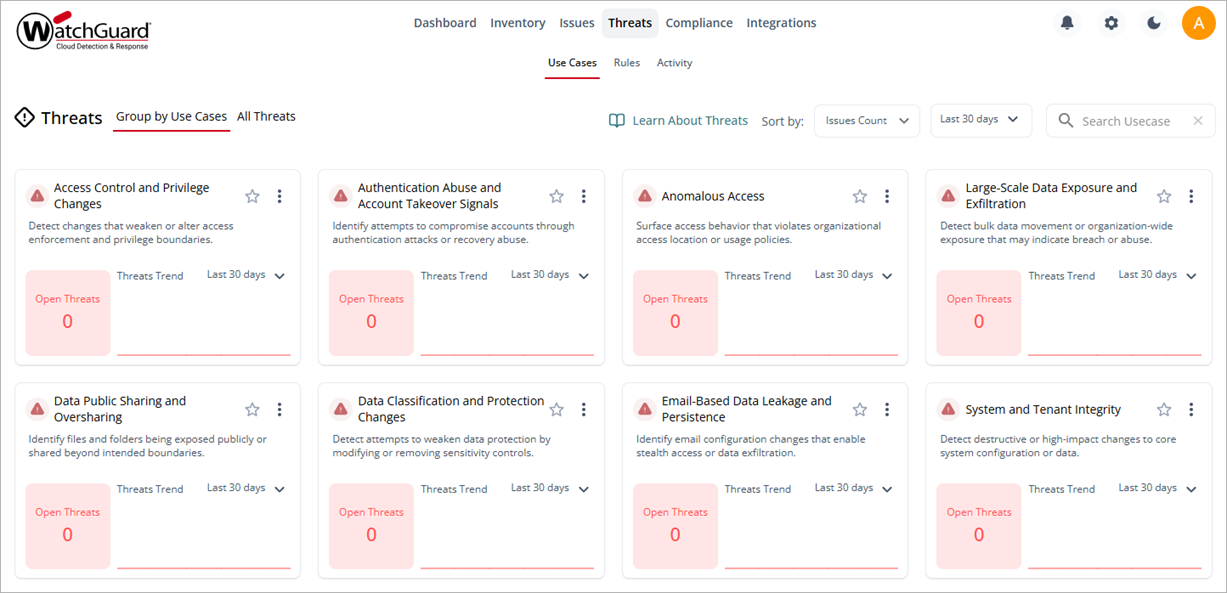
You can view the page as a list of all active threats or threats grouped by use cases.
- To view all threats, click All Threats.
- To view the threats grouped in use cases, click Group by Use Cases.
When you view the page as a list of all threats, you can filter the page by Organization, Application, Rule, Status, Risk, and Severity.

To search for a specific threat, enter the threat rule name in the Search Threat Rule Name box.
Group Rules into Use Cases
Use cases consolidate actionable insights by common security scenarios. Each use case shows as a widget on the page. To search for a specific use case, select Group by Use Cases, and then enter the use case name in the Search Usecase box.
You can sort the page to show the use cases with the greatest number of issues first. Select a date range from the drop-down list (Last 7 days, Last 30 days, Last 90 days, or Lifetime) to target a specific time period.
You can also mark a use case as a favorite for quick access. Click  on a widget to mark it as a favorite.
To show data for a specific time period in a single widget, from the drop-down list, select the time period you want to review (Last 7 days, Last 30 days, Last 90 days, or Lifetime).
To view use case details, click the widget title, or click  and select Use Case Details.
To review and resolve issues related to the use case, in the widget, click and select Review and Fix Issues. The threat details page opens with a description of the threat and recommended actions. For more information, go toAutomated Threat Response Actions in WatchGuard CloudDR.
Get Started with WatchGuard CloudDR