If you have not configured ConnectWise RMM in the onboarding application to automatically map accounts, you must create these custom fields in ConnectWise RMM and then manually map the accounts:
- WatchGuard Account ID
- WatchGuard Token
- WatchGuard Client Company ID
- WatchGuard Deployment ID
The provided scripts are used to automate agent installation when you have manually mapped accounts to the custom fields.
Custom fields you create in ConnectWise RMM must have exactly the same names as the custom fields listed here. To avoid errors, we recommend you copy and paste the custom field names.
Before you begin, export the client settings from the onboarding application. For more information, go to Export Client Settings.
To create custom fields, in ConnectWise RMM:
- Go to Settings > Custom Fields.

- Click Add Field.

-
Add these custom fields:
Name Description Level WatchGuard Account ID WatchGuard Agent Integration - Service Provider Account ID Endpoint WatchGuard Token WatchGuard Agent Integration - API Key Endpoint WatchGuard Client Company ID WatchGuard Agent Integration - Client Account ID Company WatchGuard Deployment ID WatchGuard Agent Integration - Deployment Setting ID Company
- Edit the WatchGuard Account ID field and enter the default value. The default value is the WatchGuard Account ID exported from the Client Settings page.
- Edit the WatchGuard Token field and enter the default value. The default value is the API token exported from the Client Settings page.
Manually Map the Accounts
To establish the mapping relationship, enter the WatchGuard Client Company ID and WatchGuard Deployment ID values for each company.
To manually map the accounts, in ConnectWise RMM:
- Go to Clients > Companies.
- Select your company.
- Select Custom Fields.
- For each WatchGuard Client Company ID, click
 and select Edit.
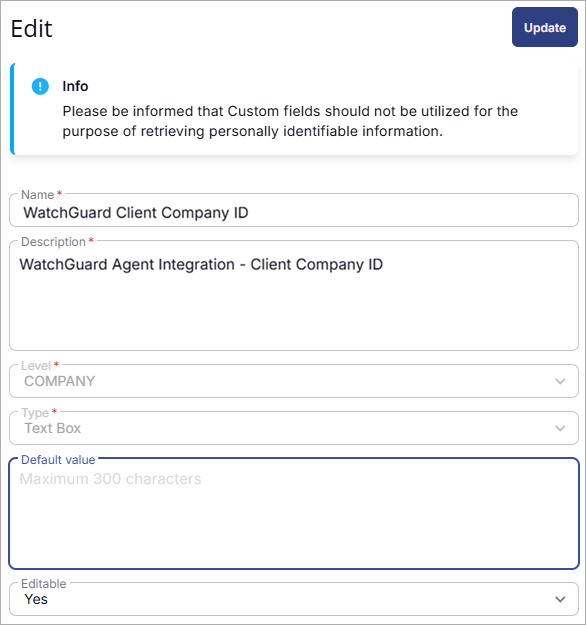
- Enter a default value. Click Update.
- For each WatchGuard Deployment ID, click and select Edit.
- Enter a default value. Click Update.
Configure the WatchGuard Cloud and ConnectWise RMM Connection