N-central では macOS デバイスのタスクを作成することができます。
macOS では以下のタスクが使用可能です:
- WatchGuard Endpoint Security をインストールする
- macOS デバイスをスキャンする
macOS デバイスに WatchGuard Endpoint Security をインストールする
macOS デバイスに WatchGuard Endpoint Security を手動でインストールするには、N-central で以下の手順を実行します:
- Actions > Run a Mac Script の順に選択します。
MAC Scripting Task ページが開きます。
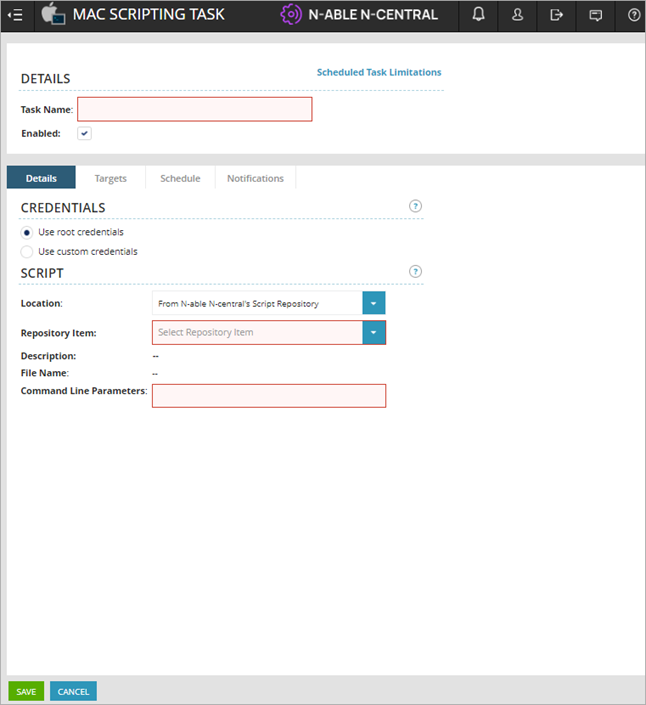
- タスク名を入力します。
- Repository Item ドロップダウン リストから、WatchGuard Endpoint Security - Install agent in macOS を選択します。

- Command Line Parameters テキスト ボックスに、以下の形式でコマンドを入力します:
WG-Install-Mac.sh -a <apikey> -s <sp account ID> -c <client account ID> -d [deployment setting ID]
ここでは、
- <apikey> — WatchGuard Endpoint Security Integration - API Key カスタム プロパティの値。
- <sp account id> — WatchGuard Endpoint Security Integration - WatchGuard Service Provider Account ID カスタム プロパティの値。
- <client account id> — WatchGuard Endpoint Security Integration - WatchGuard Subscriber Account ID カスタム プロパティの値。
- [deployment setting id] — WatchGuard Endpoint Security Integration - Deployment Setting ID カスタム プロパティの値。WatchGuard Endpoint Security Web UI で既定で設定された構成を使用するには、このパラメータを空のままにします。
例 ([deployment setting id] を含む場合):
WG-Install-Mac.sh -a aHR0cHM6Ly9ybW1hcGkud2F0Y2hndWFyZC5jb20sY2ViYWU2ZTEtMWZmMS00ZTlkLWRrN2MtYjQzNjQ5YzI5Y2ZkLDlEcHhwdjVHR0lPdXpiOUNyOVhoV3FUV0dxY3plcmxSUkxUMXduMlI1dmc9 -s ACC-2231268 -c ACC-2231268 -d cs0256a2-6443-21d4-9a21-1cf6b1a678f3
例 ([deployment setting id] を含まない場合):
WG-Install-Mac.sh -a aHR0cHM6Ly9ybW1hcGkud2F0Y2hndWFyZC5jb20sY2ViYWU2ZTEtMWZmMS00ZTlkLWRrN2MtYjQzNjQ5YzI5Y2ZkLDlEcHhwdjVHR0lPdXpiOUNyOVhoV3FUV0dxY3plcmxSUkxUMXduMlI1dmc9 -s ACC-2231268 -c ACC-2231268
- Targets タブを選択します。
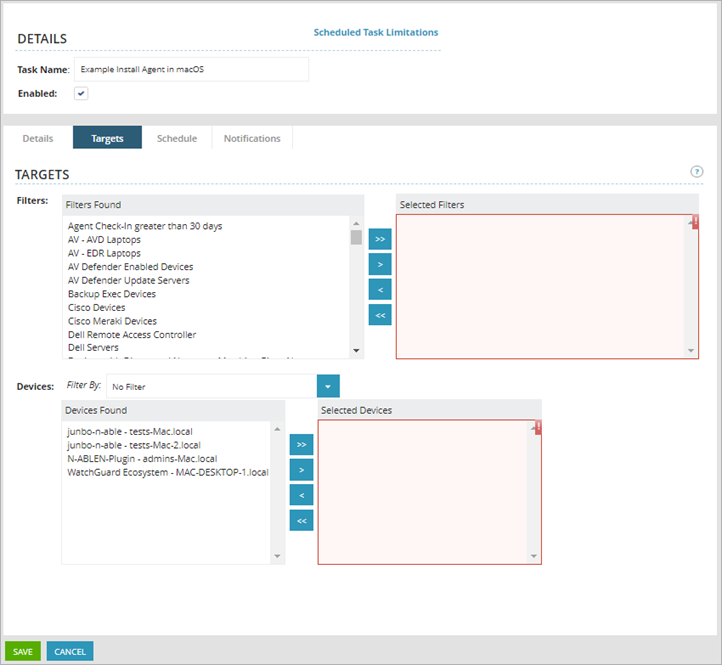
- Filters セクションで、Filters Found 列から顧客アカウントを選択し、Selected Filters 列に移動します。
- Devices セクションで、Devices Found 列から顧客デバイスを選択し、Selected Devices 列に移動します。
- Save をクリックします。
このタスクにより、選択した macOS デバイスに WatchGuard Endpoint Security がインストールされます。
macOS デバイスをスキャンする
macOS デバイスをスキャンするには、N-central から以下の手順を実行します:
- Actions > Run a Mac Script の順に選択します。
MAC Scripting Task ページが開きます。
- タスク名を入力します。
- Repository Item ドロップダウン リストから、WatchGuard Endpoint Security - Scan Mac device を選択します。
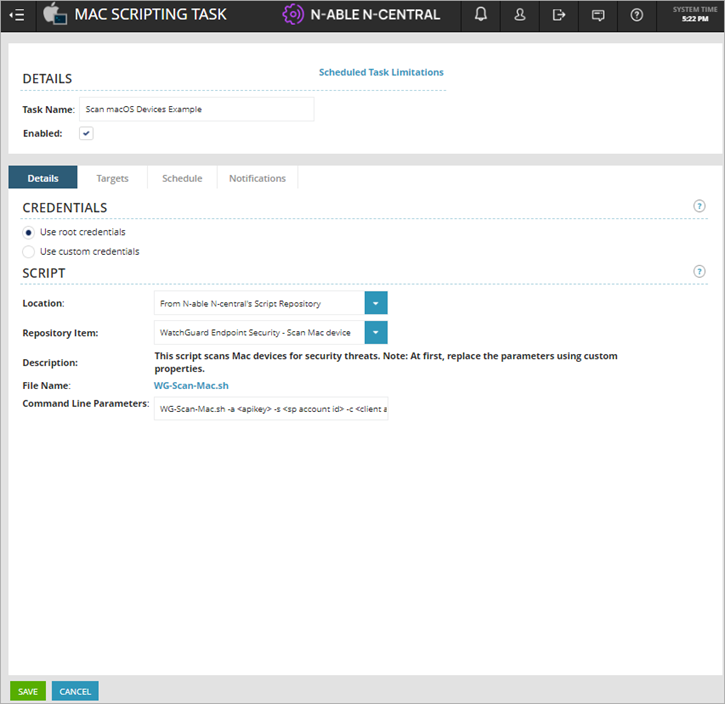
- Command Line Parameters テキスト ボックスに、以下の形式でコマンドを入力します:
WG-Install-Mac.sh -a <apikey> -s <sp account ID> -c <client account ID>
ここでは、
- <apikey> — WatchGuard Endpoint Security Integration - API Key カスタム プロパティの値。
- <sp account id> — WatchGuard Endpoint Security Integration - WatchGuard Service Provider Account ID カスタム プロパティの値。
- <client account id> — WatchGuard Endpoint Security Integration - WatchGuard Subscriber Account ID カスタム プロパティの値。
例:
WG-Scan-Mac.sh -a aHR0cHM6Ly9ybW1hcGkud2F0Y2hndWFyZC5jb20sY2ViYWU2ZTEtMWZmMS00ZTlkLWRrN2MtYjQzNjQ5YzI5Y2ZkLDlEcHhwdjVHR0lPdXpiOUNyOVhoV3FUV0dxY3plcmxSUkxUMXduMlI1dmc9 -s ACC-2231268 -c ACC-2231268
- Targets タブを選択します。
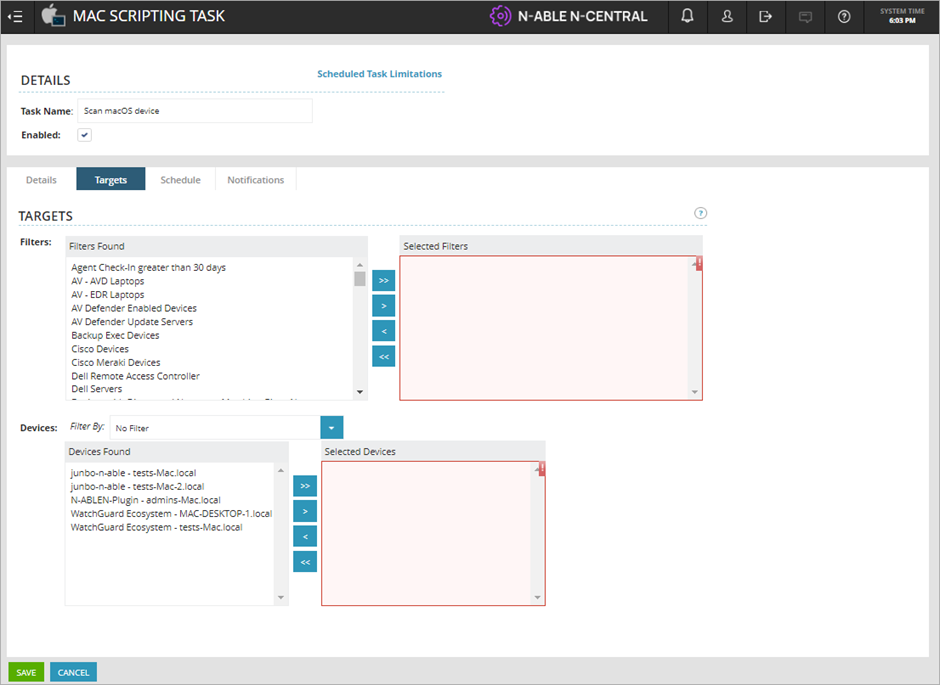
- Filters セクションで、Filters Found 列から顧客アカウントを選択し、Selected Filters 列に移動します。
- Devices セクションで、Devices Found 列から顧客デバイスを選択し、Selected Devices 列に移動します。
- Save をクリックします。
このタスクは、選択した macOS デバイスが次回 WatchGuard Endpoint Security サーバーに接続した際にそれらのデバイスをスキャンします。
N-able N-central 用 WatchGuard Endpoint Security プラグインについて