Applies To: Endpoint Security Elite, Endpoint Security 360, Endpoint Security Prime, WatchGuard EDR, WatchGuard EDR Core, Endpoint Security Basic
Complete these steps to determine the version of your Endpoint Security Elite, Endpoint Security 360, Endpoint Security Prime, WatchGuard EDR, EDR Core, or Endpoint Security Basic product and the WatchGuard Agent. With this information, you can then check if a specific device has the latest protection or agent version installed.
In the management UI, you can export a list of all managed computers to a .CSV file. Use this list to review the protection software and agent versions for the computers in your network. To export a list of the computer details to a .CSV file, on the Computers page, click  and select Export.
To determine the software version:
- In WatchGuard Cloud, select Configure > Endpoint Security.
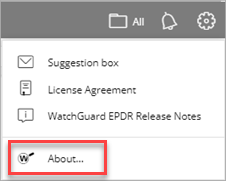
- In the top, right corner, click
 .
. - Select About.
The different versions of the product show, including the version of the:
- Management UI
- Client software for each operating system
- WatchGuard Agent for each operating system
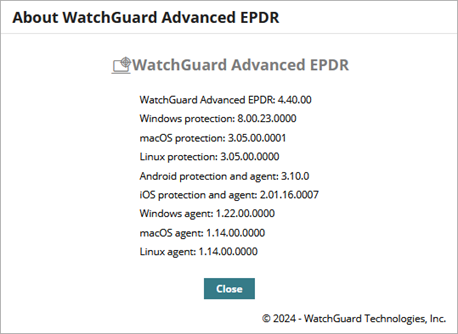
You can now check if a specific device has the latest protection or agent version installed.
Your operator role determines what you can see and do in WatchGuard Cloud. Your role must have the Add, Discover, and Delete Computers permission to view or configure this feature. For more information, go to Manage WatchGuard Cloud Operators and Roles.
To check the software version for a computer or device, in the Endpoint Security management UI:
- Select Computers.
- From the left pane, filter your list of devices.
- Select the device you want to check.
- On the computer details page, in the Computer section, confirm the version of the WatchGuard Agent.
- In the Security section, confirm the version of the endpoint software.
If you need to upgrade, go to Endpoint Security Upgrade Process.