Applies To: AuthPoint Total Identity Security
A data breach is the intentional or unintentional release of secure or confidential information to an untrusted environment such as the dark web. AuthPoint Total Identity Security includes a Dark Web Credential Monitoring feature to help you protect the credentials of your users.
With Dark Web Credential Monitoring, WatchGuard actively monitors credential breaches for your users. If a credential breach includes the email addresses or passwords of your users, you receive a notification.
To monitor your users for credential breaches, you must:
Configure Dark Web Credential Monitoring
The Dark Web Credential Monitoring service is enabled for all the users on your account with the Total Identity Security license and multi-factor authentication enabled. If you do not want to monitor credential for a specific user, you can disable Dark Web Credential Monitoring for that user. If you want, you can again enable Dark Web Credential Monitoring for that user.
By default, the Dark Web Credential Monitoring service sends email notifications about a detected credential breach to all users whose credentials are in the breach. You can also configure additional email addresses to receive notifications about credential breaches.
To configure Dark Web Credential Monitoring, you must:
- Enable Dark Web Credential Monitoring for users
- Specify which email addresses receive email notifications about credential breaches
To enable Dark Web Credential Monitoring for a user, from the WatchGuard Cloud UI:
- Select Configure > AuthPoint > Users.
The Users page opens.
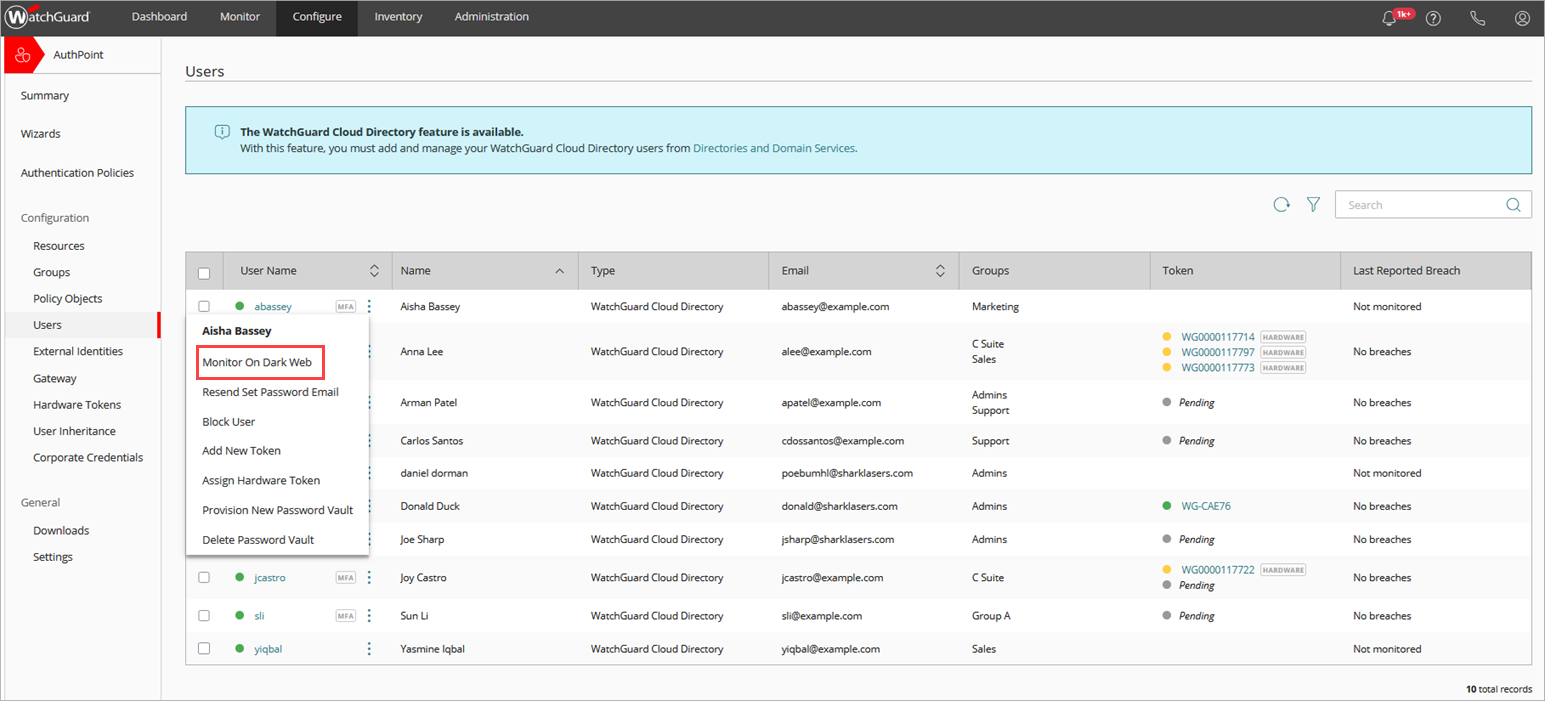
- For the user you want to enable credential monitoring for, click
 and select Monitor on Dark Web.
WatchGuard starts to monitor the credentials for that user on the dark web.
To configure the email addresses to receive email notifications for credential breaches, from the WatchGuard Cloud UI:
- Select Configure > AuthPoint > Settings.
The AuthPoint settings page opens.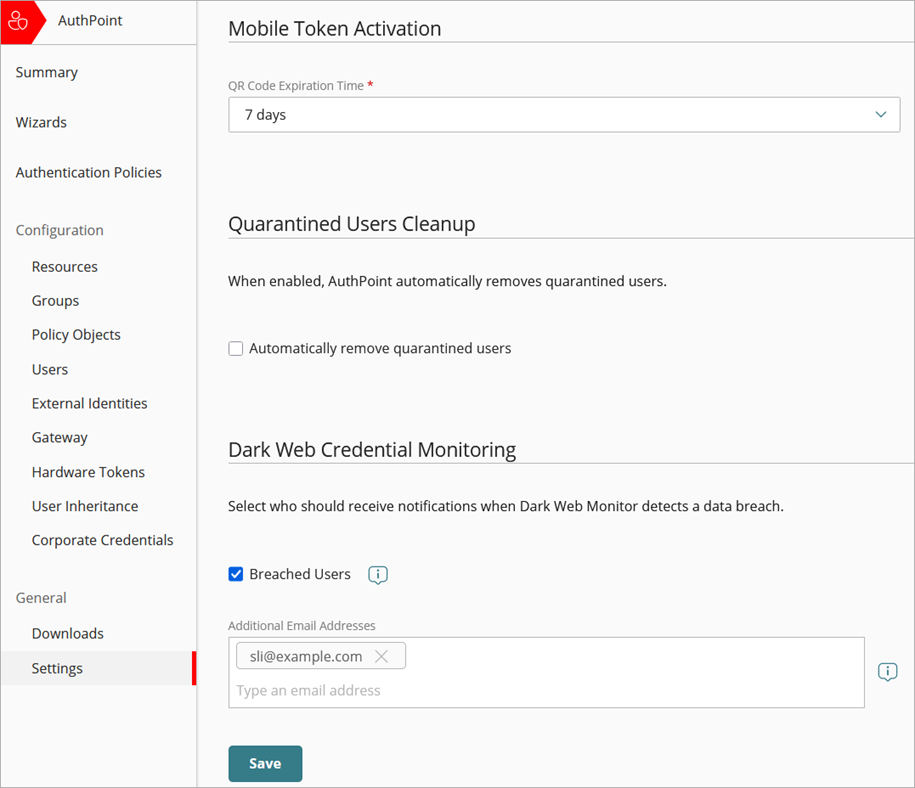
- From the Dark Web Credential Monitoring section:
- If you do not want to send email notifications to users affected by credential breaches, clear the Breached Users check box.
- In the Additional Email Addresses text box, specify the email addresses that you want to receive notifications for credential breaches.
The maximum number of additional email addresses you can specify is 30.
- Click Save.
You can also disable the Dark Web Credential Monitoring service for a user.
To disable Dark Web Credential Monitoring for a user, from the WatchGuard Cloud UI:
- Select Configure > AuthPoint > Users.
The Users page opens.
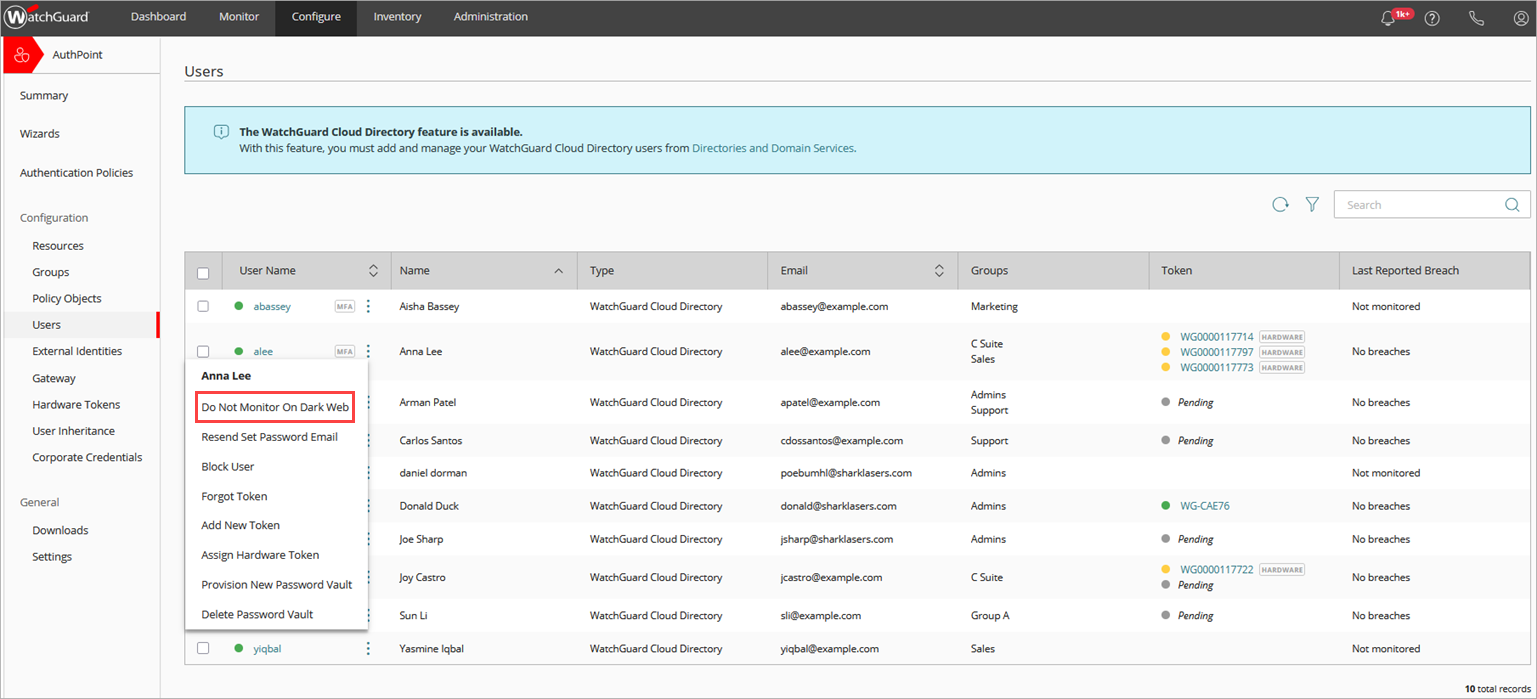
- For the user you want to disable monitoring for, click and select Do Not Monitor on Dark Web.
WatchGuard no longer monitors the credentials for that user on the dark web.
Monitor Credentials for Data Breaches
WatchGuard actively monitors credential breaches for your users. If a credential breach is reported, you can view details of the breached accounts and users from the AuthPoint Users page.
View Dark Web Credential Monitoring Details on AuthPoint Users Page
The AuthPoint Users page shows information about any credential breaches that include your users.
To view the details of credential breaches reported for your users, in the WatchGuard Cloud UI:
- Select Configure > AuthPoint > Users.
The Last Reported Breach column shows the last date when a credential breach was reported for the user, and the location of the breach.
The Last Reported Breach column can show these statuses:
- Breach Data and Location — Shows the date when the last credential breach was reported and the location of the credential breach. If the breached credentials originate from a sensitive source, the location of the breach shows the text Sensitive Breach. This protects users from potential harm if the source of the credential breach might reveal personal information, such as political affiliation, religion, or health status.
- No Breaches — No credential breach is reported for the user.
- Not Monitored — Dark Web Credential Monitoring is not enabled for the user.
You can filter the users list to view the Last Reported Breach data of your users for different time periods.
To apply filters to the users list, on the Users page:
- Click
 .
.
The Filter Users window appears.

- Select Last Reported Breach.
- From the Show Reported Breaches From drop-down list, select one of these options:
- Last 7 Days
- Last 30 Days
- Last 90 Days
- Last Year
- (Optional) Select the Only Show Unmonitored Users check box, if you want to view only the users that you do not monitor credentials for on dark web.
- Click Apply Filters.
For more information on how to apply filters, go to Filter the Users List.