Applies To: Locally-managed Fireboxes
Some of the features described in this version of Fireware Help are only available to participants in the WatchGuard Beta program. If a feature described in this topic is not available in your version of Fireware, it is a beta-only feature.
The 802.1p standard is a quality of service (QoS) or class of service (CoS) method that operates at the MAC layer (Layer 2). Equipment that supports 802.1p can add and recognize a value that indicates the priority level of the Ethernet frame. 802.1p can help make sure that real-time communications that are sensitive to latency, such as Voice Over IP (VoIP), have a high level of quality.
The Firebox and other 802.1p-enabled equipment prioritize traffic based on the priority value. 802.1p applies only to Virtual Local Area Network (VLAN) member interfaces that are configured to send and receive VLAN-tagged traffic. This includes outbound traffic that originates from the Firebox and also outbound traffic that travels through the Firebox.
When you enable 802.1p for a VLAN interface, the Firebox marks outbound traffic from that interface. The Firebox adds an 802.1q tag to Layer 2 Ethernet frames. For IP traffic, the Firebox copies the upper 3 bits of the Differentiated Services Code Point (DSCP) value from the Layer 3 IP header to the priority code point (PCP) field in the 802.1q tag.
In Fireware v2026.5 or higher, when you enable 802.1p marking, you can also configure the Control Traffic PCP setting. When you select the PCP for control traffic, the Firebox sets the 802.1p PCP value in the 802.1q tag of outgoing ARP and PPPoE Discovery frames on tagged member interfaces. This setting does not apply to IP traffic. For IP traffic, the Firebox continues to derive the PCP value from the Differentiated Services Code Point (DSCP) value in the packet.
How It Works
This diagram shows 802.1q and 802.1p information in Layer 2 Ethernet frames.
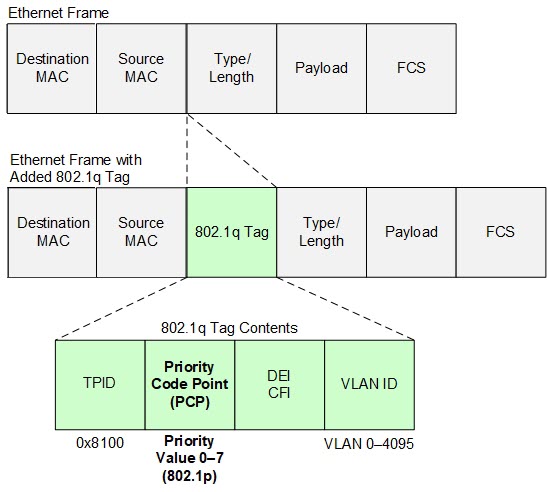
The DSCP value in IP packets maps to the PCP value:
- IPv6 packets — Upper 3 bits of the DSCP value in the Traffic Class (TC) field map to the PCP.
- IPv4 packets — Upper 3 bits of the DSCP value in the Type of Service (ToS) field map to the PCP.
The DSCP value consists of 6 bits (0–63). This table shows how DSCP values map to 802.1p PCP values.
| DSCP Value Range (Layer 3 Packet) | 802.1p PCP Priority Value (Layer 2 Ethernet Frame) |
|---|---|
| 0–7 | 0 Best effort |
| 8–15 | 1 Background |
| 16–23 | 2 Spare |
| 24–31 | 3 Excellent effort |
| 32–39 | 4 Controlled load |
| 40–47 | 5 Video (<100 ms latency) |
| 48–55 | 6 Voice (<10 ms latency) |
| 56–63 | 7 Network control |
Example
To mark outbound VoIP traffic on a VLAN interface with a PCP value of 6, the Firebox copies the DSCP value from the packet to the 3-bit PCP 802.1p field in the 802.1q tag of the frame.
- The DSCP of the ToS field (IPv4) or TC field (IPv6) is 48. In binary, the number 110000 represents the number 48.
- The Firebox uses the upper 3 bits (110) of the DSCP value as the PCP value.
- The binary number 110 represents the number 6, which means the PCP value is 6.

Enable 802.1p Marking for VLAN Interfaces
To enable 802.1p marking, go to Define a New VLAN.