Applies To: WatchGuard CloudDR
Discovered applications or shadow applications are third-party applications not authorized or provided by the organization. They can provide a significant entry point to the cloud environment and even cyberattacks.
On the Inventory > Discovered Applications page, you can review a list of applications identified as shadow applications. CloudDR uses AI to review email header meta data and email subject lines to discover cloud applications. It reviews the information for recognizable patterns and adds applications to an internal inventory of discovered applications when appropriate. It also learns from the patterns and discovers more applications over time.
If you do not see an application in the list, it could be that the meta data and subject line are not in English, or CloudDR requires more information before it can categorize the application.
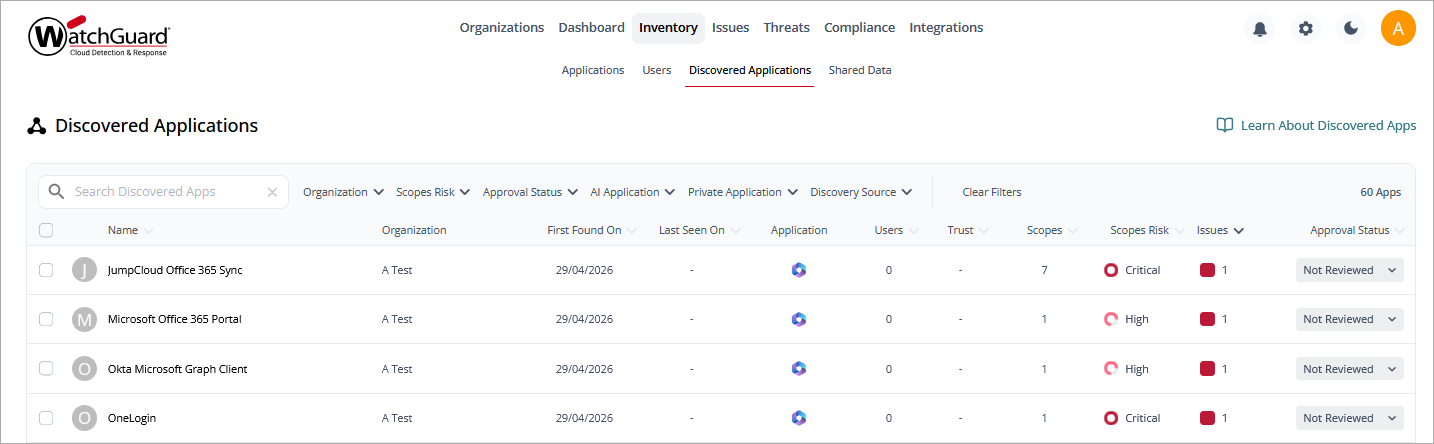
You can filter the list by Organization, Scopes Risk, Approval Status, AI Application, Private Application, and Discovery Source. Scopes risk is the risk calculated from the authorized scope of all discovered applications.
To search for a specific application, enter the application name in the Search Discovered Apps box.
To export the list to a .CSV file, next to the total number of applications, click  .
.
Information in this list includes:
Name
The name and logo of the discovered application.
First Found and Last Seen On
The date the application was first discovered and the date the user last used the discovered application
Application
The name of the cloud application from which the discovered application was authorized.
Users
The number of users from the application who authorized the discovered application.
Trust
The overall trust score for the application, as calculated by CloudDR.
Scopes
The number of total unique scopes that the discovered application was authorized to.
Scopes Risk
The calculated risk of the discovered application (Critical, High, Medium, Low, Info).
Approval Status
The approval status of the discovered application. The column includes these options:
- Approved
- Not Approved
- Not Reviewed
Applications that use AI technology are marked automatically. When a newly discovered application gets added to the list, its default status is Not Reviewed. WatchGuard can manually change this value based on a completed application inspection with the Application Trust Profile.
Discovered Application Details Page
To view more detailed information about a discovered application, click the application name.
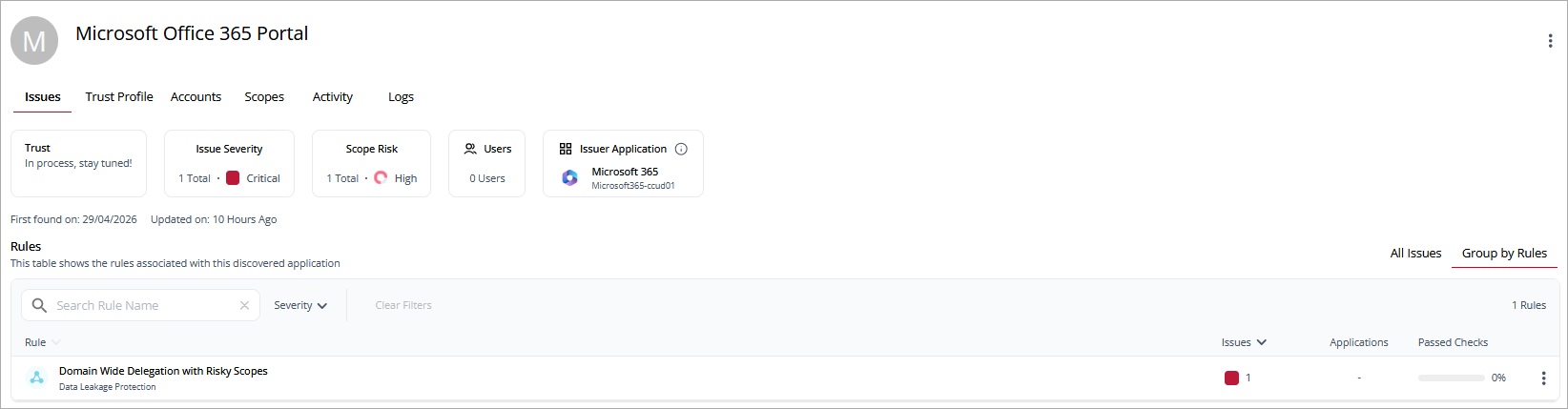
The discovered application details page shows detailed information about the trustworthiness of the application and the issues associated with the application. The discovered application details page includes these widgets:
- Trust — The overall trust score for the application.
- Issue Severity — The number of issues and their top severity. Point to the severity to review the distribution of issues at each severity level.
- Scope Risk — The overall scope risk of the application with the number of delegated scopes.
- Users — The number of users who have authorized the discovered application and the percentage of users that are managed.
- Issuer Application — The application that issued the discovered application. Click
 to view the client ID for the application.
Above the widgets, you can click tabs to open detailed information on these pages:
Issues Page
The Issues page lists the rules and issues associated with the discovered application. You can view all issues or the issues grouped by rules.
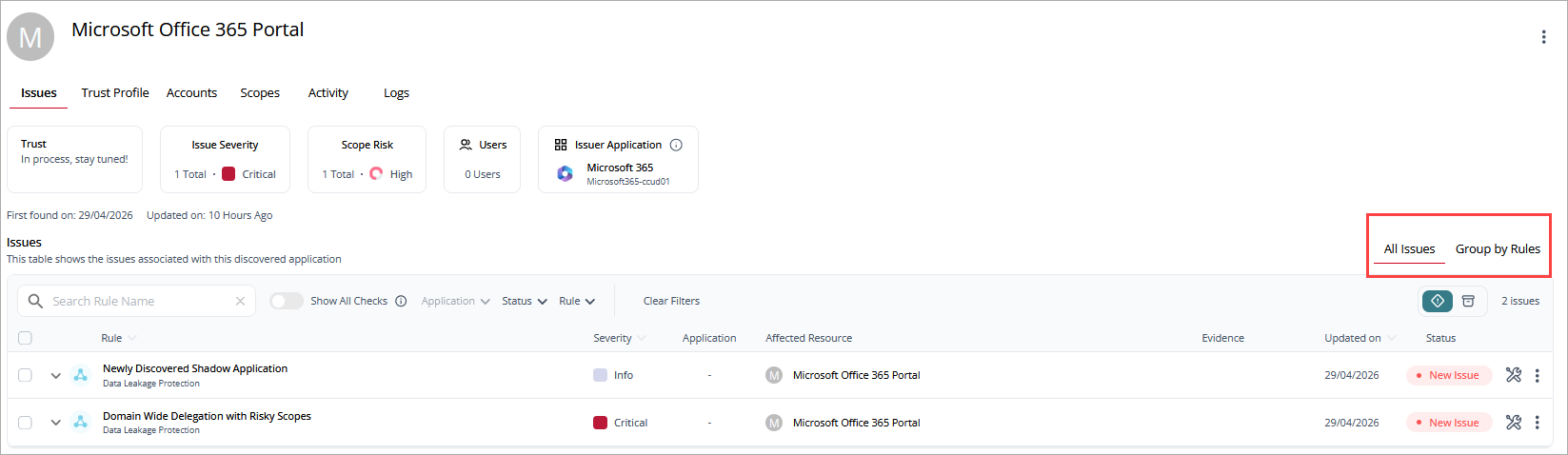
Information in this list includes:
- Rule — The name and category of the rule.
- Issues — The number of issues and severity of the issues.
- Applications — The number of applications associated with the rule.
- Passed Checks — The number of checks that the application passed.
To view more detailed information, click the rule name.
Trust Profile Page
The Trust Profile page lists the checks performed for the discovered application. You can filter the list by Severity. Information on the Trust Profile page is reviewed and approved by the WatchGuard Security team.
Information on this page includes:
- General Information — Basic information of the company or organization that provides the discovered application (app).
- Company Disclosure — Security compliances (certificates) and some data protection and processing policies such as Privacy Policy, Disaster Recovery Policy, Terms of Use.
- Security Grade — Technical or Security information such as Web Application Firewall (WAF) support, Transport layer Security (TLS) versions, Incidents etc.
- Compliance Certifications
- Supply Chain Analysis and Vendors
Accounts Page
The Accounts page lists user accounts that authorized the discovered application.
Information in this list includes:
- Name — The name of the user with the email address and profile picture. If the user is a privileged user, then a crown icon shows.
- Last Seen On — The date when the user last used the discovered application.
- Scopes — The number of scopes that the user provided the discovered application access to.
- Application — The application through which the discovered application was authorized.
- Scope Risk — The security risk of the scopes required by the discovered application.
Scopes Page
The Scopes page lists areas of scope in the application and their risk level. You can filter the list by Risk level. To search for a scope name, enter the name in the Search Scope Name box.
Information on this page includes:
- Name — The name of the area of scope.
- Applications — The applications where the scope risk was identified.
- Resource — The affected resources in the application.
- Type — The type of permission (Read, Admin).
- Risk — The overall risk level of the scope.
Activity Page
The Activity page shows application activity, including the number of unique accounts, unique events, and total events. You can filter the list for a date or date range, Action, Actor, Location, and Severity.
Information on this page includes:
- Time — The time the event occurred.
- Action — The type of event that occurred.
- Actor — The application that initiated the event.
- Target Resource — The resource the event affected.
- Severity — The severity level of the event.
- Location — The geographic location, based on IP address, where the event occurred.
Click  next to an activity to show details such as the IP address, user agent, and resource information associated with the event.
Logs Page
The Logs page lists the activity logs associated with the discovered application.
Information on this page includes:
- Timestamp — The time the activity occurred.
- Activity description — A description of the type of activity and the application the activity occurred in.