Applies To: WatchGuard CloudDR
Cisco Duo is a cloud-based, security platform that provides Identity and Access Management (IAM) and Multi-Factor Authentication (MFA), to protect organizations from unauthorized access and data breaches. Cisco Duo protects user identities and verifies logins through push notifications and assesses device health before it grants access to applications. This guide describes how to integrate Cisco Duo with CloudDR.
Available Features
- Misconfiguration Rules
- User Inventory
- Identity Rules
- Devices Inventory
Prerequisites
To configure this integration, you must:
- Have a Cisco Duo account user with the owner role.
- Generate an Admin API key for the account.
To generate an Admin API key for your Cisco Duo account user:
- Log in to Cisco Duo with the account that has the owner role.
- Select Applications > Protect an Application.
- Click Add New Key.
- Search for Admin API and click Add.
- From Settings, select these permissions:
- Grant administrators - Read
- Grant read information
- Grant applications
- Grant settings
- Grant read log
- Grant resource - Read
- Click Save Changes.
- Copy the API Hostname, Client ID, and Client secret and store in a secure location.
Required Privileges
| Scope | Use |
|---|---|
| Grant resource (Read) | Read devices and provisioned application details |
| Grant read log | Read usage activity |
| Grant settings | Read settings and configurations |
| Grant applications | Read integrated provisioned applications and their details |
| Grant read information | Read general information about the Duo instance |
| Grant administrators (Read) | Read all administrators |
Configure the Cisco Duo Integration in CloudDR
Service Providers can configure integration in CloudDR for a single organization or for all of their managed organizations. If you select a managed Service Provider from Account Manager, you can configure integration for all organizations managed by the Service Provider.
Before you begin, select the account you want to configure integration for:
- To configure integration for all organizations, from Account Manager, select Overview.
- To configure integration for a single organization, from Account Manager, select the account you want to integrate the application in CloudDR.
To integrate Cisco Duo with CloudDR, from WatchGuard Cloud:
- In WatchGuard Cloud, select Configure > CloudDR.
- Select the Integrations tab.
- (Service Providers) From the Select Integrations View drop-down list, select Add Integrations.
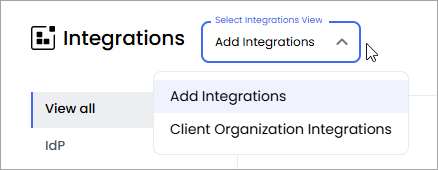
- In the Duo widget, click Add.
- Click Start Integration.
- On the Namespace page, in the Namespace text box, paste the API Hostname you copied previously.
- Click Next.
- On the Integration Key page, in the Integration Key text box, paste the Client ID you copied previously.
- On the Secret Key page, in the Secret Key text box, paste the Client Secret you copied previously.
- Click Submit.