Applies To: WatchGuard CloudDR
Atlassian Guard (previously named Access) is a subscription-based offering from Atlassian that provides enhanced security and centralized administration for Atlassian cloud products, including Jira, Confluence, Bitbucket, and more. This guide describes how to integrate Atlassian Admin with CloudDR.
Available Features
- Misconfiguration Rules
- Identity Rules (Auto-Fix Available)
- User Inventory (Auto-Fix Available)
Prerequisites
To configure this integration, you must have:
- An Atlassian account user with the Super Admin or Site-Admin role.
- An API key for your Atlassian account user.
To generate an API key for your Atlassian account user:
- Log in to your Atlassian account at https://admin.atlassian.com/.
- Select Settings > API keys.
- Click Create API Key.
- Select API key without scopes.
- Enter a label and update the expiry date. Click Create.
- To copy the generated API key, click Copy. Store the API key in a secure location.
Required Privileges
- Your Atlassian Guard account user must be a Super Admin.
Configure the Atlassian Guard Integration in CloudDR
To integrate Atlassian Guard with CloudDR:
- In WatchGuard Cloud, select Configure > CloudDR.
- Select the Integrations tab.
- (Service Providers) From the Select Integrations View drop-down list, select Add Integrations.
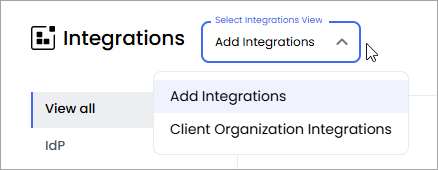
- In the Atlassian Guard widget, click Add.
- Click Start Integration.
- On the API Key page, in the API key text box, enter the API key you copied previously.
- Click Next.
- Select the organization you want to integrate with.
- Click Submit.