Applies To: Locally-managed Fireboxes
When users authenticate with RADIUS Single Sign-On (RSSO), the user session appears in Fireware Web UI and Firebox System Manager in the Authentication List.

- Log in to Fireware Web UI.
- Select System Status > Authentication List.
The Authentication List page appears.

In Fireware Web UI, user sessions authenticated through RADIUS SSO have these attributes:
- The Domain is RADIUS
- The Client is Single Sign-On
For more information about the Authentication List page in Fireware Web UI, go to See Authenticated Users in Fireware Web UI.
- Start Firebox System Manager for the Firebox.
- Select the Authentication List tab.
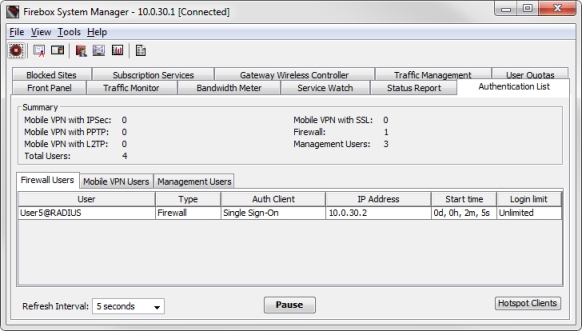
On the Authentication List tab, user sessions authenticated through RADIUS SSO have these attributes:
- The User is the user name @RADIUS
- The Auth Client is Single Sign-On
For more information about the Authentication List in Firebox System Manager, go to See Authenticated Users in Firebox System Manager.
