Applies To: ThreatSync+ NDR
This feature is only available with a ThreatSync+ NDR or Total NDR license. For more information, go to About ThreatSync+ NDR Licenses and About Total NDR Licenses.
ThreatSync+ NDR enables you to monitor logs from third-party cloud environments, such as AWS VPC Flow Logs.
Amazon Virtual Private Cloud (VPC) flow logs capture detailed information about the IP traffic that goes to and from network interfaces in your VPC. This data is crucial for network monitoring, security analysis, troubleshooting, and compliance auditing.
These logs include source and destination IP addresses, ports, protocol, traffic acceptance and rejection, and bytes and packets transferred. ThreatSync+ NDR uses AWS VPC flow logs for traffic analysis, to detect suspicious traffic patterns, and to identify potential intrusions, malware activity, or data exfiltration.
For more information about ThreatSync+ NDR cloud integration with AWS VPC flow logs, go to these sections:
Licensing
To use AWS VPC flow log integration with ThreatSync+ NDR, you must purchase and activate a ThreatSync+ NDR or Total NDR license. ThreatSync+ NDR and Total NDR are licensed for each user.
For more information about licensing, go to About ThreatSync+ NDR Licenses and About Total NDR Licenses.
Add a ThreatSync+ Cloud Integration
To add a cloud integration, you use the ThreatSync+ Integrations UI in WatchGuard Cloud. To add a ThreatSync+ cloud integration, select Configure > ThreatSync+ Integrations > Cloud Integration.
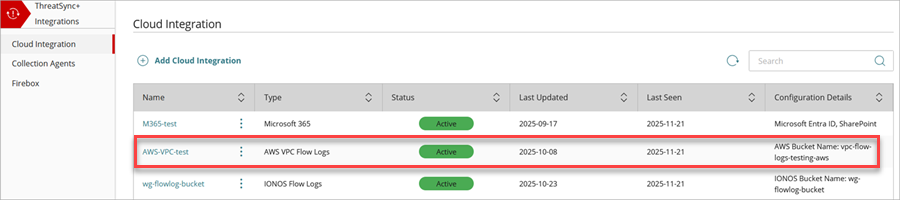
For more information, go to Configure a ThreatSync+ NDR Cloud Integration — AWS VPC Flow Logs.
ThreatSync+ UI
To configure and monitor ThreatSync+ NDR, you use the ThreatSync+ UI in WatchGuard Cloud. To connect to WatchGuard Cloud, go to cloud.watchguard.com.
Available pages and features vary and depend on your license type. Throughout this documentation, ThreatSync+ refers generally to all products. If you do not see a page or feature in the ThreatSync+ UI, it is not supported by your product.
Monitor ThreatSync+ NDR
To monitor your ThreatSync+ NDR cloud integration, use these pages:
- Network Summary — Provides an overview of trends in your network and includes links to detailed information about Smart Alerts and policy alerts. For more information, go to About the ThreatSync+ Summary Page.
- Smart Alerts — Shows open Smart Alerts for operators to review and respond to. For more information, go to About Smart Alerts.
- Policy Alerts — Shows alerts for policy violations on your network and includes detailed traffic information about your AWS VPC flow logs. For more information, go to About Policy Alerts.
- ThreatSync+ Audit Logs — Shows details of configuration activity performed for policies, zones, users, IP addresses, and cloud collector changes. For more information, go to ThreatSync+ Audit Logs.
- All IP Addresses — Shows details about internal and external IP addresses. You can use the information on this page to view the internal IP address of your AWS VPC. For more information, go to All IP Addresses.
Configure ThreatSync+ NDR
To configure ThreatSync+ NDR, select Configure > ThreatSync+.
You can use this page to configure alerts for a ThreatSync+ NDR integration with AWS VPC flow logs:
- Alerts — Configure AWS VPC flow logs heartbeat alerts. For more information, go to Configure ThreatSync+ Alerts and Notification Rules for Subscribers.
Configure a ThreatSync+ NDR Cloud Integration — AWS VPC Flow Logs