Applies To: Cloud-managed Fireboxes

This document applies to Fireboxes you manage in WatchGuard Cloud. For information that applies to Fireboxes managed in Fireware Web UI or WatchGuard System Manager, go to: About Dynamic Routing.
Overview
A route is the sequence of devices through which network traffic must travel to get from the source to the destination. Each device in this sequence, usually called a router, stores information about the networks it is connected to inside a route table. This information is used to forward the network traffic to the next router in the route. Each router along the path is called a hop, and the total number of hops indicates how many routers the traffic passes through from source to destination.
With static routing, routing tables are set and do not change. Dynamic routing automatically updates routing tables as the configuration of a network changes. This makes sure that network packets can reach their intended destination, even if a router in the path fails. For a cloud-managed Firebox, you can add dynamic routing from the Firebox to another network.
Your operator role determines what you can see and do in WatchGuard Cloud. Your role must have the Devices permission to view or configure this feature. For more information, go to Manage WatchGuard Cloud Operators and Roles.
Dynamic Routing Protocols
A dynamic routing protocol is a set of rules that routers use to share routing information and automatically update routing tables as network conditions change. Cloud-managed Fireboxes support the RIP v1, RIP v2, RIPng, OSPF, OSPFv3, and BGP v4 protocols.
- For IPv4 dynamic routing, you must use RIP, OSPF, or BGP.
- For IPv6 dynamic routing, you must use RIPng, OSPFv3, or BGP.
Routing Information Protocol (RIP and RIPng)
Routing Information Protocol (RIP) is used to manage router information in a self-contained network, such as a corporate LAN or a private WAN. With RIP, a gateway host sends its routing table to the closest router every 30 seconds. That router then sends the contents of its routing tables to neighboring routers.
RIP is best for small networks. This is because the transmission of the full routing table every 30 seconds can put a large traffic load on the network, and because RIP tables are limited to 15 hops. OSPF is a better alternative for larger networks.
For IPv4 routing, there are two versions of RIP: RIP v1 and RIP v2. RIP v1 uses a UDP broadcast over port 520 to send updates to routing tables. RIP v2 uses multicast to send routing table updates.
For information about how to configure RIP for IPv4 routing, go to Configure Dynamic Routing on a Cloud-Managed Firebox .
For more information about this routing protocol, go to About Routing Information Protocol (RIP and RIPng) in Fireware Help.
Open Shortest Path First (OSPF and OSPFv3) Protocol
OSPF (Open Shortest Path First) is an interior routing protocol used in larger networks. With OSPF, a router that sees a change to its routing table or that detects a change in the network immediately sends a multicast update to all other routers in the network. OSPF is different from RIP because:
- OSPF sends only the part of the routing table that has changed in its transmission. RIP sends the full routing table each time.
- OSPF sends a multicast only when its information has changed. RIP sends the routing table every 30 seconds.
OSPF has these requirements:
- If you have more than one OSPF area, one area must be area 0.0.0.0 (the backbone area).
- All areas must be adjacent to the backbone area. If they are not, you must configure a virtual link to the backbone area.
Fireware supports OSPFv2 for IPv4 dynamic routing and OSPFv3 for IPv6 dynamic routing.
For information about how to configure OSPF for IPv4 routing, go to Configure Dynamic Routing on a Cloud-Managed Firebox .
For more information about this routing protocol, go to About Open Shortest Path First (OSPF and OSPFv3) Protocol in Fireware Help.
Border Gateway Protocol (BGP)
Border Gateway Protocol (BGP) is a scalable dynamic routing protocol used on the Internet by groups of routers to share routing information. BGP uses route parameters or attributes to define routing policies and create a stable routing environment. This protocol allows you to advertise more than one path to and from the Internet to your network and resources, which gives you redundant paths and can increase your uptime.
Hosts that use BGP use TCP to send updated routing table information when one host finds a change. The host sends only the part of the routing table that has the change. BGP uses classless interdomain routing (CIDR) to reduce the size of the Internet routing tables.
In Fireware v12.9 and higher, the Firebox uses FRR for dynamic routing and does not enforce a fixed maximum number of BGP routes. Routing scale depends on available hardware resources, routing configuration, and current workload. As the number of routes increases, convergence time can increase, and the Routes page can respond more slowly.
The size of the typical WatchGuard customer wide area network (WAN) is best suited for OSPF dynamic routing. A WAN can also use external border gateway protocol (eBGP) when more than one gateway to the Internet is available. EBGP allows you to take full advantage of the redundancy possible with a multi-homed network.
Connections between two BGP peers can be external (eBGP) or internal (iBGP). Which type of connection it is depends on the autonomous system (AS) number assigned to each of the peers. The AS number indicates whether the peers are part of networks managed by the same or different organizations. If two BGP peers are part of the same autonomous system, they both use the same AS number, and the BGP connection between them is an iBGP session. If two BGP peers have different AS numbers, the BGP connection between them is an eBGP session.
To participate in eBGP with an ISP, you must have a public autonomous system number (ASN). You must get an ASN from one of the regional registries in the table below. After you are assigned your own ASN, you must contact each ISP to get their ASNs and other necessary information.
| Region | Registry Name | Website |
|---|---|---|
| North America | RIN | www.arin.net |
| Europe | RIPE NCC | www.ripe.net |
| Asia Pacific | APNIC | www.apnic.net |
| Latin America | LACNIC | www.lacnic.net |
| Africa | AfriNIC | www.afrinic.net |
For internal BGP between private networks, you can use a private AS number. This avoids the need to register for a public AS number.
- 16-bit AS numbers reserved for BGP between private networks: 64512 to 65535
- 32-bit AS numbers reserved for BGP between private networks: 4200000000 to 4294967294
For information about how to configure BGP for IPv4 routing, go to Configure Dynamic Routing on a Cloud-Managed Firebox .
For more information about this routing protocol, go to About Border Gateway Protocol (BGP) in Fireware Help.
Dynamic Routing Policies
When you enable a dynamic routing protocol, WatchGuard Cloud automatically creates the System policy that the protocol requires. The dynamic routing policies that WatchGuard Cloud automatically creates are:
- DR-RIP-Allow
- DR-RIPng-Allow
- DR-OSPF-Allow
- DR-OSPFv3-Allow
- DR-BGP-Allow
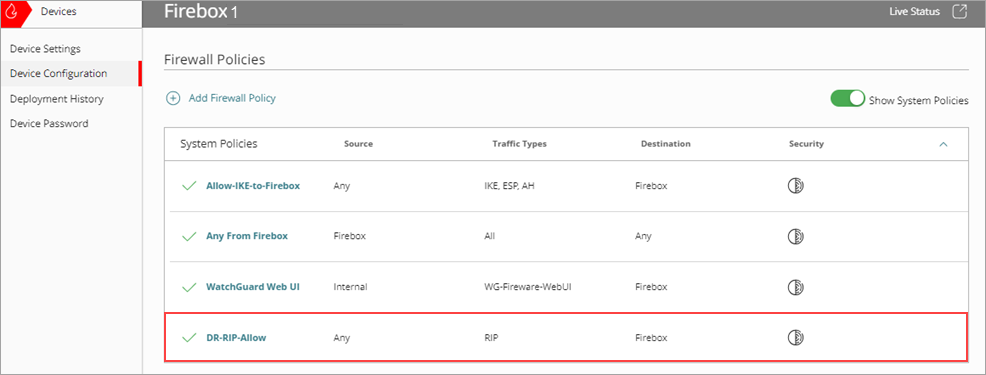
WatchGuard Cloud automatically removes the dynamic routing System policy when you disable the protocol. You can also disable the policy manually.
For more information about system firewall policies, go to System Firewall Policies on Cloud-Managed Fireboxes in Fireware Help.
Default Route Distance
The route distance, also called a metric, determines the priority of a route when multiple routes exist. Lower values indicate higher priority. The Firebox assigns default metrics to external interfaces based on whether they use single-WAN or multi-WAN configurations. These values help the Firebox decide which route to use first and which to keep as a backup.
If your Firebox has only one external interface (single WAN), the default route distance (metric) is 5. If your Firebox has more than one external interface (multi-WAN), the default route distance is 20 for an external interface that does not participate in multi-WAN.
For an external interface that participates in multi-WAN, the default route distance depends on the multi-WAN configuration:
| Multi-WAN Method | Default Route Distance (Metric) |
|---|---|
| Routing Table | 5 |
| Round Robin | 5 |
| Interface Overflow | 5 |
| Failover | 10 |
| Failover (secondary external interface) | 11 |
For each additional secondary external interface, increase the distance value by 1. For example, if you have three secondary external interfaces, the distances are 11, 12, and 13.
Configure Dynamic Routing on a Cloud-Managed Firebox