Applies To: Locally-managed Fireboxes
WatchGuard Cloud status on the Firebox indicates whether WatchGuard Cloud is enabled, and whether the Firebox is connected and logging to WatchGuard Cloud. The WatchGuard Cloud status is available for locally-managed Fireboxes in the Fireware Web UI or Firebox System Manager.
For a cloud-managed Firebox, you can also check the Firebox connection status to WatchGuard Cloud and troubleshoot network connection issues from the local Fireware Web UI. For more information, go to About Fireware Web UI for a Cloud-Managed Firebox.
WatchGuard Cloud status for a locally-managed Firebox can be:
- Connected — The Firebox is connected to WatchGuard Cloud.
- Not Connected — The Firebox is not connected to WatchGuard Cloud.
- Disabled — WatchGuard Cloud is disabled.
- Visibility Enabled — The Firebox is connected and logging to WatchGuard Cloud.
- Visibility Disabled — The Firebox is connected to WatchGuard Cloud, but logging for this device is disabled in WatchGuard Cloud.
- Management Enabled —WatchGuard Cloud manages the Firebox.
- Management Disabled — WatchGuard Cloud does not manage Firebox.
- Registered — The Firebox is registered on WatchGuard Cloud.
- Failed Registration — The Firebox failed to register to WatchGuard Cloud.
- Registration Pending — The Firebox registration is pending on WatchGuard Cloud.
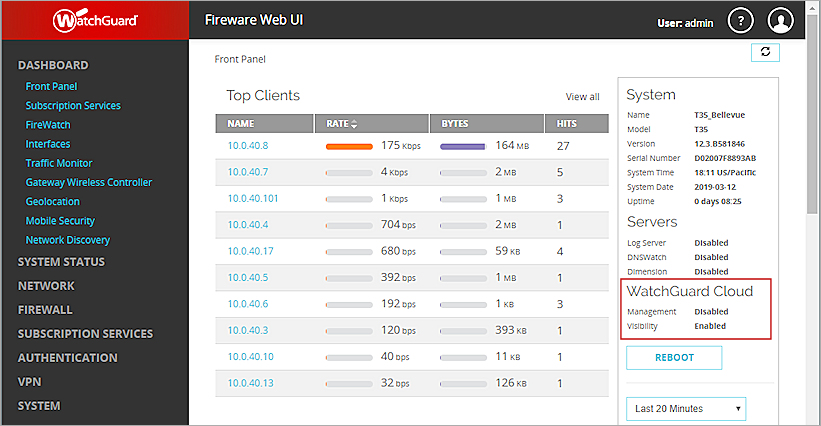
WatchGuard Cloud status appears in the Front Panel dashboard in Fireware Web UI and the Front Panel tab in Firebox System Manager. For more information about WatchGuard Cloud registration status, go to Regenerate the Firebox Verification Code.

- Log in to Fireware Web UI.
- Select Dashboard > Front Panel.
WatchGuard Cloud status shows on the right.
- Connect to the Firebox with Firebox System Manager.
- Select the Front Panel tab.
WatchGuard Cloud status shows in the Detail panel.

WatchGuard Cloud status also shows in the Status Report. For information about how to troubleshoot registration and connection errors, and about the information available in the Status Report, go to Troubleshoot Firebox Connections to WatchGuard Cloud.